
基于【 springBoot +springCloud+vue 项目】一 || 后端搭建
缘起
本项目是基于之前学习的一个Dubbo+SSM分布式项目进行升级,基于此项目对前后端分离项目、微服务项目进一步深入学习。之前学习了vue、springBoot、springCloud后,没有进行更多实战练习,借助此机会,整合之前所学知识,搭建一套微服务电商系统。本项目纯属个人学习总结,如有错误之处,还希望大家能指出,共同讨论学习。
正文
1、项目依赖环境
工具:idea+vsCode
数据库:mysql
缓存:redis
消息中间件:ActiveMq
2、项目架构图(暂时留个位置)
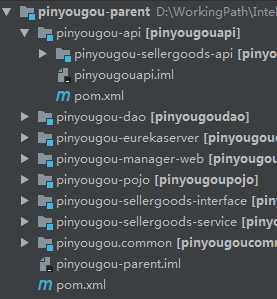
3、整体框架结构
-parent 聚合工程
-api 各模块提供服务的接口
-eurekaserver 服务注册中心
-pojo 通用实体类层
-dao 通用数据访问层
-common 通用方法
-xxxxx-interface 某服务层接口
-xxxxx-service 某服务层实现
-xxxxx-web 某web工程
4、数据库表
(后期上传)
一、搭建框架
1、创建父工程
至于如何创建聚合工程,此处不在详细说明,网上有更多详细的教程。
创建Maven工程pinyougou-parent (POM) ,groupId 为com.pinyougou ,artifactId 为pinyougou-parent 。
添加依赖(后期根据需求有所变更)
<dependencies>

    <!--安全框架-->

    <!--<dependency>

        <groupId>org.springframework.boot</groupId>

        <artifactId>spring-boot-starter-security</artifactId>

    </dependency>-->

    <!-- springboot整合activemq -->

    <dependency>

        <groupId>org.springframework.boot</groupId>

        <artifactId>spring-boot-starter-activemq</artifactId>

    </dependency>

    <!-- springboot整合amqp -->

    <!--<dependency>

        <groupId>org.springframework.boot</groupId>

        <artifactId>spring-boot-starter-amqp</artifactId>

    </dependency>-->

    <!--数据库jdbc连接池-->

    <dependency>

        <groupId>org.springframework.boot</groupId>

        <artifactId>spring-boot-starter-jdbc</artifactId>

    </dependency>

    <!-- 集成web-->

    <dependency>

        <groupId>org.springframework.boot</groupId>

        <artifactId>spring-boot-starter-web</artifactId>

    </dependency>

    <!--整合mybatis-->

    <dependency>

        <groupId>org.mybatis.spring.boot</groupId>

        <artifactId>mybatis-spring-boot-starter</artifactId>

        <version>2.0.</version>

    </dependency>

    <!--集成springCloud-->

    <dependency>

        <groupId>org.springframework.cloud</groupId>

        <artifactId>spring-cloud-starter-netflix-eureka-server</artifactId>

    </dependency>

    <dependency>

        <groupId>org.springframework.cloud</groupId>

        <artifactId>spring-cloud-starter-openfeign</artifactId>

    </dependency>

    <dependency>

        <groupId>org.springframework.cloud</groupId>

        <artifactId>spring-cloud-starter-netflix-zuul</artifactId>

    </dependency>

    <!--集成热部署-->

    <dependency>

        <groupId>org.springframework.boot</groupId>

        <artifactId>spring-boot-devtools</artifactId>

        <scope>runtime</scope>

    </dependency>

    <!--mysql连接驱动-->

    <dependency>

        <groupId>mysql</groupId>

        <artifactId>mysql-connector-java</artifactId>

        <scope>runtime</scope>

    </dependency>

    <!-- 集成lombok 框架 -->

    <dependency>

        <groupId>org.projectlombok</groupId>

        <artifactId>lombok</artifactId>

        <optional>true</optional>

    </dependency>

    <!--springBoot测试-->

    <dependency>

        <groupId>org.springframework.boot</groupId>

        <artifactId>spring-boot-starter-test</artifactId>

        <scope>test</scope>

    </dependency>

    <!-- 集成redis -->

    <dependency>

        <groupId>org.springframework.boot</groupId>

        <artifactId>spring-boot-starter-data-redis</artifactId>

    </dependency>

    <!-- jedis客户端 -->

    <dependency>

        <groupId>redis.clients</groupId>

        <artifactId>jedis</artifactId>

    </dependency>

    <!-- spring2.X集成redis所需common-pool2,使用jedis必须依赖它-->

    <dependency>

        <groupId>org.apache.commons</groupId>

        <artifactId>commons-pool2</artifactId>

        <version>2.5.</version>

    </dependency>

    <!-- 集成aop -->

    <dependency>

        <groupId>org.springframework.boot</groupId>

        <artifactId>spring-boot-starter-aop</artifactId>

    </dependency>

    <!-- 集成commons工具类 -->

    <dependency>

        <groupId>org.apache.commons</groupId>

        <artifactId>commons-lang3</artifactId>

        <version>3.4</version>

    </dependency>

    <!-- 集成发送邮件-->

    <dependency>

        <groupId>org.springframework.boot</groupId>

        <artifactId>spring-boot-starter-mail</artifactId>

    </dependency>

    <!-- 阿里巴巴数据源 -->

    <dependency>

        <groupId>com.alibaba</groupId>

        <artifactId>druid</artifactId>

        <version>1.1.</version>

    </dependency>

    <!-- httpclient -->

    <dependency>

        <groupId>commons-httpclient</groupId>

        <artifactId>commons-httpclient</artifactId>

        <version>3.1</version>

    </dependency>

    <dependency>

        <groupId>org.apache.httpcomponents</groupId>

        <artifactId>httpclient</artifactId>

    </dependency>

    <dependency>

        <groupId>com.alibaba</groupId>

        <artifactId>fastjson</artifactId>

        <version>1.2.</version>

    </dependency>

    <dependency>

        <groupId>org.springframework</groupId>

        <artifactId>spring-context-support</artifactId>

    </dependency>

    <dependency>

        <groupId>commons-net</groupId>

        <artifactId>commons-net</artifactId>

        <version>3.3</version>

    </dependency>

    <!--<dependency>

        <groupId>org.springframework.security</groupId>

        <artifactId>spring-security-test</artifactId>

        <scope>test</scope>

    </dependency>-->

</dependencies>
2、服务注册中心模块
创建服务注册中心模块-pinyougou-eurekaserver
配置注册中心,端口号设置为8761
server:

  port: 8761

eureka:

  instance:

    hostname: localhost # eureka实例的主机名

  client:

    register-with-eureka: false #不把自己注册到eureka上

    fetch-registry: false #不从eureka上来获取服务的注册信息

    service-url:

      defaultZone: http://${eureka.instance.hostname}:${server.port}/eureka/ #服务的注册地址
添加启动类,开启Eureka Server服务
@SpringBootApplication(exclude = {DataSourceAutoConfiguration.class})

@EnableEurekaServer //开启Eureka Server

public class EurekaServerApplication {

    public static void main(String[] args){

        SpringApplication.run(EurekaServerApplication.class,args);

    }

}
测试:启动Eureka Server服务,浏览器输入http://localhost:8761/,
能访问springEureka说明服务注册中心配置成功.
3、通用实体类模块
创建通用实体类模块-pinyougou-pojo
Pojo:数据库实体类
Entity:统一返回数据实体类
Pojogroup:封装的实体类数据
4、通用数据访问模块
创建通用数据访问模块pinyougou-dao .添加依赖pinyougou-pojo
新建包com.pinyougou.mapper,写需要的mapper接口,注意:需要在加注释@Mapper
在resource下,写mapper映射文件
5、通用工具类模块
创建通用工具类模块pinyougou-common
6、商家商品服务接口模块
创建模块pinyougou-sellergoods-interface,添加依赖pinyougou-pojo
新建包com.pinyougou.sellergoods.service,写service层接口
7、服务接口提供模块
创建pinyougou-api(pom)
说明:该模块提供各模块所需提供的接口,为api父工程,各模块需要提供接口服务时,在该父工程下新建各自的子模块.
本项目实现流程:该模块提供的接口,在对应service模块编写逻辑,调用方调用服务的时候,继承api提供的接口,使用@FeignClient(‘service模块的名称’)注解调用服务.
8、商品服务api
创建pinyougou-sellergoods-api模块,依赖pinyougou-pojo
创建包com.pinyougou.pojo.TbBrand,编写一个测试类:
 @RequestMapping("/brand")

public interface BrandApiService {

    @RequestMapping("/findAll")

public List<TbBrand> findAll();

}
9、商家商品服务模块
创建pinyougou-sellergoods-service,
添加依赖pinyougou-sellergoods-interface,pinyougou-dao,pinyougou-sellergoods-api
配置文件:
server:

  port: 9001

eureka:

  client:

    service-url:

      defaultZone: http://localhost:8761/eureka/

spring:

  application:

    name: sellergoods

  datasource:

    name: pinyougoudb

    #?useUnicode=true&characterEncoding=utf8

    url: jdbc:mysql://localhost:3306/pinyougoudb?useUnicode=true&characterEncoding=utf8&serverTimezone=UTC

    username: root

    password: root

    # 使用druid数据源

    type: com.alibaba.druid.pool.DruidDataSource

    driver-class-name: com.mysql.cj.jdbc.Driver

    #   数据源其他配置

    initialSize: 5

    minIdle: 5

    maxActive: 20

    maxWait: 60000

    timeBetweenEvictionRunsMillis: 60000

    minEvictableIdleTimeMillis: 300000

    validationQuery: SELECT 1 FROM DUAL

    testWhileIdle: true

    testOnBorrow: false

    testOnReturn: false

    poolPreparedStatements: true

    #   配置监控统计拦截的filters,去掉后监控界面sql无法统计,'wall'用于防火墙

    filters: stat,wall,log4j

    maxPoolPreparedStatementPerConnectionSize: 20

    useGlobalDataSourceStat: true

    connectionProperties: druid.stat.mergeSql=true;druid.stat.slowSqlMillis=500

mybatis:

  # 指定全局配置文件位置

  #config-location: classpath:mybatis/mybatis-config.xml

  mapper-locations: classpath*:/mapper/*Mapper.xml

  #实体扫描,多个package用逗号或者分号分隔

  type-aliases-package: com.pinyougou.pojo

  configuration:

    #配置返回数据库(column下划线命名&&返回java实体是驼峰命名),自动匹配无需as(没开启这个,SQL需要写as: select user_id as userId)

    map-underscore-to-camel-case: true

    #配置JdbcTypeForNull, oracle数据库必须配置

    jdbc-type-for-null: 'null'
编写启动类,添加扫描mapper类的注解,将服务注册到注册中心
@MapperScan(value = "com.pinyougou.mapper")

@SpringBootApplication

@EnableEurekaClient

public class SellerGoodsServiceApplication {

    public static void main(String[] args) {

        SpringApplication.run(SellerGoodsServiceApplication.class, args);

    }

}
创建包com.pinyougou.sellergoods.service.impl,作用:实现interface模块,编写数据访问层业务逻辑.注意:该类上要加@Service注解.
创建包com.pinyougou.sellergoods.api.service.impl,作用:实现服务提供者api接口,编写暴露接口的业务逻辑,注意:该类上要添加@RestController注解.
10、运营商管理后台
创建包pinyougou-manager-web,依赖pinyougou-sellergoods-api
在resources下创建配置文件:
server:

  port: 9101

eureka:

  client:

    service-url:

      defaultZone: http://localhost:8761/eureka/

spring:

  freemarker:

    suffix: .html

    templateLoaderPath: classpath:/templates/

    cache: false #禁用模板缓存,正式环境取消

  application:

    name: managerweb

  main:

    allow-bean-definition-overriding: true
创建包com.pinyougou.manager.feign,用于服务的调用
@FeignClient("sellergoods") //写service层的名称

public interface BrandFeign extends BrandApiService {

}
此时,就可以使用BrandFeign调用BrandApiService的接口
创建包com.pinyougou.manager.controller,进行测试
@RestController

@RequestMapping("/brands")

public class BrandController {

    @Autowired

    private BrandFeign brandFeign;

    @RequestMapping("/findAll")

    public List<TbBrand> findAll(){

        List<TbBrand> lists=null;

        lists=brandFeign.findAll();

        return lists;

    }

}
启动服务:
启动pinyougou-eurekaserver
启动pinyougou-sellergoods-service
启动pinyougou-manager-web
在浏览器输入:http://localhost:9101/brands/findAll,如果能获取到数据库数据,说明服务调用成功.
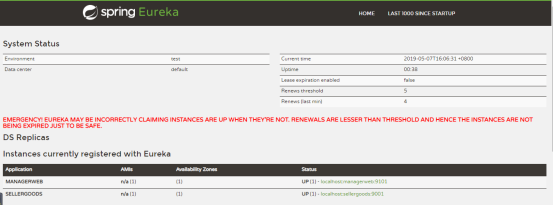
此时,浏览器中输入http://localhost:8761/,能看到刚启动的两个服务已经注册到Eureka注册中心了.
目前的项目框架如下:
本人联系方式QQ:1136069753,后期项目会发布共享,项目持续更新
基于【 springBoot +springCloud+vue 项目】一 || 后端搭建的更多相关文章
- 基于【 springBoot +springCloud+vue 项目】一 || 项目架构简介
一.前言 基于前期学习以及工作经验积累,持续更新基于springboot+springcloud+vue的demo项目.
- 基于【 springBoot +springCloud+vue 项目】二 || 后端框架详解
前言 在上一篇中,我们搭建了一个-API服务提供接口模块,目的为了提供了消费方进行调用.为什么不直接在service层直接提供调用接口,而是重新创建一个接口层模块?首先我们需要对Feign有所了解. ...
- 基于【 springBoot +springCloud+vue 项目】三 || 项目部署
前言 今天所要讲的项目部署,并非正式环境部署,而是作为开发中的测试环境部署.随着项目模块的增多,启动的模块也随之增多,本人的电脑启动四个模块就已经卡的不行了,为了减轻电脑压力,不得不自己学着搭建一个项 ...
- 基于springboot的web项目最佳实践
springboot 可以说是现在做javaweb开发最火的技术,我在基于springboot搭建项目的过程中,踩过不少坑,发现整合框架时并非仅仅引入starter 那么简单. 要做到简单,易用,扩展 ...
- 基于Typescript的Vue项目配置国际化
基于Typescript的Vue项目配置国际化 简介 使用vue-i18n插件对基于Typescript的vue项目配置国际化,切换多种语言, 配合element-ui或者其他UI库 本文以配置中英文 ...
- 教你搭建基于typescript的vue项目
自尤大去年9月推出vue对typescript的支持后,一直想开箱尝试,对于前端sr来说,vue的顺滑加上ts的面向对象,想着就非常美好~ 终于在两个月前,找到了个机会尝试了一把vue+ts的组合. ...
- vue项目环境的搭建
首先要明白Vue是基于node的,在公司要使用vue来开发项目的话肯定是要先安装node的,下面是搭建一个最简单的vue项目环境 一 安装node 这个可以去node的官网下载对应版本 安装好之后 c ...
- 使用IDEA新建基于SpringBoot的Web项目(超详细)
目前java的开发很多Learner都慢慢的学习使用IDEA这款工具,个人觉得其实相比Eclipse来说差不多,个人习惯的问题,但是我还是推荐IDEA这款工具.虽然它目前是收费的,但相信网上的各种破解 ...
- Vue ---- 项目与环境搭建 初始项目结构 Vue生命周期
目录 1. vue环境搭建 2. Vue项目搭建 pycharm配置并启动vue项目 3 . 认识项目 1. vue项目目录结构 2. 配置文件:vue.config.js 3. main.js 4. ...
随机推荐
- 集合类 collection接口 LinkedList
LinkedList 是另外一种重要的数据结构形式, 底层是使用了双向链表数据结构, 特点: 查询速度慢,增删快. 继承关系如下: 可以发现,LinkedList同时实现了Quene和Deque接口. ...
- 【大数据应用技术】作业九|安装关系型数据库MySQL 安装大数据处理框架Hadoop
本次作业的要求来自:https://edu.cnblogs.com/campus/gzcc/GZCC-16SE2/homework/3161 1.安装MySql 按ctrl+alt+t打开终端窗口,安 ...
- m4a 转MP3
import os for filename in os.listdir(r'.'): print filename os.rename(filename,filename.replace(' ',' ...
- 函数式接口, Collection等
Lambda 函数式接口 lambda 表达式的使用需要借助于 函数式接口, 也就是说只有函数式接口才可以将其用 lambda 表达式进行简化. 函数式接口定义为仅含有一个抽象方法的接口. 按照这个定 ...
- 从安装PHP到第一个tomcat执行的hello world其实没那么难
001 初入门的朋友问我为什么她的PHP老是不能安装运行成功,作为一个乐(shi)于(li)助(liao)人(mei)的半程序员, 自然是要好好研究然后手把手教妹纸了! 002 话不多说,进入正题 为 ...
- java8 中 ImageIO 读取 tiff 格式的图片失败
在java8 及之前版本中,jdk 中的 ImageIO 读取图片内容会失败,解决办法使用 java9 或者使用第三方插件. 插件可以使用 TwelveMonkeys ImageIO,地址:https ...
- cat命令创建文件
看例子是最快的熟悉方法: # cat << EOF > test.sh > #!/bin/bash #“shell脚本” > #you Shell script writ ...
- Navicat 破解版链接
本文为转载内容 百度网盘地址: https://pan.baidu.com/s/1nvIIOad 压缩包中有注册码和使用方法
- Samba通过ad域进行认证并限制空间大小
最近正在做单位电脑的AD域管理. 为漫游用户文件,研究配置Samba通过ad域进行认证并限制空间大小. 参考了很多资料,现总结如下: DC:windows server 2016(配置安装域控制器)略 ...
- mybatis:字符串转成数组拼接成SQL
<foreach item="item" index="index" collection="str.split(',')" open ...