
Java Excel 导入导出(二)
本文主要叙述定制导入模板——利用XML解析技术,确定模板样式。
1.确定模板列
2.定义标题(合并单元格)
3.定义列名
4.定义数据区域单元格样式
引入jar包:
一、预期格式类型
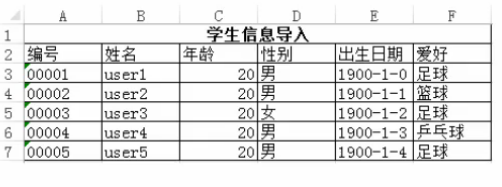
二、XML模板格式
 <?xml version="1.0" encoding="UTF-8"?>

 <excel id="student" code="student" name="学生信息导入">

     <colgroup>

         <col index="A" width="17em"></col>

         <col index="B" width="17em"></col>

         <col index="C" width="17em"></col>

         <col index="D" width="17em"></col>

         <col index="E" width="17em"></col>

         <col index="F" width="17em"></col>

     </colgroup>

     <tile>

         <tr height="16px">

             <td rowspan="1" colspan="6" value="学生信息导入"></td>

         </tr>

     </tile>

     <thead>

         <tr height="16px">

             <th value="编号"></th>

             <th value="姓名"></th>

             <th value="年龄"></th>

             <th value="性别"></th>

             <th value="出生日期"></th>

             <th value="爱好"></th>

         </tr>

     </thead>

     <tbody>

         <tr height="16px" firstrow="2" firstcol="0" repeat="5" >

             <td type="string" isnullable="false" maxlength="30"></td><!-- 用户编号 -->

             <td type="string" isnullable="false" maxlength="50"></td><!-- 姓名 -->

             <td type="numeric" format="##0" isnullable="false"></td><!-- 年龄 -->

             <td type="enum" format="男,女" isnullable="true"></td><!-- 性别 -->

             <td type="date" isnullable="false" maxlength="30"></td><!-- 出生日期 -->

             <td type="enum" format="足球,篮球,兵乓球" isnullable="true" ></td><!-- 爱好 -->

         </tr>

     </tbody>

 </excel>
二、Java解析XML模板
 import java.io.File;

 import java.io.FileOutputStream;

 import java.util.List;

 import org.apache.commons.io.FileUtils;

 import org.apache.commons.lang3.StringUtils;

 import org.apache.poi.hssf.usermodel.DVConstraint;

 import org.apache.poi.hssf.usermodel.HSSFCell;

 import org.apache.poi.hssf.usermodel.HSSFCellStyle;

 import org.apache.poi.hssf.usermodel.HSSFDataFormat;

 import org.apache.poi.hssf.usermodel.HSSFDataValidation;

 import org.apache.poi.hssf.usermodel.HSSFFont;

 import org.apache.poi.hssf.usermodel.HSSFRow;

 import org.apache.poi.hssf.usermodel.HSSFSheet;

 import org.apache.poi.hssf.usermodel.HSSFWorkbook;

 import org.apache.poi.ss.util.CellRangeAddress;

 import org.apache.poi.ss.util.CellRangeAddressList;

 import org.jdom.Attribute;

 import org.jdom.Document;

 import org.jdom.Element;

 import org.jdom.input.SAXBuilder;

 public class CreateTemplate {

     /**

      * 创建模板文件

      *

      * @author

      * @param args

      */

     public static void main(String[] args) {

         // 获取解析XML路径

         String path = System.getProperty("user.dir") + "/bin/Student.xml";

         File file = new File(path);

         SAXBuilder builder = new SAXBuilder();

         try {

             Document parse = builder.build(file);

             // 创建工作薄

             HSSFWorkbook workbook = new HSSFWorkbook();

             HSSFSheet sheet = workbook.createSheet("sheet0");

             // 获取Xml根节点

             Element root = parse.getRootElement();

             // 获取模板名称

             String templateName = root.getAttribute("name").getValue();

             int rownum = 0;

             int column = 0;

             // 设置列宽

             Element colgroup = root.getChild("colgroup");

             setColumnWidth(sheet, colgroup);

             // 设置标题

             Element title = root.getChild("title");

             List<Element> trs = title.getChildren("tr");

             for (int i = 0; i < trs.size(); i++) {

                 Element tr = trs.get(i);

                 List<Element> tds = tr.getChildren("td");

                 HSSFRow row = sheet.createRow(rownum);

                 // 设置单元格样式

                 HSSFCellStyle cellStyle = workbook.createCellStyle();

                 // 设置居中

                 cellStyle.setAlignment(HSSFCellStyle.ALIGN_CENTER);

                 for (column = 0; column < tds.size(); column++) {

                     Element td = tds.get(column);

                     HSSFCell cell = row.createCell(column);

                     Attribute rowSpan = td.getAttribute("rowspan");

                     Attribute colSpan = td.getAttribute("colspan");

                     Attribute value = td.getAttribute("value");

                     if (value != null) {

                         String val = value.getValue();

                         cell.setCellValue(val);

                         int rspan = rowSpan.getIntValue() - 1;

                         int cspan = colSpan.getIntValue() - 1;

                         // 设置字体

                         HSSFFont font = workbook.createFont();

                         font.setFontName("仿宋_GB2312");

                         font.setBoldweight(HSSFFont.BOLDWEIGHT_BOLD);// 字体加粗

                         // font.setFontHeight((short) 12);

                         font.setFontHeightInPoints((short) 12);

                         cellStyle.setFont(font);

                         cell.setCellStyle(cellStyle);

                         // 合并单元格

                         sheet.addMergedRegion(new CellRangeAddress(rspan, rspan, 0, cspan));

                     }

                 }

                 rownum++;

             }

             // 设置表头

             Element thead = root.getChild("thead");

             trs = thead.getChildren("tr");

             for (int i = 0; i < trs.size(); i++) {

                 Element tr = trs.get(i);

                 HSSFRow row = sheet.createRow(rownum);

                 List<Element> ths = tr.getChildren("th");

                 for (column = 0; column < ths.size(); column++) {

                     Element th = ths.get(column);

                     Attribute valueAttr = th.getAttribute("value");

                     HSSFCell cell = row.createCell(column);

                     if (valueAttr != null) {

                         String value = valueAttr.getValue();

                         cell.setCellValue(value);

                     }

                 }

                 rownum++;

             }

             // 设置数据区域样式

             Element tbody = root.getChild("tbody");

             Element tr = tbody.getChild("tr");

             int repeat = tr.getAttribute("repeat").getIntValue();

             List<Element> tds = tr.getChildren("td");

             for (int i = 0; i < repeat; i++) {

                 HSSFRow row = sheet.createRow(rownum);

                 for (column = 0; column < tds.size(); column++) {

                     Element td = tds.get(column);

                     HSSFCell cell = row.createCell(column);

                     // 设置单元格样式

                     setType(workbook, cell, td);

                 }

                 rownum++;

             }

             // 生成Excel导入模板

             File tempFile = new File("e:/" + templateName + ".xls");

             tempFile.delete();

             tempFile.createNewFile();

             FileOutputStream stream = FileUtils.openOutputStream(tempFile);

             workbook.write(stream);

             stream.close();

         } catch (Exception e) {

             e.printStackTrace();

         }

     }

     /**

      * 设置列宽

      *

      * @param sheet

      * @param colgroup

      */

     private static void setColumnWidth(HSSFSheet sheet, Element colgroup) {

         List<Element> cols = colgroup.getChildren("col");

         for (int i = 0; i < cols.size(); i++) {

             Element col = cols.get(i);

             Attribute width = col.getAttribute("width");

             String unit = width.getValue().replaceAll("[0-9,\\.]", "");

             String value = width.getValue().replaceAll(unit, "");

             int v = 0;

             if (StringUtils.isBlank(unit) || "px".endsWith(unit)) {

                 v = Math.round(Float.parseFloat(value) * 37F);

             } else if ("em".endsWith(unit)) {

                 v = Math.round(Float.parseFloat(value) * 267.5F);

             }

             sheet.setColumnWidth(i, v);

         }

     }

     /**

      * 设置单元格样式

      *

      * @param workbook

      * @param cell

      * @param td

      */

     private static void setType(HSSFWorkbook workbook, HSSFCell cell, Element td) {

         // TODO Auto-generated method stub

         Attribute typeAttr = td.getAttribute("type");

         String type = typeAttr.getValue();

         HSSFDataFormat format = workbook.createDataFormat();

         HSSFCellStyle cellStyle = workbook.createCellStyle();

         if ("NUMERIC".equalsIgnoreCase(type)) {

             cell.setCellType(HSSFCell.CELL_TYPE_NUMERIC);

             Attribute formatAttr = td.getAttribute("format");

             String formatValue = formatAttr.getValue();

             formatValue = StringUtils.isNotBlank(formatValue) ? formatValue : "#,##0.00";

             cellStyle.setDataFormat(format.getFormat(formatValue));

         } else if ("STRING".equalsIgnoreCase(type)) {

             cell.setCellValue("");

             cell.setCellType(HSSFCell.CELL_TYPE_STRING);

             cellStyle.setDataFormat(format.getFormat("@"));

         } else if ("DATE".equalsIgnoreCase(type)) {

             cell.setCellType(HSSFCell.CELL_TYPE_NUMERIC);

             cellStyle.setDataFormat(format.getFormat("yyyy-m-d"));

         } else if ("ENUM".equalsIgnoreCase(type)) {

             CellRangeAddressList regions = new CellRangeAddressList(cell.getRowIndex(), cell.getRowIndex(),

                     cell.getColumnIndex(), cell.getColumnIndex());

             Attribute enumAttr = td.getAttribute("format");

             String enumValue = enumAttr.getValue();

             // 加载下拉列表内容

             DVConstraint constraint = DVConstraint.createExplicitListConstraint(enumValue.split(","));

             // 数据有效性对象

             HSSFDataValidation dataValidation = new HSSFDataValidation(regions, constraint);

             workbook.getSheetAt(0).addValidationData(dataValidation);

         }

         cell.setCellStyle(cellStyle);

     }

 }
二、Java解析XML模板,实现效果

Java Excel 导入导出(二)的更多相关文章
- JAVA Excel导入导出
--------------------------------------------方式一(新)-------------------------------------------------- ...
- Java Excel 导入导出(一)
本文主要描述通过java实现Excel导入导出 一.读写Excel三种常用方式 1.JXL——Java Excel开放源码项目:读取,创建,更新 2.POI——Apache POI ,提供API给Ja ...
- Java Excel导入导出(实战)
一.批量导入(将excel文件转成list) 1. 前台代码逻辑 1)首先在html页面加入下面的代码(可以忽略界面的样式) <label for="uploadFile" ...
- java Excel导入导出工具类
本文章,导入导出依赖提前定义好的模板 package com.shareworx.yjwy.utils; import java.io.File; import java.io.FileInputSt ...
- Java——excel导入导出demo
1. java导入 package xx; import org.apache.poi.hssf.usermodel.HSSFCell;import org.apache.poi.hssf.userm ...
- java简易excel导入导出工具(封装POI)
Octopus 如何导入excel 如何导出excel github项目地址 Octopus Octopus 是一个简单的java excel导入导出工具. 如何导入excel 下面是一个excel文 ...
- java jxl excel 导入导出的 总结(建立超链接,以及目录sheet的索引)
最近项目要一个批量导出功能,而且要生成一个单独的sheet页,最后后面所有sheet的索引,并且可以点击进入连接.网上搜索了一下,找到一个方法,同时把相关的excel导入导出操作记录一下!以便以后使用 ...
- Java之POI的excel导入导出
一.Apache POI是一种流行的API,它允许程序员使用Java程序创建,修改和显示MS Office文件.这由Apache软件基金会开发使用Java分布式设计或修改Microsoft Offic ...
- Java中导入导出Excel -- POI技术
一.介绍: 当前B/S模式已成为应用开发的主流,而在企业办公系统中,常常有客户这样子要求:你要把我们的报表直接用Excel打开(电信系统.银行系统).或者是:我们已经习惯用Excel打印.这样在我们实 ...
随机推荐
- Image动画
前几课讲的静态Image挺有趣的,但是如果能有动画的效果,那就更有趣了,mPython做出动画效果也不难.用images的列表,list. 下面就是一个列表: eggs bacon tomatoes ...
- 【转帖】威盛x86 AI处理器架构、性能公布:媲美Intel 32核心
威盛x86 AI处理器架构.性能公布:媲美Intel 32核心 https://www.cnbeta.com/articles/tech/920559.htm 除了Intel.AMD,宝岛台湾的威盛也 ...
- 【洛谷】P1022 计算器的改良-全AC题解
#include <iostream> #include <cstring> #include <iomanip> using namespace std; int ...
- Delphi重庆医保支付【支持重庆东软,万达,银海医保通用】
作者QQ:(648437169) 点击下载➨Delphi重庆医保支付 东软接口文件 银海接口文件 万达接口文件 重庆市医保接口文档 [Delp ...
- 【1】【leetcode-139】【回溯超时、动态规划】单词拆分
给定一个非空字符串 s 和一个包含非空单词列表的字典 wordDict,判定 s 是否可以被空格拆分为一个或多个在字典中出现的单词. 说明: 拆分时可以重复使用字典中的单词.你可以假设字典中没有重复的 ...
- ES集群7.3.0设置快照,存储库进行索引备份和恢复等
说明:三台ES节点组成ES集群,一台kibana主机,版本均是7.3.0,白金试用版 官方地址:https://www.elastic.co/guide/en/elasticsearch/refere ...
- maven添加本地包命令mvn install:install-file
mvn install:install .jar -Dfile:要注册的jar,绝对路径
- HTTP协议随笔
代理 代理就是处在客户端和服务端之间的服务器.客户端例如浏览器发送GET请求时,代理服务器接收该请求,并转发该请求至服务所在的服务器.服务器回复的数据和资源在第一时间经过代理服务器,才能回传到浏览器, ...
- mysql 中的 not like 另一种简化方法。
第一种 not like 方法 select * from table where `zongbu` not like '%北京%' and `zongbu` not like '%上海%' and ...
- dubbo循序渐进 - nacos安装
1.安装docker ce yum install -y yum-utils device-mapper-persistent-data lvm2 yum-config-manager --add-r ...