
使用 Microsoft.Extensions.DependencyInjection 进行依赖注入
没有
的日子,才是好日子~~~~~~~~~~
Using .NET Core 3.0 Dependency Injection and Service Provider with WPF
UPDATE: this article is based on a preview release of .NET Core 3.0. Please refer to Update on using HostBuilder, Dependency Injection and Service Provider with .NET Core 3.0 WPF applications for the latest one.
We all know that .NET Core provides built-in support for Dependency Injection. We typically use it in ASP.NET Core (starting form the ConfigureServices method in the Startup.cs file), but the feature isn’t limited to this framework. So, as .NET Core 3.0 supports also Windows Clients development, we can use it in our WPF and Windows Forms applications.
Let’s see how to do that, for example, in WPF using Visual Studio 2019. Suppose we want to create a service and we also have some application settings; we want to pass both of them to each window of our application via Dependency Injection.
First of all, we must add the required NuGet packages to the project. Right click on the Solution Explorer, select the Manage NuGet Packages command and add the following packages (be sure to select the Include prerelease check):
- Microsoft.Extensions.DependencyInjection
- Microsoft.Extensions.Options.ConfigurationExtensions
- Microsoft.Extensions.Configuration.Json
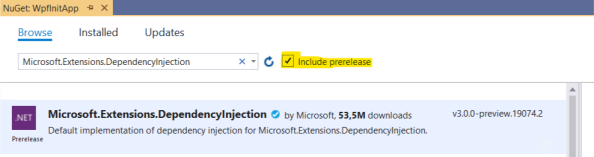
Adding Dependency Injection support to a .NET Core 3.0 WPF application
These packages are necessary to enable Dependency Injection support (the first one) and to store and retrieve application settings in the classic appsettings.json file (the other ones). They will automatically get all the required dependencies.
Then, let’s add a file named appsettings.json to the root folder of the project. Set its Build Action property to Content and Copy to Output Directory to Copy if newer:
|
1
2
3
4
5
6
7
|
{ "AppSettings": { "StringSetting": "Value", "IntegerSetting": 42, "BooleanSetting": true }} |
All the prerequisites are met, so we can start writing our code. Let’s open the App.xaml file and remove the StartupUri property of the Application class. Then, we need to override the OnStartup method in App.xaml.cs:
|
1
2
3
4
5
6
7
8
9
10
11
12
13
14
15
16
17
18
19
20
21
22
23
24
25
26
27
28
29
30
|
public partial class App : Application{ public IServiceProvider ServiceProvider { get; private set; } public IConfiguration Configuration { get; private set; } protected override void OnStartup(StartupEventArgs e) { var builder = new ConfigurationBuilder() .SetBasePath(Directory.GetCurrentDirectory()) .AddJsonFile("appsettings.json", optional: false, reloadOnChange: true); Configuration = builder.Build(); var serviceCollection = new ServiceCollection(); ConfigureServices(serviceCollection); ServiceProvider = serviceCollection.BuildServiceProvider(); var mainWindow = ServiceProvider.GetRequiredService<MainWindow>(); mainWindow.Show(); } private void ConfigureServices(IServiceCollection services) { // ... services.AddTransient(typeof(MainWindow)); }} |
In this method we create the Service Provider and configure the IoC container in a similar way of ASP.NET Core. We only need a bit of initialization. First of all, at line 9-13 we create an IConfiguration object that allows to read settings from the appsettings.json file (line 11). Then, we create an instance of a ServiceCollection class that will hold our services. Finally we call the ConfigureServices method (as we have in ASP.NET Core).
Within the latter (lines 24-29), we register all the services used by the application in the exact same way of ASP. NET Core. We’ll complete this method in a moment, but for now let’s notice that we register also the MainWindow class (line 28). This is important because, in this way, the window itself becomes part of the Dependency Injection chain. It means that, after calling this method, at line 20-21 we can get it from the ServiceProvider and then show it. But, more important, it means that we can pass to the MainWindow constructor all the dependencies it needs, as we do for ASP.NET Core Controllers.
Even if the actual services aren’t yet registered, we can run the application and see that everything works as expected.
Now it’s time to complicate the things a bit. First of all, let’s create an AppSettings.cs file to hold configuration settings. This file will map the settings that we write in appsettings.json:
|
1
2
3
4
5
6
7
8
|
public class AppSettings{ public string StringSetting { get; set; } public int IntegerSetting { get; set; } public bool BooleanSetting { get; set; }} |
Then, create also a sample service with its interface:
|
1
2
3
4
5
6
7
8
9
|
public interface ISampleService{ string GetCurrentDate();}public class SampleService : ISampleService{ public string GetCurrentDate() => DateTime.Now.ToLongDateString();} |
Now we must register these services in the IoC Container, as usual:
|
1
2
3
4
5
6
7
8
9
|
private void ConfigureServices(IServiceCollection services){ services.Configure<AppSettings> (Configuration.GetSection(nameof(AppSettings))); services.AddScoped<ISampleService, SampleService>(); // ...} |
As said before, the MainWindow itself is in the IoC Container. So, when we get it from the Service Provider, it will automatically be injected with all required services, if any. So, we just need to modify its constructor:
|
1
2
3
4
5
6
7
8
9
10
11
12
13
14
15
16
|
public partial class MainWindow : Window{ private readonly ISampleService sampleService; private readonly AppSettings settings; public MainWindow(ISampleService sampleService, IOptions<AppSettings> settings) { InitializeComponent(); this.sampleService = sampleService; this.settings = settings.Value; } // ...} |
Running this code, we’ll obtain a result like the following:
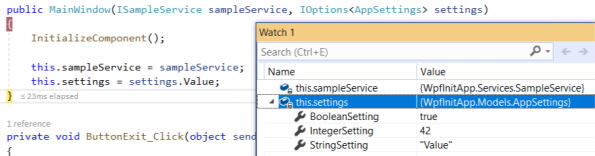
The .NET Core 3.0 WPF application with dependecies injected
原文地址:https://marcominerva.wordpress.com/2019/03/06/using-net-core-3-0-dependency-injection-and-service-provider-with-wpf/
参考:https://docs.microsoft.com/zh-cn/aspnet/core/fundamentals/dependency-injection?view=aspnetcore-3.0
使用 Microsoft.Extensions.DependencyInjection 进行依赖注入的更多相关文章
- Microsoft.Extensions.DependencyInjection中的Transient依赖注入关系,使用不当会造成内存泄漏
Microsoft.Extensions.DependencyInjection中(下面简称DI)的Transient依赖注入关系,表示每次DI获取一个全新的注入对象.但是使用Transient依赖注 ...
- DotNetCore跨平台~一起聊聊Microsoft.Extensions.DependencyInjection
写这篇文章的心情:激动 Microsoft.Extensions.DependencyInjection在github上同样是开源的,它在dotnetcore里被广泛的使用,比起之前的autofac, ...
- 解析 Microsoft.Extensions.DependencyInjection 2.x 版本实现
项目使用了 Microsoft.Extensions.DependencyInjection 2.x 版本,遇到第2次请求时非常高的内存占用情况,于是作了调查,本文对 3.0 版本仍然适用. 先说结论 ...
- 使用诊断工具观察 Microsoft.Extensions.DependencyInjection 2.x 版本的内存占用
目录 准备工作 大量接口与实现类的生成 elasticsearch+kibana+apm asp.net core 应用 请求与快照 Kibana 上的请求记录 请求耗时的分析 请求内存的分析 第2次 ...
- Microsoft.Extensions.DependencyInjection 之三:展开测试
目录 前文回顾 IServiceCallSite CallSiteFactory ServiceProviderEngine CompiledServiceProviderEngine Dynamic ...
- Microsoft.Extensions.DependencyInjection 之三:反射可以一战(附源代码)
目录 前文回顾 IServiceCallSite CallSiteFactory ServiceProviderEngine CompiledServiceProviderEngine Dynamic ...
- Microsoft.Extensions.DependencyInjection 之二:使用诊断工具观察内存占用
目录 准备工作 大量接口与实现类的生成 elasticsearch+kibana+apm asp.net core 应用 请求与快照 Kibana 上的请求记录 请求耗时的分析 请求内存的分析 第2次 ...
- Microsoft.Extensions.DependencyInjection 之一:解析实现
[TOC] 前言 项目使用了 Microsoft.Extensions.DependencyInjection 2.x 版本,遇到第2次请求时非常高的内存占用情况,于是作了调查,本文对 3.0 版本仍 ...
- MvvmLight + Microsoft.Extensions.DependencyInjection + WpfApp(.NetCore3.1)
git clone MvvmLight失败,破网络, 就没有直接修改源码的方式来使用了 Nuget安装MvvmLightLibsStd10 使用GalaSoft.MvvmLight.Command命名 ...
随机推荐
- Java检查字符串是否包含中文字符
转自:https://blog.csdn.net/zhanghan18333611647/article/details/80038629 强烈推荐一个大神的人工智能的教程:http://www.ca ...
- python实现系统调用cmd命令的模块---subprocess模块
如果要python实现系统命令或者调用脚本,python中可以利用os或者subprocess模块实现: 一.os模块: # coding:utf-8 command = os.system('net ...
- docker中使用阿里云的apt源安装各种实用工具
今天想在docker中安装vim工具,还有其他的软件等等,如果你直接执行apt-get install vim是没有用的,会显示: root@7d43d83fd3a8:/etc/nginx# apt- ...
- CodeForces - 1159B
题目链接:https://vjudge.net/problem/CodeForces-1159B 题目意思:任选选两个元素,分别为a[i],a[j]. 问 都满足K*| i - j | <= ...
- 矩阵LU分解程序实现(Matlab)
n=4;%确定需要LU分解的矩阵维数 %A=zeros(n,n); L=eye(n,n);P=eye(n,n);U=zeros(n,n);%初始化矩阵 tempU=zeros(1,n);tempP=z ...
- TabBar 设置可滚动:isScrollable: true
appBar: AppBar( bottom: TabBar( // 设置可滚动 isScrollable: true, controller: _tabController, tabs: tabs. ...
- 查看spark on yarn的日志和程序状态的方法
转自:https://blog.csdn.net/high2011/article/details/52132646 一.在命令行使用命令查看 (1)查看日志:yarn logs -applicati ...
- PHP:ThinkCMFX任意文件包含漏洞
前言:最近爆出来的漏洞,ThinkCmfX版本应该是通杀的,基于3.X Thinkphp开发的 代码下载地址:https://gitee.com/thinkcmf/ThinkCMFX/releases ...
- SQLServer 数据库封装类
using System; using System.Collections.Generic; using System.Linq; using System.Text; using System.D ...
- RabbitMQ简单介绍+Windows环境安装
文章目录 1.RabbitMQ简介2.RabbitMQ与其他MQ有什么不同3.RabbitMQ环境安装3.1 安装erlang3.2 安装rabbitmq-server4. RabbitMQ管理平台介 ...