
第一个python&selenium自动化测试实战项目
说明:本项目采用流程控制思想,未引用unittest&pytest等单元测试框架
一.项目介绍
目的
测试某官方网站登录功能模块可以正常使用
用例
1.输入格式正确的用户名和正确的密码,验证是否登录成功;
2.输入格式正确的用户名和不正确的密码,验证是否登录失败,并且提示信息正确;
3.输入格式正确的用户名和任意密码,验证是否登录失败,并且提示信息正确;
4.用户名和密码两者都为空,验证是否登录失败,并且提示信息正确;
5.用户名和密码两者之一为空,验证是否登录失败,并且提示信息正确;
环境
Windows10 +Python3.6+selenium3.13+Pycharm
环境我想大多数人都会搭建,有事没事找百度,一搜一箩筐,哈哈!我自己刚学的时候也是各种问题各种百度,好在都解决了,感谢有度娘这么强大的存在!这里就不写环境怎么搭建了,直接进入主题
二.脚本设计
目的
我们的测试脚本需要达到:脚本可移植,脚本模块化,测试数据分离,输出测试报告 等目的
脚本设计模式
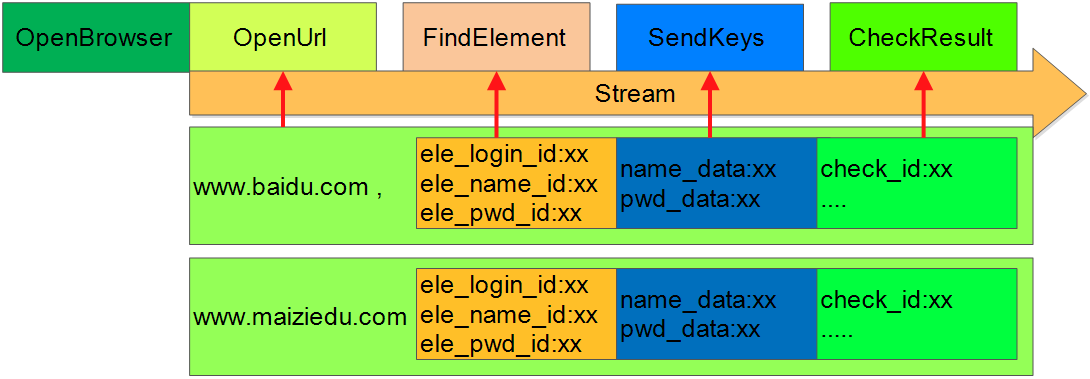
代码实现
项目目录结构
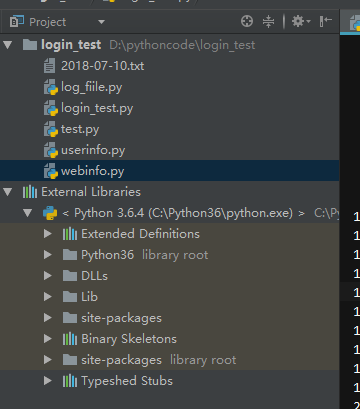
注:下面的文件存放在同一个目录下
 #! user/bin/python

 '''

 代码说明:麦子学院登录模块自动化测试用例脚本

 编写日期:

 设置者:linux超

 '''

 import time

 from selenium import webdriver

 from webinfo import webinfo

 from userinfo import userinfo

 from log_fiile import login_log

 from pathlib import Path

 def open_web():

     driver = webdriver.Firefox()

     driver.maximize_window()

     return driver

 def load_url(driver,ele_dict):

     driver.get(ele_dict['Turl'])

     time.sleep(5)

 def find_element(driver,ele_dict):

     # find element

     driver.find_element_by_class_name(ele_dict['image_id']).click()

     if 'text_id' in ele_dict:

         driver.find_element_by_link_text('登录').click()

     user_id = driver.find_element_by_id(ele_dict['userid'])

     pwd_id = driver.find_element_by_id(ele_dict['pwdid'])

     login_id = driver.find_element_by_id(ele_dict['loginid'])

     return user_id,pwd_id,login_id

 def send_val(ele_tuple,arg):

     # input userinfo

     listkey = ['uname','pwd']

     i = 0

     for key in listkey:

         ele_tuple[i].send_keys('')

         ele_tuple[i].clear()

         ele_tuple[i].send_keys(arg[key])

         i+=1

     ele_tuple[2].click()

 def check_login(driver,ele_dict,log,userlist):

     result = False

     time.sleep(3)

     try:

         err = driver.find_element_by_id(ele_dict['error'])

         driver.save_screenshot(err.text+'.png')

         log.log_write('账号:%s 密码:%s 提示信息:%s:failed\n' %(userlist['uname'],userlist['pwd'],err.text))

         print('username or password error')

     except:

         print('login success!')

         log.log_write('账号:%s 密码:%s :passed\n'%(userlist['uname'],userlist['pwd']))

         #login_out(driver,ele_dict)

         return True

     return result

 def login_out(driver,ele_dict):

     driver.find_element_by_class_name(ele_dict['logout']).click()

 '''

 def screen_shot(err):

     i = 0

     save_path = r'D:\pythondcode\capture'

     capturename = '\\'+str(i)+'.png'

     wholepath = save_path+capturename

     if Path(save_path).is_dir():

         pass

     else:

         Path(save_path).mkdir()

     while Path(save_path).exists():

         i+=1

         capturename = '\\'+str(i)+'.png'

         wholepath = save_path + capturename

     err.screenshot(wholepath)

 '''

 def login_test():

     log = login_log()

     #ele_dict = {'url': 'http://www.maiziedu.com/', 'text_id': '登录', 'user_id': 'id_account_l', 'pwd_id': 'id_password_l'

         #, 'login_id': 'login_btn','image_id':'close-windows-btn7','error_id':'login-form-tips'}

     ele_dict = webinfo(r'D:\pythoncode\webinfo.txt')

     #user_list=[{'uname':account,'pwd':pwd}]

     user_list = userinfo(r'D:\pythoncode\userinfo.txt')

     driver = open_web()

     # load url

     load_url(driver,ele_dict)

     #find element

     ele_tuple = find_element(driver,ele_dict)

     # send values

     ftitle = time.strftime('%Y-%m-%d', time.gmtime())

     log.log_write('\t\t\t%s登录系统测试报告\n' % (ftitle))

     for userlist in user_list:

         send_val(ele_tuple,userlist)

         # check login success or failed

         result = check_login(driver,ele_dict,log,userlist)

         if result:

             login_out(driver,ele_dict)

             time.sleep(3)

             ele_tuple = find_element(driver,ele_dict)

     time.sleep(3)

     log.log_close()

     driver.quit()

 if __name__ == '__main__':

     login_test()
login_test.py
 #! user/bin/python

 '''

 代码说明:从文本文档中读取用户信息

 编写日期:

 设置者:linux超

 '''

 import codecs

 def userinfo(path):

     file = codecs.open(path,'r','utf-8')

     user_list = []

     for line in file:

         user_dict = {}

         result = [ele.strip() for ele in line.split(';')]

         for sult in result:

             re_sult = [ele.strip() for ele in sult.split('=')]

             user_dict.update(dict([re_sult]))

         user_list.append(user_dict)

     return user_list

 if __name__ == '__main__':

     user_list = userinfo(r'D:\pythoncode\userinfo.txt')

     print(user_list)
userinfo.py
 #! user/bin/python

 '''

 代码说明:从文本文档中读取web元素

 编写日期:

 设置者:linux超

 '''

 import codecs

 def webinfo(path):

     file = codecs.open(path,'r','gbk')

     ele_dict = {}

     for line in file:

         result = [ele.strip() for ele in line.split('=')]

         ele_dict.update(dict([result]))

     return ele_dict

 if __name__ == '__main__':

     ele_dict = webinfo(r'D:\pythoncode\webinfo.txt')

     for key in ele_dict:

         print(key,ele_dict[key])
webinfo.py
 #! user/bin/python

 '''

 代码说明:测试输出报告

 编写日期:

 设置者:linux超

 '''

 import time

 class login_log(object):

     def __init__(self,path='',mode='w'):

         filename = path + time.strftime('%Y-%m-%d',time.gmtime())

         self.log = open(path+filename+'.txt',mode)

     def log_write(self,msg):

         self.log.write(msg)

     def log_close(self):

         self.log.close()

 if __name__ == '__main__':

     log=login_log()

     ftitle = time.strftime('%Y-%m-%d',time.gmtime())

     log.log_write('xiaochao11520')

     log.log_close()
log_file.py
 uname=273839363@qq.com;pwd=xiaochao11520

 uname=273839363;pwd=xiaochao11520

 uname= ;pwd=xiaochao11520

 uname=273839363@qq.com;pwd=

 uname=2738;pwd=xiaochao
userinfo.txt
 Turl=http://www.maiziedu.com/

 text_id=登录

 userid=id_account_l

 pwdid=id_password_l

 loginid=login_btn

 error=login-form-tips

 logout=sign_out

 image_id=close-windows-btn7
webinfo.py
实在是不擅长写文章,写完感觉内容好少,其实这么一个小模块涉及到的知识还是挺多的,但是不知道该如何下手整理,想看的就对付看下把,实在抱歉!
第一个python&selenium自动化测试实战项目的更多相关文章
- python&selenium自动化测试实战项目
https://www.cnblogs.com/linuxchao/p/linuxchao-python-selenium-demo.html
- python+selenium 自动化测试实战
一.前言: 之前的文章说过, 要写一篇自动化实战的文章, 这段时间比较忙再加回家过11一直没有更新博客,今天整理一下实战项目的代码共大家学习.(注:项目是针对我们公司内部系统的测试,只能内部网络访问, ...
- 第一章 python+selenium自动化测试实战
@序章 自动化测试是软件测试的主流方向之一: 教程从测试的根本需求出发,讲解如何开展自动化测试. 首先,我们要明白,自动化仅仅是满足我们某种需求的一种工具:没有必要花费时间把它全部弄懂:我们只需要学会 ...
- Jenkins持续集成项目搭建与实践——基于Python Selenium自动化测试(自由风格)
Jenkins简介 Jenkins是Java编写的非常流行的持续集成(CI)服务,起源于Hudson项目.所以Jenkins和Hudson功能相似. Jenkins支持各种版本的控制工具,如CVS.S ...
- 《一头扎进》系列之Python+Selenium框架实战篇7 - 年底升职加薪,年终奖全靠它!Merry Christmas
1. 简介 截止到上一篇文章为止,框架基本完全搭建完成.那么今天我们要做什么呢????聪明如你的小伙伴或者是童鞋一定已经猜到了,都测试完了,当然是要生成一份高端大气上档次的测试报告了.没错的,今天宏哥 ...
- Python+selenium自动化测试中Windows窗口跳转方法
Python+selenium自动化测试中Windows窗口跳转方法 #第一种方法 #获得当前窗口 nowhandle=driver.current_window_handle #打开弹窗 drive ...
- Python selenium自动化测试框架入门实战--登录测试案例
本文为Python自动化测试框架基础入门篇,主要帮助会写基本selenium测试代码又没有规划的同仁.本文应用到POM模型.selenium.unittest框架.configparser配置文件.s ...
- 《Selenium自动化测试实战:基于Python》Selenium自动化测试框架入门
第1章 Selenium自动化测试框架入门 1.1 Selenium自动化测试框架概述 说到目前流行的自动化测试工具,相信只要做过软件测试相关工作,就一定听说过Selenium. 图1-1是某企业 ...
- 《一头扎进》系列之Python+Selenium自动化测试框架实战篇6 - 价值好几K的框架,呦!这个框架还真牛叉哦!!!
1. 简介 本文开始介绍如何通过unittest来管理和执行测试用例,这一篇主要是介绍unittest下addTest()方法来加载测试用例到测试套件中去.用addTest()方法来加载我们测试用例到 ...
随机推荐
- @Value注解无法为static 变量赋值
使用@Value给静态变量赋值时,出现空指针异常.经了解Spring 不允许/不支持把值注入到静态变量中.所以需要另一种方式为该变量赋值. 需要注意set方法也不要加static修饰符!
- 用代码写一个“Hello World!”
很简单:三步 第一步:电脑连上Microbit 第二步:打开Mu 第三步:写程序,flash 烧录 from microbit import * display.scroll("Hello ...
- 解决ajax跨域请求问题
自己做网站的时候,经常遇到跨域问题,下面是平时多次实践总结出的解决方法,大家有什么更好的思路,可以相互交流下~ XMLHttpRequest cannot load http://www.imooc. ...
- 使用Fiddler抓包、wireshark抓包分析(三次握手、四次挥手深入理解)
==================Fiddler抓包================== Fiddler支持代理的功能,也就是说你所有的http请求都可以通过它来转发,Fiddler代理默认使用端口 ...
- NP完全问题的证明
目录 NP完全问题的证明 一.限制法 最小覆盖问题(VC) 子图同构问题 0-1背包(Knapsack) 三元集合的恰当覆盖(X3C) 集中集 有界度的生成树 多处理机调度 二.局部替换法 3SAT问 ...
- FRP represents an intersection of two programming paradigms.
FRP represents an intersection of two programming paradigms. Functional programming Functional progr ...
- python环境安装及其就业状况
一,下载及安装 1.进入官网下载 2.安装 二,就业前景 1.Python就业行情和前景分析之一 岗位数量 2..Python就业行情和前景分析之一 学历要求 3.工资状况
- c#中泛型
整理一下昨天学习的泛型,有不对的地方欢迎指正: 泛型类 定义一个类,这个类中某些字段的类型不确定,这些类型可以在构造类时确定下来 2.泛型方法 泛型方法就是定义一个方法,这个方法的参数类型可以是不确定 ...
- Hive之累计报表生成
Hive之累计报表生成 1. 原始数据 u01 2019/1/21 5u02 2019/1/23 6u03 2019/1/22 8u04 2019/1/20 3u01 2019/1/23 6u01 2 ...
- Android:异步处理之Handler+Thread的应用
担心原文消失,做此记录,感谢 https://www.cnblogs.com/net168/p/4075126.html 前言 很久很久以前就听说了,每一个android的应用程序都会分别运行在一个独 ...