
vue2.0 之 douban (四)创建Swipe图片轮播组件
swiper中文文档:http://www.swiper.com.cn
1.我们在components文件夹里创建一个swipe组件,将需要用到的js以及css文件复制到assets/lib文件夹下,如图:
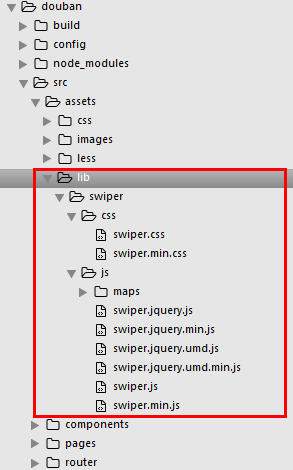
然后根据swiper的使用方法:http://www.swiper.com.cn/usage/index.html
将html结构复制到swipe组件里,引入css文件,以及js
<template>

  <div class="swiper-container">

    <div class="swiper-wrapper">

      <div class="swiper-slide">Slide 1</div>

        <div class="swiper-slide">Slide 2</div>

        <div class="swiper-slide">Slide 3</div>

    </div>

    <!-- 分页器 -->

   <div class="swiper-pagination"></div>

  </div>

</template>

<script>

  import '../assets/lib/swiper/js/swiper.js'

  export default {

    mounted() {

     var mySwiper = new Swiper ('.swiper-container', {

     loop: true,

    // 如果需要分页器

    pagination: '.swiper-pagination',

  })

    }

  }

</script>

<style>

  @import '../assets/lib/swiper/css/swiper.css';

  .swiper-pagination-bullet-active {

    background: #fff;

  }

</style>
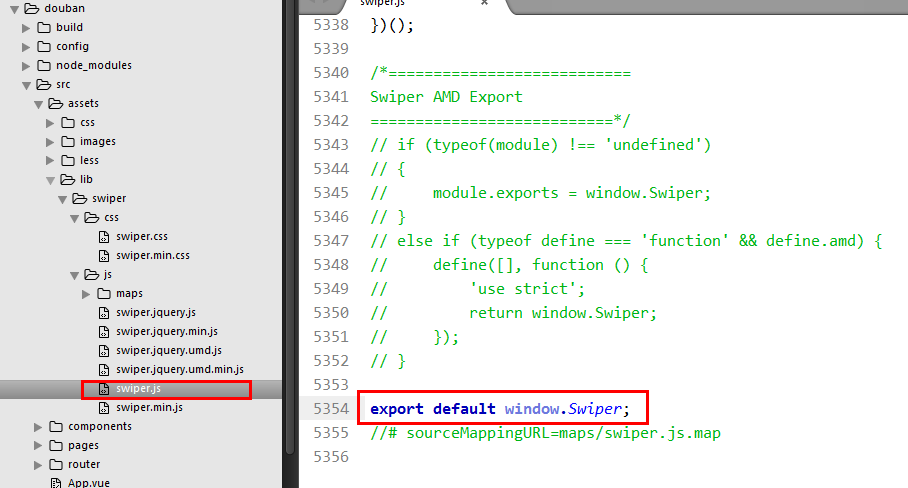
保存预览会报错,我们将swiper.js尾部需要修改一下
将AMD模式删掉,改成
export default window.Swiper;
我们可能在一个页面引用多个swipe组件,就会发生命名冲突,所以我们在实例化swiper的时候,类名需要变化一下,例如:
<m-swipe swipeid="swipe01"></m-swipe>

<m-swipe swipeid="swipe02"></m-swipe>
<div class="swiper-container" :class="swipeid">

  <div class="swiper-wrapper">

    <div class="swiper-slide">Slide 1</div>

      <div class="swiper-slide">Slide 2</div>

      <div class="swiper-slide">Slide 3</div>

  </div>

  <!-- 分页器 -->

  <div class=".swiper-pagination"></div>

</div>

export default {

  props: {

    swipeid: {

      type: String,

      default: 'swipe01'

    }

  },

  mounted() {

    var That = this;

    new Swiper('.'+That.swipeid, {

      loop: true,

      // 如果需要分页器

      pagination: '.swiper-pagination',

    })

  }

}
2.组件化
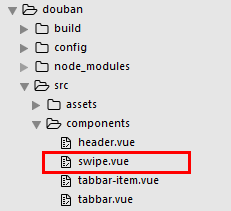
swipe.vue
<template>

  <div class="swiper-container" :class="swipeid">

    <div class="swiper-wrapper">

      <slot name="swiper-con"></slot>

    </div>

    <!-- 分页器 -->

    <div :class="{'swiper-pagination':pagination}"></div>

  </div>

</template>

<script>

  import '../assets/lib/swiper/js/swiper.js'

  export default {

    props: {

      swipeid: {

        type: String,

        default: ''

      },

      effect: {

        type: String,

        default: 'slide'

      },

      loop: {

        type: Boolean,

        default: true

      },

      direction: {

        type: String,

        default: 'horizontal'

      },

      pagination: {

        type: Boolean,

        default: true

      },

      autoplay: {

        type: Number,

        default: 5000,

      },

      paginationType: {

        type: String,

        default: 'bullets'

      }

    },

    mounted() {

      var That = this;

      new Swiper('.'+That.swipeid, {

        //循环

        loop: That.loop,

        //分页器

        pagination: '.swiper-pagination',

        //分页类型

        paginationType: That.paginationType, //fraction,progress,bullets

        //自动播放

        autoplay: That.autoplay,

        //方向

        direction: That.direction,

        //特效

        effect: That.effect, //slide,fade,coverflow,cube

      })

    }

  }

</script>

<style>

  @import '../assets/lib/swiper/css/swiper.css';

  .swiper-pagination-bullet-active {

    background: #fff;

  }

</style>
Index.vue
<template>

  <div>

    <m-header title="豆瓣app" :bg="true" fixed>

      <a href="javascript:;" slot="right">分享</a>

    </m-header>

    <div class="page-content">

      <m-swipe swipeid="swipe01" :autoplay="1000" effect="cube">

        <div class="swiper-slide slide02" slot="swiper-con">Slide 1</div>

        <div class="swiper-slide slide01" slot="swiper-con">Slide 2</div>

        <div class="swiper-slide slide03" slot="swiper-con">Slide 3</div>

      </m-swipe>

      <m-swipe swipeid="swipe021" :loop="false" paginationType="fraction" :autoplay="2000">

        <div class="swiper-slide slide01" slot="swiper-con">Slide 1</div>

        <div class="swiper-slide slide02" slot="swiper-con">Slide 2</div>

        <div class="swiper-slide slide03" slot="swiper-con">Slide 3</div>

      </m-swipe>

    </div>

  </div>

</template>

<script>

  import mHeader from '../../components/header'

  import mSwipe from '../../components/swipe'

  export default {

    name: 'index',

    components: {

      mHeader,

      mSwipe

    }

  }

</script>

<style lang="less">

.is-fixed ~ .page-content{

padding-top:44px;

}

.slide01{

  background: #41b883;

  text-align: center;

  line-height: 200px;

  font-size: 30px;

  color: #fff;

}

.slide02{

  background: #364a60;

  text-align: center;

  line-height: 200px;

  font-size: 30px;

  color: #fff;

}

.slide03{

  background: #ea6f5a;

  text-align: center;

  line-height: 200px;

  font-size: 30px;

  color: #fff;

}

</style>
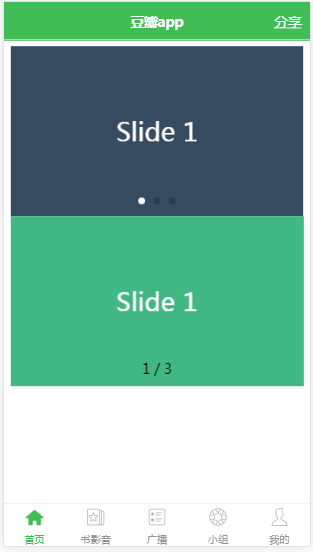
效果图
vue2.0 之 douban (四)创建Swipe图片轮播组件的更多相关文章
- 一分钟搞定AlloyTouch图片轮播组件
轮播图也涉及到触摸和触摸反馈,同时,AlloyTouch可以把惯性运动打开或者关闭,并且设置min和max为运动区域,超出会自动回弹. 除了一般的竖向滚动,AlloyTouch也可以支持横向滚动,甚至 ...
- Angular2组件与指令的小实践——实现一个图片轮播组件
如果说模块系统是Angular2的灵魂,那其组件体系就是其躯体,在模块的支持下渲染出所有用户直接看得见的东西,一个项目最表层的东西就是组件呈现的视图.而除了直接看的见的躯体之外,一个完整的" ...
- Omi-touch实战 移动端图片轮播组件的封装
pc端的轮播,移动端的轮播都很常见.一年前,我还为手机端没有左滑,右滑事件从而封装了一个swipe库,可以自定义超过多少滑动时间就不触发,也可以设置滑动多少距离才触发,这一个功能的代码就达到400多行 ...
- 如何将angular-ui的图片轮播组件封装成一个指令
在项目开发中我们经常会遇到图片轮播的功能点: 如果我们开发人员自己原生手写,将会花费很多的时间,最终得不偿失. 接下来就详细说说如何使用angular-ui发热图片轮播模块,并且将它写成一个指令(便于 ...
- Vue学习—Vue写一个图片轮播组件
1.先看效果: 熟悉的图片轮播,只要是个网站,百分之90以上会有个图片轮播.我认为使用图片轮播. 第一可以给人以一种美观的感受,而不会显得网站那么呆板, 第二可以增加显示内容,同样的区域可以显示更多内 ...
- 如何将angular-ui-bootstrap的图片轮播组件封装成一个指令
在项目开发中我们经常会遇到图片轮播的功能点: 如果我们开发人员自己原生手写,将会花费很多的时间,最终得不偿失. 接下来就详细说说如何使用angular-ui发热图片轮播模块,并且将它写成一个指令(便于 ...
- vue2.0:(四)、首页入门,组件拆分1
为什么需要组件拆分呢?这样才能更符合模块化这样一个理念. 首先是index.html,代码如下: <!DOCTYPE html> <html> <head> < ...
- JavaScript实现图片轮播组件
效果: 自动循环播放图片,下方有按钮可以切换到对应图片. 添加一个动画来实现图片切换. 鼠标停在图片上时,轮播停止,出现左右两个箭头,点击可以切换图片. 鼠标移开图片区域时,从当前位置继续轮播. 提供 ...
- EUI Scroller实现图片轮播 组件 ItemScroller
一 自定义组件如下 /** * 文 件 名:ItemScroll.ts * 功 能: 滚动组件 * 内 容: 自定义组件,支持多张图片水平(垂直)切换滚动 * * Example: * 1. 从自定义 ...
随机推荐
- ASP.net解析JSON
using System; using System.Collections.Generic; using System.Linq; using System.Web; using System.We ...
- 小程序-调用公共js对象方法/ app.js
在小程序中,如果在子页面想调用共公js的方法,需先在子页面js中先实例化app:具体过程如下 子页面js: 1 2 3 4 5 6 7 8 //调用公共js对象以便调用其方法 var app = ge ...
- php-redis的配置与使用
从此处下载 https://codeload.github.com/phpredis/phpredis/zip/develop 也就php-redis的安装包,在zip格式,在windows下解压,将 ...
- Pose &&Get的区别
从一个页面转向另一个页面的请求方式有两种,Post和Get. 如果从原理上来探究他们的区别,涉及到Http传输协议的细节,本文不加探究,只讨论一下表象. 1.Post传输数据时,不需要在URL中显示出 ...
- 我国三大常用坐标系:北京54、西安80和WGS-84
转自:http://blog.sina.com.cn/s/blog_6dbe2d780100mwr5.html 我国三大常用坐标系:北京54.西安80和WGS-84 1.北京54坐标系(BJZ54)北 ...
- 《CSS权威指南》双鱼书概述——第一章CSS和文档
前言:CSS即层叠样式表 主要是影响一个或者一组文档的表现,没有文档,CSS毫无用处. 一.web的衰落 完全结构化的文本太过古板,太平常,虽然有N个理由要求使用结构化标记,但HTML已然走到了今天. ...
- author认证模块
author认证模块 用auth模块 你就用全套 不是自己写一部分 用别人一部分 创建超级管理员,用于登录DJango admin的后台管理 命令:createsuperuser,输入顺序用户 ...
- LabWindows/CVI 下载
LabWindows/CVI 是National Instruments 公司(美国国家仪器公司,简称NI 公司)推出的交互式C 语言开发平台.LabWindows/CVI 将功能强大.使用灵活的C ...
- odoo ERP 系统安装与使用
https://hub.docker.com/_/odoo/ #!/bin/bash sudo docker pull postgres:10sudo docker pull odoo:11.0 su ...
- 个人第二次作业-c++实现四则运算生成器
c++实现四则运算生成器 GIT地址 Link Git用户名 Redwarx008 学号后五位 61128 博客地址 Link 作业链接 Link 环境配置 使用VS2019社区版,一键式安装,这里不 ...