
转 top、postop、scrolltop、offsetTop、scrollHeight、offsetHeight、clientHeight
1.top
此属性仅仅在对象的定位(position)属性被设置时可用。否则,此属性设置会被忽略。
代码如下:
<p style=" position:absolute; top:-5px;">测试top</p>
</div>
上面是一个段落P包含在一个DIV内,可以看到P的top设置为-5px后,它的上边距超过了容器DIV的上边距,超过的这段距离就是设置的5px。
需要注意的是,DIV和P这一对包含元素,都需要设置position为absolute才能得到想要的结果,假如父元素不设置,则子元素的参照将是更上层定义过position的元素,直到整个文档;
2.posTop
posTop的数值其实和top是一样的,但区别在于,top固定了元素单位为px,而posTop只是一个数值,一般使用posTop来进行运算。
3.scrollTop
代码如下:
<p style="" mce_style="">
这里是文本
</p>
</div>
<script type="text/javascript"><!--
container.scrollTop = 12;
// --></script>
这一段文本在这个100*100的DIV内无法完全显示,所以设置了overflow为auto,它会出现一个上下方向的滑动框,假如没有设置 id.scrollTop属性的话,默认情况下滑块位置在顶端。而设置了scrollTop值为12后,滑块的位置改变了,默认显示是卷过了12个象素的文本。如果设置overflow为hidden,则将会无法显示顶部12个象素的文本。
注意设置方式是id.scrollTop,而不是id.style.scrollTop。
4.offsetTop
如果元素 A 是 HTML 的 body 元素,其 display 属性计算值是 none,或者不具有 CSS 布局盒子,则返回 0,并停止本算法。
如果元素 A 的 offsetParent 是 null 或者是 HTML 的 body 元素,以 CSS 像素为单位返回元素 A 上边框距画布原点的垂直距离,并停止本算法。
以 CSS 像素为单位返回元素 A 上边框距其 offsetParent 上边框的距离。 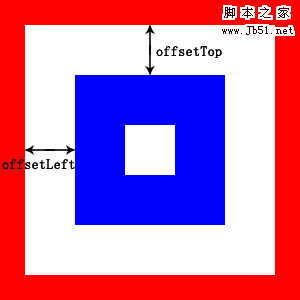
5. scrollHeight 与 offsetHeight与clientHeight
对于document.body
clientHeight
大家对 clientHeight 都没有什么异议,都认为是内容可视区域的高度,也就是说页面浏览器中可以看到内容的这个区域的高度,一般是最后一个工具条以下到状态栏以上的这个区域,与页面内容无关。
offsetHeight
IE、Opera 认为 offsetHeight = clientHeight + 滚动条 + 边框。
NS、FF 认为 offsetHeight 是网页内容实际高度,可以小于 clientHeight。
scrollHeight
IE、Opera 认为 scrollHeight 是网页内容实际高度,可以小于 clientHeight。
NS、FF 认为 scrollHeight 是网页内容高度,不过最小值是 clientHeight
对某个HTML控件
offsetHeight是自身元素的高度,scrollHeight是 自身元素的高度+隐藏元素的高度。
代码如下:
<p style=" height:250px; ">
别再做情人 做只猫 做只狗 不做情人 做只宠物至少可爱迷人 和你相交不浅无谓明日会被你憎</p>
</div>
<script type="text/javascript"><!--
alert(container.offsetHeight);
alert(container.scrollHeight);
// --></script>
将依次输出100,250。因为已经指定了元素的height为100px,所以offsetHeight始终为100px;内部元素为250px,而容器元素只有100px,那么还有150px的内容它无法显示出来,但它却是实际存在的,所以scrollHeight值为100+150=250。
转 top、postop、scrolltop、offsetTop、scrollHeight、offsetHeight、clientHeight的更多相关文章
- 【日常总结】scrollTop、scrollHeight与clientHeight的重要关系
前言 在做一个需求的时候涉及懒加载,百度了一下,发现scrollTop.scrollHeight与clientHeight这三个元素起到了重要作用,以前做过类似demo但是时间过太久忘记了,现在已经完 ...
- scrollTop、scrollHeight与clientHeight
MDN上概念 scrollTop:获取或设置一个元素的内容垂直滚动的像素数. scrollHeight:一个元素内容高度的度量,包括由于溢出导致的视图中不可见内容. clientHeight:元素内部 ...
- 各种位置和高度计算:.position()、.offset()、.outerHeight()、.scrollTop、.scrollHeight、.clientHeight
1..position()和.offset() jquery的.position()获取相对于最近的position为relative或absolute的父元素的偏移,返回.position().le ...
- scrollWidth,offsetWidth,clientWidth,width;scrollHeight,offsetHeight,clientHeight,height;offsetTop,scrollTop,top;offsetLeft,scrollLeft,left还有谁
题中的那么多属性让人头都大了,他们到底是什么意思?不同浏览器的实现是一样的吗?以下所有结论来自chrome版本 53.0.2785.89 (64-bit)和firefox版本52.0.2,操作系统ub ...
- JavaScript--clientX,clientY、pageX,pageY、offsetLeft,offsetTop/offsetWidth,offsetHeight、scrollLeft,scrollTop/scrollWidth,scrollHeight、clientHeight,clientWidth区别
/*在事件的内部console.dir(event)*/ /** * 事件对象event * clientX/clientY 获取鼠标基于浏览器窗口(可视区域的坐标位置)全兼容 * * pageX/p ...
- 关于offsetTop offsetHeight clientHeight scrollHeight scrollTop的区别研究
我是以chrome浏览器做的研究. 先看一段代码: <script> window.addEventListener('DOMContentLoaded',function(){ var ...
- offsetTop,offsetHeight,clientHeight,scrollHeight,scrollTop区别
这些高度相信很多同学都搞不清楚吧.这里我通过本地测试,发现了区别. 以聊天窗口为例. 元素(class='content')高度444px,其中上下padding分别是10px,margin为0.距离 ...
- scrollTop,scrollHeight,clientTop,clientHeight,offsetTop,offsetHeight实际意义 及 计算方式 附实例说明
一.滚动距离.高度 scrollTop scrollLeft scrollHeight scrollWidth 二.相对位置.距离 offsetTop offsetLeft offsetHeight ...
- 理解clientX、clientY、offsetLeft、event.offsetTop、offsetWidth、offsetHeight、clientWidth、clientHeight、scrollTop、scrollHeight
一.clientX和clientY 事件发生时,鼠标距离浏览器的可视区域的X.Y轴的位置,不包含滚动条的区域的部分.就算是页面进行了滚动,鼠标的坐标值还是参考可视区域的. 二.offsetLeft和o ...
- JS-scrollTop、scrollHeight、clientTop、clientHeight、offsetTop、offsetHeight的理解
scrollTop, 可写(这些属性中唯一一个可写的元素) Element.scrollTop 属性可以获取或设置一个元素的内容垂直滚动的像素数. 一个元素的 scrollTop 值是这个元素的顶部到 ...
随机推荐
- MySQL中常见函数
一.日期函数 1.NOW() 返回当前日期和时间 mysql> SELECT NOW(); +---------------------+ | NOW() | +-------------- ...
- Struts2之param标签的使用
struts2的s:param标签主要有两个属性name与value: 传值 若想在value属性中输入字符串,则可以这样写:<s:param name="tableTitle&quo ...
- HTTP协议缓存
缓存的概念 缓存这个东西真的是无处不在, 有浏览器端的缓存, 有服务器端的缓存,有代理服务器的缓存, 有ASP.NET页面缓存,对象缓存. 数据库也有缓存, 等等. http中具有缓存功能的是浏览器缓 ...
- Oracle中表连接的运行原理
Oracle优化器会自动选择以下三种方式的一种运行表连接,但在数据环境上配合强化选择合适的方式或强制使用某种方式是SQL优化的需要: NESTED LOOP 对于被连接的数据子集较小的情况, ...
- 4412 GPIO读 和 ioremap控制GPIO寄存器
一.配置GPIO读 在视频14的基础上做 1.利用拨码开关来实现GPIO输入 所以AP_SLEEP对应GPC0_3,然后在drivers/gpio/gpio-exynos4.c中对应EXYNOS4_G ...
- node连接mysql数据库
1. 创建项目,安装mysql 创建项目文件夹test, 在test文件夹下yarn add mysql --save安装mysql: 2. node使用mysql 在test文件夹下,创建test. ...
- java 通过反射调用属性,方法,构造器
package reflection2; import static org.junit.Assert.assertArrayEquals; import java.lang.reflect.Cons ...
- webbrowser控件显示word文档
参照某网站上的步骤(http://www.kuqin.com/office/20070909/968.html)首先,在Visual Studio中创建一个C#语言的Windows应用程序,然后在左侧 ...
- buuctf | [强网杯 2019]随便注
1' and '0,1' and '1 : 单引号闭合 1' order by 3--+ : 猜字段 1' union select 1,database()# :开始注入,发现正则过滤 1' an ...
- 26 October in 614
Practice tower 有 \(N\,(2\le N\le 600000)\) 块砖,要搭一个 \(N\) 层的塔,要求:如果砖 \(A\) 在砖 \(B\) 上面,那么 \(A\) 不能比 \ ...