
Video Mode Timings
A monitor draws an image on the screen by using an electron beam (3 electron beams for color models, 1 electron beam for monochrome monitors). The front of the screen is covered by a pattern of colored phosphors (pixels). If a phosphor is hit by an electron, it emits a photon and thus becomes visible.
The electron beam draws horizontal lines (scanlines) from left to right, and from the top to the bottom of the screen. By modifying the intensity of the electron beam, pixels with various colors and intensities can be shown.
After each scanline the electron beam has to move back to the left side of the screen and to the next line: this is called the horizontal retrace. After the whole screen (frame) was painted, the beam moves back to the upper left corner: this is called the vertical retrace. During both the horizontal and vertical retrace, the electron beam is turned off (blanked).
The speed at which the electron beam paints the pixels is determined by the dotclock in the graphics board. For a dotclock of e.g. 28.37516 MHz (millions of cycles per second), each pixel is 35242 ps (picoseconds) long:
1/(28.37516E6 Hz) = 35.242E-9 s
If the screen resolution is 640x480, it will take
640*35.242E-9 s = 22.555E-6 s
to paint the 640 (xres) pixels on one scanline. But the horizontal retrace also takes time (e.g. 272 `pixels'), so a full scanline takes
(640+272)*35.242E-9 s = 32.141E-6 s
We'll say that the horizontal scanrate is about 31 kHz:
1/(32.141E-6 s) = 31.113E3 Hz
A full screen counts 480 (yres) lines, but we have to consider the vertical retrace too (e.g. 49 `lines'). So a full screen will take
(480+49)*32.141E-6 s = 17.002E-3 s
The vertical scanrate is about 59 Hz:
1/(17.002E-3 s) = 58.815 Hz
This means the screen data is refreshed about 59 times per second. To have a stable picture without visible flicker, VESA recommends a vertical scanrate of at least 72 Hz. But the perceived flicker is very human dependent: some people can use 50 Hz without any trouble, while I'll notice if it's less than 80 Hz.
Since the monitor doesn't know when a new scanline starts, the graphics board will supply a synchronization pulse (horizontal sync or hsync) for each scanline. Similarly it supplies a synchronization pulse (vertical sync or vsync) for each new frame. The position of the image on the screen is influenced by the moments at which the synchronization pulses occur.
The following picture summarizes all timings. The horizontal retrace time is the sum of the left margin, the right margin and the hsync length, while the vertical retrace time is the sum of the upper margin, the lower margin and the vsync length.
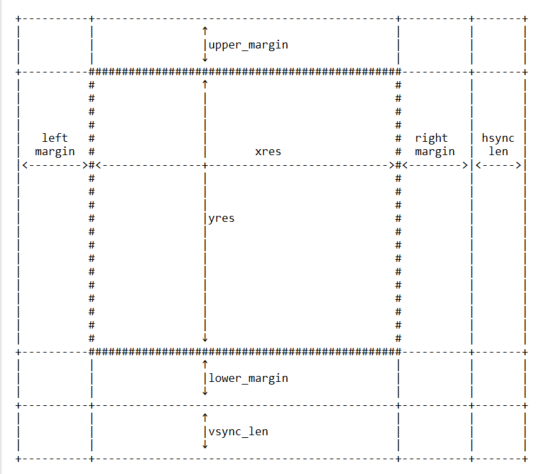
The frame buffer device expects all horizontal timings in number of dotclocks (in picoseconds, 1E-12 s), and vertical timings in number of scanlines.
6. Converting XFree86 timing values info frame buffer device timings
--------------------------------------------------------------------
An XFree86 mode line consists of the following fields:
"800x600" 50 800 856 976 1040 600 637 643 666
< name > DCF HR SH1 SH2 HFL VR SV1 SV2 VFL
The frame buffer device uses the following fields:
- pixclock: pixel clock in ps (pico seconds)
- left_margin: time from sync to picture
- right_margin: time from picture to sync
- upper_margin: time from sync to picture
- lower_margin: time from picture to sync
- hsync_len: length of horizontal sync
- vsync_len: length of vertical sync
1) Pixelclock: xfree: in MHz
fb: in picoseconds (ps)
pixclock = 1000000 / DCF
2) horizontal timings: left_margin = HFL - SH2
right_margin = SH1 - HR
hsync_len = SH2 - SH1
3) vertical timings:
upper_margin = VFL - SV2
lower_margin = SV1 - VR
vsync_len = SV2 - SV1
Good examples for VESA timings can be found in the XFree86 source tree, under "xc/programs/Xserver/hw/xfree86/doc/modeDB.txt".
Video Mode Timings的更多相关文章
- 【转载】帧缓冲驱动程序分析及其在BSP上的添加
原文地址:(四)帧缓冲驱动程序分析及其在BSP上的添加 作者:gfvvz 一.BSP修改及其分析 1. BSP中直接配置的四个寄存器 S3C6410数据手册的第14.5部分是显示控制器的编程模型部 ...
- LAV Filter 源代码分析 4: LAV Video (2)
上一篇文章分析了LAV Filter 中的LAV Video的两个主要的类:CLAVVideo和CDecodeThread.文章:LAV Filter 源代码分析 3: LAV Video (1) 在 ...
- 视频处理单元Video Processing Unit
视频处理单元Video Processing Unit VPU处理全局视频处理,它包括时钟门.块复位线和电源域的管理. 缺少什么: •完全重置整个视频处理硬件块 •VPU时钟的缩放和设置 •总线时钟门 ...
- video.js
1.github地址 2.常用API: class : video-js: video-js应用视频所需的风格.js功能,比如全屏和字幕. vjs-default-skin: vjs-default- ...
- video.js--很赞的H5视频播放库
video.js是一款很流行的html5视频播放插件.很适合在移动端播放视频(比如微信网页),功能强大,且支持降级到flash,兼容ie8.官网:http://videojs.com/ git& ...
- 《HTML5》 Audio/Video全解
一.标签解读 <audio> 标签属性 <audio id="media" src="http://www.abc.com/test.mp3" ...
- video/audio在ios/android上播放兼容
1.audio自动播放 <audio src='xxx.mp3' autoplay></audio> 上面是audio标签autoplay属性是自动播放,但是在安卓部分浏览器和 ...
- video.js-H5视频播放库
video.js是一款很流行的html5视频播放插件.很适合在移动端播放视频(比如微信网页),功能强大,且支持降级到flash,兼容ie8.官网:http://videojs.com/ git& ...
- video.js播放mp4文件
HTML5的标签 video 支持的mp4编码为视频编码 H.264 音频AAC 参考网址 http://www.w3school.com.cn/html5/html_5_video.asp 视频格式 ...
随机推荐
- 2019CCPC网络预选赛 1003 K-th occurrence 后缀自动机 + 二分 + 主席树
题意:给你一个长度为n的字符串,有m次询问,每次询问l到r的子串在原串中第k次出现的位置,如果没有输出-1.n, m均为1e5级别. 思路:后悔没学后缀数组QAQ,其实只要学过后缀数组这个题还是比较好 ...
- BZOJ1899 [Zjoi2004]Lunch 午餐 贪心+DP
题目传送门 https://lydsy.com/JudgeOnline/problem.php?id=1899 题解 如果只有一个窗口,那么可以这样考虑:因为最后一个人打完饭的时间是固定的,那么不如就 ...
- 循环移动List元素
List 循环移动元素 使用 Collections 类的 rotate() 来循环移动元素,方法第二个参数指定了移动的起始位置: public class RotateList { public s ...
- 8.xpath(dom4j支持的jar)
1.使用dom4j支持xpath的操作(xpath可以直接获取到某个元素) (1)第一种形式 /AAA/DDD/BBB:表示一层一层的,AAA下面DDD下面的BBB元素 (2)第二种形式 //BBB: ...
- centos 6.5 关闭防火墙
关闭防火墙分为临时关闭和永久关闭.临时关闭重启系统后恢复正常,永久关闭重启系统后仍然是关闭状态 临时关闭与开启 service iptables stop service iptables start ...
- pylab和pyplot的区别
Pylab combines the functionality of pyplot with the capabilities of NumPy in a single namespace, and ...
- python+selenium自动化框架搭建
环境及使用软件信息 python 3 selenium 3.13.0 xlrd 1.1.0 chromedriver HTMLTestRunner 说明: selenium/xlrd只需要再pytho ...
- pytorch数据预处理错误
出错: Traceback (most recent call last): File , in <module> train_model(model_conv, criterion, o ...
- java获取当月日期 和 周末
/** * java获取 当月所有的日期集合 * @return */public static List<Date> getDayListOfMonth() { List list = ...
- 在VMware中配置网卡之NAT模式
为什么要在VMware中配置网卡? 因为在远程连接服务器时,需要虚拟机连接网络 虚拟机网络配置的三种模式:桥接模式,NAT模式,主机模式 NAT模式也称之为网络转换模式,两层路由: 第一层路由:物理机 ...