
纯CSS3制作九款可爱复古相机
前言
掐指一算,快两个月没写博客分享了。好吧,我就只是在准备校招而已。现在已经有满意的offer了,所以我就回来啦!这两个月过得挺煎熬也挺充实的。具体细说估计得长篇大论,我就不闲扯了。总之呢,越努力,越幸运!
正文
先看看制作出来的效果图:
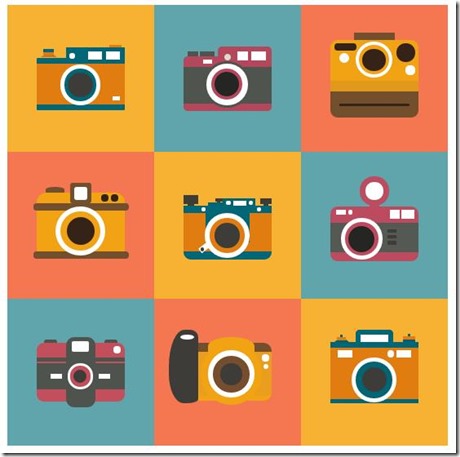
PS: 有人会说,这些东西实用性不强,没啥用。一开始我也是这么觉得,但后来我就改变自己的看法。首先,实用性目前来说确实不强,或者说应用范围很窄。但其实它可以提高自己的创意思维,css3的综合运用以及html代码的优化。当自己熟练使用的时候,会渐渐发现自己在重构那一块更加有想法和得心应手;其次,作为一个学生,在开发经验上略显不足,想分享一篇高质量的文章确实不易,所以我找准CSS3动画这个点,分享自己制作的一些好玩的demo,给大家带来一点点工作上或者生活上的乐趣,这就是我分享的初衷。当然,我也希望自己以后开发经验开始丰富的时候可以给大家分享更有价值的文章,这就等时间去沉淀吧!
OK,上面的效果是我依据一张自己在网上找的设计稿使用css3还原的,接下来就一个一个分享出来:
首先需要一个容器:
<div class="container">

</div>
以及一些必要的css样式:
.container{

    width:600px;

    height:600px;

    margin:0 auto;

    overflow:hidden;

}

.style_1,.style_2,.style_3,.style_4,.style_5,.style_6,.style_7,.style_8,.style_9{

    width:200px;

    height:200px;

    float:left;

    position:relative;

}

.style_1,.style_5,.style_9{

    background-color:#f7b234;

}

.style_2,.style_6,.style_7{

    background-color:#60a4ac;

}

.style_3,.style_4,.style_8{

    background-color:#f47752;

}
第一款相机

html代码:
<div class="style_1">

    <div class="camera_style_1">

        <div class="header">

            <div class="left"></div>

            <div class="right">

                <div class="whiteBlock"></div>

            </div>

        </div>

        <div class="main">

            <div class="round"></div>

        </div>

    </div>

</div>
css代码:
.camera_style_1{

    width:120px;

    height:86px;

    margin:0 auto;

    position: absolute;

    top:50%;

    left:50%;

    margin-left:-60px;

    margin-top:-43px;

}

.camera_style_1 .header{

    width:100%;

    height:15px;

}

.camera_style_1 .main{

    width:100%;

    height:55px;

    background-color:#e17c10;

    border-top:8px solid #016675;

    border-bottom:8px solid #016675;

    border-radius:2px;

    border-top-right-radius:;

}

.camera_style_1 .left{

    width:;

    height:;

    border:12px solid transparent;

    border-bottom:8px solid #cf7323;

    position: absolute;

    top:-5px;

    left:5px;

}

.camera_style_1 .left:after,.camera_style_1 .left:before{

    content:'';

    display:block;

    width:14px;

    height:4px;

    background-color:#e07b0f;

    position: absolute;

    top:1px;

    left:-7px;

}

.camera_style_1 .left:before{

    background-color:#016675;

    top:-3px;

    border-top-left-radius:1px;

    border-top-right-radius:1px;

}

.camera_style_1 .right{

    width:80px;

    height:14px;

    background-color:#016675;

    position: absolute;

    top:1px;

    right:;

    border-top-left-radius:1px;

    border-top-right-radius:1px;

}

.camera_style_1 .right:after{

    content:'';

    display:block;

    width:8px;

    height:8px;

    border-radius:50%;

    background-color:#fff;

    position: absolute;

    top:7px;

    left:4px;

}

.camera_style_1 .right:before{

    content:'';

    display:block;

    width:16px;

    height:4px;

    background-color:#e17c10;

    position: absolute;

    top:-4px;

    right:5px;

}

.camera_style_1 .whiteBlock{

    width:5px;

    height:11px;

    border-left:19px solid #fff;

    border-right:19px solid #fff;

    position: absolute;

    top:5px;

    right:7px;

}

.camera_style_1 .round{

    width:44px;

    height:44px;

    border-radius: 50%;

    background-color:#016675;

    border:6px solid #fff;

    position: absolute;

    top:24px;

    left:32px;

}

.camera_style_1 .round:after{

    content: '';

    display:block;

    width:34px;

    height:34px;

    background-color:#3e3c38;

    border-radius:50%;

    position: absolute;

    top:5px;

    left:5px;

}

.camera_style_1 .round:before{

    content: '';

    display:block;

    width:10px;

    height:5px;

    background-color:#fff;

    position: absolute;

    top:38px;

    right:-32px;

}
第二款相机
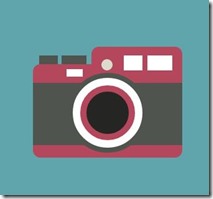
html代码:
<div class="style_2">

    <div class="camera_style_2">

        <div class="header">

            <div class="left"></div>

            <div class="right"></div>

        </div>

        <div class="main">

            <div class="round"></div>

        </div>

    </div>

</div>
css代码:
.camera_style_2{

    width:120px;

    height:90px;

    margin:0 auto;

    position: absolute;

    top:50%;

    left:50%;

    margin-left:-60px;

    margin-top:-45px;

}

.camera_style_2 .header{

    width:100%;

    height:15px;

}

.camera_style_2 .main{

    width:100%;

    height:50px;

    background-color:#50544e;

    border-top:15px solid #b5475d;

    border-bottom:10px solid #b5475d;

    border-radius:6px;

    border-top-right-radius:;

}

.camera_style_2 .round{

    width:56px;

    height:56px;

    background-color:#fff;

    border:4px solid #50544e;

    border-radius:50%;

    position: absolute;

    top:22px;

    left:28px;

}

.camera_style_2 .round:after{

    content:'';

    display:block;

    width:34px;

    height:34px;

    background-color:#252522;

    border-radius:50%;

    border:5px solid #b5475d;

    position: absolute;

    top:6px;

    left:6px;

}

.camera_style_2 .left{

    width:3px;

    height:7px;

    border-left:15px solid #50544e;

    border-right:20px solid #50544e;

    position: absolute;

    top:8px;

    left:5px;

}

.camera_style_2 .left:after{

    content:'';

    display:block;

    width:13px;

    height:6px;

    background-color:#fff;

    position: absolute;

    top:11px;

    left:7px;

}

.camera_style_2 .right{

    width:73px;

    height:14px;

    background-color:#b5475d;

    border-top-left-radius:6px;

    border-top-right-radius:6px;

    position: absolute;

    right:;

    top:1px;

}

.camera_style_2 .right:after{

    content:'';

    display:block;

    width:9px;

    height:9px;

    background-color:#dbdbcc;

    border-radius:50%;

    position: absolute;

    top:10px;

    left:8px;

}

.camera_style_2 .right:before{

    content:'';

    display:block;

    width:4px;

    height:12px;

    border-left:15px solid #fff;

    border-right:20px solid #fff;

    position: absolute;

    top:7px;

    right:8px;

}
第三款相机

html代码:
<div class="style_3">

    <div class="camera_style_3">

        <div class="main">

            <div class="left"></div>

            <div class="center"></div>

            <div class="right"></div>

        </div>

        <div class="footer"></div>

    </div>

</div>
css代码:
.camera_style_3{

    width:120px;

    height:106px;

    margin:0 auto;

    position: absolute;

    top:50%;

    left:50%;

    margin-left:-60px;

    margin-top:-53px;

}

.camera_style_3 .main{

    width:100%;

    height:71px;

    background-color:#f2a313;

    border-top-left-radius:10px;

    border-top-right-radius:10px;

}

.camera_style_3 .main:before{

    content:'';

    display:block;

    width:56px;

    height:9px;

    background-color:#744f2d;

    border-top-left-radius:2px;

    border-top-right-radius:2px;

    position:absolute;

    top:-9px;

    left:32px;

}

.camera_style_3 .main:after{

    content:'';

    display:block;

    width:100%;

    height:15px;

    background-color:#e1991c;

    position: absolute;

    bottom:35px;

    left:;

}

.camera_style_3 .footer{

    width:100%;

    height:35px;

    background-color:#744f2d;

    border-bottom-left-radius:10px;

    border-bottom-right-radius:10px;

}

.camera_style_3 .footer:after{

    content:'';

    display:block;

    width:80%;

    height:3px;

    background-color:#342316;

    border-radius:3px;

    position: absolute;

    bottom:16px;

    left:10%;

}

.camera_style_3 .left{

    width:30px;

    height:10px;

    border-radius:10px;

    background-color:#342316;

    position: absolute;

    top:5px;

    left:5px;

}

.camera_style_3 .left:after{

    content:'';

    display:block;

    width:14px;

    height:14px;

    background-color:#fff;

    border-radius:50%;

    position: absolute;

    top:13px;

    left:7px;

}

.camera_style_3 .center{

    width:42px;

    height:40px;

    border:5px solid #fff;

    border-radius:50%;

    position: absolute;

    top:3px;

    left:34px;

}

.camera_style_3 .center:after{

    content:'';

    display:block;

    width:32px;

    height:30px;

    background-color:#342316;

    border-radius:50%;

    position: absolute;

    top:5px;

    left:5px;

}

.camera_style_3 .right{

    width:25px;

    height:25px;

    background-color:#342316;

    border-radius:50%;

    position: absolute;

    top:5px;

    right:5px;

}

.camera_style_3 .right:after{

    content:'';

    display:block;

    width:13px;

    height:13px;

    background-color:#fff;

    border-radius:50%;

    position: absolute;

    top:30px;

    right:;

}
第四款相机

html代码:
<div class="style_4">

    <div class="camera_style_4">

        <div class="header">

            <div class="left"></div>

            <div class="center"></div>

            <div class="right"></div>

        </div>

        <div class="main"></div>

    </div>

</div>
css代码:
.camera_style_4{

    width:120px;

    height:90px;

    margin:0 auto;

    position: absolute;

    top:50%;

    left:50%;

    margin-left:-60px;

    margin-top:-45px;

    background-color:#f2a313;

    border-radius:14px;

}

.camera_style_4:after,.camera_style_4:before{

    content:'';

    display:block;

    width:130px;

    height:10px;

    background-color:#744f2d;

    border-radius:10px;

    position: absolute;

    left:-5px;

    top:15px;

    z-index:;

}

.camera_style_4:after{

    top:80px;

}

.camera_style_4 .header{

    width:100%;

    height:22px;

}

.camera_style_4 .left{

    width:26px;

    height:8px;

    background-color:#744f2d;

    border-top-left-radius:50%;

    border-top-right-radius:50%;

    position: absolute;

    top:-8px;

    left:12px;

}

.camera_style_4 .center{

    width:28px;

    height:28px;

    background-color:#744f2d;

    border-radius:4px;

    position: absolute;

    top:-13px;

    left:46px;

}

.camera_style_4 .center:after{

    content:'';

    display:block;

    width:18px;

    height:18px;

    background-color:#fff;

    border-radius:4px;

    position: absolute;

    top:5px;

    left:5px;

}

.camera_style_4 .right{

    width:10px;

    height:10px;

    background-color:#322317;

    border-radius:50%;

    position: absolute;

    top:3px;

    right:22px;

}

.camera_style_4 .right:after{

    content:'';

    display:block;

    width:10px;

    height:10px;

    background-color:#322317;

    border-radius:50%;

    position: absolute;

    top:;

    left:13px;

}

.camera_style_4 .main{

    width:54px;

    height:54px;

    border:7px solid #fff;

    border-radius:50%;

    position: absolute;

    top:19px;

    left:26px;

    z-index:;

}

.camera_style_4 .main:after{

    content:'';

    display:block;

    width:38px;

    height:38px;

    background-color:#342316;

    border-radius:50%;

    position: absolute;

    top:8px;

    left:8px;

}
第五款相机:

html代码:
<div class="style_5">

    <div class="camera_style_5">

        <div class="header">

            <div class="left"></div>

            <div class="center">

                <div class="center_innerLeft"></div>

                <div class="center_innerRight">

                    <div class="center_innerRight_body"></div>

                </div>

            </div>

            <div class="right"></div>

        </div>

        <div class="main">

            <div class="main_bg"></div>

            <div class="outterRound"></div>

            <div class="innerRound"></div>

        </div>

    </div>

</div>
css代码:
.camera_style_5{

    width:120px;

    height:90px;

    margin:0 auto;

    position: absolute;

    top:50%;

    left:50%;

    margin-left:-60px;

    margin-top:-43px;

}

.camera_style_5 .header{

    width:100%;

    height:16px;

}

.camera_style_5 .left{

    width:20px;

    height:12px;

    background-color:#3e3d36;

    position: absolute;

    top:2px;

}

.camera_style_5 .left:after{

    content:'';

    display:block;

    width:8px;

    height:5px;

    background-color:#3e3d36;

    position: absolute;

    top:9px;

    left:6px;

}

.camera_style_5 .center{

    width:65px;

    height:16px;

    position: absolute;

    top:;

    left:33px;

}

.camera_style_5 .center_innerLeft{

    width:20px;

    height:4px;

    background-color:#006674;

    position: absolute;

    top:12px;

    left:;

}

.camera_style_5 .center_innerLeft:before{

    content:'';

    display:block;

    width:10px;

    height:5px;

    background-color:#3f3d39;

    position: absolute;

    top:-6px;

    right:;

}

.camera_style_5 .center_innerLeft:after{

    content:'';

    display:block;

    width:4px;

    height:2px;

    background-color:#3f3d39;

    position: absolute;

    top:-2px;

    right:3px;

}

.camera_style_5 .center_innerRight{

    width:45px;

    height:10px;

    background-color:#006674;

    position: absolute;

    top:6px;

    right:;

}

.camera_style_5 .center_innerRight_body{

    width:18px;

    height:7px;

    background-color:#fff;

    position: absolute;

    top:3px;

    right:12px;

}

.camera_style_5 .center_innerRight_body:before,.camera_style_5 .center_innerRight_body:after{

    content:'';

    display:block;

    width:6px;

    height:6px;

    background-color:#fff;

    border-radius:50%;

    position: absolute;

    top:;

    left:-10px;

}

.camera_style_5 .center_innerRight_body:after{

    left:21px;

}

.camera_style_5 .right{

    width:16px;

    height:8px;

    background-color:#3e3d36;

    position: absolute;

    top:6px;

    right:;

}

.camera_style_5 .right:after{

    content:'';

    display:block;

    width:6px;

    height:4px;

    background-color:#3e3d36;

    position: absolute;

    top:6px;

    left:5px;

}

.camera_style_5 .main{

    width:100%;

    height:52px;

    background-color:#e17c10;

    border-top:10px solid #016675;

    border-bottom:12px solid #016675;

    border-bottom-right-radius:10px;

    border-bottom-left-radius:10px;

}

.camera_style_5 .main_bg{

    width:60px;

    height:40px;

    background-color:#006674;

    position: absolute;

    top:26px;

    left:30px;

}

.camera_style_5 .main_bg:before,.camera_style_5 .main_bg:after{

    content:'';

    display:block;

    width:6px;

    height:6px;

    background-color:#fff;

    border-radius:50%;

    position: absolute;

    top:-8px;

    left:-6px;

}

.camera_style_5 .main_bg:after{

    left:70px;

}

.camera_style_5 .outterRound{

    width:46px;

    height:46px;

    border:8px solid #fff;

    border-radius:50%;

    position: absolute;

    top:26px;

    left:29px;

}

.camera_style_5 .outterRound:before{

    content:'';

    display:block;

    width:15px;

    height:7px;

    background-color:#fff;

    -webkit-transform:rotate(-38deg);

    transform:rotate(-38deg);

    position: absolute;

    top:36px;

    left:-16px;

}

.camera_style_5 .outterRound:after{

    content:'';

    display:block;

    width:5px;

    height:5px;

    background-color:#3f3d39;

    border-radius:50%;

    position: absolute;

    top:39.5px;

    left:-14px;

}

.camera_style_5 .innerRound{

    width:34px;

    height:34px;

    background-color:#3e3c38;

    border:7px solid #e17c10;

    border-radius:50%;

    position: absolute;

    top:33px;

    left:36px;

}
第六款相机

html代码:
<div class="style_6">

    <div class="camera_style_6">

        <div class="header">

            <div class="top"></div>

        </div>

        <div class="main">

            <div class="main_left"></div>

            <div class="main_right"></div>

            <div class="main_round"></div>

            <div class="main_line"></div>

        </div>

    </div>

</div>
css代码:
.camera_style_6{

    width:120px;

    height:100px;

    margin:0 auto;

    position: absolute;

    top:50%;

    left:50%;

    margin-left:-60px;

    margin-top:-56px;

}

.camera_style_6 .header{

    width:100%;

    height:30px;

}

.camera_style_6 .top{

    width:24px;

    height:24px;

    background-color:#fff;

    border:8px solid #bc4c5f;

    border-radius:50%;

    position: absolute;

    top:-11px;

    left:40px;

}

.camera_style_6 .top:after{

    content:'';

    display:block;

    width:14px;

    height:5px;

    background-color:#bc4c5f;

    position: absolute;

    bottom:-10px;

    left:5px;

}

.camera_style_6 .main{

    width:100%;

    height:75px;

    background-color:#bd4b60;

    border-radius:10px;

}

.camera_style_6 .main:before{

    content:'';

    display:block;

    width:100%;

    height:40px;

    background-color:#555953;

    position: absolute;

    bottom:8px;

    left:;

}

.camera_style_6 .main_left{

    width:13px;

    height:6px;

    background-color:#fff;

    position: absolute;

    top:35px;

    left:8px;

}

.camera_style_6 .main_left:after{

    content:'';

    display:block;

    width:6px;

    height:6px;

    background-color:#fff;

    border-radius:50%;

    position: absolute;

    top:;

    right:-9px;

}

.camera_style_6 .main_right{

    width:2px;

    height:12px;

    border-left:14px solid #fff;

    border-right:18px solid #fff;

    position: absolute;

    top:35px;

    right:6px;

}

.camera_style_6 .main_round{

    width:46px;

    height:46px;

    background-color:#be4a60;

    border-radius:50%;

    border:6px solid #fff;

    position: absolute;

    bottom:-3px;

    left:14px;

}

.camera_style_6 .main_round:after{

    content:'';

    display:block;

    width:36px;

    height:36px;

    background-color:#252522;

    border-radius:50%;

    position: absolute;

    top:5px;

    left:5px;

}

.camera_style_6 .main_line,.camera_style_6 .main_line:before,.camera_style_6 .main_line:after{

    width:12px;

    height:5px;

    background-color:#3e3d36;

    position: absolute;

    top:61px;

    left:78px;

}

.camera_style_6 .main_line:before{

    content:'';

    display:block;

    top:8px;

    left:;

}

.camera_style_6 .main_line:after{

    content:'';

    display:block;

    top:16px;

    left:;

}
第七款相机

html代码:
<div class="style_7">

    <div class="camera_style_7">

        <div class="main">

            <div class="whiteBlock"></div>

            <div class="round"></div>

        </div>

    </div>

</div>
css代码:
.camera_style_7{

    width:120px;

    height:80px;

    background-color:#c34e5c;

    border-radius:10px;

    position: absolute;

    top:50%;

    left:50%;

    margin-top:-40px;

    margin-left:-60px;

}

.camera_style_7:before,.camera_style_7:after{

    content:'';

    display:block;

    width:18px;

    height:5px;

    background-color:#51524d;

    border-top-left-radius:4px;

    border-top-right-radius:4px;

    position: absolute;

    top:-5px;

}

.camera_style_7:before{

    left:10px;

}

.camera_style_7:after{

    right:10px;

}

.camera_style_7 .main{

    width:100%;

    height:35px;

    background-color:#4f534d;

    position: absolute;

    top:28px;

    left:;

}

.camera_style_7 .main:before{

    content:'';

    display:block;

    width:100%;

    height:5px;

    background-color:#4f534d;

    position: absolute;

    top:-8px;

    left:;

}

.camera_style_7 .main:after{

    content:'';

    display:block;

    width:40px;

    height:96px;

    background-color:#4f534d;

    border-radius:12px;

    position: absolute;

    top:-36px;

    left:40px;

    z-index:;

}

.camera_style_7 .whiteBlock{

    width:50px;

    height:7px;

    border-left:16px solid #fff;

    border-right:16px solid #fff;

    position: absolute;

    top:14px;

    left:19px;

}

.camera_style_7 .whiteBlock:before{

    content:'';

    display:block;

    width:24px;

    height:14px;

    background-color:#fff;

    border-radius:3px;

    position: absolute;

    top:-44px;

    left:13px;

    z-index:;

}

.camera_style_7 .whiteBlock:after{

    content:'';

    display:block;

    width:10px;

    height:10px;

    background-color:#fff;

    border-radius:50%;

    position: absolute;

    top:-38px;

    left:70px;

}

.camera_style_7 .round{

    width:28px;

    height:28px;

    background-color:#c34e5c;

    border:4px solid #fff;

    border-radius:50%;

    position: absolute;

    top:;

    left:42px;

    z-index:;

}

.camera_style_7 .round:after{

    content:'';

    display:block;

    width:18px;

    height:18px;

    background-color:#3e3c38;

    border-radius:50%;

    position: absolute;

    top:5px;

    left:5px;

}
第八款相机

html代码:
<div class="style_8">

    <div class="camera_style_8">

        <div class="round"></div>

        <div class="whiteBlock"></div>

    </div>

</div>
css代码:
.camera_style_8{

    width:120px;

    height:60px;

    background-color:#e99e1e;

    border-radius:12px;

    border-top:13px solid #744f2d;

    border-bottom:7px solid #f2a313;

    position: absolute;

    top:50%;

    left:50%;

    margin-top:-40px;

    margin-left:-60px;

}

.camera_style_8:before{

    content:'';

    display:block;

    width:40px;

    height:100px;

    background-color:#3e3c38;

    border-top-left-radius:22px 50px;

    border-top-right-radius:12px 10px;

    border-bottom-left-radius:20px 40px;

    border-bottom-right-radius:16px 6px;

    position: absolute;

    bottom:-10px;

    left:-20px;

}

.camera_style_8:after{

    content:'';

    display:block;

    width:18px;

    height:7px;

    background-color:#fff;

    border-radius:28px/10px;

    position:absolute;

    top:-24px;

    left:-4px;

}

.camera_style_8 .round{

    width:64px;

    height:64px;

    background-color:#fff;

    border:10px solid #f2a313;

    border-radius:50%;

    position: absolute;

    top:-12px;

    left:23px;

    z-index:;

}

.camera_style_8 .round:after{

    content:'';

    display:block;

    width:30px;

    height:30px;

    background-color:#3e3c38;

    border:10px solid #764e2d;

    border-radius:50%;

    position: absolute;

    top:7px;

    left:7px;

}

.camera_style_8 .whiteBlock{

    width:64px;

    height:25px;

    background-color:#f2a313;

    border-top-left-radius:50%;

    border-top-right-radius:50%;

    position: absolute;

    top:-20px;

    left:33px;

    z-index:;

}

.camera_style_8 .whiteBlock:before{

    content:'';

    display:block;

    width:10px;

    height:10px;

    background-color:#fff;

    border-radius:50%;

    position: absolute;

    top:23px;

    left:74px;

}

.camera_style_8 .whiteBlock:after{

    content:'';

    display:block;

    width:7px;

    height:7px;

    background-color:#fff;

    border-radius:50%;

    position: absolute;

    top:36px;

    left:76px;

}
第九款相机

html代码:
<div class="style_9">

    <div class="camera_style_9">

        <div class="header">

            <div class="left"></div>

            <div class="center"></div>

            <div class="right"></div>

        </div>

        <div class="whiteBlock"></div>

    </div>

</div>
css代码:
.camera_style_9{

    width:120px;

    height:70px;

    background-color:#e17c10;

    border-top:8px solid #016675;

    border-bottom:6px solid #016675;

    position: absolute;

    top:50%;

    left:50%;

    margin-left:-60px;

    margin-top:-41px;

}

.camera_style_9:before{

    content:'';

    display:block;

    width:50px;

    height:50px;

    background-color:#026573;

    border:6px solid #fff;

    border-radius:50%;

    position: absolute;

    bottom:-4px;

    left:29px;

}

.camera_style_9:after{

    content:'';

    display:block;

    width:34px;

    height:34px;

    background-color:#3e3c38;

    border-radius:50%;

    position:absolute;

    bottom:10px;

    left:43px;

}

.camera_style_9 .whiteBlock{

    width:60px;

    height:10px;

    border-left:20px solid #fff;

    border-right:20px solid #fff;

    position: absolute;

    top:3px;

    left:10px;

}

.camera_style_9 .whiteBlock:after{

    content:'';

    display:block;

    width:9px;

    height:9px;

    border-radius:50%;

    background-color:#fff;

    position: absolute;

    top:0.5px;

    right:3px;

}

.camera_style_9 .header{

    width:100%;

    height:20px;

    position: absolute;

    top:-28px;

    left:;

}

.camera_style_9 .left{

    width:;

    height:;

    border:10px solid transparent;

    border-bottom:8px solid #00606f;

    position: absolute;

    bottom:;

    left:5px;

}

.camera_style_9 .left:before{

    content:'';

    display:block;

    width:12px;

    height:4px;

    background-color:#e07c13;

    position: absolute;

    bottom:-5px;

    left:-6px;

}

.camera_style_9 .left:after{

    content:'';

    display:block;

    width:4px;

    height:3px;

    background-color:#016673;

    position: absolute;

    bottom:-1px;

    left:-2px;

}

.camera_style_9 .center{

    width:38px;

    height:10px;

    background-color:#fff;

    border:7px solid #016675;

    border-top-left-radius:6px;

    border-top-right-radius:6px;

    border-bottom:none;

    position: absolute;

    bottom:;

    left:34px;

}

.camera_style_9 .right{

    width:16px;

    height:4px;

    background-color:#00606f;

    position: absolute;

    bottom:;

    right:5px;

}

.camera_style_9 .right:before{

    content:'';

    display:block;

    width:16px;

    height:4px;

    background-color:#e17b12;

    position:absolute;

    bottom:4px;

    right:;

}

.camera_style_9 .right:after{

    content:'';

    display:block;

    width:4px;

    height:3px;

    background-color:#006775;

    position:absolute;

    bottom:8px;

    right:6px;

}
PS: 篇幅有点长,代码都提供了,有兴趣的可以尝试一下。
若需转载,请注明出处,谢谢!
纯CSS3制作九款可爱复古相机的更多相关文章
- 8个纯CSS3制作的动画应用及源码
对于一个复杂的图形或者动画来说,之前我们的处理方式是图片叠加或者利用CSS+JavaScript的方法,然而随着CSS3标准的不断成熟,我们甚至完全可以利用CSS3来绘制一些图片和制作丰富的动画特效. ...
- CSS源码之纯css3制作的哆啦a梦图片
本文章向大家介绍一个纯css3制作的哆啦a梦图像,主要巧妙的使用了css3的border-radius属性,需要的朋友介意参考一下本文章的源码. 效果图: 源码 <!doctype html&g ...
- 纯CSS3制作卡通场景汽车动画效果
前言 今天分享一下我昨晚做的CSS3动画效果——卡通场景汽车动画.在接触CSS3动画之前,我之前实现一些简单的动画效果都是使用flash完成的.但是自从CSS3横空出世,在移动端对CSS3动画的运用越 ...
- 纯CSS3制作的“Ribbons”效果
在看具体每个demo之前,我们一起来看下面一个截图: 上图是一个典型的“Ribbons”各部位的示意图,但每一个“Ribbons”并不会都使用上图示意的各个部分,在下面的实例中大家可以明显的看 到或者 ...
- 纯CSS3制作皮卡丘动画壁纸
前言 明天就放假了,趁着今晚的空挡时间来写这篇博客——这是我昨晚实现的一个简单的CSS3动画效果.话说还得缘起我逛了一下站酷网,然后不小心看到了一张皮卡丘的手机壁纸,觉得很可爱,然后觉得这种效果是可以 ...
- 移动端纯CSS3制作圆形进度条所遇到的问题
近日在开发的页面中,需要制作一个动态的圆形进度条,首先想到的是利用两个矩形,宽等于直径的一半,高等于直径,两个矩形利用浮动贴在一起,设置overflow:hidden属性,作为盒子,内部有一个与其宽高 ...
- 纯CSS3制作超级漂亮又实用的加载小图标
先来一张各种效果的预览图,其实代码并不复杂,关键看自己如何运用. <!doctype html> <head> <meta charset="utf-8&quo ...
- 纯CSS3制作进度条源代码
<!DOCTYPE html><html lang="en"><head> <meta charset="UTF-8&qu ...
- 纯css3制作写轮眼开眼及进化过程
今天是火影忍者(漫画)宣告完结的日子,也是我首发的第一个随笔.看过火影的朋友都知道,写轮眼是什么,这里就不多说了.下面就直接展示整个效果,上张图,先睹为快: 目前已经测试 IE10.Firefox浏览 ...
随机推荐
- 简易的可拖动的桌面悬浮窗效果Demo
首先,我们需要知道,悬浮窗分为两种:Activity级别的悬浮窗,系统级别的悬浮窗 Activity级别的悬浮窗跟随所属Activity的生命周期而变化,而系统级别的悬浮窗则可以脱离Activity而 ...
- iOS多线程技术
iOS多线程技术主要分配NSThread.NSOperation和GCD.下边来简单的介绍一下吧. 随性一点,就不按照顺序来了.所以先介绍一下NSOperation. ---------------- ...
- UISegmentedControl的使用
#import "SegmentedControlTestViewController.h" @implementation SegmentedControlTestViewCon ...
- 【原】iOS下KVO使用过程中的陷阱
KVO,全称为Key-Value Observing,是iOS中的一种设计模式,用于检测对象的某些属性的实时变化情况并作出响应.网上广为流传普及的一个例子是利用KVO检测股票价格的变动,例如这里.这个 ...
- IOS开发-表单控件的应用
1. 需求描述 2. 开发环境介绍 3. 创建一个工程 4. 工程配置介绍 5. 目录结构介绍 6. 界面设置 7. 关联输入输出 8. 关联事件代码 9. 运行结果 10. UITextField ...
- iOS之 PJSIP静态库编译(二)
咱们书接上回: 上一篇编译好了PJsip这次我们来点实战 上次编译过后就不必做别的修改因为ios平台的库都支持了. 打开工程 找到 pjsip- apps/src/pjsua/ios/ipjsua ...
- IOS设计模式-简单工厂
为什么 “简单工厂原理” 叫简单工厂,因为这个工厂类不是抽象类,而是实体类,工厂本身就是一个具体的对象. 写一个例子演示简单工厂模式: >>>>>>>> ...
- android 进程间通信---Service Manager(1)
Bind机制由4个部分组成.bind驱动,Client,ServiceManager &Service 1.Bind其实是一个基于linux系统的驱动,目的是为了实现内存共享. bind驱动的 ...
- android 进程间通信---bind的前世
在分析bind机制之前,我发现已经有一篇文章讲解的非常清晰,并且提出了很多问题. 地址:http://my.oschina.net/keeponmoving/blog/64218 一.Linux系统进 ...
- PMP 项目管理过程组与知识领域