
wmi详解,RPC和防火墙
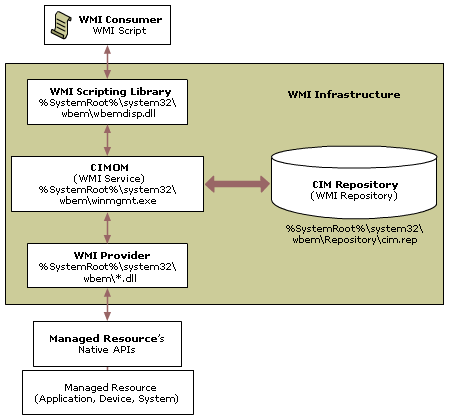


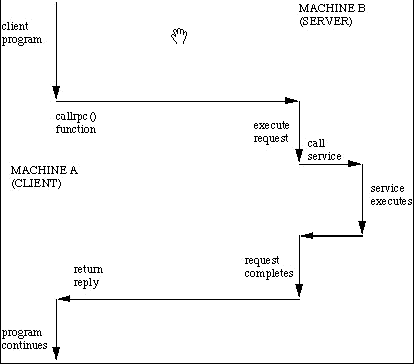

135端口:Microsoft在这个端口运行DCE RPC end-point mapper为它的DCOM服务。这与UNIX 111端口的功能很相似。使用DCOM和RPC的服务利用计算机上的end-point mapper注册它们的位置。远端客户连接到计算机时,它们查找end-point mapper找到服务的位置。
135端口主要用于使用RPC(Remote Procedure Call,远程过程调用)协议并提供DCOM(分布式组件对象模型)服务,通过RPC可以保证在一台计算机上运行的程序可以顺利地执行远程计算机上的代码;使用DCOM可以通过网络直接进行通信,能够跨包括HTTP协议在内的多种网络传输。
Windows Firewall: Allow Remote Administration Exception
The Windows Firewall: Allow remote administration exception setting allows you to specify whether computers running Windows XP with SP2 can be remotely administered by applications that use TCP ports 135 and 445 (such as MMC and WMI), and is shown in the following figure.

Services that use these ports to communicate are using remote procedure calls (RPC) and Distributed Component Object Model (DCOM) to access remote hosts. In effect, Windows Firewall adds Svchost.exe and Lsass.exe to the program exceptions list and allows those services to open additional, dynamically assigned ports, typically in the range of 1024 to 1034. Windows Firewall also allows incoming ICMP Echo messages (also known as the ICMP Echo Request messages).
You can select the following:
Not Configured (default)
Remote administration is not allowed.
Enabled
Windows Firewall allows the computer to receive the unsolicited incoming messages associated with remote administration. InAllow unsolicited incoming messages from, type * to specify traffic originating from any source IPv4 address or a comma-separated list of sources. The sources can be LocalSubnet to specify traffic originating from a directly reachable IPv4 address or one or more IPv4 addresses or IPv4 address ranges separated by commas. IPv4 address ranges typically correspond to subnets. For IPv4 addresses, type the IPv4 address in dotted decimal notation. For IPv4 address ranges, you can specify the range using a dotted decimal subnet mask or a prefix length. When you use a dotted decimal subnet mask, you can specify the range as an IPv4 network ID (such as 10.47.81.0/255.255.255.0) or by using an IPv4 address within the range (such as 10.47.81.231/255.255.255.0). When you use a network prefix length, you can specify the range as an IPv4 network ID (such as 10.47.81.0/24) or by using an IPv4 address within the range (such as 10.47.81.231/24). The following is an example list of sources:
Note This command is shown on multiple lines for better readability; enter them as a single line.
                  LocalSubnet,10.91.12.56,10.7.14.9/255.255.255.0,10.

                  116.45.0/255.255.255.0,172.16.31.11/24,172.16.111.0/24
IPv6 traffic supports the * and LocalSubnet scopes.
Note If you have any spaces between the entries in the list of sources or any other invalid characters, the scope is ignored and the setting behaves as if it were disabled. Please double-check your scope syntax before saving changes.
Host names, DNS names, or DNS suffixes are not supported.
Disabled
Remote administration is not allowed. Windows Firewall blocks port 135 and does not open 445. Also, in effect, it adds SVCHOST.EXE and LSASS.EXE to the program exceptions list with the Status of Disabled. Because disabling this policy setting does not block TCP port 445, it does not conflict with the Windows Firewall: Allow file and printer sharing exceptionsetting. This does not prevent these programs from running or their corresponding ports from being opened.
Malicious users and programs often attempt to attack networks and computers using RPC and DCOM traffic. We recommend that you contact the manufacturers of your critical programs to determine if they require RPC and DCOM communication. If they do not, then do not enable this setting.
Note If you only want to open a subset of the ports that this setting opens, leave this setting set to Not Configured and use theWindows Firewall: Define port exceptions setting to selectively open ports.
Windows Server Firewall Exceptions for Remote Administration Tools
by ADMIN on APRIL 17, 2008
Microsoft has a web page that lists the various tools you can use to remotely administer a Windows Server system. The page lists each remote administration tool and the steps that are required to successfully use the tool with the Windows Firewall service enabled on the local or remote machine.
Firewall configuration details for the following remote administration tools are provided:
- Active Directory Domains and Trusts (Windows Firewall: domain)
- Active Directory Management (Windows Firewall: admgmt)
- Active Directory Schema Management (Windows Firewall: schmmgmt)
- Active Directory Sites and Services (Windows Firewall: dssite)
- Active Directory Users and Computers (Windows Firewall: dsa)
- Authorization Manager (Windows Firewall: azman)
- Certificate Templates (Windows Firewall: certtmpl)
- Certificates (Windows Firewall: certmgr)
- Certification Authority (Windows Firewall: certsrv)
- Certutil command (Windows Firewall: certutil)
- Cluster Administrator (Windows Firewall: cluadmin)
- Cluster command (Windows Firewall: cluster)
- Component Services (Windows Firewall: comexp)
- Computer Management (Windows Firewall: compmgmt)
- Connection Manager Administration Kit Binaries (Windows Firewall: cmbins)
- Connection Manager Administration Kit Wizard (Windows Firewall: cmak)
- Device Manager (Windows Firewall: devmgr)
- Dfscmd command (Windows Firewall: dfscmd)
- DHCP (Windows Firewall: dhcpmgmt)
- Directory Service Utilities (Windows Firewall: ntdsutil)
- Disk Defragmenter (Windows Firewall: dfrg)
- Disk Management (Windows Firewall: diskmgmt)
- Distributed File System (Windows Firewall: dfsgui)
- DNS Management (Windows Firewall: dnsmgmt)
- Dsadd command (Windows Firewall: dsadd)
- Dsget command (Windows Firewall: dsget)
- Dsmod command (Windows Firewall: dsmod)
- Dsmove command (Windows Firewall: dsmove)
- Dsquery command (Windows Firewall: dsquery)
- Dsrm command (Windows Firewall: dsrm)
- Event Viewer (Windows Firewall: eventvwr)
- Fax client console (Windows Firewall: fxsclnt)
- Fax Service Manager (Windows Firewall: fxsadmin)
- File Server Management (Windows Firewall: filesvr)
- Group Policy Object Editor (Windows Firewall: gpedit)
- IIS Application Management script (Windows Firewall: iisapp)
- IIS Backup script (Windows Firewall: iisback)
- IIS Configuration script (Windows Firewall: iiscnfg)
- IIS FTP script (Windows Firewall: iisftp)
- IIS FTP Virtual Directory script (Windows Firewall: iisftpdr)
- IIS Help script (Windows Firewall: iisschlp)
- IIS Service Extension script (Windows Firewall: iisext)
- IIS Virtual Directory script (Windows Firewall: iisvdir)
- IIS Web Management script (Windows Firewall: iisweb)
- Indexing Service (Windows Firewall: ciadv)
- Internet Authentication Service (Windows Firewall: iasmsc)
- Internet Information Services (IIS) Manager (Windows Firewall: iis)
- IP Security Monitor (Windows Firewall: ipsecmon)
- IP Security Policies (Windows Firewall: ipsecpol)
- Local Security Settings (Windows Firewall: secpol)
- Local Users and Groups (Windows Firewall: lusrmgr)
- Network Load Balancing Manager (Windows Firewall: nlbmgr)
- Network Monitor tools (Windows Firewall: netmon)
- Performance (Windows Firewall: perfmon)
- POP3 Service (Windows Firewall: p3server)
- Public Key Management (Windows Firewall: pkmgmt)
- Remote Desktops (Windows Firewall: tsmmc)
- Remote Storage (Windows Firewall: rsadmin)
- Removable Storage (Windows Firewall: ntmsmgr)
- Removable Storage Operator Requests (Windows Firewall: ntmsoprq)
- Resultant Set of Policy (Windows Firewall: rsop)
- Routing and Remote Access (Windows Firewall: rrasmgmt)
- Security Configuration and Analysis (Windows Firewall: sca)
- Services (Windows Firewall: services)
- Shared Folders (Windows Firewall: fsmgmt)
- Telephony (Windows Firewall: tapimgmt)
- Terminal Services Configuration (Windows Firewall: tscc)
- Terminal Services Manager (Windows Firewall: tsadmin)
- UDDI Services Console (Windows Firewall: uddi)
- Windows Management Infrastructure (Windows Firewall: wmimgmt)
- Windows Media Services (Windows Firewall: wmsadmin)
- Windows Server 2003 Administration Tools Pack (Windows Firewall: adminpak)
- WINS (Windows Firewall: winsmgmt)
- Wireless Monitor (Windows Firewall: wiremon)
Microsoft also has a guide to Windows firewall configuration by server role.
wmi详解,RPC和防火墙的更多相关文章
- 详解RPC远程调用和消息队列MQ的区别
PC(Remote Procedure Call)远程过程调用,主要解决远程通信间的问题,不需要了解底层网络的通信机制. RPC框架 知名度较高的有Thrift(FB的).dubbo(阿里的). RP ...
- CentOS7下Firewall防火墙配置用法详解
官方文档地址: https://access.redhat.com/documentation/en-US/Red_Hat_Enterprise_Linux/7/html/Security_Guide ...
- Linux防火墙iptables学习笔记(三)iptables命令详解和举例[转载]
Linux防火墙iptables学习笔记(三)iptables命令详解和举例 2008-10-16 23:45:46 转载 网上看到这个配置讲解得还比较易懂,就转过来了,大家一起看下,希望对您工作能 ...
- iptables防火墙详解
iptables常用命令 iptables -nv -L 查看iptables列表 iptables -F 清空iptables规则 iptables-save > /etc/sysconfig ...
- Linux iptables 防火墙详解
0x00 iptables介绍 linux的包过滤功能,即linux防火墙,它由netfilter 和 iptables 两个组件组成. netfilter 组件也称为内核空间,是内核的一部分,由一些 ...
- 防火墙之netfailt、iptables详解
[TOC] Iptables入门 # 1.iptables介绍 linux的包过滤功能,即linux防火墙,它由netfilter 和 iptables 两个组件组成. netfilter 组件也称为 ...
- Linux防火墙iptables基础详解
原文来自于:https://www.linuxidc.com/Linux/2017-01/140073.htm(引用自) 一:前言 防火墙,其实说白了讲,就是用于实现Linux下访问控制的功能的,它分 ...
- 网卡配置文件详解 用户管理与文件权限篇 文件与目录权限 软连接 tar解压命令 killall命令 linux防火墙 dns解析设置 计划任务crond服务 软件包安装 阿里云 yum源 安装
Linux系统基础优化及常用命令 Linux基础系统优化 引言没有,只有一张图. Linux的网络功能相当强悍,一时之间我们无法了解所有的网络命令,在配置服务器基础环境时,先了解下网络参数设定命令. ...
- Spark2.1.0——内置RPC框架详解
Spark2.1.0——内置RPC框架详解 在Spark中很多地方都涉及网络通信,比如Spark各个组件间的消息互通.用户文件与Jar包的上传.节点间的Shuffle过程.Block数据的复制与备份等 ...
随机推荐
- Fiddler怎么对IPhone手机的数据进行抓包分析
http://www.cr173.com/html/20064_1.html Fiddler绝对称得上是"抓包神器", Fiddler不但能截获各种浏览器发出的HTTP请求, 也可 ...
- linux ps命令
名称:ps 使用权限:所有使用者 使用方式:ps [options] [--help] 说明:显示瞬间行程 (process) 的动态 参数: ps 的参数非常多, 在此仅列出几个常用的参数并大略介绍 ...
- P2320 [HNOI2006]鬼谷子的钱袋
洛谷2320 06湖南 鬼谷子的钱袋 来源 题目描述 鬼谷子非常聪明,正因为这样,他非常繁忙,经常有各诸侯车的特派员前来向他咨询时政.有一天,他在咸阳游历的时候,朋友告诉他在咸阳最大的拍卖行(聚宝商行 ...
- 去除html标签 正则表达式
/// <summary> /// 去除html标签 /// </summary> public static string Clea ...
- load data ERROR 1197 (HY000)错误
有一份csv格式的文件,大小在14G左右.max_binlog_cache_size=4G. 登录mysql实例,选择对应的表通过load data往指定表里导数.大概20分钟左右,报以下错误: ER ...
- Programming Assignment 2: Randomized Queues and Deques
实现一个泛型的双端队列和随机化队列,用数组和链表的方式实现基本数据结构,主要介绍了泛型和迭代器. Dequeue. 实现一个双端队列,它是栈和队列的升级版,支持首尾两端的插入和删除.Deque的API ...
- 小程序 - c字符串表示大整数
#define max(a, b) ((a) > (b) ? (a) : (b)) static char* reverse(char *str) { char *l, *r, c; ; l & ...
- "产品测试管理&敏捷项目管理"研讨会在深圳成功举办!
2016年1月9日,由深圳市共创力企业管理咨询发起的"产品测试管理&敏捷项目管理"研讨会在深圳南山科技园创新谷咖啡成功举办!参加此次研讨会的企业有华为.中兴.烽火.腾讯.康 ...
- Queue插入的时候报错:源数组长度不足。请检查 srcIndex 和长度以及数组的下限。
异常问题记录: 本想自己手动实现一个日志记录功能.使用Queue队列集合来实现多线程的日志记录. 测试 一个线程写入数据Enqueue和一个线程读取数据Dequeue ,直接用的无休眠死循环. 终于抛 ...
- 除非 Windows Activation Service (WAS)和万维网发布服务(W3SVC)均处于运行状态,否则无法启动网站。目前,这两项服务均处于停止状态。
win7 IIS 所有网站都停止了,启动提示: 除非 Windows Activation Service (WAS)和万维网发布服务(W3SVC)均处于运行状态,否则无法启动网站.目前,这两项服务均 ...