
Nvidia VertexTextureFetch Water
http://http.download.nvidia.com/developer/SDK/Individual_Samples/samples.html
http://http.download.nvidia.com/developer/SDK/Individual_Samples/DEMOS/Direct3D9/VertexTextureFetchWater.zip
|
This sample demonstrates a technique for simulating and rendering water. The water is simulated via Verlet integration of the 2D wave equation using a pixel shader. The simulation result is used by a vertex shader via vertex texture fetch (VTF). The water surface is rendered by combining screen-space refraction and reflection textures. |
 |
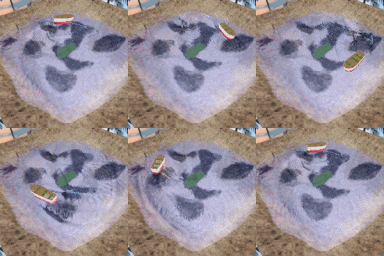 |
#include "registers.hlsl"
sampler refractionSampler : register(s0); // Refraction map
sampler reflectionSampler : register(s1); // Reflection map
sampler refractionNearSampler : register(s2); // Refraction map for objects penetrating water's surface
sampler fadeSampler : register(s4); // A fade texture to alleviate some border artifacts
sampler simulationSampler : register(s257);
struct Interpolants
{
float4 positionSS : POSITION; // Screen space position
float2 reflectionTexCoord : TEXCOORD0; // texture coordinates for reflection map
float4 refractionTexCoords : TEXCOORD1; // texture coordinates for refraction maps
float3 normalWS : TEXCOORD2; // normal in world space
float3 eyeVectorWS : TEXCOORD3; // eye vector in world space
float3 lightVectorWS : TEXCOORD4; // light vector in world space
float3 halfVectorWS : TEXCOORD5; // half vector in world space
};
////////////////////////////////////////////////////////////////////////////////
////////////////////////////////////////////////////////////////////////////////
//
//
// Vertex Shader
//
//
////////////////////////////////////////////////////////////////////////////////
////////////////////////////////////////////////////////////////////////////////
// Vertex shader Function declarations
float2 computeTextureCoord(float4 positionWS, float3 directionWS, float distance, float2 scale, float2 offset);
Interpolants vertexShader(float4 positionMS : POSITION, // Model space position
float4 color0 : COLOR0,
float4 simulationTexCoord : TEXCOORD0, // texture coord to look up simulated height and normal
float4 perturbation : TEXCOORD1) // Describes how much to reflect / refract
{
Interpolants o = (Interpolants)0;
float4 simulationSample; // Sample for simulation that contains the height and normal
float4 positionWS;
float3 normalModelSpace;
float3 normalWS;
float3 reflectionVectorWS;
float3 refractionVectorWS;
// Look up the simulation result for this vertex
// simulationSample.x is the height (simulationSample.y, simulationSample.z, simulationSample.w) is the normal
simulationSample = tex2Dlod(simulationSampler, simulationTexCoord);
// Extract the height and normal out of the sample
// Stick the height in the position where it belongs
positionMS.y = simulationSample.x;
positionMS.w = 1; // This probably isn't necessary
normalModelSpace = simulationSample.yzw;
// Output the screen space position
o.positionSS = mul(positionMS, vsWorldViewProjectionMatrix);
// Compute the world space position
positionWS = mul(positionMS, vsWorldMatrix);
// Compute the world space normal
normalWS = mul(normalModelSpace, vsWorldMatrix);
// Flip the normal if we're under water
normalWS.xyz *= vsNormalSign.x;
// Output the world space normal
o.normalWS = normalWS;
// Output the eye vector in world space
o.eyeVectorWS = normalize(vsEyePositionWorld - positionWS);
// Output the light vector in world space
o.lightVectorWS = normalize(vsLightPositionWorld - positionWS);
// Output the half vector in world space
// No need to normalize because it's normalized in the pixel shader
o.halfVectorWS = o.eyeVectorWS + o.lightVectorWS;
//////////////////////////////////////////////////////////////////////////////////
//
// Calculate reflection map coordinates
//
//////////////////////////////////////////////////////////////////////////////////
// Compute the reflection vector in world space
reflectionVectorWS = reflect(-o.eyeVectorWS, normalWS);
// Compute the reflection map coordinates
o.reflectionTexCoord.xy = computeTextureCoord(positionWS, reflectionVectorWS, perturbation.x, vsReflectionTexcoordScaleOffset.xy,
vsReflectionTexcoordScaleOffset.zw);
//////////////////////////////////////////////////////////////////////////////////
//
// Calculate refraction map coordinates
//
//////////////////////////////////////////////////////////////////////////////////
// Compute the refraction vector in world space
refractionVectorWS = refract(-o.eyeVectorWS, normalWS, vsEtaRatio.x);
// Calculate the refraction map coordinates for objects that are not penetrating the water
o.refractionTexCoords.xy = computeTextureCoord(positionWS, refractionVectorWS, perturbation.y, vsRefractionTexcoordScaleOffset.xy,
vsRefractionTexcoordScaleOffset.zw);
// Calculate the refraction map coordinates for objects that are penetrating the water
o.refractionTexCoords.zw = computeTextureCoord(positionWS, refractionVectorWS, perturbation.w, vsRefractionTexcoordScaleOffset.xy,
vsRefractionTexcoordScaleOffset.zw);
return(o);
}
// computeTextureCoord() takes a starting position, direction and distance in world space.
// It computes a new position by moving the distance along the direction vector. This new
// world space position is projected into screen space. The screen space coordinates are
// massaged to work as texture coordinates.
float2 computeTextureCoord(float4 positionWS, float3 directionWS, float distance, float2 scale, float2 offset)
{
float4 positionSS;
// Compute the position after traveling a fixed distance
positionWS.xyz = positionWS.xyz + directionWS * distance;
positionWS.w = 1.0;
// Compute the screen space position of the newly computed position
positionSS = mul(positionWS, vsViewProjectionMatrix);
// Do the perspective divide
positionSS.xy /= positionSS.w;
// Convert screen space position from [-1,-1]->[1,1] to [0,0]->[1,1]
// This is done to match the coordinate space of the reflection/refraction map
positionSS.xy = positionSS.xy * 0.5 + 0.5;
// Account for the fact that we use a different field of view for the reflection/refraction maps.
// This overdraw allows us to see stuff in the reflection/refraction maps that is not visible
// from the normal viewpoint.
positionSS.xy = positionSS.xy * scale + offset;
// Flip the t texture coordinate upside down to be consistent with D3D
positionSS.y = 1 - positionSS.y;
// Return the screen space position as the result. This will be used as the texture coordinate
// for the screenspace reflection/refraction maps.
return(positionSS.xy);
}
////////////////////////////////////////////////////////////////////////////////
////////////////////////////////////////////////////////////////////////////////
//
//
// Pixel Shader
//
//
////////////////////////////////////////////////////////////////////////////////
////////////////////////////////////////////////////////////////////////////////
// Pixel shader Function declarations
half computeFresnel(half3 light, half3 normal, half R0);
half4 pixelShader(Interpolants i) : COLOR
{
half4 refraction;
half4 reflection;
half4 refractionNear;
half4 reflectionNear;
half2 refractionTexCoord;
half2 refractionNearTexCoord;
half2 reflectionNearTexCoord;
half refractionVisibility;
half4 fade;
half4 specular;
half depth;
half fresnel;
// Normalize direction vectors
i.lightVectorWS = normalize(i.lightVectorWS);
i.normalWS = normalize(i.normalWS);
i.halfVectorWS = normalize(i.halfVectorWS);
// Compute the specular term
specular.x = pow(max(dot(i.halfVectorWS, i.normalWS), 0), 3);
// Put a cliff in the specular function
if(specular.x < 0.5)
{
specular.x = 2.0 * specular.x * specular.x;
}
specular.xyz = specular.xxx * half3(0.2, 0.2, 0.2);
specular.w = 0;
// Do the texture lookup for the reflection
reflection = tex2D(reflectionSampler, i.reflectionTexCoord.xy);
// Modulate the reflection texture by a texture to fade out at the edges.
// This avoids an objectionable artifact when the reflection map
// doesn't cover enough area.
fade = tex2D(fadeSampler, i.reflectionTexCoord.xy);
reflection *= fade;
// Do the texture lookup for the refraction
refractionTexCoord = i.refractionTexCoords.xy;
refractionNearTexCoord = i.refractionTexCoords.zw;
refraction = tex2D(refractionSampler, refractionTexCoord);
refractionNear = tex2D(refractionNearSampler, refractionNearTexCoord);
// Do a very simple compositing of objects in the refraction textures
if(dot(refractionNear.xyz, refractionNear.xyz) > 0.1)
{
refraction.xyz = refractionNear.xyz;
}
// Compute the fresnel to blend the refraction and reflection terms together
fresnel = computeFresnel(i.eyeVectorWS, i.normalWS, psFresnelR0.x);
// Handle total internal reflection
refractionVisibility = saturate(dot(i.eyeVectorWS, i.normalWS));
refractionVisibility = saturate((refractionVisibility - psTotalInternalReflectionSlopeBias.y) * psTotalInternalReflectionSlopeBias.x +
psTotalInternalReflectionSlopeBias.z);
refraction *= refractionVisibility;
// Give some blue tint to the refraction
refraction = lerp(refraction, half4(0, 0, 1, 0), .1);
#ifdef RETURN_REFRACTION
return(refraction);
#endif
#ifdef RETURN_REFLECTION
return(reflection);
#endif
#ifdef RETURN_FRESNEL
return(half4(fresnel, fresnel, fresnel, 1.0));
#endif
#ifdef RETURN_NORMALS
return(half4(i.normalWS.xyz, 1.0));
#endif
// Combine the refraction, reflection and specular terms
return(lerp(refraction, reflection, fresnel) + specular);
}
half computeFresnel(half3 eye, half3 normal, half R0)
{
// R0 = pow(1.0 - refractionIndexRatio, 2.0) / pow(1.0 + refractionIndexRatio, 2.0);
half eyeDotNormal;
eyeDotNormal = dot(eye, normal);
// Make sure eyeDotNormal is positive
eyeDotNormal = max(eyeDotNormal, -eyeDotNormal);
return(R0 + (1.0 - R0) * pow(1.0 - eyeDotNormal, 4.5));
}
Nvidia VertexTextureFetch Water的更多相关文章
- nVIDIA SDK White Paper ----Vertex Texture Fetch Water
http://blog.csdn.net/soilwork/article/details/713842 nVIDIA SDK White Paper ----Vertex Texture Fetch ...
- Using Vertex Texture Displacement for Realistic Water Rendering
http://blog.csdn.net/soilwork/article/details/709869 Using Vertex Texture Displacement for Realistic ...
- 解决Ubuntu Kylin 1610安装ANSYS17.2的NVIDIA显卡驱动问题
Ubuntu Kylin 1610在安装完毕后,会自动安装显卡驱动,对于一般的图形图像使用来说自然不会有太大的问题,但是对于ANSYS17.2的一些模块,还是会出现问题.一个比较常见的问题就是Open ...
- Fedora 21 安装 Nvidia 驱动以及失败后的补救方法
在 Linux 桌面系统下玩了这么久,大部分时间都是使用 Ubuntu,偶尔使用一下 Fedora.我的电脑中安装有多个 Linux 发行版,见这里<在同一个硬盘上安装多个Linux发行版及Fe ...
- 笔记:xubuntu下如何让系统默认使用nvidia显卡,而不是intel集显
经反复折腾,得到如下的解决方法: prime-select nvidia 简单吧,但关系是如果让它开机自动执行一次. 反复折腾了xinitrc ,~/.xinitrc , /etc/rc.local ...
- [LeetCode] Pacific Atlantic Water Flow 太平洋大西洋水流
Given an m x n matrix of non-negative integers representing the height of each unit cell in a contin ...
- [LeetCode] Trapping Rain Water II 收集雨水之二
Given an m x n matrix of positive integers representing the height of each unit cell in a 2D elevati ...
- [LeetCode] Water and Jug Problem 水罐问题
You are given two jugs with capacities x and y litres. There is an infinite amount of water supply a ...
- [LeetCode] Trapping Rain Water 收集雨水
Given n non-negative integers representing an elevation map where the width of each bar is 1, comput ...
随机推荐
- win激活查询及修改
slmgr.vbs -dlv 命令可以查询到Win8.1的激活信息,包括:激活ID.安装ID.激活截止日期! slmgr.vbs -dli 命令可以查询到操作系统版本.部分产品密钥.许可证状态! ...
- java 小知识点
1.转Java中Vector和ArrayList的区别 首先看这两类都实现List接口,而List接口一共有三个实现类,分别是ArrayList.Vector和LinkedList.List用于存 ...
- 学SEO你其实只需要半个钟
网站上线之前: 关键词的分析以及选择: 关键词在我们网站的每个页面:首页,栏目页,文章都存在,它定位了你的网站的这个页面是做什么的,有什么内容,也是SEO中的最重要的部分. 网站必须确定并且设置好关键 ...
- CI批量更新$this->db->update_batch();
$this->db->update_batch(); 生成一条update命令是以你提供的数据为基础的,并执行查询.你可以传递一个数组或对象的参数给update_batch()函数.下面是 ...
- Android 开发 --Unable to resolve target 'android-19'
Android 开发 --Unable to resolve target 'android-19' http://blog.csdn.net/love_javc_you/article/detail ...
- java环境变量配置(转)
java环境变量配置 windows xp下配置JDK环境变量: 1.安装JDK,安装过程中可以自定义安装目录等信息,例如我们选择安装目录为D:\java\jdk1.5.0_08: 2.安装完成后,右 ...
- onSaveInstanceState和onRestoreInstanceState
本文摘自: http://h529820165.iteye.com/blog/1399023 Android calls onSaveInstanceState() before the activi ...
- WinForm窗体间传值
1.通过构造函数 特点:传值是单向的(不可以互相传值),实现简单 实现代码如下: 在窗体Form2中 int value1; string value2; public Form2 ( int val ...
- AutoCompleteTextView自动填充文本
布局: <AutoCompleteTextView android:id="@+id/auto" android:layout_width="match_paren ...
- 帧动画FrameAnimation
<!-- 布局 --> <item android:drawable="@drawable/girl_1" android:duration="100& ...