
获取云硬盘列表bug
有段时间没写博客了,主要还是刚进新公司,多少有点不适应(真会给自己找理由,明明是手里没技术,肚子里没货,能写啥!)。前面几个星期都在修一修horizon的bug,这个没啥很大难度,就是用了一个django的框架,然后再嵌套一些js框架,简明易懂。不扯远了,来点干货。。
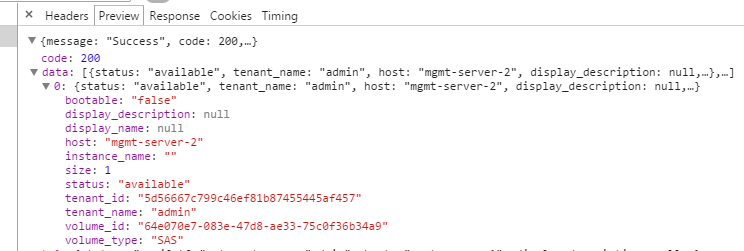

浏览器抓包可以看到,这样一个请求耗时2.4秒,再把日志打到horizon代码中,看下结果如何:
class GetVolumes(APIMeta):

    def handle(self):

        status = self.request.POST.get('status', '')

        tenant_id = self.request.POST.get('tenant_id', '')

        data = []

        instances_info = {}

        LOG.error("step1:%s" % time.time())

        # import pdb

        # pdb.set_trace()

        volumes_obj = api.cinder.volume_list(self.request,

                                             {'all_tenants': 1})

        LOG.error("step2:%s" % time.time())

        volumes = filters.add_tenant_info(self.request,

                              volumes_obj,

                              "os-vol-tenant-attr:tenant_id")

        LOG.error("step3:%s" % time.time())

        instances = api.nova.server_list(self.request, all_tenants=True)

        LOG.error("step4:%s" % time.time())

        for ins in instances[0]:

            instances_info[ins.id] = ins.name

        if status:

            volumes = filter(lambda x: status in x.status, volumes)

        if tenant_id:

            volumes = filter(lambda x: \

                    getattr(x, 'os-vol-tenant-attr:tenant_id') == tenant_id,

                    volumes)

        LOG.error("step5:%s" % time.time())

        for volume in volumes:

            if volume.attachments:

                instance_id = volume.attachments[0]['server_id']

                instance_name = instances_info.get(instance_id,

                                                   instance_id)

            else:

                instance_name = ''

            tenant = getattr(volume, 'tenant', '')

            data.append({'volume_id': volume.id,

                         'display_name': volume.display_name,

                         'display_description': volume.display_description,

                         'bootable': volume.bootable,

                         'size': volume.size,

                         'status': volume.status,

                         'volume_type': volume.volume_type,

                         'host': getattr(volume,

                             "os-vol-host-attr:host", None),

                         'tenant_name': getattr(tenant, "name", None),

                         'tenant_id': getattr(tenant, "id", None),

                         'instance_name': instance_name,

                         })

        LOG.error("step6:%s" % time.time())

        return sorted(data, key = lambda x: x['display_name'], reverse = False)
测试结果如下:
-- ::, openstack_dashboard.dashboards.admin.volumes.json_views[line:] ERROR step1:1430963063.15

-- ::, openstack_dashboard.dashboards.admin.volumes.json_views[line:] ERROR step2:1430963064.71

-- ::, openstack_dashboard.dashboards.admin.volumes.json_views[line:] ERROR step3:1430963064.8

-- ::, openstack_dashboard.dashboards.admin.volumes.json_views[line:] ERROR step4:1430963066.29

-- ::, openstack_dashboard.dashboards.admin.volumes.json_views[line:] ERROR step5:1430963066.29

-- ::, openstack_dashboard.dashboards.admin.volumes.json_views[line:] ERROR step6:1430963066.29
可以看到,主要的耗时在step1-step2 step3-step4时间,定位到相应代码段:
# step1与step2之间耗时:

volumes_obj = api.cinder.volume_list(self.request,{'all_tenants': 1})

# step3与step4之间耗时:

instances = api.nova.server_list(self.request, all_tenants=True)
再在cinderclient做时间戳:
def volume_list(request, search_opts=None):

    """

    To see all volumes in the cloud as an admin you can pass in a special

    search option: {'all_tenants': 1}

    """

    c_client = cinderclient(request)

    if c_client is None:

        return []

    import time

    LOG.error("horizon_start time: %s " % time.time())

    result = c_client.volumes.list(search_opts=search_opts)

    LOG.error("horizon_end time: %s " % time.time())

    return result

#    return c_client.volumes.list(search_opts=search_opts)
结果如下:
-- ::, openstack_dashboard.api.cinder[line:] ERROR horizon_start time: 1431069736.4

-- ::, openstack_dashboard.api.cinder[line:] ERROR horizon_end time: 1431069739.85
再在cinder服务端设置时间戳:/cinder/api/v1/volumes.py
    def _items(self, req, entity_maker):

        # import pdb

        # pdb.set_trace()

        """Returns a list of volumes, transformed through entity_maker."""

        #pop out limit and offset , they are not search_opts

        LOG.debug(_("time1------------------------%s" % time.time()))

        search_opts = req.GET.copy()

        search_opts.pop('limit', None)

        search_opts.pop('offset', None)

        if 'metadata' in search_opts:

            search_opts['metadata'] = ast.literal_eval(search_opts['metadata'])

        context = req.environ['cinder.context']

        remove_invalid_options(context,

                               search_opts, self._get_volume_search_options())

        volumes = self.volume_api.get_all(context, marker=None, limit=None,

                                          sort_key='created_at',

                                          sort_dir='desc', filters=search_opts)

        volumes = [dict(vol.iteritems()) for vol in volumes]

        LOG.debug(_("time2------------------------%s" % time.time()))

        for volume in volumes:

            self._add_visible_admin_metadata(context, volume)

        limited_list = common.limited(volumes, req)
        LOG.debug(_("time3------------------------%s" % time.time()))

        req.cache_resource(limited_list)

        res = [entity_maker(context, vol) for vol in limited_list]
        LOG.debug(_("time4------------------------%s" % time.time()))

        return {'volumes': res}
结果如下:
time1------------------------1431069737.57
time2------------------------1431069738.02
time3------------------------1431069738.02
time4------------------------1431069738.05
显而易见,时间都消耗在cinder服务端向cinder客户端返回数据上面了,下面分析一下返回的数据:
{'migration_status': None,

'availability_zone': u'nova',

'terminated_at': None,

'updated_at': datetime.datetime(, , , , , ),

'provider_geometry': None,

'snapshot_id': None,

'ec2_id': None,

'mountpoint': None,

'deleted_at': None,

'id': u'69400200-6dea-41ec-ab7f-e3719fc9b18f',

'size': 3L,

'user_id': u'33d5edff940f4812b5368e54499991e4',

'attach_time': None,

'attached_host': None,

'display_description': u'',

'encryption_key_id': None,

'project_id': u'01f2a2e8594342d78865376cd81e2c67',

'launched_at': datetime.datetime(, , , , , ),

'scheduled_at': datetime.datetime(, , , , , ),

'status': u'available',

'volume_type_id': u'3a255382-1da3-4449-ad5b-5f37a4cf3d2c',

'deleted': False,

'provider_location': None,

'host': u'test1',

'source_volid': None,

'provider_auth': None,

'display_name': u'disk-102',

'instance_uuid': None,

'bootable': False,

'created_at': datetime.datetime(, , , , , ),

'attach_status': u'detached',

'volume_type': <cinder.db.sqlalchemy.models.VolumeTypes object at 0x44277d0>,

'_name_id': None, 'volume_metadata': []},
上面字段基本都会用到,看来解决方案不能在精简数据上面了,或者可以在cinder客户端做一个缓存,未完待续。。
获取云硬盘列表bug的更多相关文章
- 复盘价值1000万的腾讯云硬盘固件"BUG"
摘要: 除了吃瓜,还是得吸取教训啊同学们! 这次,我从纯技术角度分析腾讯云与前沿数控的磁盘数据丢失事件,不站队. 硬盘门 这里说的硬盘门不是10年前陈老师的那一次,而聊的是最近"腾讯云&qu ...
- 阿里云使用js 实现OSS图片上传、获取OSS图片列表、获取图片外网访问地址(读写权限私有、读写权限公共);
详情请参考:https://help.aliyun.com/document_detail/32069.html?spm=a2c4g.11186623.6.763.ZgC59a 或者https://h ...
- [转] Android SDK manager 无法获取更新版本列表
打开这个网址(LINK)就可以看到adt的详细信息. 或者直接在你的eclipse的Help > Install New Software里面add,地址直接输入 https://dl-ss ...
- android SDK manager 无法获取更新版本列表【转载】
http://mirrors.neusoft.edu.cn/eclipse/releases/luna/打开这个网址就可以看到adt的详细信息: http://developer.android.c ...
- OpenStack实践系列⑨云硬盘服务Cinder
OpenStack实践系列⑨云硬盘服务Cinder八.cinder8.1存储的三大分类 块存储:硬盘,磁盘阵列DAS,SAN存储 文件存储:nfs,GluserFS,Ceph(PB级分布式文件系统), ...
- 完整部署CentOS7.2+OpenStack+kvm 云平台环境(2)--云硬盘等后续配置
继上一篇博客介绍了完整部署CentOS7.2+OpenStack+kvm 云平台环境(1)--基础环境搭建,本篇继续讲述后续部分的内容 1 虚拟机相关1.1 虚拟机位置介绍 openstack上创建的 ...
- 容器服务 TKE 存储插件与云硬盘 CBS 最佳实践应用
引言 随着自研上云的深入,越来越多的有状态服务对于在 TKE 集群中使用云上存储能力的需求也越来越强烈. 目前腾讯云容器服务 TKE(Tencent Kubernetes Engine已支持在 TKE ...
- 云硬盘error、error deleting、deleting状态(数据库基本操作小记)
起因是发现云硬盘显示删光了,但还是创建不了新的云硬盘,在api节点上用cinder list可以看到已经没有硬盘了,但是创建硬盘时,还是会提示配额满了,这是因为数据库里的记录没有更新,对数据库的操作记 ...
- Discuz! X3.1直接进入云平台列表的方法
Discuz! X3.1已经改版,后台不能直接进云平台列表,不方便操作,操作云平台服务时,大家可以这样操作: 1.登录后台:2.访问域名进入云平台列表http://你域名/admin.php?fram ...
随机推荐
- VirtualBox如何增加CentOS根目录容量
1.扩充磁盘容量 单位为M,40000为40G VBoxManage modifyhd centos.vdi --resize 40000 2.指定新的磁盘文件 系统 > 右击 > 设置 ...
- WebLogic Server 12.2.1 多租户安装配置
1.安装WebLogic 12.2.1版本 下载安装的时候记住选择Fusion Middleware Infrastructer Installer. 2.安装OTD OTD需要单独下载安装,安装的时 ...
- flask-compress的使用方法以及对应的http头Vary、Content-Encoding的意思
参考:https://github.com/shengulong/flask-compress 1.Content-Encoding是HTTP协议的响应报文头,一般形式如:Content-Encodi ...
- 使用Spring进行远程访问与Web服务
1.1. 简介 Spring为各种远程访问技术的集成提供了整合类.Spring使得开发具有远程访问功能的服务变得相当容易,而这些远程访问服务由普通Spring POJO实现.目前,Spring支持 ...
- Java solr 分词
代码如下: import java.io.IOException; import java.util.*; import org.apache.solr.client.solrj.SolrClient ...
- CocoSourcesCS 4
/*------------------------------------------------------------------------- ParserGen.cs -- Generati ...
- JAVA加解密 -- 对称加密算法与非对称加密算法
对称加密算法:双方必须约定好算法 DES 数据加密标准:由于不断地被破解 自98年起就已经逐渐放弃使用 AES 目前使用最多的加密方式,官方并未公布加密方式已被破解,替代DES 实现和DES非常接近 ...
- Node.js meitulu图片批量下载爬虫 1.05版(Final最终版)
//====================================================== // https://www.meitulu.com图片批量下载Node.js爬虫1. ...
- Win7如何自定义桌面右键菜单
1 在注册表的HKEY_CLASSES_ROOT\DesktopBackground\Shell\位置,我们新建一个计算器,他的下面有一个项目command,然后这个command去打开计算器(通过分 ...
- web前端常用的linux命令(在git命令行使用)
cd (文件目录): 回到上一层目录 cd .. 回到根目录 cd / mkdir(新建文件夹) 下面的命令在当前目录新建了文件夹css html js 3个文件夹 mkdir css html js ...