
ViewStub 的使用
一、内容概述
举例说明ViewStub标签的使用
二、ViewStub类的文档说明及应用场举例
文档描述:
A ViewStub is an invisible, zero-sized View that can be used to lazily inflate layout resources at runtime. When a ViewStub is made visible, or when inflate() is invoked, the layout resource is inflated. The ViewStub then replaces itself in its parent with the inflated View or Views. Therefore, the ViewStub exists in the view hierarchy until setVisibility(int) or inflate() is invoked. The inflated View is added to the ViewStub's parent with the ViewStub's layout parameters. Similarly, you can define/override the inflate View's id by using the ViewStub's inflatedId property. For instance:
  <ViewStub android:id="@+id/stub"
            android:inflatedId="@+id/subTree"
            android:layout="@layout/mySubTree"
            android:layout_width="120dip"
            android:layout_height="40dip" />
The ViewStub thus defined can be found using the id "stub." After inflation of the layout resource "mySubTree," the ViewStub is removed from its parent. The View created by inflating the layout resource "mySubTree" can be found using the id "subTree," specified by the inflatedId property. The inflated View is finally assigned a width of 120dip and a height of 40dip. The preferred way to perform the inflation of the layout resource is the following:
 ViewStub stub = (ViewStub) findViewById(R.id.stub);
 View inflated = stub.inflate();
When inflate() is invoked, the ViewStub is replaced by the inflated View and the inflated View is returned. This lets applications get a reference to the inflated View without executing an extra findViewById().
上面的问题大致意思是:
ViewStub 是一种不可见且不占屏幕大小的View,它可以用于运行时延迟加载一个布局文件,当它的visibility被设置为View.visiable或者它的inflate方法被调用时
它所引用的布局文件就会被加载,接着ViewStub会用它加载的那个布局文件的View来替代自己。
在上面的例子中,我们可以用id为stub来findViewById,而当我们调用ViewStub.inflate()或者ViewStub.setVisiable(View.VISIABLE)时,那么它的将变成一个由mySubTree布局文件指定的View,而我们可以使用id为subTree去索引这个View。
应用举例:
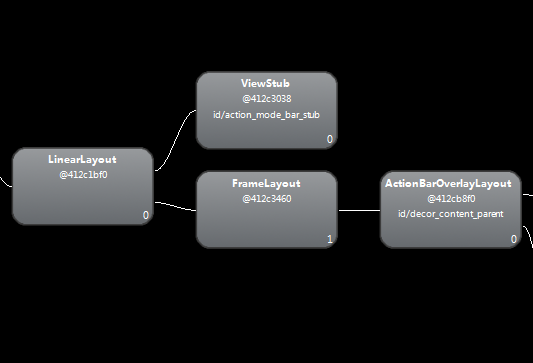
如下是应用的布局框架,中间的那个FrameLayout正式我们当前Activity的布局,而上面就有一个ViewStub,具体它是系统用来干嘛呢,可以进一步查找。
三、我的demo
1. 定义一个用ViewStub延迟加载的布局文件,这里简单定义如下(headbar.xml)
<?xml version="1.0" encoding="utf-8"?>

<RelativeLayout xmlns:android="http://schemas.android.com/apk/res/android"

    android:layout_width="match_parent"

    android:layout_height="match_parent" >

    <Button

        android:id="@+id/back"

        android:layout_width="wrap_content"

        android:layout_height="wrap_content"

        android:layout_alignParentLeft="true"

        android:text="back" >

    </Button>

    <Button

        android:id="@+id/go"

        android:layout_width="wrap_content"

        android:layout_height="wrap_content"

        android:layout_alignParentRight="true"

        android:text="go" >

    </Button>

    <TextView

        android:layout_width="wrap_content"

        android:layout_height="wrap_content"

        android:layout_toLeftOf="@id/go"

        android:layout_toRightOf="@id/back"

        android:text="as you see" >

    </TextView>

</RelativeLayout>
2.mainActivity的布局文件(activity_main.xml)
<RelativeLayout xmlns:android="http://schemas.android.com/apk/res/android"

    xmlns:tools="http://schemas.android.com/tools"

    android:layout_width="match_parent"

    android:layout_height="match_parent"

    tools:context="com.example.stubview.MainActivity" >

    <ViewStub

        android:id="@+id/hiddenHead"

        android:layout_width="wrap_content"

        android:layout_height="wrap_content"

        android:inflatedId="@+id/headbar"

        android:layout="@layout/headbar" >

    </ViewStub>

    <Button

        android:id="@+id/show"

        android:layout_width="match_parent"

        android:layout_height="wrap_content"

        android:layout_alignParentBottom="true"

        android:text="加载View" />

</RelativeLayout>
3.mainActivity中的使用ViewStub 代码
@Override

    protected void onCreate(Bundle savedInstanceState) {

        super.onCreate(savedInstanceState);

        setContentView(R.layout.activity_main);

        findViewById(R.id.show).setOnClickListener(new OnClickListener() {

            @Override

            public void onClick(View v) {

                ViewStub stubView = (ViewStub) findViewById(R.id.hiddenHead);

                View view = stubView.inflate();

                Toast.makeText(getApplicationContext(),

                        "hiddenHead View 的id为" + view.getId(),

                        Toast.LENGTH_LONG).show();

            }

        });

    }
附代码参考https://github.com/LuLei2013/StubView.git
ViewStub 的使用的更多相关文章
- ViewStub的使用
ViewStub是一个不可见的.大小为0的控件,运行时ViewStub可以滞后加载.当ViewStub置为可见或者调用inflate()的时候,布局就会加载出来.用加载进来的布局取代ViewStub在 ...
- ViewStub源码分析
ViewStub是一种特殊的View,Android官方给出的解释是:一种不可见的(GONE).size是0的占位view,多用于运行时 延迟加载的,也就是说真正需要某个view的时候.在实际项目中, ...
- include、merge 、ViewStub
在布局优化中,Androi的官方提到了这三种布局<include />.<merge />.<ViewStub />,并介绍了这三种布局各有的优势,下面也是简单说一 ...
- Android实战技巧:ViewStub的应用
在开发应用程序的时候,经常会遇到这样的情况,会在运行时动态根据条件来决定显示哪个View或某个布局.那么最通常的想法就是把可能用到的View都写在上面,先把它们的可见性都设为View.GONE,然后在 ...
- ViewStub的简单用法和说明
最近无意间知道了ViewStub,所以特地的去了解了一下 都知道ViewStub是一个不可见的,大小为0的View,实际上跟include差不多,但是ViewStub要更加节约资源.被称为是" ...
- Android引导指示层的制作 (ViewStub + SharePreference)
引导指示界面是个什么鬼东西?一张图即明了:
- 【转】Android布局优化之ViewStub
ViewStub是Android布局优化中一个很不错的标签/控件,直接继承自View.虽然Android开发人员基本上都听说过,但是真正用的可能不多. ViewStub可以理解成一个非常轻量级的Vie ...
- Android性能优化之一:ViewStub
ViewStub是Android布局优化中一个很不错的标签/控件,直接继承自View.虽然Android开发人员基本上都听说过,但是真正用的可能不多. ViewStub可以理解成一个非常轻量级的Vie ...
- Android优化——UI优化(三)使用ViewStub延迟加载
使用ViewStub延迟加载 1.ViewStub延迟加载 ViewStub是一个不可见的,大小为0的View,最佳用途就是实现View的延迟加载,在需要的时候再加载View,可Java中常见的性能优 ...
- ViewStub的简单解析和使用场景
ViewStub是Android布局优化中一个很不错的标签/控件,直接继承自View.虽然Android开发人员基本上都听说过,但是真正用的可能不多. ViewStub可以理解成一个非常轻量级的Vie ...
随机推荐
- 2017 ACM-ICPC 亚洲区(青岛赛区)网络赛 1009
#include<cmath> #include<set> #include<list> #include<deque> #include<map ...
- debug 英文翻译
declaration of 'int a' shadows a parameter :函数参数里,已经有这两个名称的变量了,指定义了同名的参数,造成了隐藏. expected primary-exp ...
- 让你的mysql或mariadb 支持ipv6
如果你在windows 或Linux系统已经安装了mysql/mariadb,并且操作系统本身已经支持了ipv6. 在/etc/my.conf 这样配置可以让mysql也支持ipv6 [mysqld] ...
- Codeforces Round #124 (Div. 1) C. Paint Tree(极角排序)
C. Paint Tree time limit per test 2 seconds memory limit per test 256 megabytes input standard input ...
- HDUOJ题目HTML的爬取
HDUOJ题目HTML的爬取 封装好的exe/app的GitHub地址:https://github.com/Rhythmicc/HDUHTML 按照系统选择即可. 其实没什么难度,先爬下来一个题目的 ...
- 【PKUSC 2015】的一道数学题
有9个人,每三个人中至少有两个互相认识,求证这里面至少有4个人互相认识 PKU官方题解: 引理:二染色K6中一定有同色K3. 证明:考虑某一个点,它一定连出至少三条同色边(不妨设为红边),这三条边连的 ...
- luogu P1107 最大整数
题目描述 设有n个正整数 (n<=20), 将它们连接成一排, 组成一个最大的多位整数. 例如: n=3时, 3个整数13, 312, 343连接成的最大整数为: 34331213 又如: n= ...
- 【动态规划】【spfa】【最短路】bzoj1003 [ZJOI2006]物流运输trans
预处理cost[a][b] 表示第a天到第b天用同一条线路的成本. 具体转移看代码. #include<cstdio> #include<algorithm> #include ...
- 【动态规划】bzoj3992 [Sdoi2015]序列统计 10分
#include<cstdio> using namespace std; #define MOD 1004535809 int a[8001],f[1001][101],n,m,x,S; ...
- 【KM】POJ2195/HDU1533-Going home
//最近没什么时间quq据说长得帅的人都在切八中,然而长得丑的人只能水水裸题 [题目大意] 给出一张地图及人和房屋的位置,求出每个人回到不同房屋所具有的最小代价和. [思路] 最小权匹配,先O(n^2 ...