
Unity使用native读取streamingasset里文件
需求是,使用native方式,读取apk包里的lua代码,读进c#,做解密
一准备unity工程
public class GameMain : MonoBehaviour {

    public const string libName = "TGNative";

    public Text content;

    [DllImport(libName)]

    public static extern int ReadAsset(string fileName, byte[] buffer, int size);

    // Use this for initialization

    void Start () {

        Debug.Log("Start################");

        var size =  * ;

        var buffer = new byte[size];

        var num = ReadAsset("test.txt", buffer, size);

        Debug.Log("ReadAsset ################"+ num);

        if (num >  )

        {

            Debug.Log("Read succ");

            var str = UTF8Encoding.UTF8.GetString(buffer,, num);

            content.text = str;

            Debug.Log(str);

        }

    }

    // Update is called once per frame

    void Update () {

    }

}
二unity导出android工程
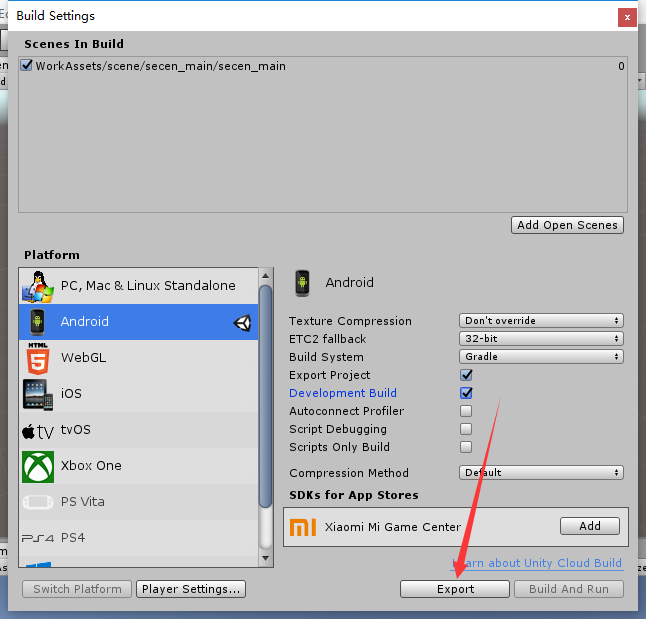
注意playersetting 里设置包名
三android studio 打开导出的工程
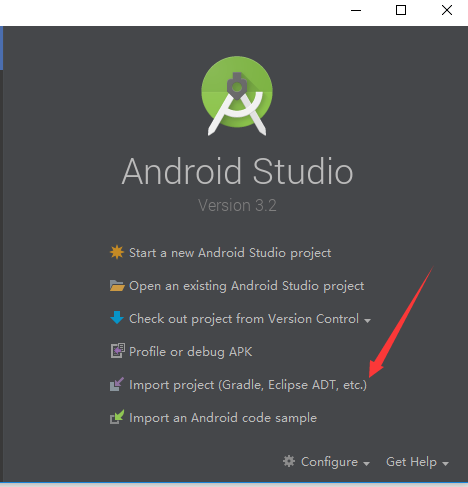
四 添加代码
UnityPlayerActivity里
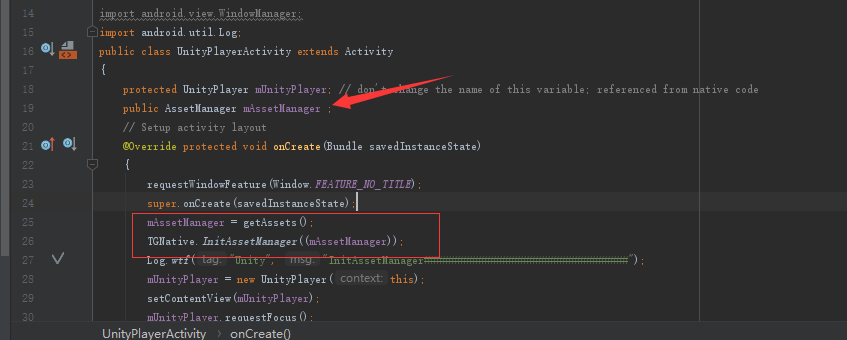
新增TGNative.java,增加native方法
public native static void InitAssetManager( AssetManager am );
五使用javah生成头文件
javah -d jni -classpath D:\work\ndkread\AssetMgr\AndroidAssetMgr\NativeAssetMgr\build\intermediates\classes\debug;C:\Users\Topjoy\AppData\Local\Android\Sdk\platforms\android-\android.jar com.topjoy.JniTest.TGNative
六新增NativeUtil.c和Android.mk Applicatioin,mk ,build.bat
build.bat
ndk-build NDK_PROJECT_PATH=. NDK_APPLICATION_MK=Application.mk APP_BUILD_SCRIPT=Android.mk APP_PLATFORM=android-
NativeUtil.c
//

// Created by Topjoy on 2018/12/7.

//

#include <jni.h>

#include <assert.h>

#include <string.h>

#include <malloc.h>

#include <android/asset_manager.h>

#include <android/asset_manager_jni.h>

#include <android/log.h>

#include "com_topjoy_JniTest_TGNative.h"

#define LOGD(...)  __android_log_print(ANDROID_LOG_DEBUG,"Unity",__VA_ARGS__) // 定义LOGD类型

#define LOGW(...)  __android_log_print(ANDROID_LOG_WARN,"Unity",__VA_ARGS__)

static AAssetManager* mgr = NULL;

JNIEXPORT void JNICALL Java_com_topjoy_JniTest_TGNative_InitAssetManager

  (JNIEnv * env, jclass tis, jobject assetmanager){

    mgr = AAssetManager_fromJava(env, assetmanager);

}

extern int ReadAsset(char* fileName, char* buffer, int size)

{

    if(mgr == NULL)

    {

        LOGW( "mgr is null" );

        return ;

    }

    AAsset* asset = AAssetManager_open(mgr, fileName, AASSET_MODE_UNKNOWN);

    if( asset == NULL )

    {

        LOGW( "open asset (%s) failed" , fileName);

        return ;

    }

    int len = (int)AAsset_getLength(asset);

    if(len >size)

    {

        LOGW("Buffer less than length");

        return ;

    }

    int nread = AAsset_read(asset, buffer, size);

    AAsset_close(asset);

    if(nread != len)

    {

        LOGW("Read num %d not equal length %d", nread, len);

        return ;

    }

    return nread;

}
七运行build.bat 生成so文件
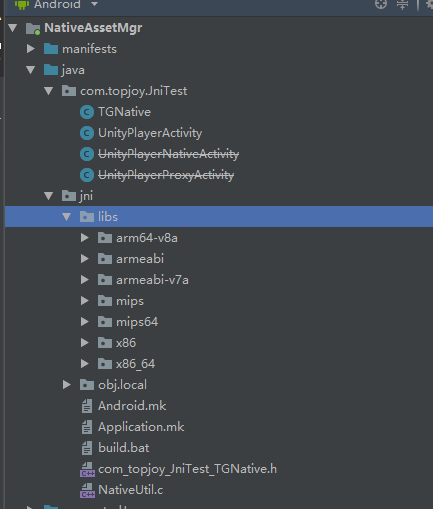
八使用jar命令生成jar文件
@echo off

set app=%cd%

set debugp=%cd%\build\intermediates\classes\debug

set classp=%debugp%\com\topjoy\JniTest

cd %classp%

pause

for %%x in (*) do (

    if not "%%x"=="UnityPlayerActivity.class" (

        if not "%%x"=="TGNative.class" (

        del %%x

        )

    )

)

cd %debugp%

jar  -cvf  class.jar com

move class.jar %app%\
九把生成的class.jar 和so文件拷贝进unity工程
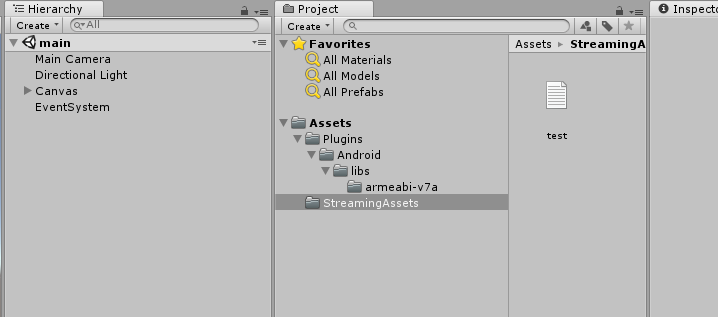
十生成apk,拷贝进木木测试

成功!
Unity使用native读取streamingasset里文件的更多相关文章
- unity Android在streamingAssets路径下文件无法读取的的解决方法
unity Android在streamingAssets路径下文件,有时候plugin下的.jar或者.so无法直接读取: 解决方法之一,拷贝至其他路径: #if UNITY_ANDROID str ...
- JAVA读取本地html文件里的html文本
/** * 读取本地html文件里的html代码 * @param file File file=new File("文件的绝对路径") * @return */ public s ...
- Unity Assets目录下的特殊文件夹名称
1.隐藏文件夹以.开头的文件夹会被Unity忽略.在这种文件夹中的资源不会被导入,脚本不会被编译.也不会出现在Project视图中.2.Standard Assets在这个文件夹中的脚本最先被编译.这 ...
- 【Unity基础知识之三】Unity Assets目录下的特殊文件夹名称
Unity3D的特殊目录名称 Unity预留了一些目录名称,这些目录有着特殊的含义.比较重要的有: Resources这个目录下的所有文件都会被打包到发布版本中,程序可以通过文件路径来访问它们.这 ...
- JNI读取assets资源文件
源自:http://www.rosoo.net/a/201112/15459.html assets目录底下的文件会被打包到一个apk文件里,这些资源在安装时他们并没被解压,使用时是直接从apk中读取 ...
- (转)Unity Assets目录下的特殊文件夹名称(作用和是否会被打包到build中)
原文:http://wiki.unity3d.com/index.php/Special_Folder_Names_in_your_Assets_Folder 1.隐藏文件夹以.开头的文件夹会被Uni ...
- 在Unity中使用LitJson解析json文件
LitJson 这个库需要找资源,找到LitJson.dll后将它放在Assets文件夹下,在脚本中使用using引入即可 测试代码 json文件: {"Archice":[{&q ...
- 如何读取Access里的OLE类型的图片
身份证一类读卡器读取的照片信息,保存在Access数据库中一般为OLE型字段,图片为BMP格式,因为是用其读卡器写入的,其数据类型为常二进制数据. 再用报表或EXCEL读取这些图片时,如果将该图片字段 ...
- 不可或缺 Windows Native (10) - C 语言: 文件
[源码下载] 不可或缺 Windows Native (10) - C 语言: 文件 作者:webabcd 介绍不可或缺 Windows Native 之 C 语言 文件 示例cFile.h #ifn ...
随机推荐
- Android_View_得到Activity
Context context = view.getContext(); if (context instanceof Activity){ Activity activity = (Activity ...
- 调用腾讯QQ启动
http://wpa.qq.com/msgrd?v=3&uin=88888888&site=qq&menu=yes
- Flume入门样例
Flume 作为 cloudera 开发的实时日志收集系统,受到了业界的认可与广泛应用.Flume 初始的发行版本目前被统称为 Flume OG(original generation),属于 clo ...
- J2EE的体系架构——J2EE
J2EE是Java2平台企业版(Java 2 Platform,Enterprise Edition),它的核心是一组技术规范与指南,提供基于组件的方式来设计.开发.组装和部署企业应用.J2EE使用多 ...
- C++ 内存泄漏
1. 内存泄漏: 在计算机科学中,内存泄漏指由于疏忽或错误造成程序未能释放已经不再使用的内存的情况. 内存泄漏并非指内存在物理上的消失,而是应用程序分配某段内存后,由于设计错误,导致在释放该段内存之前 ...
- TensorFlow学习笔记 补充1——InteractiveSession
InteractiveSession 大家有时候在阅读代码时会看见InteractiveSession而不是熟悉的Session,这是什么东东呢? 其实,它们只有一点不同..... Interacti ...
- ModelSim6.2 설치에 관한(About the Installation problem of ModelSim 6.2)
ModelSim 설치는 PC OS 따라서 호환성 문제가 발생한다. !!!!!! Vista OS에서는 ModelSim 설치가 안됨(호환성 문제) XP, Win7에서는 호환성 문제 없 ...
- 迁移TFS 2012服务至新的电脑硬件
迁移TFS 2012的时候碰到一些问题, 中文记录很少, 英文的记录也比较零散. 这里记录最直接和简单的方法. 环境: 1. 公司域环境, 所有TFS用户都是公司域帐户. 2. TFS从一台服务器转移 ...
- libevent源码学习_event_test
对应的sample文件中提供了event_test.c,里面就是关于事件的简单示例,具体如下: /* * Compile with: * cc -I/usr/local/include -o even ...
- Django学习之项目结构优化
其实就是采用包结构,比如: 目录models,包含__init__.py,a.py,b.py 然后将model class写在a和b中,但是这样的话,导入时就要改变了! from models imp ...