
接口自动化测试框架Karate入门
介绍
在这篇文章中,我们将介绍一下开源的Web-API自动化测试框架——Karate
Karate是基于另一个BDD测试框架Cucumber来建立的,并且共用了一些相同的思想。其中之一就是使用Gherkin文件,该文件描述了被测试的功能
与Cucumber不同的是测试用例不需要用Java编写,并且被完整的描述在Gherkin文件中
通过Karate,您可以编写任何类型的Web服务端的测试脚本,并检查响应是否符合预期
Karate的验证引擎可以灵活的比较两个JSON或XML文件内容,不受空格和数据顺序的影响
有关Karate的更详细的内容,请参考Karate官方介绍
特点
- 建立在Cucumber-JVM基础上
- 可以像标准的Java工程一样运行测试并且产生报告
- 测试代码的开发不需要掌握任何的Java知识
- 即使对非编程人员,测试代码也很容易编写
环境需求
- JDK1.8及以上
- Maven
- IDEA
使用
创建工程
- 打开IDEA,File|New|Project
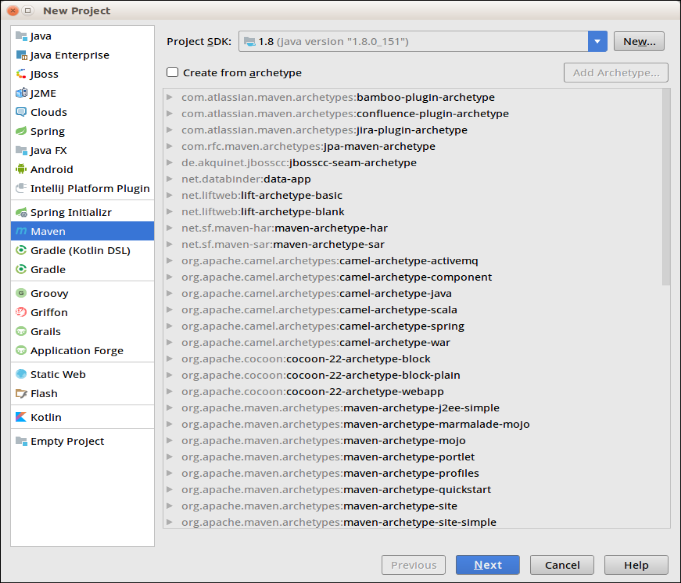
- 选择Maven工程,点击Next
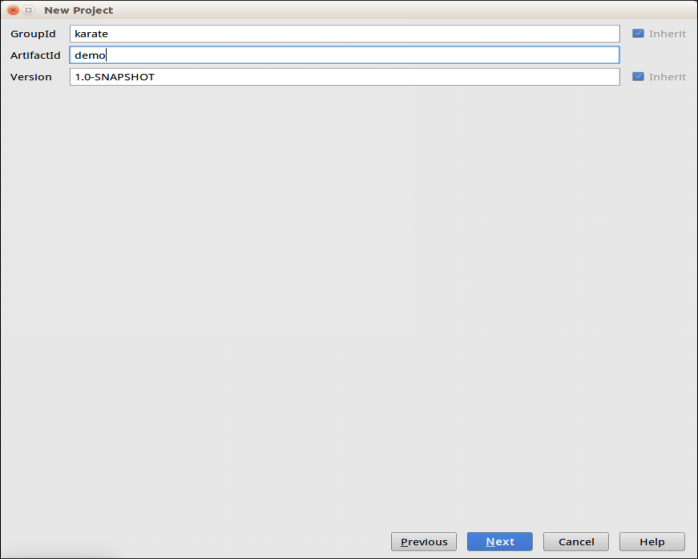
- 输入Maven基本信息,点击Next
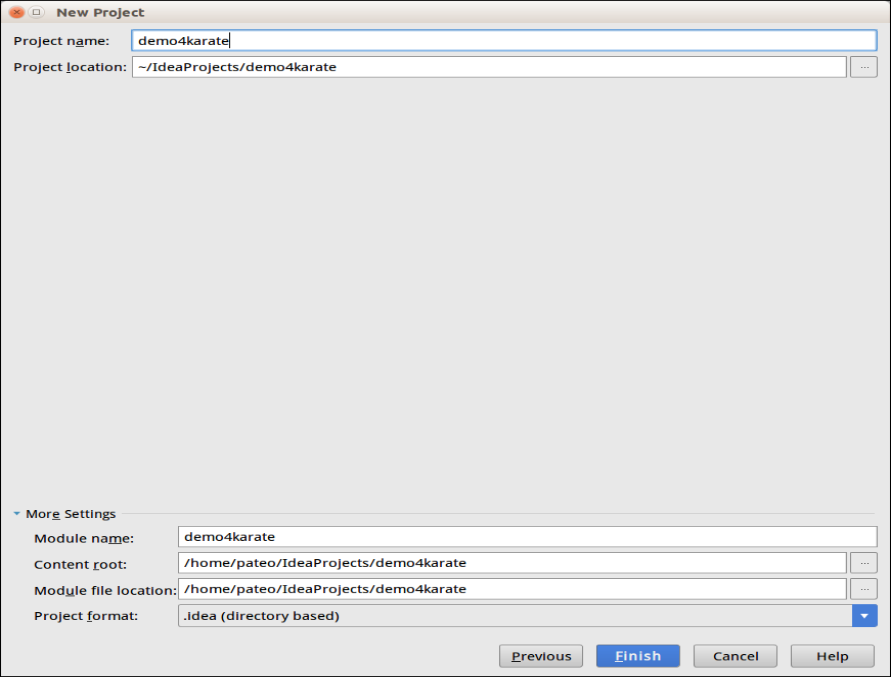
- 输入工程名称和存放路径,点击Finish
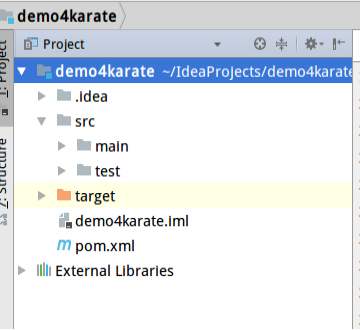
添加依赖
要在Maven项目中使用Karate,需要将karate-apache依赖项添加到pom.xml,如果实现JUnit测试还需要添加karate-junit4依赖
<dependencies>

    <dependency>

        <groupId>com.intuit.karate</groupId>

        <artifactId>karate-apache</artifactId>

        <version>0.8.0</version>

        <scope>test</scope>

    </dependency>

     <dependency>

        <groupId>com.intuit.karate</groupId>

        <artifactId>karate-junit4</artifactId>

        <version>0.8.0</version>

        <scope>test</scope>

    </dependency>

</dependencies>
设置测试资源文件目录,建议测试用例文件和java文件放在同一个目录下,遇到庞大的工程的时候方便管理,不必在文件夹src/test/java和src/test/resources文件夹之间切换,可以在pom.xml的标签中添加一下设置
<testResources>

    <testResource>

        <directory>src/test/java</directory>

        <excludes>

            <exclude>**/*.java</exclude>

        </excludes>

    </testResource>

</testResources>
服务端模拟
为了演示REST API,我们使用WireMock服务器
在pom.xml中添加mock服务依赖配置
<dependency>

    <groupId>com.github.tomakehurst</groupId>

    <artifactId>wiremock-standalone</artifactId>

    <version>2.18.0</version>

    <scope>test</scope>

</dependency>
编写一个启动服务的类
package server;

import com.github.tomakehurst.wiremock.WireMockServer;

import static com.github.tomakehurst.wiremock.client.WireMock.*;

public class StartServer {

    private static WireMockServer wireMockServer = new WireMockServer(8080);

    public static void startServer(){

        wireMockServer.start();

        stubFor(

                get(urlEqualTo("/user/get"))

                        .willReturn(aResponse()

                                .withStatus(200)

                                .withHeader("Content-Type", "application/json")

                                .withBody("{ \"id\": \"1234\", name: \"John Smith\" }")));

        stubFor(

                post(urlEqualTo("/user/create"))

                        .withHeader("content-type", equalTo("application/json"))

                        .withRequestBody(containing("id"))

                        .willReturn(aResponse()

                                .withStatus(200)

                                .withHeader("Content-Type", "application/json")

                                .withBody("{ \"id\": \"1234\", name: \"John Smith\" }")));

    }

   public static void main(String... args){

        startServer();

   }

}
用例文件编写
一个用例文件以“ .feature”扩展名保存。
文件以Feature关键字开头,在同一行跟着所测试的功能名称
一个用例文件包含不同的测试场景,每个场景都以关键字Scenario开头,并且包含多个步骤。这些步骤包含关键字Given,When,Then,And和But
有关Cucumber和Gherkin结构的更多信息,请点击此处
Feature: Learn How to use Karate for testing.

  Scenario: Testing valid GET endpoint

    Given url 'http://localhost:8080/user/get'

    When method GET

    Then status 200

  Scenario: Testing the exact response of a GET endpoint

    Given url 'http://localhost:8080/user/get'

    When method GET

    Then status 200

    And match $ == {id:"1234", name:"John Smith"}

  Scenario: Testing that GET response contains specific field

    Given url 'http://localhost:8080/user/get'

    When method GET

    Then status 200

    And match $ contains {id:"1234"}
Runner类编写
建议放在用例文件同级目录下
我们可以通过将Karate与JUnit集成来运行我们的测试
我们将使用@CucumberOptions注解指定Feature文件的具体位置
package demo;

import com.intuit.karate.junit4.Karate;

import cucumber.api.CucumberOptions;

import org.junit.runner.RunWith;

@RunWith(Karate.class)

@CucumberOptions(features = "classpath:demo/demo.feature")

public class DemoRunner {

}
运行用例
先启动服务
右击StartServer类选择Run StartServer.main()启动服务运行用例
右击DemoRunner类选择Run DemoRunner运行测试
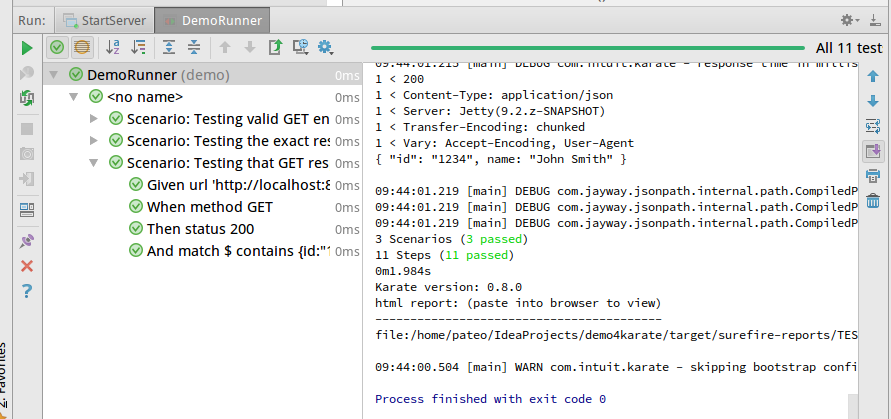
查看报告
在项目的target/surfire-reports目录下有TEST-demo.demo.html文件,浏览器中打开即可看到结果
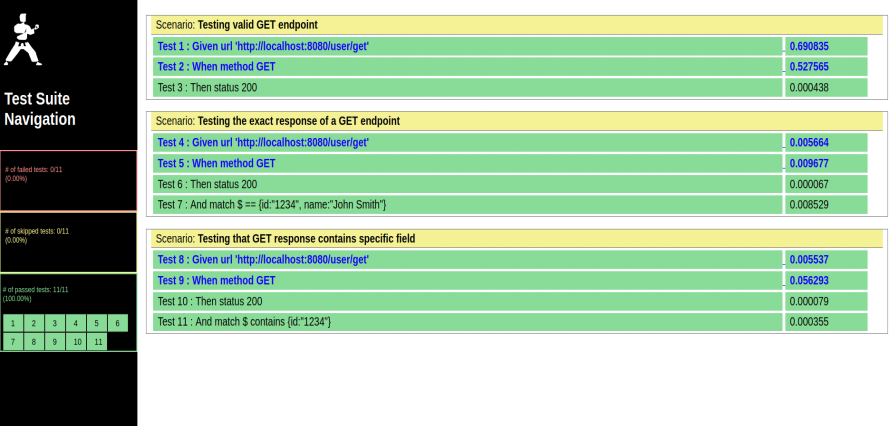
持续集成
可以借助于jenkins完成自动化测试并且jenkins提供插件cucumber-reports可以展示可读性强的自动化测试报告
需要修改Runner继承KarateRunner,先引入Karate-testng依赖
<dependency>

    <groupId>com.intuit.karate</groupId>

    <artifactId>karate-testng</artifactId>

    <version>0.8.0</version>

</dependency>
修改DemoRunner,注意配置CucumberOptions,要产生json格式的报告,cucumber-reports插件会去解析该文件并生成报告
package demo;

import com.intuit.karate.junit4.Karate;

import com.intuit.karate.testng.KarateRunner;

import cucumber.api.CucumberOptions;

import org.junit.runner.RunWith;

@CucumberOptions(features = "classpath:demo/demo.feature",format={"pretty","html:reports","json:report.json"})

public class DemoRunner extends KarateRunner {

}
jenkins中cucumber-reports配置请参考网络资源
jenkins配置命令行运行指令
rm -rf ${WORKSPACE}/report.json
cd /home/pateo/IdeaProjects/demo4karate
mvn test -Dtest=DemoRunner
cp report.json ${WORKSPACE}/report.json
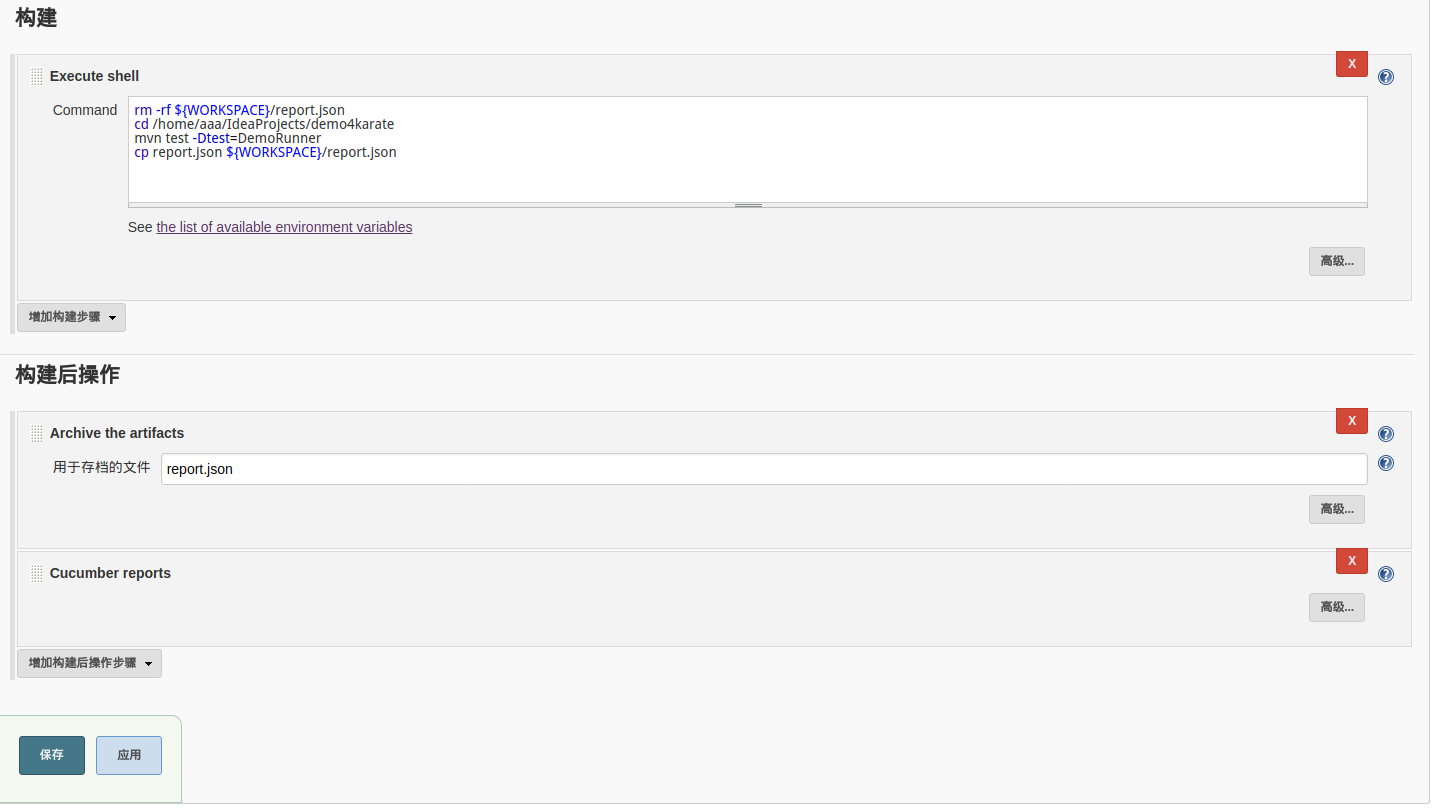
jenkins报告展示
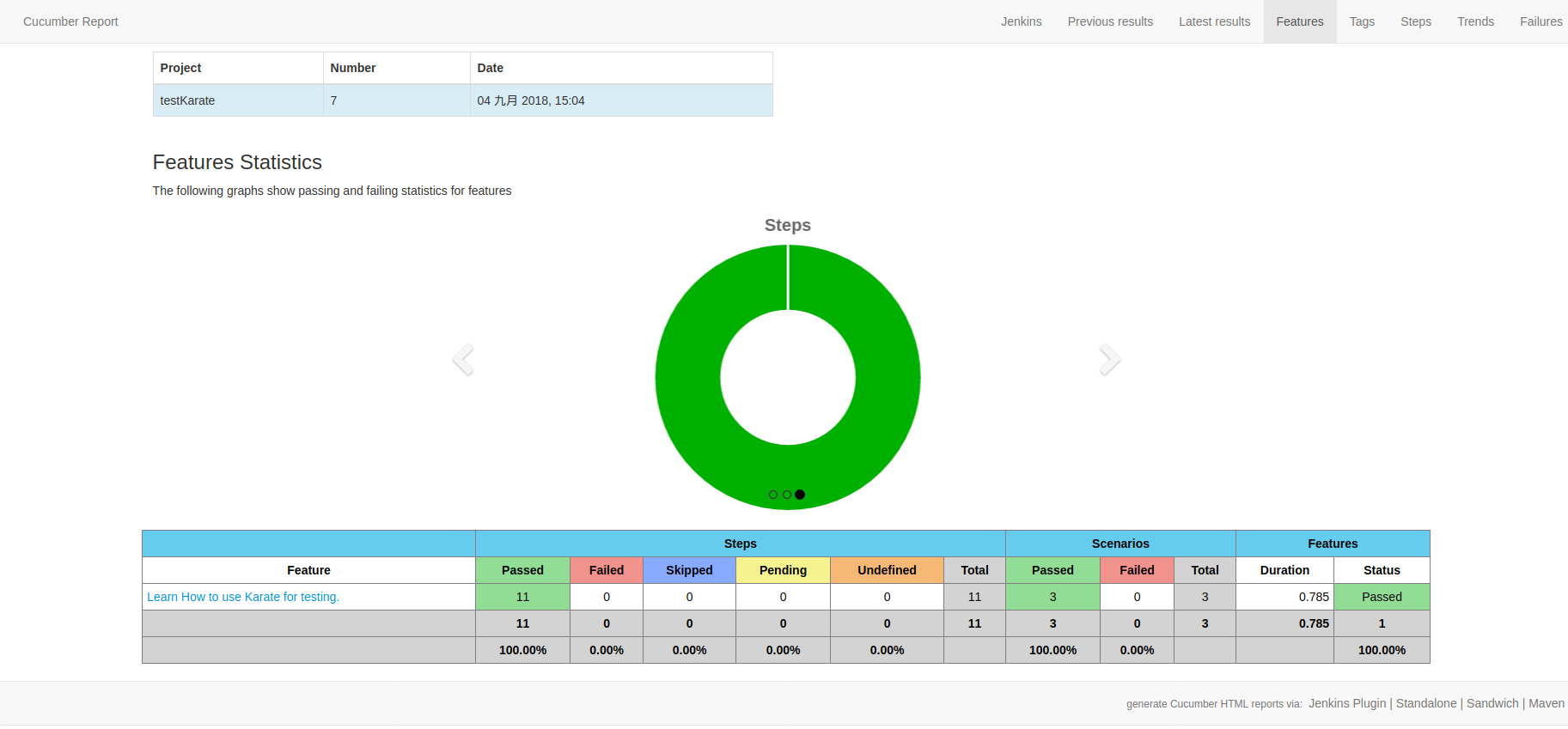
代码参考地址: https://github.com/ouguangqian/demo4Karate
接口自动化测试框架Karate入门的更多相关文章
- 接口测试入门(4)--接口自动化测试框架 / list和map用法 / 随机选取新闻 (随机数生成) / 接口相关id映射
一.接口自动化测试框架 为了更好的组织测试方法,测试用例并且持续集成,我们选择了 java+testNG(测试用例组织)+gitlab(代码版本管理)+Jenkins(持续集成工具) 作为一整套的自 ...
- 1分钟入门接口自动化框架Karate
介绍 在这篇文章中,我们将介绍一下开源的Web-API自动化测试框架——Karate Karate是基于另一个BDD测试框架Cucumber来建立的,并且共用了一些相同的思想.其中之一就是使用Gher ...
- python版接口自动化测试框架源码完整版(requests + unittest)
python版接口自动化测试框架:https://gitee.com/UncleYong/my_rf [框架目录结构介绍] bin: 可执行文件,程序入口 conf: 配置文件 core: 核心文件 ...
- 接口自动化 [授客]基于python+Testlink+Jenkins实现的接口自动化测试框架V3.0
基于python+Testlink+Jenkins实现的接口自动化测试框架V3.0 by:授客 QQ:1033553122 博客:http://blog.sina.com.cn/ishou ...
- 接口自动化 基于python+Testlink+Jenkins实现的接口自动化测试框架[V2.0改进版]
基于python+Testlink+Jenkins实现的接口自动化测试框架[V2.0改进版] by:授客 QQ:1033553122 由于篇幅问题,,暂且采用网盘分享的形式: 下载地址: [授客] ...
- 基于python+Testlink+Jenkins实现的接口自动化测试框架V3.0
基于python+Testlink+Jenkins实现的接口自动化测试框架V3.0 目录 1. 开发环境2. 主要功能逻辑介绍3. 框架功能简介 4. 数据库的创建 5. 框架模块详细介绍6. Tes ...
- 【转】robot framework + python实现http接口自动化测试框架
前言 下周即将展开一个http接口测试的需求,刚刚完成的java类接口测试工作中,由于之前犯懒,没有提前搭建好自动化回归测试框架,以至于后期rd每修改一个bug,经常导致之前没有问题的case又产生了 ...
- 【python3+request】python3+requests接口自动化测试框架实例详解教程
转自:https://my.oschina.net/u/3041656/blog/820023 [python3+request]python3+requests接口自动化测试框架实例详解教程 前段时 ...
- 接口自动化 基于python实现的http+json协议接口自动化测试框架源码(实用改进版)
基于python实现的http+json协议接口自动化测试框架(实用改进版) by:授客 QQ:1033553122 欢迎加入软件性能测试交流QQ群:7156436 目录 1. ...
随机推荐
- centos修改hostname
1.临时修改 hostname localhost 2.永久修改 vim /etc/sysconfig/network 修改hostname的值后保存
- SqlSugar之DbContext
创建一个DbContext和DbSet进行使用,我们可以在DbSet中进行扩展我们的方法 //可以直接用SimpleClient也可以扩展一个自个的类 //推荐直接用 SimpleClient //为 ...
- LINQ to XML简介
我们的配置文件使用XML存储信息.ADO.NET的DataSet(利用扩展方法)可以方便的将数据保存(或加载)为XML..NET特有的XML API,如XmlReader/XmlWriter类.微端提 ...
- 关于css透明度的问题
先看background和background-color background:可以设置背景颜色,背景图片,还有定位.默认background:no-repeat; background-color ...
- HTML5笔记——第一节
我的第一个网页 <!--html的基础模板--><!--html hyperText markup Language--><!--声明文档类型--><!DOC ...
- Linux7静默安装Oracle11g教程,亲测实用有效!
1.查看swap大小,若小于150M,需添加增加虚拟空间 dd if=/dev/zero of=/swapadd bs=1024 count=2006424 mkswap /swapadd swapo ...
- BZOJ3277: 串(广义后缀自动机)
Time Limit: 10 Sec Memory Limit: 128 MBSubmit: 1196 Solved: 478[Submit][Status][Discuss] Descripti ...
- checkbox的第三种状态--不确定状态
视觉上,checkbox有三种状态:checked.unchecked.indeterminate(不确定的).看起来就像这样子:
- JSP/Servlet开发——第二章 JSP数据交互(二)
1. JSP 内置对象 application: ●application 对象类似于系统的 "全局变量", 用于同一个应用内的所有用户之问的数据共享: ●application对 ...
- PHP学习day1
PHP 变量规则: 变量以 $ 符号开头,其后是变量的名称 变量名称必须以字母或下划线开头 变量名称不能以数字开头 变量名称只能包含字母数字字符和下划线(A-z.0-9 以及 _) 变量名称对大小写敏 ...