
TabbedPane标签美化式样自定义
JTabbedPane标签美化式样自定义
通过继承BasicTabbedPaneUI类重写JTabbedPane标签式样,实现渐变的标签效果。
效果图: 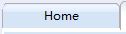
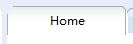
相关代码:
 public class TabbedPaneUI extends BasicTabbedPaneUI {

     private Color selectColor;

     private Color deSelectColor;

     private int inclTab = 3;

     private int anchoFocoV = inclTab;

     private int anchoFocoH = 1;

     private int anchoCarpetas = 18;

     private Polygon shape;

     private Color bgColor;

     private Color frontColor;

     private ColorSet selectedColorSet;

     private ColorSet defaultColorSet;

     private ColorSet hoverColorSet;

     public TabbedPaneUI(String bgColorHex, String frontColorHex){

         setColor(bgColorHex,frontColorHex);

         selectedColorSet = new ColorSet();

         selectedColorSet.topGradColor1 = Color.decode("#E0EEEE");//选中的最上层

         selectedColorSet.topGradColor2 = Color.decode("#FFFFFF");//选中的第二层

         selectedColorSet.bottomGradColor1 = Color.decode("#FFFFFF");//选中的第三层

         selectedColorSet.bottomGradColor2 = Color.decode("#FFFFFF");//选中的最下层

         defaultColorSet = new ColorSet();

         defaultColorSet.topGradColor1 = Color.decode("#FFFFFF");//未选的最上层

         defaultColorSet.topGradColor2 = Color.decode("#DEEBFE");

         defaultColorSet.bottomGradColor1 = Color.decode("#D6E5F5");

         defaultColorSet.bottomGradColor2 = Color.decode("#D6E5F5");

         hoverColorSet = new ColorSet();

         hoverColorSet.topGradColor1 = Color.decode("#FFFFFF");//鼠标悬停最上层

         hoverColorSet.topGradColor2 = Color.decode("#FFFFFF");

         hoverColorSet.bottomGradColor1 = Color.decode("#FFFFFF");

         hoverColorSet.bottomGradColor2 = Color.decode("#FFFFFF");

     }

 //

 //  public static ComponentUI createUI(JComponent c) {

 //      return new TabbedPaneUI();

 //  }

     @Override

     protected void installDefaults() {

         super.installDefaults();

         RollOverListener l = new RollOverListener();

         tabPane.addMouseListener(l);

         tabPane.addMouseMotionListener(l);

         selectColor = new Color(250, 192, 192);

         deSelectColor = new Color(197, 193, 168);

         tabAreaInsets.right = anchoCarpetas;

     }

     public void setColor(String bgColorHex, String frontColorHex){

         bgColor = Color.decode(bgColorHex);

         frontColor = Color.decode(frontColorHex);

     }

     @Override

     protected void paintContentBorderTopEdge(Graphics g, int tabPlacement,

             int selectedIndex, int x, int y, int w, int h) {

         super.paintContentBorderTopEdge(g, tabPlacement, -1, x, y, w, h);

     }

     @Override

     protected void paintTabArea(Graphics g, int tabPlacement, int selectedIndex) {

         if (runCount > 1) {

             int lines[] = new int[runCount];

             for (int i = 0; i < runCount; i++) {

                 lines[i] = rects[tabRuns[i]].y

                         + (tabPlacement == TOP ? maxTabHeight : 0);

             }

             Arrays.sort(lines);

             if (tabPlacement == TOP) {

                 int fila = runCount;

                 for (int i = 0; i < lines.length - 1; i++, fila--) {

                     Polygon carp = new Polygon();

                     carp.addPoint(0, lines[i]);

                     carp.addPoint(tabPane.getWidth() - 2 * fila - 2, lines[i]);

                     carp.addPoint(tabPane.getWidth() - 2 * fila, lines[i] + 3);

                     if (i < lines.length - 2) {

                         carp.addPoint(tabPane.getWidth() - 2 * fila,

                                 lines[i + 1]);

                         carp.addPoint(0, lines[i + 1]);

                     } else {

                         carp.addPoint(tabPane.getWidth() - 2 * fila, lines[i]

                                 + rects[selectedIndex].height);

                         carp.addPoint(0, lines[i] + rects[selectedIndex].height);

                     }

                     carp.addPoint(0, lines[i]);

                     g.setColor(hazAlfa(fila));

                     g.fillPolygon(carp);

                     g.setColor(darkShadow.darker());

                     g.drawPolygon(carp);

                 }

             } else {

                 int fila = 0;

                 for (int i = 0; i < lines.length - 1; i++, fila++) {

                     Polygon carp = new Polygon();

                     carp.addPoint(0, lines[i]);

                     carp.addPoint(tabPane.getWidth() - 2 * fila - 1, lines[i]);

                     carp.addPoint(tabPane.getWidth() - 2 * fila - 1,

                             lines[i + 1] - 3);

                     carp.addPoint(tabPane.getWidth() - 2 * fila - 3,

                             lines[i + 1]);

                     carp.addPoint(0, lines[i + 1]);

                     carp.addPoint(0, lines[i]);

                     g.setColor(hazAlfa(fila + 2));

                     g.fillPolygon(carp);

                     g.setColor(darkShadow.darker());

                     g.drawPolygon(carp);

                 }

             }

         }

         super.paintTabArea(g, tabPlacement, selectedIndex);

     }

     @Override

     protected void paintTabBackground(Graphics g, int tabPlacement,

             int tabIndex, int x, int y, int w, int h, boolean isSelected) {

         Graphics2D g2D = (Graphics2D) g;

         ColorSet colorSet;

         Rectangle rect = rects[tabIndex];

         if (isSelected) {

             colorSet = selectedColorSet;

         } else if (getRolloverTab() == tabIndex) {

             colorSet = hoverColorSet;

         } else {

             colorSet = defaultColorSet;

         }

         g2D.setRenderingHint(RenderingHints.KEY_ANTIALIASING,

                 RenderingHints.VALUE_ANTIALIAS_ON);

         int width = rect.width;

         int xpos = rect.x;

         int yPos = rect.y;

         if (tabIndex > -1) {

             width--;

             xpos++;

             yPos += 2;

         }

         g2D.setPaint(new GradientPaint(xpos, 0, colorSet.topGradColor1, xpos,

                 h / 2, colorSet.topGradColor2));

         g2D.fill(this.getUpArea(xpos, yPos, width, h - 2));

         g2D.setPaint(new GradientPaint(0, h / 2, colorSet.bottomGradColor1, 0,

                 h, colorSet.bottomGradColor2));

         g2D.fill(this.getDownArea(xpos, yPos, width, h - 2));

     }

     private Shape getArea(int x, int y, int w, int h) {

         RoundRectangle2D rect = new RoundRectangle2D.Float(x, y, w, h, 15, 15);

         Area a = new Area(rect);

         Rectangle2D rec = new Rectangle2D.Float(x, y + h / 2, w, h / 2);

         Area b = new Area(rec);

         a.add(b);

         return a;

     }

     private Shape getUpArea(int x, int y, int w, int h) {

         Rectangle2D rec = new Rectangle2D.Float(x, y, w, h / 3 );

         Area a = new Area(rec);

         RoundRectangle2D rect = new RoundRectangle2D.Float(x, y, w, h, 15, 15);

         Area b = new Area(rect);

         a.intersect(b);

         return a;

     }

     private Shape getDownArea(int x, int y, int w, int h) {

         Rectangle2D rec = new Rectangle2D.Float(x, y + h / 3, w, h*2 / 3 +1);

         Area a = new Area(rec);

         RoundRectangle2D rect = new RoundRectangle2D.Float(x, y, w, h, 15, 15);

         // Area b = new Area(rect);

         // a.intersect(b);

         return a;

     }

     private class ColorSet {

         Color topGradColor1;

         Color topGradColor2;

         Color bottomGradColor1;

         Color bottomGradColor2;

     }

     @Override

     protected void paintText(Graphics g, int tabPlacement, Font font,

             FontMetrics metrics, int tabIndex, String title,

             Rectangle textRect, boolean isSelected) {

         super.paintText(g, tabPlacement, font, metrics, tabIndex, title,

                 textRect, isSelected);

         g.setFont(font);

         View v = getTextViewForTab(tabIndex);

         if (v != null) {

             // html

             v.paint(g, textRect);

         } else {

             // plain text

             int mnemIndex = tabPane.getDisplayedMnemonicIndexAt(tabIndex);

             if (tabPane.isEnabled() && tabPane.isEnabledAt(tabIndex)) {

                 g.setColor(tabPane.getForegroundAt(tabIndex));

                 BasicGraphicsUtils

                         .drawStringUnderlineCharAt(g, title, mnemIndex,

                                 textRect.x, textRect.y + metrics.getAscent());

             } else { // tab disabled

                 g.setColor(Color.BLACK);

                 BasicGraphicsUtils

                         .drawStringUnderlineCharAt(g, title, mnemIndex,

                                 textRect.x, textRect.y + metrics.getAscent());

                 g.setColor(tabPane.getBackgroundAt(tabIndex).darker());

                 BasicGraphicsUtils.drawStringUnderlineCharAt(g, title,

                         mnemIndex, textRect.x - 1,

                         textRect.y + metrics.getAscent() - 1);

             }

         }

     }

     //固定tab标签宽度

     @Override

     protected int calculateTabWidth(int tabPlacement, int tabIndex,

             FontMetrics metrics) {

         return 120;

 //      return 10 + anchoFocoV

 //              + super.calculateTabWidth(tabPlacement, tabIndex, metrics);

     }

     @Override

     protected int calculateTabHeight(int tabPlacement, int tabIndex,

             int fontHeight) {

         if (tabPlacement == LEFT || tabPlacement == RIGHT) {

             return super.calculateTabHeight(tabPlacement, tabIndex, fontHeight);

         } else {

             return anchoFocoH

                     + super.calculateTabHeight(tabPlacement, tabIndex,

                             fontHeight);

         }

     }

     protected int calculateMaxTabHeight(int tabPlacement) {

         return 25;

     }

     //set tab title hight

     @Override

     protected void paintTabBorder(Graphics g, int tabPlacement, int tabIndex,

             int x, int y, int w, int h, boolean isSelected) {

 //      if (isSelected) {

             g.setColor(Color.decode("#afafaf"));

             int[] xp = new int[] { x, x, x + 3, x + w - inclTab - 6,

                     x + w - inclTab - 3, x + w - inclTab, x + w - inclTab, x };

             int[] yp = new int[] { y + h, y + 3, y, y, y, y + 3, y + h, y + h };

             shape = new Polygon(xp, yp, xp.length);

             Graphics2D g2D = (Graphics2D) g;

             g2D.drawPolygon(shape);

             g.setColor(Color.white);

             g.drawLine(x, y + h, x + w - inclTab, y + h);

 //      }

     }

     protected int getTabLabelShiftY(int tabPlacement, int tabIndex,

             boolean isSelected) {

         return 0;

     }

     protected int getTabLabelShiftX(int tabPlacement, int tabIndex,

             boolean isSelected) {

         return 0;

     }

     @Override

     protected void paintFocusIndicator(Graphics g, int tabPlacement,

             Rectangle[] rects, int tabIndex, Rectangle iconRect,

             Rectangle textRect, boolean isSelected) {

         if (tabPane.hasFocus() || isSelected) {

             // g.setColor(UIManager.getColor("ScrollBar.thumbShadow"));

             // g.drawPolygon(shape);

         }

     }

     protected Color hazAlfa(int fila) {

         int alfa = 0;

         if (fila >= 0) {

             alfa = 50 + (fila > 7 ? 70 : 10 * fila);

         }

         return new Color(0, 0, 0, alfa);

     }

     private int lastRollOverTab = -1;

     private class RollOverListener implements MouseMotionListener,

             MouseListener {

         public void mouseMoved(MouseEvent e) {

             checkRollOver();

         }

         public void mouseEntered(MouseEvent e) {

             checkRollOver();

         }

         public void mouseExited(MouseEvent e) {

             tabPane.repaint();

         }

         private void checkRollOver() {

             int currentRollOver = getRolloverTab();

             if (currentRollOver != lastRollOverTab) {

                 lastRollOverTab = currentRollOver;

                 Rectangle tabsRect = new Rectangle(0, 0, tabPane.getWidth(),

                         tabPane.getHeight()+1);

                 tabPane.repaint(tabsRect);

             }

         }

     }

 }
关键点:
1. 继承BasicTabbedPaneUI类,这其中有我们必须要重写的一个方法:
public static ComponentUI createUI(JComponent c) {
return new XXXTabbedPaneUI();
}
其中XXXTabbedPaneUI就是自己实现的BasicTabbedPaneUI的子类的名字。
2.下面类出几个改变外观的重要的方法:
a. protectedvoid installDefaults() //可以改变一些BasicTabbedPaneUI中默认的属性。
b.protectedvoid paintTabArea(Graphics g, int tabPlacement, int selectedIndex) //绘制整个选项卡区域
c. protectedvoid paintTabBackground(Graphics g, int tabPlacement,
int tabIndex, int x, int y, int w, int h, boolean isSelected)
//绘制某个选项卡的背景色
d. protectedvoid paintContentBorder(Graphics g, int tabPlacement,
int selectedIndex) //绘制TabbedPane容器的四周边框样式。
e. protectedvoid paintFocusIndicator(Graphics g, int tabPlacement,
Rectangle[] rects, int tabIndex, Rectangle iconRect,
Rectangle textRect, boolean isSelected)
//绘制选中某个Tab后,获得焦点的样式。
3、具体paint()渲染可参考前篇: JButton自定义式样
TabbedPane标签美化式样自定义的更多相关文章
- jsp的标签库和自定义标签
1.jstl标签库 JSP标准标签库(JSTL)是一个JSP标签集合,它封装了JSP应用的通用核心功能. JSTL支持通用的.结构化的任务,比如迭代,条件判断,XML文档操作,国际化标签,SQL标签. ...
- Spring源码分析(九)解析默认标签中的自定义标签元素
摘要:本文结合<Spring源码深度解析>来分析Spring 5.0.6版本的源代码.若有描述错误之处,欢迎指正. 到这里我们已经完成了分析默认标签的解析与提取过程,或许涉及的内容太多,我 ...
- [原创]java WEB学习笔记42:带标签体的自定义标签,带父标签的自定义标签,el中自定义函数,自定义标签的小结
本博客为原创:综合 尚硅谷(http://www.atguigu.com)的系统教程(深表感谢)和 网络上的现有资源(博客,文档,图书等),资源的出处我会标明 本博客的目的:①总结自己的学习过程,相当 ...
- JUnit5学习之五:标签(Tag)和自定义注解
欢迎访问我的GitHub https://github.com/zq2599/blog_demos 内容:所有原创文章分类汇总及配套源码,涉及Java.Docker.Kubernetes.DevOPS ...
- C语言 C++1X STL QT免费视频课程 QT5界面开发美化 式样表 QML
C/C++/QT界面开发界面美化视频课程系列 课程1 C语言 C++1X STL QT免费视频课程 QT5界面开发美化 式样表 QML 返回顶部 课程1 C语言 C++1X STL QT免费视 ...
- 学会怎样使用Jsp 内置标签、jstl标签库及自定义标签
学习jsp不得不学习jsp标签,一般来说,对于一个jsp开发者,可以理解为jsp页面中出现的java代码越少,对jsp的掌握就越好,而替换掉java代码的重要方式就是使用jsp标签. jsp标签的分 ...
- Javaweb学习笔记——(十三)——————JSTL、JSTL核心标签库、自定义标签、有标签体的标签、带有属性的标签、MVC、Javaweb三层框架
JSTLApache提供的标签库 jar包:jstl-1.2.jar,如果传MyEclipse,他会在我们导入jar包,无需自己导入,如果没有使用MyEclipse那么需要自行导入.--------- ...
- 2.html基础标签:无序+有序+自定义列表
<!DOCTYPE html> <html lang="en"> <head> <meta charset="UTF-8&quo ...
- Java基础83 JSP标签及jsp自定义标签(网页知识)
1.JSP标签 替代jsp脚本,用于jsp中执行java代码1.1.内置标签: <jsp:forward></jsp:forward> 相当于:request.getReu ...
随机推荐
- C# Sql参数化 in like
[in] string sql = "exec('select * from bid where id in ('+@IDS+')')"; System.Data.SqlClien ...
- SQLite3的运用
1.导入库文件:libsqlite3. 2..m文件的代码: // // ViewController.m // SQLite3的运用 // // Created by PengYunjing on ...
- 阿里云ESC上面部署项目
注意:我这里的服务器是Windows系统,后面会研究Linux下的命令 1.将javaWEB项目打包为war包 右击项目,先择“Export ” 2.通过“附件”->“远程连接桌面”,连接到服务 ...
- PAT1018——最短路加DFS
http://pat.zju.edu.cn/contests/pat-a-practise/1018 在杭州各个点,有很多自助自行车的点,最大容纳点为CMAX,但比较适合的情况是CMAX/2, 现在从 ...
- 第15篇 PSR-04 规范
1. Overview This PSR describes a specification for autoloading classes from file paths. It is fully ...
- 有关Botton的用法(一)
<Button android:layout_width="wrap_content" android:layout_height="wrap_content&qu ...
- java代码实现鼠标双击出现画图-----------paint()方法由系统自动调用,且一定是小写的字母p
总结:在运行过程中,自己不是很认真,没有检查自己写的代码,结果是无论你怎么运行,双击 frame都没用,因为系统根本就没有调用paint()方法绘图.所以很重要的是实现这个方法 package com ...
- 命令行调用远程dubbo服务
有时需要对dubbo服务做个简单的测试,或者想看下某个dubbo服务类所提供的方法,可以直接在命令行通过telnet的方式来查看和调用dubbo服务,方法如下: telnet 127.0.0.1 20 ...
- python3+ros api
官方文档:https://wiki.mikrotik.com/wiki/Manual:API_Python3 # !/usr/bin/env python# -*- coding:utf-8 -*-# ...
- PHP - Swoole websocket理解
php swoole实现websocket功能 1.确保安装了swoole扩展. 2.撰写服务程序 <?php //创建websocket服务器对象,监听0.0.0.0:9502端口 $ws = ...