
python3+ros api
官方文档:https://wiki.mikrotik.com/wiki/Manual:API_Python3
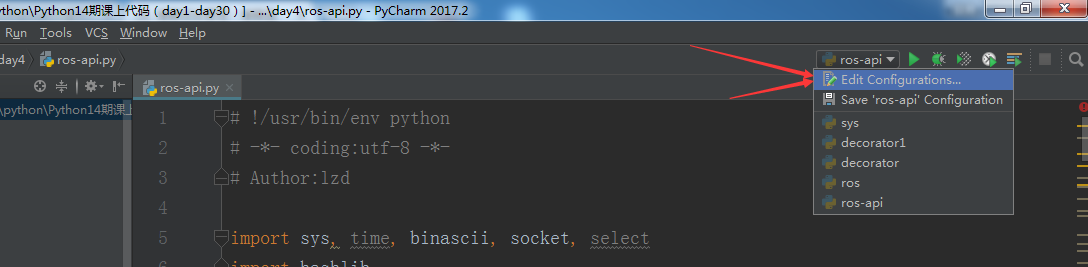
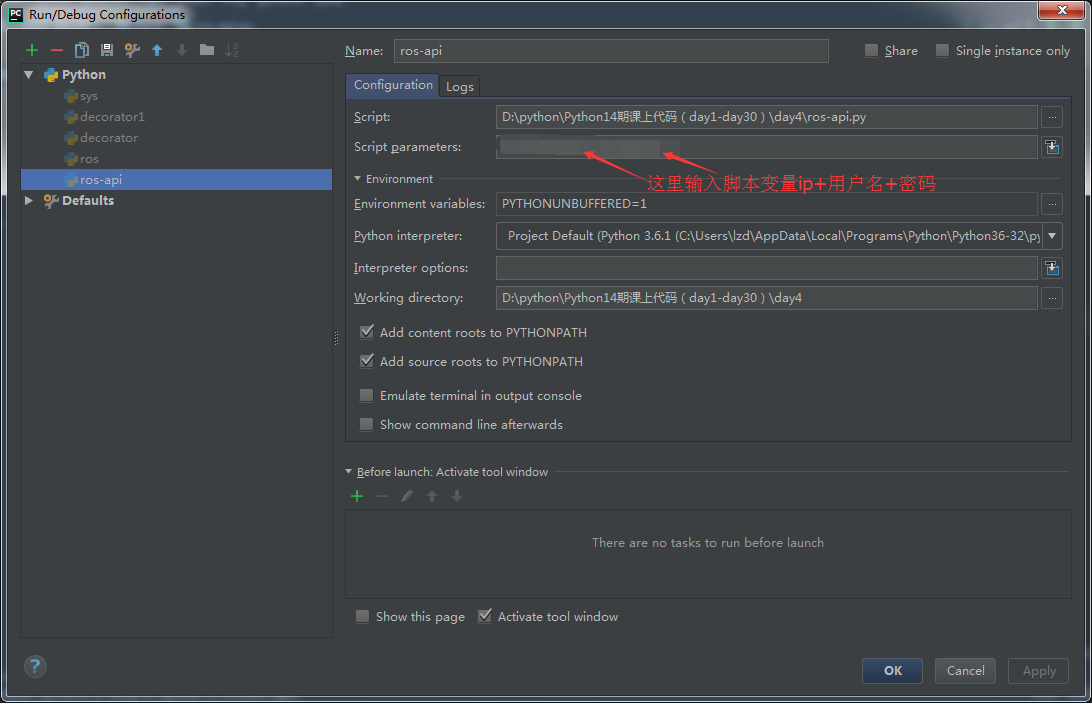
# !/usr/bin/env python
# -*- coding:utf-8 -*-
# Author:lzd

import sys, time, binascii, socket, select
import hashlib

class ApiRos:
    "Routeros api"

    def __init__(self, sk):
        self.sk = sk
        self.currenttag = 0

    def login(self, username, pwd):
        for repl, attrs in self.talk(["/login"]):
            chal = binascii.unhexlify((attrs['=ret']).encode('UTF-8'))
        md = hashlib.md5()
        md.update(b'\x00')
        md.update(pwd.encode('UTF-8'))
        md.update(chal)
        self.talk(["/login", "=name=" + username,
                   "=response=00" + binascii.hexlify(md.digest()).decode('UTF-8')])

    def talk(self, words):
        if self.writeSentence(words) == 0: return
        r = []
        while 1:
            i = self.readSentence();
            if len(i) == 0: continue
            reply = i[0]
            attrs = {}
            for w in i[1:]:
                j = w.find('=', 1)
                if (j == -1):
                    attrs[w] = ''
                else:
                    attrs[w[:j]] = w[j + 1:]
            r.append((reply, attrs))
            if reply == '!done': return r

    def writeSentence(self, words):
        ret = 0
        for w in words:
            self.writeWord(w)
            ret += 1
        self.writeWord('')
        return ret

    def readSentence(self):
        r = []
        while 1:
            w = self.readWord()
            if w == '': return r
            r.append(w)

    def writeWord(self, w):
        print(("<<< " + w))
        self.writeLen(len(w))
        self.writeStr(w)

    def readWord(self):
        ret = self.readStr(self.readLen())
        print((">>> " + ret))
        return ret

    def writeLen(self, l):
        if l < 0x80:
            self.writeStr(chr(l))
        elif l < 0x4000:
            l |= 0x8000
            self.writeStr(chr((l >> 8) & 0xFF))
            self.writeStr(chr(l & 0xFF))
        elif l < 0x200000:
            l |= 0xC00000
            self.writeStr(chr((l >> 16) & 0xFF))
            self.writeStr(chr((l >> 8) & 0xFF))
            self.writeStr(chr(l & 0xFF))
        elif l < 0x10000000:
            l |= 0xE0000000
            self.writeStr(chr((l >> 24) & 0xFF))
            self.writeStr(chr((l >> 16) & 0xFF))
            self.writeStr(chr((l >> 8) & 0xFF))
            self.writeStr(chr(l & 0xFF))
        else:
            self.writeStr(chr(0xF0))
            self.writeStr(chr((l >> 24) & 0xFF))
            self.writeStr(chr((l >> 16) & 0xFF))
            self.writeStr(chr((l >> 8) & 0xFF))
            self.writeStr(chr(l & 0xFF))

    def readLen(self):
        c = ord(self.readStr(1))
        if (c & 0x80) == 0x00:
            pass
        elif (c & 0xC0) == 0x80:
            c &= ~0xC0
            c <<= 8
            c += ord(self.readStr(1))
        elif (c & 0xE0) == 0xC0:
            c &= ~0xE0
            c <<= 8
            c += ord(self.readStr(1))
            c <<= 8
            c += ord(self.readStr(1))
        elif (c & 0xF0) == 0xE0:
            c &= ~0xF0
            c <<= 8
            c += ord(self.readStr(1))
            c <<= 8
            c += ord(self.readStr(1))
            c <<= 8
            c += ord(self.readStr(1))
        elif (c & 0xF8) == 0xF0:
            c = ord(self.readStr(1))
            c <<= 8
            c += ord(self.readStr(1))
            c <<= 8
            c += ord(self.readStr(1))
            c <<= 8
            c += ord(self.readStr(1))
        return c

    def writeStr(self, str):
        n = 0;
        while n < len(str):
            r = self.sk.send(bytes(str[n:], 'UTF-8'))
            if r == 0: raise RuntimeError("connection closed by remote end")
            n += r

    def readStr(self, length):
        ret = ''
        while len(ret) < length:
            s = self.sk.recv(length - len(ret))
            if s == '': raise RuntimeError("connection closed by remote end")
            ret += s.decode('UTF-8', 'replace')
        return ret

def main():
    s = None
    for res in socket.getaddrinfo(sys.argv[1], "8728", socket.AF_UNSPEC, socket.SOCK_STREAM):
        af, socktype, proto, canonname, sa = res
        try:
            s = socket.socket(af, socktype, proto)
        except (socket.error, msg):
            s = None
            continue
        try:
            s.connect(sa)
        except (socket.error, msg):
            s.close()
            s = None
            continue
        break
    if s is None:
        print('could not open socket')
        sys.exit(1)

    apiros = ApiRos(s);
    apiros.login(sys.argv[2], sys.argv[3]);

    #模拟用户自己输入代码进行api控制
    tmpcommand=input('请输入你想查询的命令')
    inputsentence = []
    inputsentence.append(tmpcommand)
    apiros.writeSentence(inputsentence)
    while 1:
        x = apiros.readSentence()
        #print(x)
        if x == ['!done'] or x==['!re', '=status=finished']:
            break
    #导出ros配置到ROS本地ghg1.rsc文件
    # inputsentence = []
    #
    # inputsentence.append('/export')
    # inputsentence.append('=file=ghg1.rsc')
    # apiros.writeSentence(inputsentence)
    # while 1:
    #     x = apiros.readSentence()
    #     #print(x)
    #     if x == ['!done'] or x==['!re', '=status=finished']:
    #         break
    #从ros上传文件到ftp的代码
    # inputsentence = []
    # inputsentence.append('/tool/fetch')
    # inputsentence.append('=address=192.168.0.108')
    # inputsentence.append('=src-path=ghg1.rsc')
    # inputsentence.append('=user=xxxxx')
    # inputsentence.append('=mode=ftp')
    # inputsentence.append('=password=xxxxx')
    # inputsentence.append('=dst-path=123.rsc')
    # inputsentence.append('=upload=yes')
    # apiros.writeSentence(inputsentence)
    # inputsentence = []
    # while 1:
    #     x = apiros.readSentence()
    #     #print(x)
    #     if x == ['!done'] or x==['!re', '=status=finished']:
    #         break
    #删除文件代码
    # inputsentence = []
    # inputsentence.append('/file/remove')
    # inputsentence.append('=numbers=ghg1.rsc')
    # apiros.writeSentence(inputsentence)
    # while 1:
    #     x = apiros.readSentence()
    #     print(x)
    #     if x == ['!done'] or x==['!re', '=status=finished']:
    #         break
            #官方循环代码,等待你输入命令行,可以用来测试代码命令行
            # while 1:
            #     r = select.select([s, sys.stdin], [], [], None)
            #     if s in r[0]:
            #         # something to read in socket, read sentence
            #         x = apiros.readSentence()
            #
            #     if sys.stdin in r[0]:
            #         # read line from input and strip off newline
            #         l = sys.stdin.readline()
            #         print(l)
            #         l = l[:-1]
            #         print(l)
            #
            #
            #         # if empty line, send sentence and start with new
            #         # otherwise append to input sentence
            #         if l == '':
            #             apiros.writeSentence(inputsentence)
            #             inputsentence = []
            #         else:
            #             inputsentence.append(l)

if __name__ == '__main__':
    main()
# !/usr/bin/env python

# -*- coding:utf-8 -*-

# Author:lzd

import sys, time, binascii, socket, select

import hashlib

class ApiRos:

    "Routeros api"

    def __init__(self, sk):

        self.sk = sk

        self.currenttag = 0

    def login(self, username, pwd):

        for repl, attrs in self.talk(["/login"]):

            chal = binascii.unhexlify((attrs['=ret']).encode('UTF-8'))

        md = hashlib.md5()

        md.update(b'\x00')

        md.update(pwd.encode('UTF-8'))

        md.update(chal)

        self.talk(["/login", "=name=" + username,

                   "=response=00" + binascii.hexlify(md.digest()).decode('UTF-8')])

    def talk(self, words):

        if self.writeSentence(words) == 0: return

        r = []

        while 1:

            i = self.readSentence();

            if len(i) == 0: continue

            reply = i[0]

            attrs = {}

            for w in i[1:]:

                j = w.find('=', 1)

                if (j == -1):

                    attrs[w] = ''

                else:

                    attrs[w[:j]] = w[j + 1:]

            r.append((reply, attrs))

            if reply == '!done': return r

    def writeSentence(self, words):

        ret = 0

        for w in words:

            self.writeWord(w)

            ret += 1

        self.writeWord('')

        return ret

    def readSentence(self):

        r = []

        while 1:

            w = self.readWord()

            if w == '': return r

            r.append(w)

    def writeWord(self, w):

        print(("<<< " + w))

        self.writeLen(len(w))

        self.writeStr(w)

    def readWord(self):

        ret = self.readStr(self.readLen())

        print((">>> " + ret))

        return ret

    def writeLen(self, l):

        if l < 0x80:

            self.writeStr(chr(l))

        elif l < 0x4000:

            l |= 0x8000

            self.writeStr(chr((l >> 8) & 0xFF))

            self.writeStr(chr(l & 0xFF))

        elif l < 0x200000:

            l |= 0xC00000

            self.writeStr(chr((l >> 16) & 0xFF))

            self.writeStr(chr((l >> 8) & 0xFF))

            self.writeStr(chr(l & 0xFF))

        elif l < 0x10000000:

            l |= 0xE0000000

            self.writeStr(chr((l >> 24) & 0xFF))

            self.writeStr(chr((l >> 16) & 0xFF))

            self.writeStr(chr((l >> 8) & 0xFF))

            self.writeStr(chr(l & 0xFF))

        else:

            self.writeStr(chr(0xF0))

            self.writeStr(chr((l >> 24) & 0xFF))

            self.writeStr(chr((l >> 16) & 0xFF))

            self.writeStr(chr((l >> 8) & 0xFF))

            self.writeStr(chr(l & 0xFF))

    def readLen(self):

        c = ord(self.readStr(1))

        if (c & 0x80) == 0x00:

            pass

        elif (c & 0xC0) == 0x80:

            c &= ~0xC0

            c <<= 8

            c += ord(self.readStr(1))

        elif (c & 0xE0) == 0xC0:

            c &= ~0xE0

            c <<= 8

            c += ord(self.readStr(1))

            c <<= 8

            c += ord(self.readStr(1))

        elif (c & 0xF0) == 0xE0:

            c &= ~0xF0

            c <<= 8

            c += ord(self.readStr(1))

            c <<= 8

            c += ord(self.readStr(1))

            c <<= 8

            c += ord(self.readStr(1))

        elif (c & 0xF8) == 0xF0:

            c = ord(self.readStr(1))

            c <<= 8

            c += ord(self.readStr(1))

            c <<= 8

            c += ord(self.readStr(1))

            c <<= 8

            c += ord(self.readStr(1))

        return c

    def writeStr(self, str):

        n = 0;

        while n < len(str):

            r = self.sk.send(bytes(str[n:], 'UTF-8'))

            if r == 0: raise RuntimeError("connection closed by remote end")

            n += r

    def readStr(self, length):

        ret = ''

        while len(ret) < length:

            s = self.sk.recv(length - len(ret))

            if s == '': raise RuntimeError("connection closed by remote end")

            ret += s.decode('UTF-8', 'replace')

        return ret

def main():

    s = None

    for res in socket.getaddrinfo(sys.argv[1], "", socket.AF_UNSPEC, socket.SOCK_STREAM):

        af, socktype, proto, canonname, sa = res

        try:

            s = socket.socket(af, socktype, proto)

        except (socket.error, msg):

            s = None

            continue

        try:

            s.connect(sa)

        except (socket.error, msg):

            s.close()

            s = None

            continue

        break

    if s is None:

        print('could not open socket')

        sys.exit(1)

    apiros = ApiRos(s);

    apiros.login(sys.argv[2], sys.argv[3]);

    #模拟用户自己输入代码进行api控制

    tmpcommand=input('请输入你想查询的命令')

    inputsentence = []

    inputsentence.append(tmpcommand)

    apiros.writeSentence(inputsentence)

    while 1:

        x = apiros.readSentence()

        #print(x)

        if x == ['!done'] or x==['!re', '=status=finished']:

            break

    #导出ros配置到ROS本地ghg1.rsc文件

    # inputsentence = []

    #

    # inputsentence.append('/export')

    # inputsentence.append('=file=ghg1.rsc')

    # apiros.writeSentence(inputsentence)

    # while 1:

    #     x = apiros.readSentence()

    #     #print(x)

    #     if x == ['!done'] or x==['!re', '=status=finished']:

    #         break

    #从ros上传文件到ftp的代码

    # inputsentence = []

    # inputsentence.append('/tool/fetch')

    # inputsentence.append('=address=192.168.0.108')

    # inputsentence.append('=src-path=ghg1.rsc')

    # inputsentence.append('=user=xxxxx')

    # inputsentence.append('=mode=ftp')

    # inputsentence.append('=password=xxxxx')

    # inputsentence.append('=dst-path=123.rsc')

    # inputsentence.append('=upload=yes')

    # apiros.writeSentence(inputsentence)

    # inputsentence = []

    # while 1:

    #     x = apiros.readSentence()

    #     #print(x)

    #     if x == ['!done'] or x==['!re', '=status=finished']:

    #         break

    #删除文件代码

    # inputsentence = []

    # inputsentence.append('/file/remove')

    # inputsentence.append('=numbers=ghg1.rsc')

    # apiros.writeSentence(inputsentence)

    # while 1:

    #     x = apiros.readSentence()

    #     print(x)

    #     if x == ['!done'] or x==['!re', '=status=finished']:

    #         break

            #官方循环代码,等待你输入命令行,可以用来测试代码命令行

            # while 1:

            #     r = select.select([s, sys.stdin], [], [], None)

            #     if s in r[0]:

            #         # something to read in socket, read sentence

            #         x = apiros.readSentence()

            #

            #     if sys.stdin in r[0]:

            #         # read line from input and strip off newline

            #         l = sys.stdin.readline()

            #         print(l)

            #         l = l[:-1]

            #         print(l)

            #

            #

            #         # if empty line, send sentence and start with new

            #         # otherwise append to input sentence

            #         if l == '':

            #             apiros.writeSentence(inputsentence)

            #             inputsentence = []

            #         else:

            #             inputsentence.append(l)

if __name__ == '__main__':

    main()
python3+ros api的更多相关文章
- easyradius隆重发布ROS API计费接口,支持ROS 3.3以上版本,实现简单快捷的ROS宽带计费系统云端版
easyradius对接ROS也是使用的是ROS的api接口,即您要开启 /ip /service api服务,不了解api接口的,可以自己百度噢 开启API,就到easyradius配置通讯接口,具 ...
- python3 + zabbix api 的使用
喜欢需要理由吗?需要吗?当然需要,zabbix的那么多功能足以让你喜欢她,现在还有zabbix API,zabbix真让我疯了,太牛逼了,太让人喜欢了.有zabbix API我们可以做很多,自己开发w ...
- python3+ros+telnet+telnetlib
利用python3的telnetlib模块 远程登录ros,输入帐号密码,然后执行命令,并导出结果到txt文本: 不过实际操作这种方式不行,因为telnet导出来的文本文件,带颜色编码,根本无法看哦. ...
- python3 kubernetes api 使用
一.安装 github:https://github.com/kubernetes-client/python 安装 pip install kubernetes 二.认证 1.kubeconfig文 ...
- python3 ansible api 命令和playbook
一.api代码 # coding: utf-8 import os import sys from collections import namedtuple from ansible.parsing ...
- python3封装Api接口
注:本篇的代码和语法基于Python3.5环境,下面将用到Python 的Flask框架 封装接口主要讲静态接口(无参数传入).动态接口(有参数传入,不同参数返回的信息不同).针对动态接口有三种传参方 ...
- python3 tornado api + angular8 + nginx 跨域问题
问题: 上一个博客部署好了api之后,前端开始吊发现了跨域的问题. 接口地址: http://111.231.201.164/api/houses 服务器上使用的是nginx转发 数据: 前端ang ...
- python3 jenkins api操作
一.安装依赖包 pip install python-jenkins 二.常用操作 0.调用jenkins(以下用的server都是这里的环境) import jenkins server = jen ...
- python3 mysql API
1. 安装引入 2. 对象简介 3. 代码封装 1. 安装引入 1)安装: pip install PyMySQL 2)Pycharm 中引入 pymysql:
随机推荐
- Linux平台上DPDK入门指南
1. 简介 本文档包含DPDK软件安装和配置的相关说明.旨在帮助用户快速启动和运行软件.文档主要描述了在Linux环境下编译和 运行DPDK应用程序,但是文档并不深入DPDK的具体实现细节. 1.1. ...
- LeetCode第[2]题(Java):Add Two Numbers (链表相加)——Medium
题目难度:Medium 题目: You are given two non-empty linked lists representing two non-negative integers. The ...
- h5 audio播放音频文件
h5 audio播放音频文件 注:下面html中样式及不相关的内容去掉了 第一个例子 播放没有防盗链的外网音频文件是可以的 <!doctype html> <html> < ...
- 通过Linux命令搭建测试环境里面的jdk
一.文件准备 1.1 文件名称 jdk-8u121-linux-x64.tar.gz 1.2 下载地址 http://www.oracle.com/technetwork/java/javase/do ...
- 【OpenGL ES】关于VBO(Vertex Buffer Object)的一些坑——解析一些关于glBuffer的函数
最近在写毕设的时候用到OpenGL ES中的VBO,由于对一些接口用到的变量不了解被坑得很惨,在此记录一下防止以后再被坑. 本文为大便一箩筐的原创内容,转载请注明出处,谢谢:http://www.cn ...
- 【scala】模式匹配
Scala的模式匹配是通过match表达式从若干可选项中选择,类似Java中的switch. 例子: val firstArg = if(args.length>0) args(0) else ...
- Oracle11g数据库监听配置
(转自:http://blog.sina.com.cn/s/blog_6908928501018057.html) 经验告诉我:最好把数据库的SID和数据库全局名称分开,免得配置时混了,如果要配置服务 ...
- Idea_00_资源贴
一.精选资料 tengj/IntelliJ-IDEA-Tutorial IntelliJ IDEA 使用教程-极客学院 二.参考资料 eclipse&Myeclipse&Intelli ...
- react style: 二级菜单
1.样式 @import "../../styles/varibles"; .app-sidebar { overflow: hidden; width: 180px; > ...
- Siemens
Sr.EE-Complete the electronics and mechanical designs from design concepts to mass production for RU ...