
【Vue】Re18 Router 第五部分(KeepAlive)
一、KeepAlive概述
默认状态下,用户点击新的路由时,是访问新的组件
那么当前组件是会被销毁的,然后创建新的组件对象出来
如果某些组件频繁的使用,将造成内存空间浪费,也吃内存性能
所以需求是希望组件能被缓存起来,不是立即销毁
生命周期的创建函数 create(); 和销毁函数 destory(); 都将反复调用
二、使用
只需要把router-view做为keep-alive的子元素就行了
<template>

  <div id="app">

    <router-link to="/home" tag="button" >去首页</router-link>

    <router-link to="/about" tag="button" >去关于</router-link>

    <router-link :to="/user/+username" tag="button" >用户管理</router-link>

    <router-link :to="ppp" tag="button" >profile</router-link>

<!--    <button @click="toProfile" >profile</button>-->

<!--    <button @click="toHome">首页</button>-->

<!--    <button @click="toAbout">关于</button>-->

    <keep-alive>

      <router-view></router-view>

    </keep-alive>

    <p>

      <button @click="getRouterInstance">获取Router对象</button>

      <button @click="getCurrentRouteInstance">获取Route对象</button>

    </p>

  </div>

</template>
如果组件的周期不再销毁,那么生命状态则发生了改变
在访问时是被激活的状态
如果离开了组件时,则是非激活状态
对应了两个生命周期函数:
activated () {

  // todo ...

}

deactivated () {

  // todo ...

}
注意!!!上述的函数仅对keep-alive处理的组件有效
三、关于重定向路由BUG问题
/router/index.js
父级路由
  /* 重定向首页路由配置 */

  {

    path : '', /* 缺省值默认指向 '/' */

    redirect : '/home',

  },
子级路由
    children : [ /* 设置子路由 */

      {

        path : '', /* 这个缺省默认/home */

        redirect : 'news',

      },
重定向home的时候触发子路由的重定向
向下继续重定向到/home/news
解决方案:
移除子路由的重定向,在组件初始化时重定向一次,后续不再重定向
还有要记录用户之前访问的组件的路由,回到之前的父组件时访问的子组件
<template>

  <div>

    <h3>这是首页Home组件</h3>

    <p>

      首页Home组件的内容 <br>

      <router-link to="/home/news">新闻列表</router-link>

      <router-link to="/home/messages">消息列表</router-link>

    </p>

    <router-view></router-view>

  </div>

</template>

<script>

export default {

  name: "Home",

  created() {

  },

  data () {

    return {

      path : '/home/news'

    }

  },

  activated() {

    this.$router.push(this.path);

  },

  // deactivated() {

  //   this.path = this.$route.path;

  // }

  beforeRouteLeave (to, from, next) {

    this.path = this.$route.path;

    next();

  }

}

</script>

<style scoped>

</style>
四、Keep-Alive的两个属性
    <keep-alive

      include="Home,Message"

      exclude="News,Profile"

    >

      <router-view></router-view>

    </keep-alive>
include表示需要缓存在里面的组件
exclude表示排除,不要缓存的组件
默认是使用正则表达式,符合正则规则的组件名称,就会把该组件选中
也可以是直接写组件的名称表示,注意不要有空格
组件的名称就是这个: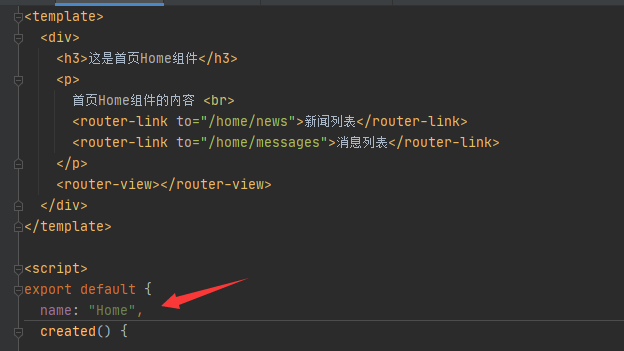
用途主要是为了排除特定不需要缓存的组件,一般需要缓存的不需要填写属性表示了
【Vue】Re18 Router 第五部分(KeepAlive)的更多相关文章
- Vue.js(23)之 keepAlive和activated
阅读: vue中前进刷新.后退缓存用户浏览数据和浏览位置的实践 keep-alive 组件级缓存 keep-alive <keep-alive> 包裹动态组件时,会缓存不活动的组件实例,而 ...
- 三、vue之router
三.vue之router 此时vue的脚手架.创建项目已经完成. ... vue的运行流程 index.html-->main.js-->App.vue-->router/index ...
- Vue中router两种传参方式
Vue中router两种传参方式 1.Vue中router使用query传参 相关Html: <!DOCTYPE html> <html lang="en"> ...
- 四 Vue学习 router学习
index.js: 按需加载组件: const login = r => require.ensure([], () => r(require('@/page/login')), 'log ...
- Vue基础系列(五)——Vue中的指令(中)
写在前面的话: 文章是个人学习过程中的总结,为方便以后回头在学习. 文章中会参考官方文档和其他的一些文章,示例均为亲自编写和实践,若有写的不对的地方欢迎大家和我一起交流. VUE基础系列目录 < ...
- vue 中router.go;router.push和router.replace的区别
vue 中router.go:router.push和router.replace的区别:https://blog.csdn.net/div_ma/article/details/79467165 t ...
- 【vue】 router.beforeEach
import store from '@/store' const Vue = require('vue') const Router = require('vue-router') Vue.use( ...
- vue & this.$router.resolve
vue & this.$router.resolve gotoAutoUpdate (query = {}) { const { href } = this.$router.resolve({ ...
- Vue中router路由的使用、router-link的使用(在项目中的实际运用方式)
文章目录 1.先看router中的index.js文件 2.router-link的使用 3.实现的效果 前提:router已经安装 1.先看router中的index.js文件 import Vue ...
- vue中router使用keep-alive缓存页面的注意事项
<keep-alive exclude="QRCode"> <router-view></router-view> </keep-aliv ...
随机推荐
- js字符串类型
<!DOCTYPE html> <html lang="en"> <head> <meta charset="UTF-8 ...
- ETL工具-nifi干货系列 第五讲 处理器GenerateFlowFile
1.今天我们一起来学习处理器GenerateFlowFile.这个处理器创建带有随机数据或自定义内容的 FlowFiles.GenerateFlowFile 对于负载测试.配置和模拟非常有用.从工具栏 ...
- ETL工具-nifi干货系列 第一讲 揭开nifi神秘面纱
1.nifi简介 Apache NiFi 是基于流程编程概念的数据流系统.它支持强大且可扩展的数据路由.转换和系统中介逻辑的有向图.NiFi具有基于Web的用户界面,用于设计.控制.反馈和监控数据流. ...
- C++中 符号的优先级
符号 运算顺序 :: 从左至右 a++ a-- type() type{} a() a[] . -> 从左至右 ! ~ ++a --a +a -a (type) sizeof &a *a ...
- 像 Google SRE 一样 OnCall
在 Google SRE 的著作<Google运维解密>(原作名:Site Reliability Engineering: How Google Runs Production Syst ...
- mysql8新版本安装注意事项及解决本地系统账户Strart the server和SQLyog客户端连接报 plugin caching_sha2_password could not be loaded
mysql 安装包一路next安装, 到Apply Configuration,卡住在Start the server,原因是mysql8新版本的登录身份不对,需要进入服务,找到mysql80,然后属 ...
- IP数据报分片问题
为什么要分片? 很多时候,由于单个数据太大,超过了MTU的限定值,就要对数据包进行分组,即切割并分别发送. 我们要解决以下几个问题: 1.顺序问题.接收方可以按照原来的顺序重组这些分片,并能知道这些分 ...
- 集成学习与随机森林(四)Boosting与Stacking
Boosting Boosting(原先称为hypothesis boosting),指的是能够将多个弱学习器结合在一起的任何集成方法.对于大部分boosting方法来说,它们常规的做法是:按顺序训练 ...
- Python_9 py文件导入和路径处理
一.查缺补漏 Python中两个值交换可以直接交换如:a,b=b,a 冒泡就是从小到大排序,因为越到后越大 自动导包也适用于自己创建的模块 关于正斜杠和反斜杠https://www.cnblogs.c ...
- 对Transformer的一些理解
在学习Transformer这个模型前对seq2seq架构有个了解时很有必要的 先上图 输入和输出 首先理解模型时第一眼应该理解输入和输出最开始我就非常纠结 有一个Inputs,一个Outputs(s ...