
Navigation and Pathfinding
【Navigation and Pathfinding】
术语:
1)NavMesh
2)NavMesh Agent
3)Off-Mesh Link
4)NavMesh Obstacle
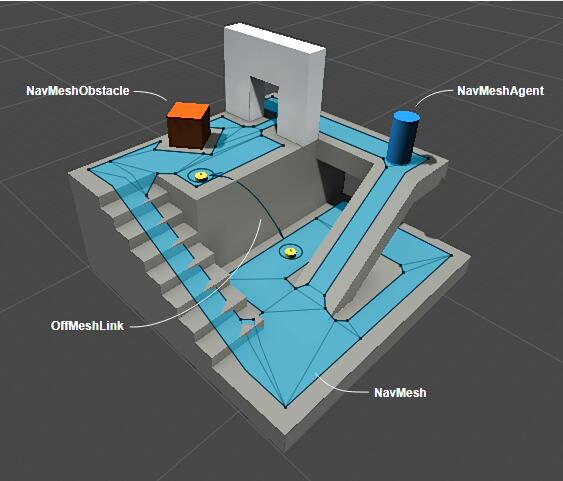
A common algorithm to find the path is A* (pronounced “A star”), which is what Unity uses.
Unity is using reciprocal velocity obstacles (RVO) to predict and prevent collisions.
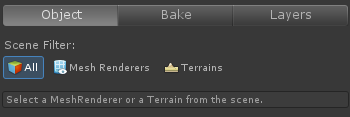
对于开放式场景,轨迹线不适用,NaviMesh此时就派上用场了。Unity的导航系统在已有的Mesh基础上生成一个新的FloorMesh,也叫NaviMesh。通过(menu: Window > Navigation)可以打开Navigation编辑器。
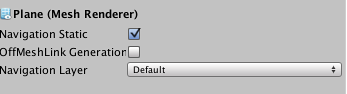
Navigation Static:是否根据此网格生成Navimesh。
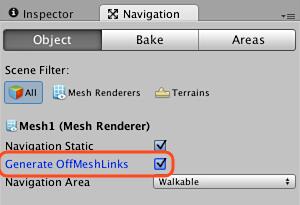
OffMeshLink Generator:是否生成从此网格出发的Link。
Navigation Layer:层。
Bake页中包含更多内容。
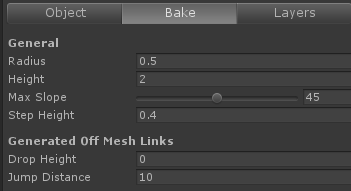
Radius: The Radius determines how close a navigating character can get to a wall and consequently the width of the narrowest gap between two walls that can it can squeeze through.
Height:efers to the height of the “ceiling” above the navmesh surface - an area may not be reachable simply because there is not enough headroom for the character
Max Slope:parameter sets the threshold of steepness where a ramp becomes a wall
Step Height: the maximum height of bump or step in the floor surface that is ignored by the character (any step greater than this height results in a disconnected walkable area rather than a continuation of the same area).
【Off-mesh link】
1、Manually create Off-Mesh Link.
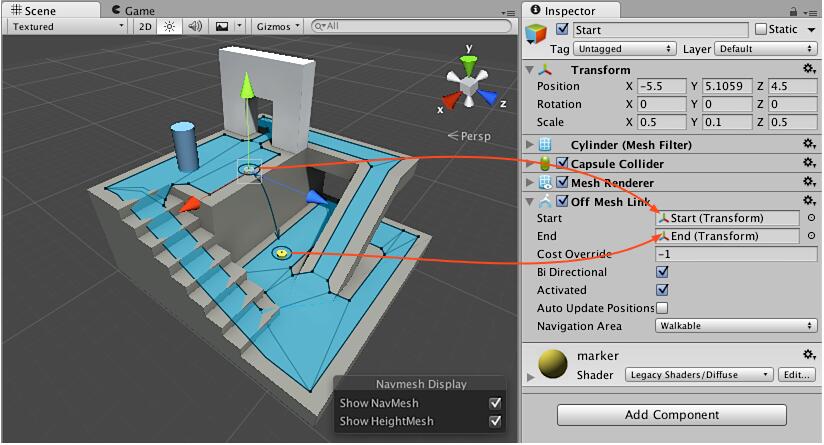
添加Off-mesh Link的步骤:
- First create two cylinders: Game Object > 3D Object > cylinder.
- You can scale the cylinders to (0.1, 0.5, 0.1) to make it easier to work with them.
- Move the first cylinder at the edge of the top platform, close to the NavMesh
surface. - Place the second cylinder on the ground, close to the NavMesh, at the location where the link should land.
- Select the cylinder on the left and add an Off-Mesh Link component to it. Choose Add Component from the inspector and choose Navigation > Off Mesh Link.
- Assign the leftmost cylinder in the Start field and rightmost cylinder in the End field.
参考:https://docs.unity3d.com/Manual/nav-CreateOffMeshLink.html
2、Building Off-Mesh Link Automatically.
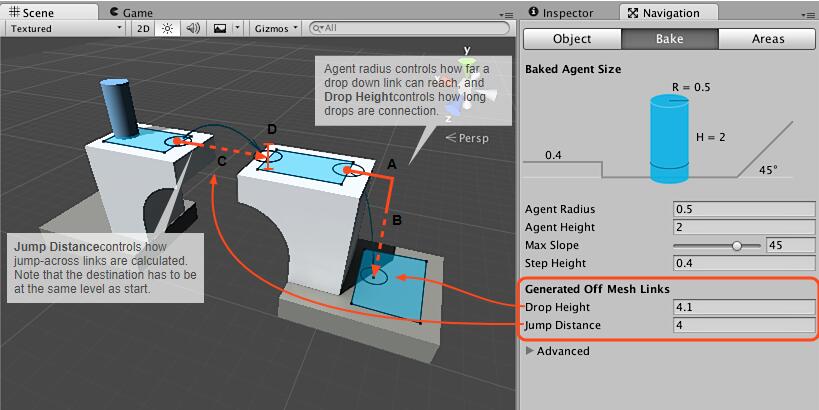
1、Drop-Down link generation is controlled by the Drop Height parameter. The parameter controls what is the highest drop that will be connected, setting the value to 0 will disable the generation.
2、Jump-Across link generation is controlled by the Jump Distance parameter. The parameter controls what is the furthest distance that will be connected. Setting the value to 0 will disable the generation.
参考:https://docs.unity3d.com/Manual/nav-BuildingOffMeshLinksAutomatically.html
【Enabling a Character to Navigate】


更多资料参考:~/Unity/Editor/Data/Documentation/html/en/Manual/Navigation.html
Navigation and Pathfinding的更多相关文章
- CritterAI与Recast Navigation寻路
版权声明:本文为博主吴欣伟原创文章,未经博主允许不得转载. 前言 这篇文章写于去年,由于工作需要,故写出这个研究文档,发现网上有关此寻路库的中文资源十分稀少,故发布出来与诸位共享交流,如文中有不对之处 ...
- Unity 2018 Artificial Intelligence Cookbook Second Edition (Jorge Palacios 著)
https://github.com/PacktPublishing/Unity-2018-Artificial-Intelligence-Cookbook-Second-Edition 1 Beha ...
- Unity. Navigation和寻路
Navigation Static:不会移动.可以用于计算可行走区域.例如:地板.墙.静态障碍物. 将一个物体选为Navigation Static:Navigation窗口-> 勾选项
- MMORPG战斗系统随笔(二)、浅谈场寻路Flow Field PathFinding算法
转载请标明出处http://www.cnblogs.com/zblade/ 今天给大家带来一篇游戏中寻路算法的博客.去年,我加入一款RTS的游戏项目,负责开发其中的战斗系统,战斗系统的相关知识,属于游 ...
- arcgis api for js共享干货系列之二自定义Navigation控件样式风格
arcgis api for js默认的Navigation控件样式风格如下图: 这样的风格不能说不好,各有各的爱好,审美观,这里也不是重点,这里的重点是如何自定义一套自己喜欢的样式风格呢:自己自定义 ...
- The Safe Navigation Operator (&.) in Ruby
The most interesting addition to Ruby 2.3.0 is the Safe Navigation Operator(&.). A similar opera ...
- Unity3D 导航网格自动寻路(Navigation Mesh)
NavMesh(导航网格)是3D游戏世界中用于实现动态物体自动寻路的一种技术,将游戏中复杂的结构组织关系简化为带有一定信息的网格,在这些网格的基础上通过一系列的计算来实现自动寻路..导航时,只需要给导 ...
- ABP理论学习之导航(Navigation)
返回总目录 本篇目录 创建菜单 注册导航提供者 展示菜单 每一个web应用在页面之间都有一些要导航的菜单.ABP提供了公用的基础设施来创建菜单并将菜单展示给用户. 创建菜单 一个应用可能由不同的模块组 ...
- Sharepoint学习笔记—ECM系列—文档列表的Metedata Navigation与Key Filter功能的实现
如果一个文档列表中存放了成百上千的文档,想要快速的找到你想要的还真不是件容易的事,Sharepoint提供了Metedata Navigation与Key Filter功能可以帮助我们快速的过滤和定位 ...
随机推荐
- 简单地为DBNavigator填加Caption
http://bbs.2ccc.com/topic.asp?topicid=346735 http://www.cnblogs.com/GarfieldTom/archive/2010/01/18/1 ...
- jQuery判断checkbox是否选
方法一: if ($("#checkbox-id").get(0).checked) { // do something } 方法二: if($('#checkbox-id').i ...
- URL 生成带文字二维码
<!DOCTYPE html> <html> <head> <title></title> <meta charset="u ...
- python中多进程
多进程 什么是进程 进程:正在进行的一个过程或者说一个任务,而负责执行任务的是CPU. 进程和程序的区别 程序仅仅是一堆代码而已,而进程指的是程序的运行过程. 举例 想象以为有着一手好厨艺的科学家肖亚 ...
- 转:MyISAM 和 InnoDB 讲解
InnoDB和MyISAM是许多人在使用MySQL时最常用的两个表类型,这两个表类型各有优劣,视具体应用而定.基本的差别为:MyISAM类型不支持事务处理等高级处理,而InnoDB类型支持.MyISA ...
- scanf()与gets()的区别
scanf()与gets()的区别 1.scanf()可以同时接受多个字符串,而gets()一次只能接受一个字符串. #include<stdio.h>int main(){ char s ...
- MySQL-with rollup函数运用
如果想在下面这个表下面添加一行 总计 数据行SQL代码怎么实现 并且根据9月金额进行城市降序 总计置于底部呢 MySQL提供了 group by with rollup 函数进行group by 字段 ...
- 2018-2019-2 《网络对抗技术》Exp3免杀原理与实践 20165222
1. 实践内容 1.1 正确使用msf编码器 使用 msfvenom -p windows/meterpreter/reverse_tcp -e x86/shikata_ga_nai -i 7 -b ...
- jQuqery append 和 after 区别
jQuqery append 和 after 区别 append 是在被选元素内的结尾插入内容. 比如以下选中了 ol 元素,使用 append 后会在 <li> List Item 2 ...
- 什么是HBase(五) HBase的运维工具
常用工具 文件修复 hbck 文件查看 hfile WAL查看工具 hlog 压缩测试工具 compressTest(字段前缀编码以及block压缩设置后进行测试) 数据迁移工具copyTable 导 ...