
jQuery中animate与scrollTop、offset().top实例
<!DOCTYPE html>

<html lang="en">

<head>

    <meta charset="UTF-8">

    <meta name="viewport" content="width=device-width, initial-scale=1.0">

    <meta http-equiv="X-UA-Compatible" content="ie=edge">

    <title>scrollTop与offset.top、animate</title>

    <style>

        * {

            margin: 0;

            padding: 0

        }

        body {

            margin: 0 auto;

            max-width: 640px;

            background-color: #fbfbfb;

            padding: 10px;

        }

        .bd {

            height: 1650px;

            overflow: hidden;

        }

        .btn_animate {

            position: absolute;

            width: 120px;

            height: 30px;

            line-height: 30px;

            background-color: rgb(129, 26, 26);

            color: #fff;

            text-align: center;

        }

        .btn_ho {

            position: absolute;

            top: 40px;

            left: 0;

            width: 120px;

            height: 30px;

            line-height: 30px;

            background-color: rebeccapurple;

            border-radius: 5px;

            color: #fff;

            text-align: center;

            margin: 10px 0;

        }

        .btn_go {

            position: absolute;

            left: 0;

            top: 90px;

            height: 30px;

            line-height: 30px;

            width: 150px;

            background-color: plum;

            border-radius: 5px;

            text-align: center;

        }

        .hide {

            position: absolute;

            top: 160px;

            left: 0;

            display: none;

            width: 100px;

            height: 30px;

            background-color: orange;

        }

        .btn_top{ overflow: hidden; height: 30px;line-height: 30px; width: 130px; text-align: center; background-color: navy; border-radius: 5px; color: #fff;}

        .btn_top_r{ overflow: hidden; height: 30px;line-height: 30px; width: 130px; text-align: center; background-color: rgb(11, 104, 84); border-radius: 5px; color: #fff;}

    </style>

</head>

<body>

    <div class="bd">

        <div style="height: 400px; background-color: rgb(33, 107, 172); position: relative;" id="demo">

            <div class="btn_animate" id="btnAnimate">点击向左移动</div>

            <div class="btn_ho" id="btnHo">点击切换</div>

            <div class="hide" id="hide">后显示</div>

            <div class="btn_go" id="go">点击变化</div>

        </div>

        <h2>注意:用animate效果的时候样式一定要定位</h2>

        <div style="height: 500px; background-color: rgb(34, 59, 99)" id="floor"></div>

        <div style="height: 500px; background-color: orangered"></div>

        <div class="btn_top" id="btnTop">scrollTop:top</div>

        <div class="btn_top_r" id="btnTop_r">offset().top</div>

    </div>

    <script src="http://apps.bdimg.com/libs/jquery/1.9.1/jquery.min.js"></script>

    <script>

        $(function () {

            // 让指定元素左右移动

            $("#btnAnimate").on("click", function () {

                $(this).animate({

                    left: '+150px'

                }, "slow");

            });

            //在600毫秒内切换段落的高度和透明度

            $("#btnHo").on("click", function () {

                $("#btnAnimate").animate({

                    height: 'toggle',

                    opacity: 'toggle'

                }, "slow");

            });

            //用500毫秒将段落移到left为50的地方并且完全清晰显示出来(透明度为1)

            $("#go").click(function () {

                $("#hide").animate({

                    width: "40%",

                    height: "100%",

                    fontSize: "20px",

                    left: 50,

                    opacity: 'show'

                }, 500);

            });

            $("#btnTop").on("click",function(){

                //html,body是兼容Firfox与Chrome

                $("html,body").animate({"scrollTop":top})

            })

            $("#btnTop_r").on("click",function(){

                $("html,body").scrollTop($("#floor").offset().top - 50)

            })

        });

    </script>

</body>

</html>
效果图:
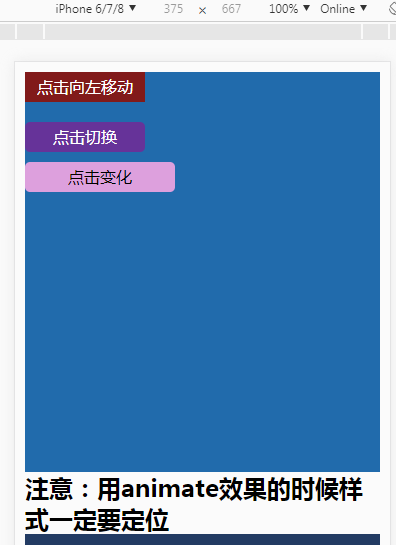
jQuery中animate与scrollTop、offset().top实例的更多相关文章
- jQuery中animate()的方法以及$("body").animate({"scrollTop":top})不被Firefox支持问题的解决
转载请注明出处:http://blog.csdn.net/dongdong9223/article/details/50846678 本文出自[我是干勾鱼的博客] jQuery中animate()的方 ...
- jQuery中animate()方法用法实例
本文实例讲述了jQuery中animate()方法用法.分享给大家供大家参考.具体分析如下: 此方法用于创建自定义动画,并且能够规定动画执行时长.擦除效果.动画完成后还可以地触发一个回调函数. ani ...
- jQuery中animate动画第二次点击事件没反应
jQuery中animate动画第二次点击事件没反应 用animate做点击翻页动画时发现第二次点击事件动画没反应,而第一次点击有动画效果,代码如下: 复制代码 代码如下: $(".page ...
- jQuery中Animate进阶用法(一)
jQuery中animate的用法你了解多少呢?如果仅仅是简单的移动位置,显示隐藏,哦!天哪你在浪费资源!因为animate太强大了,你可以有很多意想不到的用法!让我们一起研究一下吧~~ 首先要了解j ...
- jQuery动画效果animate和scrollTop结合使用实例
CSS属性值是逐渐改变的,这样就可以创建动画效果.只有数字值可创建动画(比如 "margin:30px").字符串值无法创建动画(比如 "background-color ...
- jquery中attr()与prop()函数用法实例详解(附用法区别)
本文实例讲述了jQuery中attr()与prop()函数用法.分享给大家供大家参考,具体如下: 一.jQuery的attr()方法 jquery中用attr()方法来获取和设置元素属性,attr是a ...
- scrollTop,offset().top
1.scrollTop是指滚动条滚动的距离 如果没有出现滚动条,则距离为0 css: <style type="text/css"> *{ margin: 0; pad ...
- jQuery中animate()方法以及$('body').animate({"scrollTop":top})不被Firefox支持问题的解决
$("body").animate({"scrollTop":top}): 只被chrome支持,而不被Firefox支持 $("html" ...
- jQuery中Animate进阶用法(二)
Step Type: Function( Number now, Tween tween )每个动画元素的每个动画属性将调用的函数.这个函数为修改Tween 对象提供了一个机会来改变设置中得属性值. ...
随机推荐
- 【python】 time模块和datetime模块详解 【转】
一.time模块 time模块中时间表现的格式主要有三种: a.timestamp时间戳,时间戳表示的是从1970年1月1日00:00:00开始按秒计算的偏移量 b.struct_time时间元组,共 ...
- MySQL 触发器示例
简介: MySQL 触发器 这次实验是在一台 MySQL Slave 上进行的,事实证明:从库添加数据库.表.插入.删除数据等,不会导致主从失败. 一.创建实验数据库.表 mysql > cre ...
- Excel VBA入门(八)单元格边框
本文基于以下文件 http://pan.baidu.com/s/1nvJtsu9 (部分)内容预览: 1. 边框样式 Sub cell_format() Dim sht As Worksheet Di ...
- JS 语法大全
来源http://blog.csdn.net/newegg2009/article/details/6230582 js语法2008年03月19日 星期三 11:14一.js的数据类型和变量 Java ...
- jmeter 使用cookie管理器
1.jmeter.properties 中 将CookieManager.save.cookies 设置为true 2.添加一个cookie管理器,什么都不用填 3.把需要用到的请求放到登录后面.后 ...
- Spring boot 、mybatis 和 swagger 整合
文件路径 添加依赖 <?xml version="1.0" encoding="UTF-8"?> <project xmlns="h ...
- c#解决Nullable类型的转换 (包含DataContract的序列化和反序列化以及 该例子应用在反射属性setvalue的时候有用)
using System;using System.Collections.Generic;using System.IO;using System.Linq;using System.Reflect ...
- Linux gcc支持的语法 __attribute__ 属性设置
__attribute__实际上是gcc专有的一种语法,是用来设置函数属性.变量属性.类属性的 语法:之前在C中的结构体对齐中提到过,当时是用来告诉编译器这个结构体的对齐方式 ,其实他还有很多种用法, ...
- Selenium Webdriver定位元素的几种方式
原文:http://www.cnblogs.com/tobecrazy/p/4570494.html 工作中使用到记录一下. 主要有: 上传 alter dialog prompt dialog co ...
- 软件工程:java实现wordcount基本功能
github链接:https://github.com/Nancy0611/wc 一:项目相关要求 该项目能统计文本文件的字符数.单词数和行数.这个项目要求写一个命令行程序,模仿已有wc.exe 的功 ...