
Spring boot 、mybatis 和 swagger 整合
文件路径
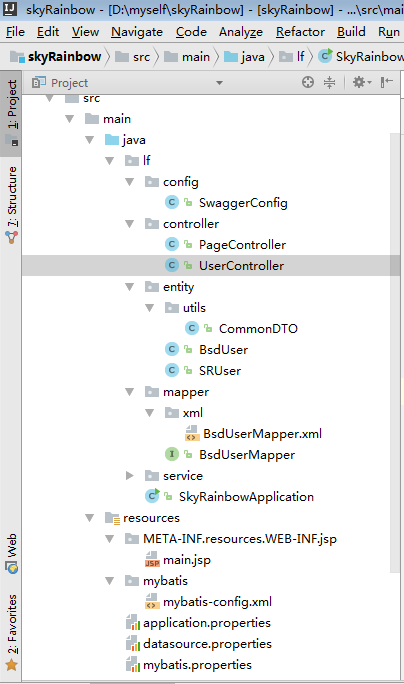
添加依赖
<?xml version="1.0" encoding="UTF-8"?>

<project xmlns="http://maven.apache.org/POM/4.0.0"

         xmlns:xsi="http://www.w3.org/2001/XMLSchema-instance"

         xsi:schemaLocation="http://maven.apache.org/POM/4.0.0 http://maven.apache.org/xsd/maven-4.0.0.xsd">

    <modelVersion>4.0.0</modelVersion>

    <groupId>wonder</groupId>

    <artifactId>skyRainbow</artifactId>

    <version>1.0-SNAPSHOT</version>

    <properties>

        <project.build.sourceEncoding>UTF-8</project.build.sourceEncoding>

        <project.reporting.outputEncoding>UTF-8</project.reporting.outputEncoding>

        <java.version>1.8</java.version>

    </properties>

    <parent>

        <groupId>org.springframework.boot</groupId>

        <artifactId>spring-boot-starter-parent</artifactId>

        <version>1.5.9.RELEASE</version>

        <relativePath/> <!-- lookup parent from repository -->

    </parent>

    <dependencies>

        <!--spring boot 的依赖 START-->

        <dependency>

            <groupId>org.springframework.boot</groupId>

            <artifactId>spring-boot-starter</artifactId>

        </dependency>

        <dependency>

            <groupId>org.springframework.boot</groupId>

            <artifactId>spring-boot-starter-test</artifactId>

            <scope>test</scope>

        </dependency>

        <dependency>

            <groupId>org.springframework.boot</groupId>

            <artifactId>spring-boot-starter-web</artifactId>

        </dependency>

        <!--spring boot 的依赖 END-->

        <!--mybatis 的依赖 START-->

        <dependency>

            <groupId>org.mybatis.spring.boot</groupId>

            <artifactId>mybatis-spring-boot-starter</artifactId>

            <version>1.1.1</version>

        </dependency>

        <!--mybatis 的依赖 END-->

        <!--mysql 的依赖 START-->

        <dependency>

            <groupId>mysql</groupId>

            <artifactId>mysql-connector-java</artifactId>

        </dependency>

        <!--mysql 的依赖 END-->

        <!--jsp 的依赖 START-->

        <dependency>

            <groupId>org.apache.tomcat.embed</groupId>

            <artifactId>tomcat-embed-jasper</artifactId>

        </dependency>

        <dependency>

            <groupId>javax.servlet</groupId>

            <artifactId>jstl</artifactId>

        </dependency>

        <!--jsp 的依赖 END-->

        <!--swagger 的依赖 START-->

        <dependency>

            <groupId>io.springfox</groupId>

            <artifactId>springfox-swagger2</artifactId>

            <version>2.2.2</version>

        </dependency>

        <dependency>

            <groupId>io.springfox</groupId>

            <artifactId>springfox-swagger-ui</artifactId>

            <version>2.2.2</version>

        </dependency>

        <!--swagger 的依赖 END-->

    </dependencies>

    <build>

        <!--配置文件读取路径-->

        <resources>

            <resource>

                <directory>src/main/java</directory>

                <includes>

                    <include>**/*.xml</include>
<include>**/*.properties</include>
                </includes>

            </resource>

        </resources>

        <plugins>

            <plugin>

                <groupId>org.springframework.boot</groupId>

                <artifactId>spring-boot-maven-plugin</artifactId>

            </plugin>

        </plugins>

    </build>

</project>
添加spring boot 启动文件
package lf;

import org.mybatis.spring.annotation.MapperScan;

import org.springframework.boot.SpringApplication;

import org.springframework.boot.autoconfigure.SpringBootApplication;

import org.springframework.context.annotation.PropertySource;

@SpringBootApplication

@MapperScan("lf.mapper") // mapper层的路径

@PropertySource({"classpath:mybatis.properties",

                 "classpath:datasource.properties"})// 读取.properties 文件路径

public class SkyRainbowApplication {

    public static void main(String[] args) {

        /**

         * Spring boot 程序入口

         */

        SpringApplication.run(SkyRainbowApplication.class,args);

   }

}
添加swagger 启动文件
package lf.config;

import org.springframework.context.annotation.Bean;

import org.springframework.context.annotation.Configuration;

import org.springframework.web.context.request.async.DeferredResult;

import springfox.documentation.service.ApiInfo;

import springfox.documentation.spi.DocumentationType;

import springfox.documentation.spring.web.plugins.Docket;

import springfox.documentation.swagger2.annotations.EnableSwagger2;

import static com.google.common.base.Predicates.or;

import static springfox.documentation.builders.PathSelectors.regex;

@Configuration

@EnableSwagger2

public class SwaggerConfig {

    @Bean

    public Docket api_lf(){

        return  new Docket(DocumentationType.SWAGGER_2)

                .groupName("api_lf")

                .genericModelSubstitutes(DeferredResult.class)

                .useDefaultResponseMessages(false)

                .forCodeGeneration(false)

                .pathMapping("/")

                .select()

                .paths(or(regex("/lf/.*")))

                .build()

                .apiInfo(apiInfo());

    }

    /**

     *  构建api文档详细信息

     */

    private ApiInfo apiInfo() {

        ApiInfo apiInfo = new ApiInfo(

                "甘雨路 API",// 标题

                "API 描述说明",//描述

                "1.0",//版本

                "NO terms of service",

                "lf@qq.com",// 创建人

                "The Apache License, Version 2.0",

                "http://www.apache.org/licenses/LICENSE-2.0.html"

        );

        return apiInfo;

    }

}
添加控制层
package lf.controller;

import io.swagger.annotations.Api;

import io.swagger.annotations.ApiParam;

import lf.entity.BsdUser;

import lf.service.BsdUserSerive;

import org.springframework.stereotype.Controller;

import org.springframework.ui.Model;

import org.springframework.web.bind.annotation.RequestMapping;

import org.springframework.web.bind.annotation.RequestMethod;

import org.springframework.web.bind.annotation.RequestParam;

import javax.annotation.Resource;

import java.util.Date;

@Controller

@RequestMapping(value="${modulePath}/page")

@Api(description = "页面跳转控制器")

public class PageController {

    @Resource

    private BsdUserSerive userSerive;

    /**

     * 进入公司主页

     */

    @RequestMapping(value = "/company",method = RequestMethod.GET)

    public String gotoCompanyPage(Model model,@RequestParam @ApiParam("用户id") Long id){

        BsdUser user = userSerive.getUserById(id);

        model.addAttribute("time",new Date());

        model.addAttribute("loginName",user.getName());

        return "main";

    }

}
package lf.controller;

import io.swagger.annotations.*;

import lf.entity.BsdUser;

import lf.entity.utils.CommonDTO;

import lf.service.BsdUserSerive;

import org.springframework.stereotype.Controller;

import org.springframework.web.bind.annotation.RequestMapping;

import org.springframework.web.bind.annotation.RequestMethod;

import org.springframework.web.bind.annotation.RequestParam;

import org.springframework.web.bind.annotation.ResponseBody;

import javax.annotation.Resource;

@Api(description = "用户控制器")//swagger注解用于类

@Controller // 控制器注解

@RequestMapping(value="${modulePath}/user")

public class UserController {

    @Resource

    private BsdUserSerive userSerive;

    @ResponseBody

    @RequestMapping(value = "/info",method = RequestMethod.GET)

    public CommonDTO<BsdUser> getUserbyId(@RequestParam @ApiParam("用户id") Long id){

        CommonDTO<BsdUser> detailDTO = new CommonDTO<>(0,1);

        try {

            BsdUser user = userSerive.getUserById(id);

            detailDTO.setData(user);

        } catch (Exception e) {

            e.printStackTrace();

            detailDTO.setStatus(1);

            detailDTO.setCode(400);

            detailDTO.setMsg("获取用户信息异常:"+e.getMessage());

        }

        return detailDTO;

    }

}
添加实体类
package lf.entity.utils;

import io.swagger.annotations.ApiModel;

import io.swagger.annotations.ApiModelProperty;

import java.util.Map;

@ApiModel(description = "详情DTO")

public class CommonDTO<T>{

    @ApiModelProperty(value = "提示信息")

    private String msg;

    @ApiModelProperty(value = "0 代表无错误 1代表有错误")

    private Integer status;

    @ApiModelProperty(value = "总记录")

    private Integer total;

    @ApiModelProperty(value = "业务数据")

    private T data;

    @ApiModelProperty(value = "200 代表无错误 400代表有错误--->加入这个字段是原生需求")

    private Integer code;

    @ApiModelProperty(value = "当前页码")

    private Integer pageNo = 1;

    @ApiModelProperty(value = "当前页码,默认:10")

    private Integer pageSize = Integer.valueOf(10); // 页面大小,设置为“-1”表示不进行分页(分页无效)

    @ApiModelProperty(value = "总记录数")

    private long totalSize;// 总记录数,设置为“-1”表示不查询总数

    private Map<String,Object> DataMap;

    public CommonDTO(Integer status) {

        if (status == 0){

            this.status = status;

            this.code = 200;

            this.msg = "操作成功";

        }

        this.data = null;

    }

    public CommonDTO(Integer status, Integer total) {

        if (status == 0){

            this.status = status;

            this.code = 200;

            this.msg = "操作成功";

        }

        this.data = null;

        this.total = total;

    }

    public Map<String, Object> getDataMap() {

        return DataMap;

    }

    public void setDataMap(Map<String, Object> dataMap) {

        DataMap = dataMap;

    }

    public Integer getCode() {return code;}

    public void setCode(Integer code) {this.code = code;}

    public String getMsg() {

        return msg;

    }

    public void setMsg(String msg) {

        this.msg = msg;

    }

    public Integer getStatus() {

        return status;

    }

    public void setStatus(Integer status) {

        this.status = status;

    }

    public Integer getTotal() {

        return total;

    }

    public void setTotal(Integer total) {

        this.total = total;

    }

    public T getData() {

        return data;

    }

    public void setData(T data) {

        this.data = data;

    }

    public Integer getPageNo() {

        return (pageNo!=null&&pageNo>0)?pageNo:-1;

    }

    public void setPageNo(Integer pageNo) {

        this.pageNo = pageNo;

    }

    public Integer getPageSize() {

        return (pageSize!=null&&pageSize>0)?pageSize:10;

    }

    public void setPageSize(Integer pageSize) {

        this.pageSize = pageSize;

    }

    /**

     * 获取设置总数

     * @return

     */

    public long getTotalSize() {

        return totalSize;

    }

    /**

     * 设置数据总数

     * @param count

     */

    public void setTotalSize(long totalSize) {

        this.totalSize = totalSize;

        if (pageSize >= totalSize){

            pageNo = 1;

        }

    }

    @Override

    public String toString() {

        return "CommonDTO{" +

                "msg='" + msg + '\'' +

                ", status=" + status +

                ", total=" + total +

                ", data=" + data +

                '}';

    }

}
package lf.entity;

import com.fasterxml.jackson.annotation.JsonFormat;

import io.swagger.annotations.ApiModel;

import io.swagger.annotations.ApiModelProperty;

import java.io.Serializable;

import java.math.BigDecimal;

import java.util.Date;

@ApiModel(description = "用户实体")

public class BsdUser implements Serializable {

    @ApiModelProperty("主键")

    private Long id;

    @ApiModelProperty("组织id")

    private Long orgId;

    @ApiModelProperty("用户类型(0,品牌商1,服务商2,零售商,3客服)")

    private Integer userType;

    @ApiModelProperty("登录名")

    private String loginName;

    @ApiModelProperty("电话")

    private String phone;

    @ApiModelProperty("姓名")

    private String name;

    @ApiModelProperty("简称")

    private String shortName;

    @ApiModelProperty("密码")

    private String password;

    @ApiModelProperty("联系人")

    private String contactUserName;

    @ApiModelProperty("地址")

    private String address;

    @ApiModelProperty("经度")

    private BigDecimal longitude;

    @ApiModelProperty("纬度")

    private BigDecimal latitude;

    @ApiModelProperty("级别(0,普通会员,1,一级会员,2,二级会员,3三级会员,4,四级会员,5,五级会员)")

    private Integer level;

    @ApiModelProperty("状态(0,无效,1有效,2未审核,3审核未通过)")

    private Integer state;

    @ApiModelProperty("银行卡")

    private String bankCard;

    @ApiModelProperty("总积分")

    private Long totalPoints;

    @ApiModelProperty("上级组织id")

    private Long superiorId;

    @ApiModelProperty("创建人id")

    private Long createdBy;

    @ApiModelProperty("最后更新人")

    private Long lastUpdatedBy;

    @ApiModelProperty("创建日期")

    @JsonFormat(pattern="yyyy-MM-dd HH:mm:ss",timezone = "GMT+8")

    private Date createdDate;

    @JsonFormat(pattern="yyyy-MM-dd HH:mm:ss",timezone = "GMT+8")

    @ApiModelProperty("最后更新日期")

    private Date lastUpdatedDate;

    @ApiModelProperty("软删除标志")

    private Integer removeFlag;

    @ApiModelProperty("图片地址")

    private String imgUrl;

    @ApiModelProperty("消费总金额")

    private BigDecimal totalPaymentAmount;

    @ApiModelProperty("佣金")

    private BigDecimal commission;

    @ApiModelProperty("运费")

    private BigDecimal freight;

    @ApiModelProperty("编号")

    private String code;

    @ApiModelProperty("已经支付定金")

    private Long depositPaid;

    @ApiModelProperty("注册信息附件信息传")

    private String registerAttachmentUrl;

    @ApiModelProperty("支付密码")

    private String payPassWord;

    @ApiModelProperty("钱包余额")

    private BigDecimal balance;

    @ApiModelProperty("现金卷余额")

    private BigDecimal cashRoll;

    private static final long serialVersionUID = 1L;

    public Long getId() {

        return id;

    }

    public void setId(Long id) {

        this.id = id;

    }

    public Long getOrgId() {

        return orgId;

    }

    public void setOrgId(Long orgId) {

        this.orgId = orgId;

    }

    public Integer getUserType() {

        return userType;

    }

    public void setUserType(Integer userType) {

        this.userType = userType;

    }

    public String getCode() {

        return code;

    }

    public void setCode(String code) {

        this.code = code == null ? null : code.trim();

    }

    public String getLoginName() {

        return loginName;

    }

    public void setLoginName(String loginName) {

        this.loginName = loginName == null ? null : loginName.trim();

    }

    public String getPhone() {

        return phone;

    }

    public void setPhone(String phone) {

        this.phone = phone == null ? null : phone.trim();

    }

    public String getShortName() {

        return shortName;

    }

    public void setShortName(String shortName) {

        this.shortName = shortName == null ? null : shortName.trim();

    }

    public String getName() {

        return name;

    }

    public void setName(String name) {

        this.name = name == null ? null : name.trim();

    }

    public String getPassword() {

        return password;

    }

    public void setPassword(String password) {

        this.password = password == null ? null : password.trim();

    }

    public String getContactUserName() {

        return contactUserName;

    }

    public void setContactUserName(String contactUserName) {

        this.contactUserName = contactUserName == null ? null : contactUserName.trim();

    }

    public String getAddress() {

        return address;

    }

    public void setAddress(String address) {

        this.address = address == null ? null : address.trim();

    }

    public BigDecimal getLongitude() {

        return longitude;

    }

    public void setLongitude(BigDecimal longitude) {

        this.longitude = longitude;

    }

    public String getRegisterAttachmentUrl() {

        return registerAttachmentUrl;

    }

    public void setRegisterAttachmentUrl(String registerAttachmentUrl) {

        this.registerAttachmentUrl = registerAttachmentUrl == null ? null : registerAttachmentUrl.trim();

    }

    public BigDecimal getLatitude() {

        return latitude;

    }

    public void setLatitude(BigDecimal latitude) {

        this.latitude = latitude;

    }

    public Integer getLevel() {

        return level;

    }

    public void setLevel(Integer level) {

        this.level = level;

    }

    public String getImgUrl() {

        return imgUrl;

    }

    public void setImgUrl(String imgUrl) {

        this.imgUrl = imgUrl == null ? null : imgUrl.trim();

    }

    public Integer getState() {

        return state;

    }

    public void setState(Integer state) {

        this.state = state;

    }

    public String getBankCard() {

        return bankCard;

    }

    public void setBankCard(String bankCard) {

        this.bankCard = bankCard == null ? null : bankCard.trim();

    }

    public BigDecimal getTotalPaymentAmount() {

        return totalPaymentAmount;

    }

    public void setTotalPaymentAmount(BigDecimal totalPaymentAmount) {

        this.totalPaymentAmount = totalPaymentAmount;

    }

    public Long getTotalPoints() {

        return totalPoints;

    }

    public void setTotalPoints(Long totalPoints) {

        this.totalPoints = totalPoints;

    }

    public Long getSuperiorId() {

        return superiorId;

    }

    public void setSuperiorId(Long superiorId) {

        this.superiorId = superiorId;

    }

    public BigDecimal getCommission() {

        return commission;

    }

    public void setCommission(BigDecimal commission) {

        this.commission = commission;

    }

    public BigDecimal getFreight() {

        return freight;

    }

    public void setFreight(BigDecimal freight) {

        this.freight = freight;

    }

    public Long getDepositPaid() {

        return depositPaid;

    }

    public void setDepositPaid(Long depositPaid) {

        this.depositPaid = depositPaid;

    }

    public String getPayPassWord() {

        return payPassWord;

    }

    public void setPayPassWord(String payPassWord) {

        this.payPassWord = payPassWord == null ? null : payPassWord.trim();

    }

    public BigDecimal getBalance() {

        return balance;

    }

    public void setBalance(BigDecimal balance) {

        this.balance = balance;

    }

    public BigDecimal getCashRoll() {

        return cashRoll;

    }

    public void setCashRoll(BigDecimal cashRoll) {

        this.cashRoll = cashRoll;

    }

    public Long getCreatedBy() {

        return createdBy;

    }

    public void setCreatedBy(Long createdBy) {

        this.createdBy = createdBy;

    }

    public Date getCreatedDate() {

        return createdDate;

    }

    public void setCreatedDate(Date createdDate) {

        this.createdDate = createdDate;

    }

    public Long getLastUpdatedBy() {

        return lastUpdatedBy;

    }

    public void setLastUpdatedBy(Long lastUpdatedBy) {

        this.lastUpdatedBy = lastUpdatedBy;

    }

    public Date getLastUpdatedDate() {

        return lastUpdatedDate;

    }

    public void setLastUpdatedDate(Date lastUpdatedDate) {

        this.lastUpdatedDate = lastUpdatedDate;

    }

    public Integer getRemoveFlag() {

        return removeFlag;

    }

    public void setRemoveFlag(Integer removeFlag) {

        this.removeFlag = removeFlag;

    }

}
添加service层
package lf.service;

import lf.entity.BsdUser;

public interface BsdUserSerive {

    /**

     * 根据用户id获取用户

     * @param id

     * @return

     */

    public BsdUser getUserById(Long id);

}
package lf.service.impl;

import lf.entity.BsdUser;

import lf.mapper.BsdUserMapper;

import lf.service.BsdUserSerive;

import org.springframework.beans.factory.annotation.Autowired;

import org.springframework.stereotype.Service;

import javax.annotation.Resource;

@Service

public class BsdUserSeriveImpl implements BsdUserSerive{

    @Autowired

    private BsdUserMapper userMapper;

    /**

     * 根据用户id获取用户信息

     * @param id

     * @return

     */

    @Override

    public BsdUser getUserById(Long id) {

        return userMapper.getUserById(id);

    }

}
添加mapper层
package lf.mapper;

import lf.entity.BsdUser;

import org.mapstruct.Mapper;

import java.math.BigDecimal;

import java.util.List;

import java.util.Map;

public interface BsdUserMapper{

    /**

     * 根据用户id获取用户信息

     * @param id

     * @return

     */

    public BsdUser getUserById(Long id);

}
添加mapper的xml文件
<?xml version="1.0" encoding="UTF-8"?>

<!DOCTYPE mapper PUBLIC "-//mybatis.org//DTD Mapper 3.0//EN"

        "http://mybatis.org/dtd/mybatis-3-mapper.dtd">

<mapper namespace="lf.mapper.BsdUserMapper">

  <resultMap id="BsdUserResultMap" type="lf.entity.BsdUser">

    <id column="id" jdbcType="BIGINT" property="id" />

    <result column="org_id" jdbcType="BIGINT" property="orgId" />

    <result column="user_type" jdbcType="INTEGER" property="userType" />

    <result column="code" jdbcType="VARCHAR" property="code" />

    <result column="login_name" jdbcType="VARCHAR" property="loginName" />

    <result column="phone" jdbcType="VARCHAR" property="phone" />

    <result column="name" jdbcType="VARCHAR" property="name" />

    <result column="short_name" property="shortName" jdbcType="VARCHAR" />

    <result column="register_attachment_url" property="registerAttachmentUrl" jdbcType="VARCHAR" />

    <result column="password" jdbcType="VARCHAR" property="password" />

    <result column="contact_user_name" jdbcType="VARCHAR" property="contactUserName" />

    <result column="address" jdbcType="VARCHAR" property="address" />

    <result column="longitude" jdbcType="DECIMAL" property="longitude" />

    <result column="latitude" jdbcType="DECIMAL" property="latitude" />

    <result column="level" jdbcType="INTEGER" property="level" />

    <result column="img_url" jdbcType="VARCHAR" property="imgUrl" />

    <result column="state" jdbcType="INTEGER" property="state" />

    <result column="bank_card" jdbcType="VARCHAR" property="bankCard" />

    <result column="total_payment_amount" jdbcType="DECIMAL" property="totalPaymentAmount" />

    <result column="commission" jdbcType="DECIMAL" property="commission" />

    <result column="freight" jdbcType="DECIMAL" property="freight" />

    <result column="total_points" jdbcType="BIGINT" property="totalPoints" />

    <result column="superior_id" jdbcType="BIGINT" property="superiorId" />

    <result column="created_by" jdbcType="BIGINT" property="createdBy" />

    <result column="created_date" jdbcType="TIMESTAMP" property="createdDate" />

    <result column="last_updated_by" jdbcType="BIGINT" property="lastUpdatedBy" />

    <result column="last_updated_date" jdbcType="TIMESTAMP" property="lastUpdatedDate" />

    <result column="remove_flag" jdbcType="INTEGER" property="removeFlag" />

    <result column="deposit_paid" jdbcType="DECIMAL" property="depositPaid" />

    <result column="pay_pass_word" jdbcType="VARCHAR" property="payPassWord" />

    <result column="balance" jdbcType="DECIMAL" property="balance" />

    <result column="cash_roll" jdbcType="DECIMAL" property="cashRoll" />

  </resultMap>

  <sql id="BsdUser_Column_List">

    id, org_id, user_type, code, login_name, phone, name,short_name,register_attachment_url,password, contact_user_name,

    address, longitude, latitude, level, img_url, state, bank_card, total_payment_amount,commission,freight,

    total_points, superior_id, created_by, created_date, last_updated_by, last_updated_date,

    remove_flag, deposit_paid, pay_pass_word, balance, cash_roll

  </sql>

  <select id="selectByPrimaryKey" parameterType="java.lang.Long" resultMap="BsdUserResultMap">

    select

    <include refid="BsdUser_Column_List" />

    from bsd_user

    where id = #{id}

  </select>

  <select id="getUserById" parameterType="java.lang.Long" resultMap="BsdUserResultMap">

    select

    <include refid="BsdUser_Column_List" />

    from bsd_user

    where id = #{id}

  </select>

</mapper>
添加jsp(如果工具是idea,jsp路径如为:/src/main/resources/META-INF/resources/WEB-INF/jsp;如果eclipse、myEclipse工具,放在在 src/main 下面创建 webapp/WEB-INF/jsp 目录用来存放我们的jsp页面)
<%@ page contentType="text/html;charset=UTF-8" language="java" %>

<html>

<head>

    <title>主页</title>

</head>

<body>

    <h1>欢迎登陆甘雨路主页</h1>

    <div>登陆时间:${time}</div>

    <div>登陆人:${loginName}</div>

</body>

</html>
添加mybatis配置
<?xml version="1.0" encoding="UTF-8" ?>

<!DOCTYPE configuration PUBLIC "-//mybatis.org//DTD Config 3.0//EN" "http://mybatis.org/dtd/mybatis-3-config.dtd">

<configuration>

    <typeAliases>

        <typeAlias alias="Integer" type="java.lang.Integer" />

        <typeAlias alias="Long" type="java.lang.Long" />

        <typeAlias alias="HashMap" type="java.util.HashMap" />

        <typeAlias alias="LinkedHashMap" type="java.util.LinkedHashMap" />

        <typeAlias alias="ArrayList" type="java.util.ArrayList" />

        <typeAlias alias="LinkedList" type="java.util.LinkedList" />

    </typeAliases>

</configuration>
添加application.properties文件(基本配置)
# 页面默认前缀目录

spring.mvc.view.prefix=/WEB-INF/jsp/

# 响应页面默认后缀

spring.mvc.view.suffix=.jsp

#swagger

modulePath=/lf
添加datasource.properties文件(数据源配置)
#数据源配置

spring.datasource.driverClassName = com.mysql.jdbc.Driver

spring.datasource.url = jdbc:mysql://localhost:3306/bsdmxm?useUnicode=true&characterEncoding=utf8

spring.datasource.username = bs

spring.datasource.password = bs7
添加mybatis.properties文件(mybatis配置)
#mybatis 配置

mybatis.config-locations=classpath:mybatis/mybatis-config.xml

mybatis.mapper-locations=classpath:lf/mapper/xml/*.xml

mybatis.type-aliases-package=lf.entity
然后启动程序,在浏览器输入http://localhost:8080/swagger-ui.html 可查看相关接口

然后启动程序,在浏览器输入http://localhost:8080/lf/page/company?id=52 即可
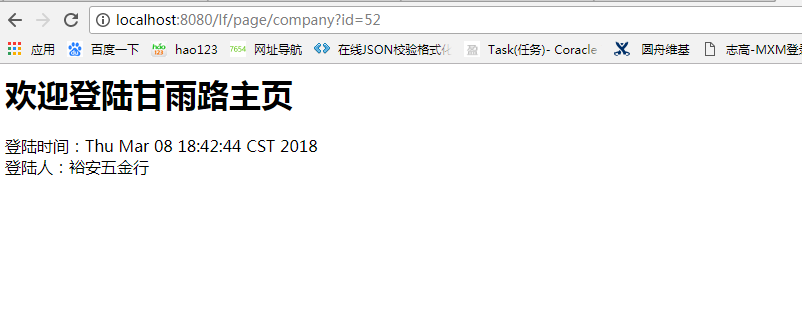
然后启动程序,在浏览器输入http://localhost:8080/lf/user/info?id=51 即可

Spring boot 、mybatis 和 swagger 整合的更多相关文章
- Spring boot Mybatis 整合(完整版)
个人开源项目 springboot+mybatis+thymeleaf+docker构建的个人站点开源项目(集成了个人主页.个人作品.个人博客) 朋友自制的springboot接口文档组件swagge ...
- Spring boot Mybatis 整合
PS: 参考博客 PS: spring boot配置mybatis和事务管理 PS: Spring boot Mybatis 整合(完整版) 这篇博客里用到了怎样 生成 mybatis 插件来写程 ...
- Spring Boot + MyBatis + Druid + Redis + Thymeleaf 整合小结
Spring Boot + MyBatis + Druid + Redis + Thymeleaf 整合小结 这两天闲着没事想利用**Spring Boot**加上阿里的开源数据连接池**Druid* ...
- spring boot+mybatis+swagger搭建
环境概述 使用的开发工具:idea 2018 3.4 环境:jdk1.8 数据库:MariaDB (10.2.21) 包管理:Maven 3.5 Web容器:Tomcat 8.0 开发机系统:Wind ...
- Spring boot Mybatis整合构建Rest服务(超细版)
Springboot+ Mybatis+MySql整合构建Rest服务(涵盖增.删.改.查) 1.概要 1.1 为什么要使用Spring boot? 1.1.1 简单方便.配置少.整合了大多数框架 ...
- Spring boot Mybatis 整合(注解版)
之前写过一篇关于springboot 与 mybatis整合的博文,使用了一段时间spring-data-jpa,发现那种方式真的是太爽了,mybatis的xml的映射配置总觉得有点麻烦.接口定义和映 ...
- Spring Boot入门教程2-1、使用Spring Boot+MyBatis访问数据库(CURD)注解版
一.前言 什么是MyBatis?MyBatis是目前Java平台最为流行的ORM框架https://baike.baidu.com/item/MyBatis/2824918 本篇开发环境1.操作系统: ...
- Spring Boot + Mybatis 配置多数据源
Spring Boot + Mybatis 配置多数据源 Mybatis拦截器,字段名大写转小写 package com.sgcc.tysj.s.common.mybatis; import java ...
- spring boot + mybatis + layui + shiro后台权限管理系统
后台管理系统 版本更新 后续版本更新内容 链接入口: springboot + shiro之登录人数限制.登录判断重定向.session时间设置:https://blog.51cto.com/wyai ...
- Spring Boot 学习笔记(六) 整合 RESTful 参数传递
Spring Boot 学习笔记 源码地址 Spring Boot 学习笔记(一) hello world Spring Boot 学习笔记(二) 整合 log4j2 Spring Boot 学习笔记 ...
随机推荐
- 第9课 函数重载分析(下)与C、C++相互调用
重载与指针 下面的函数指针将保存哪个函数的地址: 在给p赋值的时候,我们使用了func,但是这里并没有指明参数,编译器是怎么知道这个func函数指的是第一个func函数呢? 函数重载遇上指针: 将重载 ...
- SpringBoot实现网站注册,邮件激活码激活功能
项目源码:https://gitee.com/smfx1314/springbootemail 上一篇文章已经讲到如何springboot如何实现邮件的发送,趁热打铁,这篇文章实现如下功能. 很多网站 ...
- SqlServer高级特性--游标
游标 用途:在数据很多的时候,如果在java代码中进行循环之后再进行更新数据,会造成频繁的连接数据库,耗费性能,所以就可以使用到游标 作用:查询出来的集合直接在SQL中进行遍历在进行更新 DECLAR ...
- 使用 Win2D 绘制带图片纹理的圆(或椭圆)
使用 Win2D 绘制图片和绘制椭圆都非常容易,可是如何使用 Win2D 绘制图片纹理的椭圆呢? 本文内容 重力迷宫小球 Win2D 实现 关于 CanvasCommandList 重力迷宫小球 ▲ ...
- C# 空合并操作符(??)不可重载?其实有黑科技可以间接重载!
?? 操作符叫做 null-coalescing operator,即 null 合并运算符.如果此运算符的左操作数不为 null,则此运算符将返回左操作数:否则返回右操作数. 在微软的官方 C# 文 ...
- bootstrap class sr-only 什么意思?
bootstrap class sr-only 什么意思? 在看 bootstrap 内联表单时,label 有一个 class 是 sr-only. sr-only 是给屏幕阅读器用的,是给视力不方 ...
- [LeetCode系列] 变序词查找问题(Anagrams)
给定一系列词, 找出其中所有的变序词组合. Note: 变序词 - 组成字符完全相同但次序不同的单词. 如dog和god, ate和eat. 算法描述: 使用map<string, vector ...
- (5)函数式接口的简单使用之Predicate
我们经常操作List,例如现在有一个功能要求在所有人中筛选出年龄在20岁以上的人. public class MyTest { private final List<Person> ...
- 微博短链接的生成算法(Java版本)
最近看到微博的短链接真是很火啊,新浪.腾讯.搜狐等微博网站都加入了短链接的功能.之所以要是使用短链接,主要是因为微博只允许发140 字,如果链接地址太长的话,那么发送的字数将大大减少.短链接的主要职责 ...
- 《Linux内核精髓:精通Linux内核必会的75个绝技》一HACK #1 如何获取Linux内核
HACK #1 如何获取Linux内核 本节介绍获取Linux内核源代码的各种方法.“获取内核”这个说法看似简单,其实Linux内核有很多种衍生版本.要找出自己想要的源代码到底是哪一个,必须首先理解各 ...