
.NET批量大数据插入性能分析及比较
数据插入使用了以下几种方式
1. 逐条数据插入
2. 拼接sql语句批量插入
3. 拼接sql语句并使用Transaction
4. 拼接sql语句并使用SqlTransaction
5. 使用DataAdapter
6. 使用TransactionScope及SqlBulkCopy
7. 使用表值参数
数据库使用SQL Server,脚本如下
create table TestTable
(
Id int
,Name nvarchar(20)
)
程序中生成测试DataTable结构和测试数据的类如下
[c-sharp] view plaincopyprint?
1.public class Tools
2.{
3. public static DataTable MakeDataTable()
4. {
5. DataTable table = new DataTable();
6.
7. //生成DataTable的模式(schema)
8. table.Columns.Add("Id", Type.GetType("System.Int32"));
9. table.Columns.Add("Name", Type.GetType("System.String"));
10.
11. //设置主键
12. table.PrimaryKey = new DataColumn[] { table.Columns["ID"] };
13. table.Columns["Id"].AutoIncrement = true;
14. table.Columns["Id"].AutoIncrementSeed = 1;
15. table.Columns["Id"].ReadOnly = true;
16. return table;
17. }
18.
19. public static void MakeData(DataTable table, int count)
20. {
21. if (table == null)
22. return;
23.
24. if (count <= 0)
25. return;
26.
27. DataRow row = null;
28.
29. for (int i = 1; i <= count; i++)
30. {
31. //创建一个新的DataRow对象(生成一个新行)
32. row = table.NewRow();
33. row["Name"] = "Test" + i.ToString();
34. //添加新的DataRow
35. table.Rows.Add(row);
36. }
37. }
38.}
public class Tools
{
public static DataTable MakeDataTable()
{
DataTable table = new DataTable();
//生成DataTable的模式(schema)
table.Columns.Add("Id", Type.GetType("System.Int32"));
table.Columns.Add("Name", Type.GetType("System.String"));
//设置主键
table.PrimaryKey = new DataColumn[] { table.Columns["ID"] };
table.Columns["Id"].AutoIncrement = true;
table.Columns["Id"].AutoIncrementSeed = 1;
table.Columns["Id"].ReadOnly = true;
return table;
}
public static void MakeData(DataTable table, int count)
{
if (table == null)
return;
if (count <= 0)
return;
DataRow row = null;
for (int i = 1; i <= count; i++)
{
//创建一个新的DataRow对象(生成一个新行)
row = table.NewRow();
row["Name"] = "Test" + i.ToString();
//添加新的DataRow
table.Rows.Add(row);
}
}
}
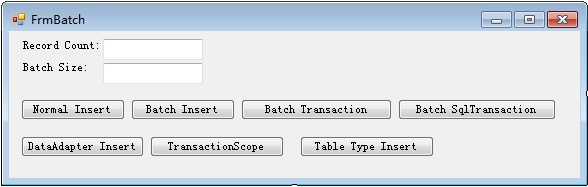
使用Log4net记录日志,默认插入记录数为40000条,每次插入1条,可在界面修改,使用System.Diagnostics.StopWatch记录插入时间,每次测试后删除原表重建
窗体代码如下:
- public delegate bool InsertHandler(DataTable table, int batchSize);
- public partial class FrmBatch : Form
- {
- private Stopwatch _watch = new Stopwatch();
- public FrmBatch()
- {
- InitializeComponent();
- }
- private void FrmBatch_Load(object sender, EventArgs e)
- {
- txtRecordCount.Text = "40000";
- txtBatchSize.Text = "1";
- }
- //逐条数据插入
- private void btnInsert_Click(object sender, EventArgs e)
- {
- Insert(DbOperation.ExecuteInsert, "Use SqlServer Insert");
- }
- //拼接sql语句插入
- private void btnBatchInsert_Click(object sender, EventArgs e)
- {
- Insert(DbOperation.ExecuteBatchInsert, "Use SqlServer Batch Insert");
- }
- //拼接sql语句并使用Transaction
- private void btnTransactionInsert_Click(object sender, EventArgs e)
- {
- Insert(DbOperation.ExecuteTransactionInsert, "Use SqlServer Batch Transaction Insert");
- }
- //拼接sql语句并使用SqlTransaction
- private void btnSqlTransactionInsert_Click(object sender, EventArgs e)
- {
- Insert(DbOperation.ExecuteSqlTransactionInsert, "Use SqlServer Batch SqlTransaction Insert");
- }
- //使用DataAdapter
- private void btnDataAdapterInsert_Click(object sender, EventArgs e)
- {
- Insert(DbOperation.ExecuteDataAdapterInsert, "Use SqlServer DataAdapter Insert");
- }
- //使用TransactionScope
- private void btnTransactionScopeInsert_Click(object sender, EventArgs e)
- {
- Insert(DbOperation.ExecuteTransactionScopeInsert, "Use SqlServer TransactionScope Insert");
- }
- //使用表值参数
- private void btnTableTypeInsert_Click(object sender, EventArgs e)
- {
- Insert(DbOperation.ExecuteTableTypeInsert, "Use SqlServer TableType Insert");
- }
- private DataTable InitDataTable()
- {
- DataTable table = Tools.MakeDataTable();
- int count = 0;
- if (int.TryParse(txtRecordCount.Text.Trim(), out count))
- {
- Tools.MakeData(table, count);
- //MessageBox.Show("Data Init OK");
- }
- return table;
- }
- public void Insert(InsertHandler handler, string msg)
- {
- DataTable table = InitDataTable();
- if (table == null)
- {
- MessageBox.Show("DataTable is null");
- return;
- }
- int recordCount = table.Rows.Count;
- if (recordCount <= 0)
- {
- MessageBox.Show("No Data");
- return;
- }
- int batchSize = 0;
- int.TryParse(txtBatchSize.Text.Trim(), out batchSize);
- if (batchSize <= 0)
- {
- MessageBox.Show("batchSize <= 0");
- return;
- }
- bool result = false;
- _watch.Reset(); _watch.Start();
- result = handler(table, batchSize);
- _watch.Stop(www.nuoya66.com);
- string log = string.Format("{0};RecordCount:{1};BatchSize:{2};Time:{3};", msg, recordCount, batchSize, _watch.ElapsedMilliseconds);
- LogHelper.Info(log);
- MessageBox.Show(result.ToString());
- }
- }
.NET批量大数据插入性能分析及比较的更多相关文章
- 大数据应用之HBase数据插入性能优化实测教程
引言: 大家在使用HBase的过程中,总是面临性能优化的问题,本文从HBase客户端参数设置的角度,研究HBase客户端数据批量插入性能优化的问题.事实胜于雄辩,数据比理论更有说服力,基于此,作者设计 ...
- Impala简介PB级大数据实时查询分析引擎
1.Impala简介 • Cloudera公司推出,提供对HDFS.Hbase数据的高性能.低延迟的交互式SQL查询功能. • 基于Hive使用内存计算,兼顾数据仓库.具有实时.批处理.多并发等优点 ...
- .NET 百万级 大数据插入、更新 ,支持多种数据库
功能介绍 (需要版本5.0.44) 大数据操作ORM性能瓶颈在实体转换上面,并且不能使用常规的Sql去实现 当列越多转换越慢,SqlSugar将转换性能做到极致,并且采用数据库最佳API 操作数据库 ...
- sql 根据指定条件获取一个字段批量获取数据插入另外一张表字段中+MD5加密
/****** Object: StoredProcedure [dbo].[getSplitValue] Script Date: 03/13/2014 13:58:12 ******/ SET A ...
- 学习Hadoop+Spark大数据巨量分析与机器学习整合开发-windows利用虚拟机实现模拟多节点集群构建
记录学习<Hadoop+Spark大数据巨量分析与机器学习整合开发>这本书. 第五章 Hadoop Multi Node Cluster windows利用虚拟机实现模拟多节点集群构建 5 ...
- "Entity Framework数据插入性能追踪"读后总结
园友莱布尼茨写了一篇<Entity Framework数据插入性能追踪>的文章,我感觉不错,至少他提出了问题,写了出来,引起了大家的讨论,这就是一个氛围.读完文章+评论,于是我自己也写了个 ...
- 向mysql中批量插入数据的性能分析
MYSQL批量插入数据库实现语句性能分析 假定我们的表结构如下 代码如下 CREATE TABLE example (example_id INT NOT NULL,name VARCHAR( 5 ...
- 大数据应用之HBase数据插入性能优化之多线程并行插入测试案例
一.引言: 上篇文章提起关于HBase插入性能优化设计到的五个参数,从参数配置的角度给大家提供了一个性能测试环境的实验代码.根据网友的反馈,基于单线程的模式实现的数据插入毕竟有限.通过个人实测,在我的 ...
- 使用Oracle Stream Analytics 21步搭建大数据实时流分析平台
概要: Oracle Stream Analytics(OSA)是企业级大数据流实时分析计算平台.它可以通过使用复杂的关联模式,扩充和机器学习算法来自动处理和分析大规模实时信息.流式传输的大数据可以源 ...
随机推荐
- javascript 模仿 html5 placeholder
<form action="?action=deliver" method="post" class="deliver-form"&g ...
- 私人C#笔记
coust 定义常量 string是密封类,所以不能继承它 namespace默认是按照文件夹的结构命名的,如(System.文件夹.子文件夹),而且namespace是可以手动改的 Arra ...
- C# 操作 AppSettings节点
1.实例 //1.简单获取内容 string value = ConfigurationManager.AppSettings["one"] as string; Console. ...
- js+图片实现图片flash效果
var pic_width=685; //图片宽度 var pic_height=225; // 图片高度 var button_pos=4; //按扭位置 1左 2右 3上 4下 var stop_ ...
- Eclipse MAT: Understand Incoming and Outgoing References
引用:http://xmlandmore.blogspot.hk/2014/01/eclipse-mat-understand-incoming-and.html?utm_source=tuicool ...
- C语言中的静态局部变量
代码: 0x601070 0x7ffcf44243fc 0x60106c 0x60106c 0x60106c [hu@localhost test]$ cat test.cpp #include &l ...
- HDU 5044 离线LCA算法
昨天写了HDU 3966 ,本来这道题是很好解得,结果我想用离线LCA 耍一把,结果发现离线LCA 没理解透,错了好多遍,终得AC ,这题比起 HDU 3966要简单,因为他不用动态查询.但是我还是错 ...
- Java之集合类
出处:http://blog.csdn.net/zhangerqing 一.集合类简介 数组是很常用的一种的数据结构,我们用它可以满足很多的功能,但是,有时我们会遇到如下这样的问题: 1.我们需要该容 ...
- Scala学习笔记--抽象成员
package com.evor.test1 class Test1 { } object Test1{ def main(args:Array[String]):Unit = { //类参数和抽象字 ...
- XJOI网上同步训练DAY3 T2
考试的时候已经想出来怎么做了,但是没有时间打了T_T 思路:我们考虑将询问以lim排序,然后树链剖分,把边作为线段树的节点,然后随着询问lim的增大,改变线段树中节点的信息,然后每次询问我们用树链剖分 ...