
android-带进度条的系统通知栏消息
效果图:
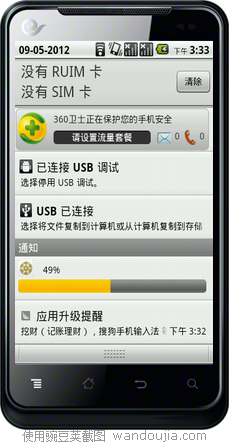
主界面只有一个按钮就不上文件了
通知栏显示所用到的布局文件content_view.xml
- <?xml version="1.0" encoding="utf-8"?>
- <RelativeLayout xmlns:android="http://schemas.android.com/apk/res/android"
- android:layout_width="fill_parent"
- android:layout_height="fill_parent"
- android:background="#00000000"
- android:orientation="vertical"
- android:padding="5dp">
- <ImageView
- android:id="@+id/content_view_image"
- android:layout_width="25dp"
- android:layout_height="25dp"
- android:src="@drawable/logo"
- />
- <TextView
- android:id="@+id/content_view_text1"
- android:layout_width="wrap_content"
- android:layout_height="wrap_content"
- android:text="0%"
- android:textColor="#000000"
- android:layout_toRightOf="@id/content_view_image"
- android:layout_centerHorizontal="true"
- android:layout_marginTop="5dp"
- android:layout_marginLeft="15dp"
- />
- <ProgressBar
- android:id="@+id/content_view_progress"
- android:layout_width="fill_parent"
- android:layout_height="wrap_content"
- style="@android:style/Widget.ProgressBar.Horizontal"
- android:max="100"
- android:layout_below="@id/content_view_image"
- android:layout_marginTop="4dp"
- />
- </RelativeLayout>
主运行类:
- package yyy.testandroid4;
- import java.util.Timer;
- import java.util.TimerTask;
- import android.app.Activity;
- import android.app.AlertDialog.Builder;
- import android.app.Notification;
- import android.app.NotificationManager;
- import android.app.PendingIntent;
- import android.content.DialogInterface;
- import android.content.Intent;
- import android.content.pm.PackageManager.NameNotFoundException;
- import android.os.Bundle;
- import android.os.Handler;
- import android.os.Message;
- import android.view.View;
- import android.view.View.OnClickListener;
- import android.widget.Button;
- import android.widget.RemoteViews;
- import android.widget.Toast;
- public class TestAndroid4Activity extends Activity {
- private Handler handler = new Handler(){
- @Override
- public void handleMessage(Message msg) {
- // TODO Auto-generated method stub
- super.handleMessage(msg);
- switch (msg.what) {
- case 0:
- notif.contentView.setTextViewText(R.id.content_view_text1, len+"%");
- notif.contentView.setProgressBar(R.id.content_view_progress, 100, len, false);
- manager.notify(0, notif);
- break;
- case 1:
- Toast.makeText(TestAndroid4Activity.this, "下载完成", 0).show();
- break;
- default:
- break;
- }
- }
- };
- private Button update,cancel;
- private int localVersion,serverVersion;
- private int len;
- private NotificationManager manager;
- private Notification notif;
- /** Called when the activity is first created. */
- @Override
- public void onCreate(Bundle savedInstanceState) {
- super.onCreate(savedInstanceState);
- setContentView(R.layout.main);
- update = (Button) findViewById(R.id.update);
- update.setOnClickListener(new OnClickListener() {
- @Override
- public void onClick(View arg0) {
- // TODO Auto-generated method stub
- //点击通知栏后打开的activity
- Intent intent = new Intent(TestAndroid4Activity.this,OtherActivity.class);
- PendingIntent pIntent = PendingIntent.getActivity(TestAndroid4Activity.this, 0, intent, 0);
- manager = (NotificationManager) getSystemService(NOTIFICATION_SERVICE);
- notif = new Notification();
- notif.icon = R.drawable.logo;
- notif.tickerText = "新通知";
- //通知栏显示所用到的布局文件
- notif.contentView = new RemoteViews(getPackageName(), R.layout.content_view);
- notif.contentIntent = pIntent;
- manager.notify(0, notif);
- new DownLoadThread().start();
- }
- });
- }
- }
- private class DownLoadThread extends Thread{
- private Timer timer = new Timer();
- @Override
- public void run() {
- // TODO Auto-generated method stub
- super.run();
- timer.schedule(new TimerTask() {
- @Override
- public void run() {
- // TODO Auto-generated method stub
- Message msg = new Message();
- msg.what = 0;
- msg.obj = len;
- handler.sendMessage(msg);
- if(len == 100){
- timer.cancel();
- handler.sendEmptyMessage(1);
- }
- }
- }, 0, 1000);
- len = 0;
- try {
- while(len < 100){
- len++;
- Thread.sleep(1000);
- }
- } catch (InterruptedException e) {
- // TODO Auto-generated catch block
- e.printStackTrace();
- }
- }
- }
- }
android-带进度条的系统通知栏消息的更多相关文章
- 025 Android 带进度条的对话框(ProgressDialog)
1.ProgressDialog介绍 ProgressDialog可以在当前界面弹出一个置顶于所有界面元素的对话框,同样具有屏蔽其他控件的交互能力,用于提示用户当前操作正在运行,让用户等待: 2.应用 ...
- Android带进度条的文件上传,使用AsyncTask异步任务
最近项目中要做一个带进度条的上传文件的功能,学习了AsyncTask,使用起来比较方便,将几个方法实现就行,另外做了一个很简单的demo,希望能对大家有帮助,在程序中设好文件路径和服务器IP即可. A ...
- 高仿手机QQ音乐之——Android带进度条的开关
最新版的手机QQ音乐体验确实不错,发现首页播放按钮能够显示歌曲当前进度条.认为挺有新意.效果例如以下: 自己琢磨了下.能够用自己定义组件来实现,试着做了一下.效果例如以下: 整理了下思路.大概设计流程 ...
- Android更新带进度条的通知栏
在网上查询了下.Android版本号更新通知栏带进度条,醉了,基本都是复制过来.有的代码不全,连源代码下载都没有.有下载也须要积分,还不能用,真黑心啊!!之前自己也写过自己定义通知栏Notificat ...
- Android -- 自定义带进度条的按钮
1. 实现了一个带进度条的按钮,完成后显示提示信息,并设置按钮为不可再次被点击
- [Delphi]带进度条的ListView
带进度条的ListView unit Unit1; interface uses Windows, Messages, SysUtils, Variants, Classes, Graphics, C ...
- android多线程进度条
多线程实现更新android进度条. 实例教程,详细信息我已经注释 android多线程进度条 01package com.shougao.hello; 02 03import android ...
- 自定义带进度条的WebView , 增加获取web标题和url 回掉
1.自定义ProgressWebView package com.app.android05; import android.content.Context; import android.graph ...
- android 自定义进度条颜色
android 自定义进度条颜色 先看图 基于产品经理各种自定义需求,经过查阅了解,下面是自己对Android自定义进度条的学习过程! 这个没法了只能看源码了,还好下载了源码, sources\b ...
随机推荐
- J2SE知识点摘记(一)
1. 数组的声明时无法指定数组的长度. 2. 一维数组的声明和内存的分配 "数据类型 数组名[]; //声明一维数组 数组名= new 数据类型[ ...
- Mono For Android中简单实现按钮的动画效果
Android中动画的分Tween Animation和Frame Animation,本节主要讲Tween Animation的实现. 一般是通过XML文件来定义动画的,具体如下: 1.在项目res ...
- C#句柄使用
原文:C#句柄使用 调用 API 函数 SendMessage 发送 WM_CLOSE 消息. DllImport("User32.dll",EntryPoint="Se ...
- gitlab 安装报错:Could not find modernizr-2.6.2 in any of the sources
2014-04-30 15:27:44 标签:gitlab 原创作品,允许转载,转载时请务必以超链接形式标明文章 原始出处 .作者信息和本声明.否则将追究法律责任.http://davidbj.b ...
- 网易云课堂_程序设计入门-C语言_第六章:数组_1多项式加法
1 多项式加法(5分) 题目内容: 一个多项式可以表达为x的各次幂与系数乘积的和,比如: 现在,你的程序要读入两个多项式,然后输出这两个多项式的和,也就是把对应的幂上的系数相加然后输出. 程序要处理的 ...
- Tkinter类之窗口部件类
Tkinter类之窗口部件类 Tkinter支持15个核心的窗口部件,这个15个核心窗口部件类列表如下:窗口部件及说明:Button:一个简单的按钮,用来执行一个命令或别的操作.Canvas:组织图形 ...
- n!的近似值 (stirling approximation)与 大O记法(big -O- notation)
參考wiki: 1.n!的近似值 (stirling approximation) (中文) http://zh.wikipedia.org/wiki/%E6%96%AF%E7%89%B9%E9%9D ...
- Math.round(11.5)等于()Math.round(-11.5)等于()
几天前去面试,这道简单的题目居然做错了,看来基础就是慢慢积累的.并不断使用和复习才会成为高手,假设基础不是那么熟练.恐怕在成为高手的路上会困难重重.所以在做项目的间歇时间.偶尔回顾一下最基础的知识.是 ...
- var_dump(php)
var_dump -- 打印变量的相关信息 描述 void var_dump ( mixed expression [, mixed expression [, ...]] ) 此函数显示关于一个或多 ...
- wcf系列学习5天速成——第五天 服务托管
今天是系列的终结篇,当然要分享一下wcf的托管方面的知识. wcf中托管服务一般有一下四种: Console寄宿: 利于开发调试,但不是生产环境中的最佳实践. winform寄 ...