
Android基础TOP3:Activity的线性,相对,帧和表格布局的概括
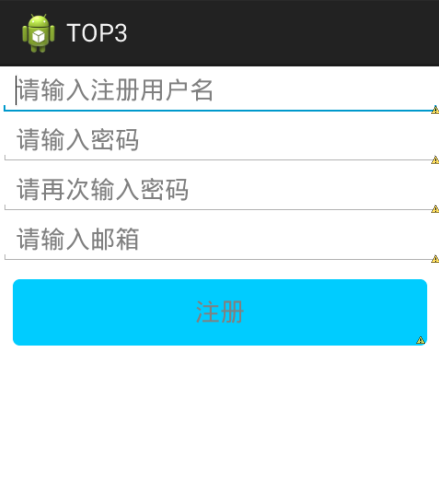
线性布局 LinearLayout:
<LinearLayout xmlns:android="http://schemas.android.com/apk/res/android"

    xmlns:tools="http://schemas.android.com/tools"

    android:layout_width="match_parent"

    android:layout_height="match_parent"

    android:orientation="vertical"

    tools:context="com.example.top3.MainActivity" >

 <EditText

        android:layout_width="fill_parent"

        android:layout_height="wrap_content"

        android:hint="请输入注册用户名"/>

  <requestFocus />

  <EditText

        android:layout_width="fill_parent"

        android:layout_height="wrap_content"

        android:hint="请输入密码"

        />

  <EditText

      android:layout_width="fill_parent"

      android:layout_height="wrap_content"

      android:ems="5"

      android:hint="请再次输入密码" >

  </EditText>

    <EditText

        android:layout_width="fill_parent"

        android:layout_height="wrap_content"

        android:hint="请输入邮箱"/>

    <Button

        android:layout_width="fill_parent"

        android:layout_height="wrap_content"

        android:layout_margin="10dip"

        android:background="@drawable/btn_bg"

        android:gravity="center"

        android:hint="注册" />

</LinearLayout>
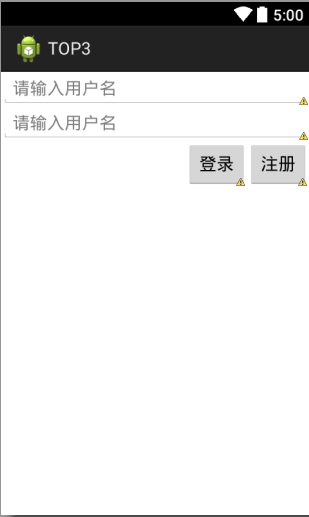
相对布局 RelativeLayout:
 <?xml version="1.0" encoding="utf-8"?>

 <RelativeLayout

     xmlns:android="http://schemas.android.com/apk/res/android"

     android:layout_width="match_parent"

     android:layout_height="match_parent"

     >

 <EditText

     android:id="@+id/e1"

     android:layout_width="fill_parent"

     android:layout_height="wrap_content"

     android:hint="请输入用户名"

     />

 <EditText

     android:id="@+id/e2"

     android:layout_below="@id/e1"

   android:layout_width="fill_parent"

     android:layout_height="wrap_content"

    android:hint="请输入用户名"    />

 <Button

     android:id="@+id/b2"

       android:layout_below="@id/e2"

       android:layout_alignRight="@id/e2"

     android:layout_width="wrap_content"

     android:layout_height="wrap_content"

     android:text="注册"

     />

 <Button

     android:id="@+id/b1"

       android:layout_below="@id/e2"

       android:layout_toLeftOf="@id/b2"

     android:layout_width="wrap_content"

     android:layout_height="wrap_content"

     android:text="登录"

     />

 </RelativeLayout>
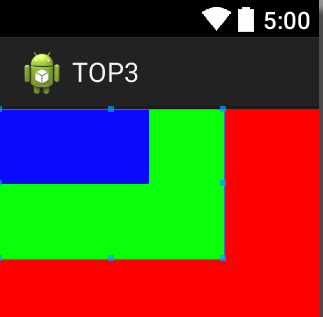
帧布局FrameLyaout:
<?xml version="1.0" encoding="utf-8"?>

<FrameLayout xmlns:android="http://schemas.android.com/apk/res/android"

    android:layout_width="fill_parent"

    android:layout_height="fill_parent" >

    <TextView

        android:id="@+id/t1"

        android:layout_width="wrap_content"

        android:layout_height="wrap_content"

        android:background="#f00"

        android:height="300dp"

        android:width="300dp" />

      <TextView

          android:layout_width="wrap_content"

          android:layout_height="wrap_content"

          android:background="#0f0"

          android:height="100dp"

          android:width="150dp" />

      <TextView

          android:layout_width="wrap_content"

          android:layout_height="wrap_content"

          android:background="#00f"

          android:height="50dp"

          android:width="100dp" />

</FrameLayout>
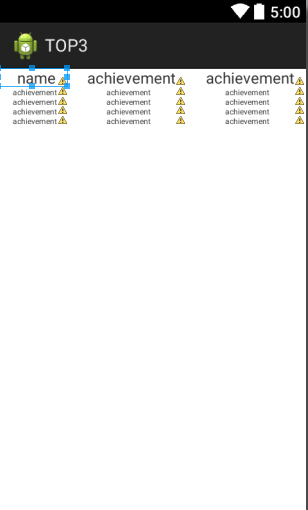
表格布局TableLayout:
<?xml version="1.0" encoding="utf-8"?>

<TableLayout xmlns:android="http://schemas.android.com/apk/res/android"

    android:layout_width="match_parent"

    android:layout_height="match_parent"

    android:orientation="vertical" >

    <TableRow >

    <TextView

        android:layout_width="match_parent"

        android:layout_height="wrap_content"

        android:layout_weight="1"

        android:text="name"

        android:paddingLeft="20dp"

        android:textSize="16dp"

        />

    <TextView

        android:layout_width="match_parent"

        android:layout_height="wrap_content"

        android:layout_weight="1"

        android:text="achievement"

        android:paddingLeft="20dp"

        android:textSize="16dp"

        />

       <TextView

        android:layout_width="match_parent"

        android:layout_height="wrap_content"

        android:layout_weight="1"

        android:text="achievement"

        android:paddingLeft="20dp"

        android:textSize="16dp"

        />

</TableRow>

<TableRow>

   <TextView

        android:layout_width="match_parent"

        android:layout_height="wrap_content"

        android:layout_weight="1"

        android:text="achievement"

        android:paddingLeft="15dp"

        android:textSize="8dp"

        />

        <TextView

        android:layout_width="match_parent"

        android:layout_height="wrap_content"

        android:layout_weight="1"

        android:text="achievement"

        android:paddingLeft="40dp"

        android:textSize="8dp"

        />

        <TextView

        android:layout_width="match_parent"

        android:layout_height="wrap_content"

        android:layout_weight="1"

        android:text="achievement"

        android:paddingLeft="40dp"

        android:textSize="8dp"

        />

</TableRow>

<TableRow>

   <TextView

        android:layout_width="match_parent"

        android:layout_height="wrap_content"

        android:layout_weight="1"

        android:text="achievement"

        android:paddingLeft="15dp"

        android:textSize="8dp"

        />

        <TextView

        android:layout_width="match_parent"

        android:layout_height="wrap_content"

        android:layout_weight="1"

        android:text="achievement"

        android:paddingLeft="40dp"

        android:textSize="8dp"

        />

        <TextView

        android:layout_width="match_parent"

        android:layout_height="wrap_content"

        android:layout_weight="1"

        android:text="achievement"

        android:paddingLeft="40dp"

        android:textSize="8dp"

        />

</TableRow>

<TableRow>

   <TextView

        android:layout_width="match_parent"

        android:layout_height="wrap_content"

        android:layout_weight="1"

        android:text="achievement"

        android:paddingLeft="15dp"

        android:textSize="8dp"

        />

        <TextView

        android:layout_width="match_parent"

        android:layout_height="wrap_content"

        android:layout_weight="1"

        android:text="achievement"

        android:paddingLeft="40dp"

        android:textSize="8dp"

        />

        <TextView

        android:layout_width="match_parent"

        android:layout_height="wrap_content"

        android:layout_weight="1"

        android:text="achievement"

        android:paddingLeft="40dp"

        android:textSize="8dp"

        />

</TableRow>

<TableRow>

   <TextView

        android:layout_width="match_parent"

        android:layout_height="wrap_content"

        android:layout_weight="1"

        android:text="achievement"

        android:paddingLeft="15dp"

        android:textSize="8dp"

        />

        <TextView

        android:layout_width="match_parent"

        android:layout_height="wrap_content"

        android:layout_weight="1"

        android:text="achievement"

        android:paddingLeft="40dp"

        android:textSize="8dp"

        />

        <TextView

        android:layout_width="match_parent"

        android:layout_height="wrap_content"

        android:layout_weight="1"

        android:text="achievement"

        android:paddingLeft="40dp"

        android:textSize="8dp"

        />

</TableRow>

</TableLayout>
Android基础TOP3:Activity的线性,相对,帧和表格布局的概括的更多相关文章
- Android零基础入门第29节:善用TableLayout表格布局,事半功倍
原文:Android零基础入门第29节:善用TableLayout表格布局,事半功倍 前面学习了线性布局和相对布局,线性布局虽然方便,但如果遇到控件需要排列整齐的情况就很难达到要求,用相对布局又比较麻 ...
- Android基础_2 Activity线性布局和表格布局
在activity的布局中,线性布局和表格布局是最简单的,这次分别从线性布局,表格布局以及线性布局和表格混合布局做了实验,实验中只需要编写 相应的xml的代码,java代码不需要更改,因为我们这里只是 ...
- Android基础_3 Activity相对布局
相对布局要比前面讲的线性布局和表格布局要灵活一些,所以平常用得也是比较多的.相对布局控件的位置是与其周围控件的位置相关的,从名字可以看出来,这些位置都是相对的,确定出了其中一个控件的位置就可以确定另一 ...
- android 基础02 - Activity 的生命周期及状态
返回栈 Android 中的 Activity 是可以层叠的,当我们启动一个新的 Activity 时,就会覆盖在原有的 Activity 之上, 点击 Back 会销毁当前 Activity,下面的 ...
- Android 基础 (四大组件,五大存储,六大布局)
Android四大组件: 参考:https://blog.csdn.net/shenggaofei/article/details/52450668 Android四大组件分别为activity.se ...
- Android基础TOP3:线性布局的特点,常用属性,及权重值
线性布局是一种让视图水平或者垂直布排列的布局: 常用属性: androuid:orientation :表示布局方向 取值vertical表示垂直布局 取值horizontal表示水平布局 andro ...
- Android基础之Activity launchMode详解
本文来自http://blog.csdn.net/liuxian13183/ ,引用必须注明出处! Activity的lauchmode,是基础的属性,但也是App优化必须掌握的知识,它约束了Acti ...
- Android基础之Activity四种启动模式
这东西是最基础的,发现自己其实没有真正试过,好好研究研究 standard :默认, singleTop :大体上同standard,但是当该Activity实例已经在task栈顶,不再创建新的实例, ...
- Android基础之Activity
一.什么是Activity Activity是Android四大组件之一,并且Activity是组件中的重中之重. Activity是为用户提供一个用于信息交互的窗口. 二.如何去创建Activity ...
随机推荐
- HXY烧情侣(洛谷 2194)
题目描述 众所周知,HXY已经加入了FFF团.现在她要开始喜(sang)闻(xin)乐(bing)见(kuang)地烧情侣了.这里有n座电影院,n对情侣分别在每座电影院里,然后电影院里都有汽油,但是要 ...
- JAVA虚拟机运行时内存划分--运行时数据区域
Java虚拟机在执行java程序时会把内存划分为以下几个不同的数据区域: java虚拟机内存划分(运行时)1.线程私有的: 程序计数器(Program Counter Register):可以看作当前 ...
- Oracle创建表空间、用户名、密码步骤教程
第一步,以最高级别 SYSDBA 身份登录数据库 cmd 进入命令行 登录方式一: C:\Documents and Settings\Administrator>sqlplus sys/sys ...
- 移动端,input输入获得焦点被键盘遮住简单解决方案
(function (window,document) { document.querySelector('input[type="text"]').addEventListene ...
- android中读取通讯录学习笔记
1.读取通讯录时一次读取时,尽量少读取全部属性.特别是列表展示的时候.会让你的列表载入速度变得难以忍受,建议先载入少量属性.然后在详情的时候载入全部属性. 2.在读取一类属性的时候,建议用一个游标,且 ...
- 从hbase读取数据优化策略和实验对照结果
起因:工作须要.我须要每5分钟从hbase中.导出一部分数据,然后导入到ES中.可是在開始阶段编写的python脚本,我发现从hbase读取数据的速度较慢,耗费大量的时间.影响整个导数过程,恐怕无法在 ...
- [学习笔记]JavaScript基础
JavaScript概述 1. JavaScript定义 JavaScript是Netscape公司开发的一种基于对象和事件驱动的脚本语言.它是弱类型语言.仅仅能由浏览器解释运行. 当中: 脚本语言: ...
- javascript 数组总结
数组的创建: 数组可以使用Array构造函数来创建,或者使用[]快速创建. 1. Array构造函数创建数组: 无参数,创建空数组: var arry = new Array(); 参数为一个数字,指 ...
- ECMAScript 对象类型
ECMAScript:本地对象.内置对象.宿主对象 一.本地对象: 定义:ECMA-262(ECMAScript语言规范) 定义其为“独立于宿主环境的 ECMAScript 实现提供的对象”.它是由 ...
- 将canvas画布内容转化为图片(toDataURL(),创建url)
将canvas画布内容转化为图片(toDataURL(),创建url) 总结 1.现在的浏览器都支持右键另存为图片的方法来将canvas画布内容转化为图片 2.在代码里面可以通过toDataURL() ...