
Android基础TOP3:Activity的线性,相对,帧和表格布局的概括
线性布局 LinearLayout:
<LinearLayout xmlns:android="http://schemas.android.com/apk/res/android"

    xmlns:tools="http://schemas.android.com/tools"

    android:layout_width="match_parent"

    android:layout_height="match_parent"

    android:orientation="vertical"

    tools:context="com.example.top3.MainActivity" >

 <EditText

        android:layout_width="fill_parent"

        android:layout_height="wrap_content"

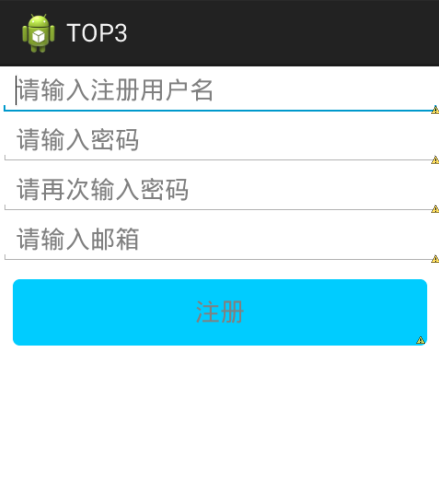
        android:hint="请输入注册用户名"/>

  <requestFocus />

  <EditText

        android:layout_width="fill_parent"

        android:layout_height="wrap_content"

        android:hint="请输入密码"

        />

  <EditText

      android:layout_width="fill_parent"

      android:layout_height="wrap_content"

      android:ems="5"

      android:hint="请再次输入密码" >

  </EditText>

    <EditText

        android:layout_width="fill_parent"

        android:layout_height="wrap_content"

        android:hint="请输入邮箱"/>

    <Button

        android:layout_width="fill_parent"

        android:layout_height="wrap_content"

        android:layout_margin="10dip"

        android:background="@drawable/btn_bg"

        android:gravity="center"

        android:hint="注册" />

</LinearLayout>
相对布局 RelativeLayout:
 <?xml version="1.0" encoding="utf-8"?>

 <RelativeLayout

     xmlns:android="http://schemas.android.com/apk/res/android"

     android:layout_width="match_parent"

     android:layout_height="match_parent"

     >

 <EditText

     android:id="@+id/e1"

     android:layout_width="fill_parent"

     android:layout_height="wrap_content"

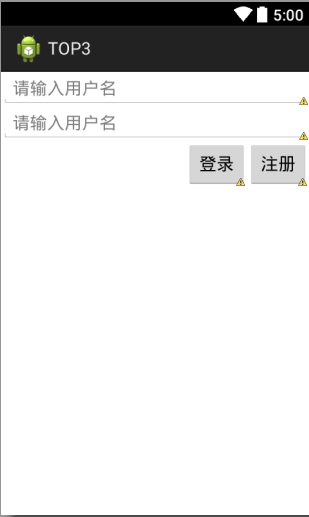
     android:hint="请输入用户名"

     />

 <EditText

     android:id="@+id/e2"

     android:layout_below="@id/e1"

   android:layout_width="fill_parent"

     android:layout_height="wrap_content"

    android:hint="请输入用户名"    />

 <Button

     android:id="@+id/b2"

       android:layout_below="@id/e2"

       android:layout_alignRight="@id/e2"

     android:layout_width="wrap_content"

     android:layout_height="wrap_content"

     android:text="注册"

     />

 <Button

     android:id="@+id/b1"

       android:layout_below="@id/e2"

       android:layout_toLeftOf="@id/b2"

     android:layout_width="wrap_content"

     android:layout_height="wrap_content"

     android:text="登录"

     />

 </RelativeLayout>
帧布局FrameLyaout:
<?xml version="1.0" encoding="utf-8"?>

<FrameLayout xmlns:android="http://schemas.android.com/apk/res/android"

    android:layout_width="fill_parent"

    android:layout_height="fill_parent" >

    <TextView

        android:id="@+id/t1"

        android:layout_width="wrap_content"

        android:layout_height="wrap_content"

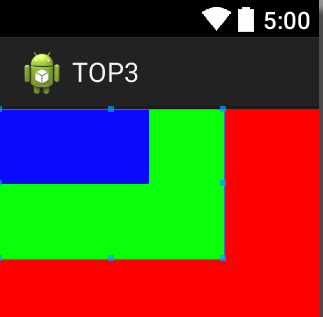
        android:background="#f00"

        android:height="300dp"

        android:width="300dp" />

      <TextView

          android:layout_width="wrap_content"

          android:layout_height="wrap_content"

          android:background="#0f0"

          android:height="100dp"

          android:width="150dp" />

      <TextView

          android:layout_width="wrap_content"

          android:layout_height="wrap_content"

          android:background="#00f"

          android:height="50dp"

          android:width="100dp" />

</FrameLayout>
表格布局TableLayout:
<?xml version="1.0" encoding="utf-8"?>

<TableLayout xmlns:android="http://schemas.android.com/apk/res/android"

    android:layout_width="match_parent"

    android:layout_height="match_parent"

    android:orientation="vertical" >

    <TableRow >

    <TextView

        android:layout_width="match_parent"

        android:layout_height="wrap_content"

        android:layout_weight="1"

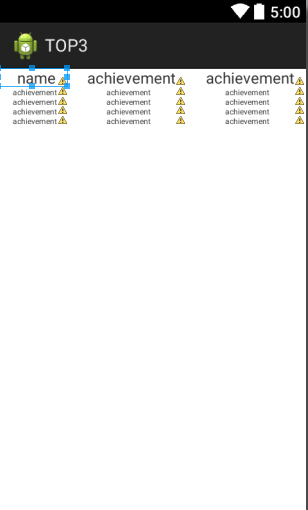
        android:text="name"

        android:paddingLeft="20dp"

        android:textSize="16dp"

        />

    <TextView

        android:layout_width="match_parent"

        android:layout_height="wrap_content"

        android:layout_weight="1"

        android:text="achievement"

        android:paddingLeft="20dp"

        android:textSize="16dp"

        />

       <TextView

        android:layout_width="match_parent"

        android:layout_height="wrap_content"

        android:layout_weight="1"

        android:text="achievement"

        android:paddingLeft="20dp"

        android:textSize="16dp"

        />

</TableRow>

<TableRow>

   <TextView

        android:layout_width="match_parent"

        android:layout_height="wrap_content"

        android:layout_weight="1"

        android:text="achievement"

        android:paddingLeft="15dp"

        android:textSize="8dp"

        />

        <TextView

        android:layout_width="match_parent"

        android:layout_height="wrap_content"

        android:layout_weight="1"

        android:text="achievement"

        android:paddingLeft="40dp"

        android:textSize="8dp"

        />

        <TextView

        android:layout_width="match_parent"

        android:layout_height="wrap_content"

        android:layout_weight="1"

        android:text="achievement"

        android:paddingLeft="40dp"

        android:textSize="8dp"

        />

</TableRow>

<TableRow>

   <TextView

        android:layout_width="match_parent"

        android:layout_height="wrap_content"

        android:layout_weight="1"

        android:text="achievement"

        android:paddingLeft="15dp"

        android:textSize="8dp"

        />

        <TextView

        android:layout_width="match_parent"

        android:layout_height="wrap_content"

        android:layout_weight="1"

        android:text="achievement"

        android:paddingLeft="40dp"

        android:textSize="8dp"

        />

        <TextView

        android:layout_width="match_parent"

        android:layout_height="wrap_content"

        android:layout_weight="1"

        android:text="achievement"

        android:paddingLeft="40dp"

        android:textSize="8dp"

        />

</TableRow>

<TableRow>

   <TextView

        android:layout_width="match_parent"

        android:layout_height="wrap_content"

        android:layout_weight="1"

        android:text="achievement"

        android:paddingLeft="15dp"

        android:textSize="8dp"

        />

        <TextView

        android:layout_width="match_parent"

        android:layout_height="wrap_content"

        android:layout_weight="1"

        android:text="achievement"

        android:paddingLeft="40dp"

        android:textSize="8dp"

        />

        <TextView

        android:layout_width="match_parent"

        android:layout_height="wrap_content"

        android:layout_weight="1"

        android:text="achievement"

        android:paddingLeft="40dp"

        android:textSize="8dp"

        />

</TableRow>

<TableRow>

   <TextView

        android:layout_width="match_parent"

        android:layout_height="wrap_content"

        android:layout_weight="1"

        android:text="achievement"

        android:paddingLeft="15dp"

        android:textSize="8dp"

        />

        <TextView

        android:layout_width="match_parent"

        android:layout_height="wrap_content"

        android:layout_weight="1"

        android:text="achievement"

        android:paddingLeft="40dp"

        android:textSize="8dp"

        />

        <TextView

        android:layout_width="match_parent"

        android:layout_height="wrap_content"

        android:layout_weight="1"

        android:text="achievement"

        android:paddingLeft="40dp"

        android:textSize="8dp"

        />

</TableRow>

</TableLayout>
Android基础TOP3:Activity的线性,相对,帧和表格布局的概括的更多相关文章
- Android零基础入门第29节:善用TableLayout表格布局,事半功倍
原文:Android零基础入门第29节:善用TableLayout表格布局,事半功倍 前面学习了线性布局和相对布局,线性布局虽然方便,但如果遇到控件需要排列整齐的情况就很难达到要求,用相对布局又比较麻 ...
- Android基础_2 Activity线性布局和表格布局
在activity的布局中,线性布局和表格布局是最简单的,这次分别从线性布局,表格布局以及线性布局和表格混合布局做了实验,实验中只需要编写 相应的xml的代码,java代码不需要更改,因为我们这里只是 ...
- Android基础_3 Activity相对布局
相对布局要比前面讲的线性布局和表格布局要灵活一些,所以平常用得也是比较多的.相对布局控件的位置是与其周围控件的位置相关的,从名字可以看出来,这些位置都是相对的,确定出了其中一个控件的位置就可以确定另一 ...
- android 基础02 - Activity 的生命周期及状态
返回栈 Android 中的 Activity 是可以层叠的,当我们启动一个新的 Activity 时,就会覆盖在原有的 Activity 之上, 点击 Back 会销毁当前 Activity,下面的 ...
- Android 基础 (四大组件,五大存储,六大布局)
Android四大组件: 参考:https://blog.csdn.net/shenggaofei/article/details/52450668 Android四大组件分别为activity.se ...
- Android基础TOP3:线性布局的特点,常用属性,及权重值
线性布局是一种让视图水平或者垂直布排列的布局: 常用属性: androuid:orientation :表示布局方向 取值vertical表示垂直布局 取值horizontal表示水平布局 andro ...
- Android基础之Activity launchMode详解
本文来自http://blog.csdn.net/liuxian13183/ ,引用必须注明出处! Activity的lauchmode,是基础的属性,但也是App优化必须掌握的知识,它约束了Acti ...
- Android基础之Activity四种启动模式
这东西是最基础的,发现自己其实没有真正试过,好好研究研究 standard :默认, singleTop :大体上同standard,但是当该Activity实例已经在task栈顶,不再创建新的实例, ...
- Android基础之Activity
一.什么是Activity Activity是Android四大组件之一,并且Activity是组件中的重中之重. Activity是为用户提供一个用于信息交互的窗口. 二.如何去创建Activity ...
随机推荐
- js cookies all in one
js cookies all in one cookies // http://10.1.5.202/auto-deploy-platform/publish/index.html // 非当前 UR ...
- 15、Java并发性和多线程-线程通讯
以下内容转自http://ifeve.com/thread-signaling/: 线程通信的目标是使线程间能够互相发送信号.另一方面,线程通信使线程能够等待其他线程的信号. 例如,线程B可以等待线程 ...
- Eclipse代码/目录虚线对齐设置
前提: 我的Eclipse版本如下: 比这个版本新或者旧都可以实现如下效果. 实现步骤: 在代码上显示虚线设置有如下方法: 1.如果不使用插件,Eclipse是不支持虚线的,只能是横条的点状,效果如下 ...
- JNI/NDK开发指南(三)——JNI数据类型及与Java数据类型的映射关系
转载请注明出处:http://blog.csdn.net/xyang81/article/details/42047899 当我们在调用一个Java native方法的时候.方法中的參数是怎样传递给C ...
- Android 内存管理
1.Activity中的对象生命周期勿大于Activity的生命周期.OOM演示样例代码例如以下: private static Drawable sBackground; @Override pro ...
- HDU 4920 Matrix multiplication(bitset)
HDU 4920 Matrix multiplication 题目链接 题意:给定两个矩阵,求这两个矩阵相乘mod 3 思路:没什么好的想法,就把0的位置不考虑.结果就过了.然后看了官方题解,上面是用 ...
- JavaScript设计模式 Item9 --适配器模式Adapter
适配器模式(转换器面模式),通常是为要使用的接口,不符本应用或本系统使用,而需引入的中间适配层类或对象的情况. 适配器模式的作用是解决两个软件实体间的接口不兼容的问题. 一.定义 适配器模式(Adap ...
- Android抽屉菜单DrawerLayout的实现案例
(1)项目布局文件 activity_main.xml <android.support.v4.widget.DrawerLayout xmlns:android="http://sc ...
- java中inputstream的使用
java中的inputstream是一个面向字节的流抽象类,其依据详细应用派生出各种详细的类. 比方FileInputStream就是继承于InputStream,专门用来读取文件流的对象,其详细继承 ...
- oninput 中文输入
使用 input 监听 input 中文输入,会被每次输入的字母打断,下面就解决这个问题 $('input') .off() .on('input',function(){ if($(this).pr ...