
Ryubook_1_switch_hub_源码
一、switching hub by openflow:
用Ryu实现一个有如下功能的switching hub。
• Learns the MAC address of the host connected to a port and retains it in the MAC address table.
• When receiving packets addressed to a host already learned, transfers them to the port connected to the host.
• When receiving packets addressed to an unknown host, performs flooding.
openflow交换机能够通过接收openflow控制器的的指令完成以下功能:
• Rewrites the address of received packets or transfers the packets from the specified port.
• Transfers the received packets to the controller (Packet-In).
• Transfers the packets forwarded by the controller from the specified port (Packet-Out).
以上几个功能结合起来,可以实现上面的switching hub。
总体代码:
from ryu.base import app_manager

from ryu.controller import ofp_event

from ryu.controller.handler import CONFIG_DISPATCHER, MAIN_DISPATCHER

from ryu.controller.handler import set_ev_cls

from ryu.ofproto import ofproto_v1_3

from ryu.lib.packet import packet

from ryu.lib.packet import ethernet

class ExampleSwitch13(app_manager.RyuApp):   #继承ryu.base.app_manager.RyuApp

    OFP_VERSIONS = [ofproto_v1_3.OFP_VERSION]  #指定openflow版本

    def __init__(self, *args, **kwargs):

        super(ExampleSwitch13, self).__init__(*args, **kwargs)

        self.mac_to_port = {}    # initialize mac address table. a dict(or map)

    #set_ev_cls装饰器以 事件类型 和 交换机状态 为参数

    @set_ev_cls(ofp_event.EventOFPSwitchFeatures, CONFIG_DISPATCHER)

    def switch_features_handler(self, ev):

        datapath = ev.msg.datapath  #描述一个交换机

        ofproto = datapath.ofproto  #用于导出协商好版本的openflow定义的模块

        parser = datapath.ofproto_parser  #用于导出协商好版本的openflow编码器和解码器的模块

        # install the table-miss flow entry.

        match = parser.OFPMatch()  #ofproto_parser.OFPxxxx准备将要发送给交换机的消息

        # OFPActionOutput(port,max_len)定义一个action,将数据包输出到指定port

        actions = [parser.OFPActionOutput(ofproto.OFPP_CONTROLLER,  #输出端口指定为控制器端口

            ofproto.OFPCML_NO_BUFFER)] #在ovs上不缓存packet,将收到的整个packet发送至controller

        self.add_flow(datapath, 0, match, actions)  #添加Table-miss流表项

    def add_flow(self, datapath, priority, match, actions):

        ofproto = datapath.ofproto

        parser = datapath.ofproto_parser

        # construct flow_mod message and send it.

        inst = [parser.OFPInstructionActions(ofproto.OFPIT_APPLY_ACTIONS,actions)]

        #instruction type = APPLY_ACTIONS,立即执行actions list

        mod = parser.OFPFlowMod(datapath=datapath, priority=priority,

                                match=match, instructions=inst)

        datapath.send_msg(mod)

    @set_ev_cls(ofp_event.EventOFPPacketIn, MAIN_DISPATCHER)

    def _packet_in_handler(self, ev):

        msg = ev.msg

        datapath = msg.datapath  #交换机

        ofproto = datapath.ofproto

        parser = datapath.ofproto_parser

        # get Datapath ID to identify OpenFlow switches.

        dpid = datapath.id  #dpip区分交换机

        self.mac_to_port.setdefault(dpid, {})  #设置该交换机的MAC地址表

        # analyse the received packets using the packet library.

        pkt = packet.Packet(msg.data)  # packet.Packet A packet decoder/encoder class.

        eth_pkt = pkt.get_protocol(ethernet.ethernet)  #获得以太网的协议(头)

        dst = eth_pkt.dst

        src = eth_pkt.src

        # get the received port number from packet_in message.

        in_port = msg.match['in_port']

        self.logger.info("packet in %s %s %s %s", dpid, src, dst, in_port)

        # learn a mac address to avoid FLOOD next time.

        self.mac_to_port[dpid][src] = in_port

        # if the destination mac address is already learned,

        # decide which port to output the packet, otherwise FLOOD.

        if dst in self.mac_to_port[dpid]:

            out_port = self.mac_to_port[dpid][dst]

        else:

            out_port = ofproto.OFPP_FLOOD  #将输出端口指定为洪泛

        # construct action list.

        actions = [parser.OFPActionOutput(out_port)]

        # install a flow to avoid packet_in next time.

        if out_port != ofproto.OFPP_FLOOD:  #端口已学习,下发流表项

            match = parser.OFPMatch(in_port=in_port, eth_dst=dst)

            self.add_flow(datapath, 1, match, actions)

        # construct packet_out message and send it.

        out = parser.OFPPacketOut(datapath=datapath,

                                  buffer_id=ofproto.OFP_NO_BUFFER,

                                  in_port=in_port, actions=actions,

                                  data=msg.data)

        datapath.send_msg(out)  #send packetout
simpleSwitch
首先,控制器接收交换机发送的packet-in包学习MAC地址。则交换机分析接收到的数据包中的发送方和接收方主机的MAC地址以及接收到消息的端口信息,在自己的流表中进行匹配,若失配,则将这些信息通过packet-in传给控制器;若成功匹配,则根据流表项将数据包传到指定的端口,而控制器不介入。
当接收的数据包在交换机上失配,控制器通过packet-in进行学习,之后将接收到数据包进行传输:
1、若目的主机地址控制器已经学习到,则使用packet-out包向交换机下发流表项,交换机根据本该流表项从指定端口传出数据包。
2、若目的主机地址控制器未曾学习到,则使用packet-out包向交换机下发洪泛指令(flooding),交换机将数据包从除源端口外的所有端口传出。
二、使用Ryu实现:
1、控制器类定义和初始化:
为了实现Ryu应用,
1)需要继承ryu.base.app_manager.RyuApp类,
2)通过OFP_VERSION指定Openflow的版本,
3)定义MAC地址表mac_to_port
    class ExampleSwitch13(app_manager.RyuApp):
      OFP_VERSIONS = [ofproto_v1_3.OFP_VERSION]

      def __init__(self, *args, **kwargs):

        super(ExampleSwitch13, self).__init__(*args, **kwargs)

        # initialize mac address table.

        self.mac_to_port = {}

    # ...
2、事件处理(event handler)
使用Ryu控制器,当接收到Openflow消息时,产生一个与消息一致的事件。Ryu应用需要实现一个和应用期望收到信息相一致的event handler。
event handler是一个以事件对象为参数且使用ryu.controller.handler.set_ev_cls装饰器装饰的函数。set_ev_cls装饰器使用事件类型(event class)和Openflow交换机状态为参数。
事件类型以ryu.controller.ofp_event.EventOFP + <OpenFlow message name>命名。例:Packet-in message的事件类型为ofp_event.EventOFPPacketIn。
交换机状态(state):

2.1 添加Table-miss Flow Entry
在控制器和交换机handshake之后,在流表中添加Table-miss Flow Entry以准备接收Packet-in消息。具体来说,是在接收到Switch Feature(Feature Reply) message后添加。
      @set_ev_cls(ofp_event.EventOFPSwitchFeatures, CONFIG_DISPATCHER)

      def switch_features_handler(self, ev):

          datapath = ev.msg.datapath

          ofproto = datapath.ofproto

          parser = datapath.ofproto_parser

        # ...
在ev.msg中存放着与事件一致的Openflow message的实例,此处message为ryu.ofproto.ofproto_v1_3_parser.OFPSwitchFeatures。
在msg.datapath中存放着与发出message的交换机一致的ryu.controller.controller.Datapath类的实例,这个类用于描述Openflow交换机。Datapath类承担着非常重要的任务:与交换机通信和保证event和message一致。datapath中常用的属性有:
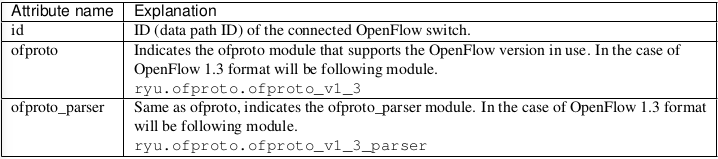
Datapath类中被Ryu应用用到的主要的方法是:send_msg(msg),用于发送Openflow message。其中msg是ryu.ofproto.ofproto_parser.MsgBase类的子类,与要发送的Openflow message一致。
Switching hub不会使用Switch Feature message本身,而是通过处理这个event得到一个添加Table-miss flow Entry的时机。
      def switch_features_handler(self, ev):

          # ...

          # install the table-miss flow entry.

          match = parser.OFPMatch()

          actions = [parser.OFPActionOutput(ofproto.OFPP_CONTROLLER,

          ofproto.OFPCML_NO_BUFFER)]

          self.add_flow(datapath, 0, match, actions)
Table-miss flow entry拥有最低的优先级(0),这个表项能够匹配上所有数据包,该表项的指令将output action指定为输出到控制器的端口,发出Packet-in消息。
首先,一个空匹配用来匹配所有数据包,OFPMatch类用作匹配。
然后,一个OUTPUT action类的实例OFPActionOutput生成并传输到控制器端口,控制器为output的目的地并且OFPCML_NO_BUFFER被设置为max_len(设置交换机的缓存),用于接收所有数据包。
最后,通过add_flow()方法发送Flow Mod message,将Table-miss Flow Entry下发至交换机流表中。
2.2 Packet-in Message:
创建一个packet_in_handler用于接受收到的目的未知的数据包。
      @set_ev_cls(ofp_event.EventOFPPacketIn, MAIN_DISPATCHER)

      def _packet_in_handler(self, ev):

          msg = ev.msg

          datapath = msg.datapath

          ofproto = datapath.ofproto

          parser = datapath.ofproto_parser

        # ...
ev.msg是event对应的message,此处为ryu.ofproto.ofproto_v1_3_parser.OFPPacketIn,其中常用属性有:

2.3 更新MAC地址表:
    def _packet_in_handler(self, ev):

    # ...

        # get the received port number from packet_in message.

        in_port = msg.match['in_port']

        self.logger.info("packet in %s %s %s %s", dpid, src, dst, in_port)

        # learn a mac address to avoid FLOOD next time.

        self.mac_to_port[dpid][src] = in_port

    # ...
使用OFPPacketIn中match方法获得in_port。目的MAC和源MAC通过Ryu’s packet library在接收到的数据包的以太网头部中获取。
为支持控制器与多个交换机连接,datapath ID用于区分不同的交换机。
2.4判断传输的目的端口:
当目的MAC地址存在于MAC地址表中时,目的MAC地址对应的端口号也在表中可以得到。如果目的MAC未知,OUTPUT action类的实例指定洪泛(OFPP_FLOOD),并产生目的端口。
        def _packet_in_handler(self, ev):

        # ...

            # if the destination mac address is already learned,

            # decide which port to output the packet, otherwise FLOOD.

            if dst in self.mac_to_port[dpid]:

               out_port = self.mac_to_port[dpid][dst]

            else:

              out_port = ofproto.OFPP_FLOOD

             # construct action list.

            actions = [parser.OFPActionOutput(out_port)]

           # install a flow to avoid packet_in next time.

           if out_port != ofproto.OFPP_FLOOD:

             match = parser.OFPMatch(in_port=in_port, eth_dst=dst)

             self.add_flow(datapath, 1, match, actions)

        # ...
如果目的地址已经被学习到,那么需要向交换机下发一条流表项,设置好匹配规则(match)、优先级和action,再调用add_flow()方法。这次优先级设为1,这条表项将在Table-miss flow entry之前进行参与匹配。
通过Openflow,让数据包都传输到指定端口,这样使Openflow switch表现得像一个switching hub(switching hub给我的感觉就是一个传统交换机)。
2.5添加流表项(add_flow):
    def add_flow(self, datapath, priority, match, actions):

        ofproto = datapath.ofproto

        parser = datapath.ofproto_parser

        # construct flow_mod message and send it.

        inst = [parser.OFPInstructionActions(ofproto.OFPIT_APPLY_ACTIONS,actions)]

    # ...
对于要添加的表项,设置match用于指明目标数据包的条件(target packet conditions)、instruction用于指明在目标数据包上的操作、表项优先级和有效时间。
在上面代码中的APPLY_ACTIONS用于指明设置的action立即被使用。
最后发出Flow Mod message添加表项到流表。
      def add_flow(self, datapath, priority, match, actions):

          # ...

          mod = parser.OFPFlowMod(datapath=datapath, priority=priority,

          match=match, instructions=inst)

          datapath.send_msg(mod)
Flow Mod message对应着OFPFlowMod类。将OFPFlowMod实例化并使用Datapath.send_msg()方法发送到Openflow交换机。
OFPFlowMod的构造器有很多参数,通常很多都有默认值:

1)datapath:Datapath的实例,通常从event对应的msg中获得。
2)cookie (0):由控制器设置的可选参数,在更新或删除流表项是用作过滤。
3)cookie_mask (0):在更新或删除流表项时,当该参数值非0时,用流表项的cookie值来过滤对目标表项的操作。
4)table_id (0):用于指定操作的目标流表。
5)command (ofproto_v1_3.OFPFC_ADD):用于指明进行什么操作:
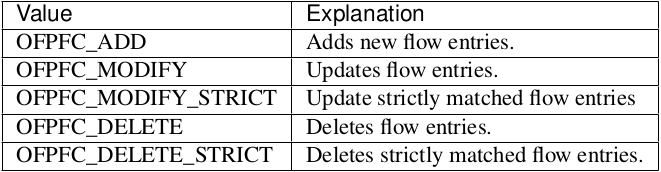
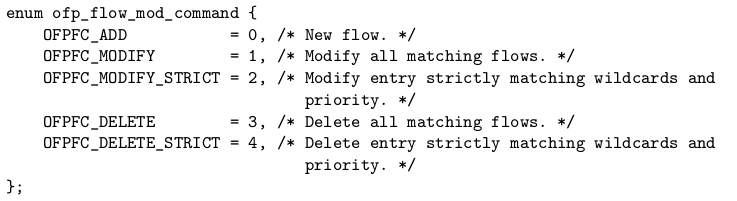
6)idle_timeout (0):指明表项的有效期,单位为秒,如果表项一直未被引用,当idle_timeout时间用完,该表项将被删除,当表项被引用时,该参数值重置。
7)hard_timeout (0):指明表项的有效期,单位为秒,但是当表项被使用时参数值不会重置,时间用完则删除表项。
8)priority (0):优先级。
9)buffer_id (ofproto_v1_3.OFP_NO_BUFFER):指明数据包缓存到交换机哪个buffer。
10)out_port (0):当command为OFPFC_DELETE或OFPFC_DELETE_STRICT时,输出端口将对目标表项进行过滤,若command为其它,则忽略该参数。将值设为OFPP_ANY,输出端口不进行过滤。
11)out_group (0):功能与out_port相似,将值设为OFPG_ANY,输出端口不进行过滤。
12)flags (0):下列flag可组合使用。

13)match (none):指定match。
14)instructions ([]):指定指令列表。
2.6 数据包传输:
Packet-In handler最后一个步骤是数据包传输。
无论是否在MAC地址表中找到目的地址,最后都要发出Packet-out message并且交换机将传输收到的数据包。
        def _packet_in_handler(self, ev):

        # ...

            # construct packet_out message and send it.

            out = parser.OFPPacketOut(datapath=datapath,buffer_id=ofproto.OFP_NO_BUFFER,
                          in_port=in_port, actions=actions,data=msg.data)

            datapath.send_msg(out)
Packet-out message对应OFPPacketOut类,其构造器的参数有:datapath、buffer_id、in_port、actions、data。
in_port:指定接收数据包的端口。
data:数据包的二进制数据,当buffer指定为OFP_NO_BUFFER时使用,当交换机上使用buffer时,可以忽略该参数。
Ryubook_1_switch_hub_源码的更多相关文章
- 【原】Android热更新开源项目Tinker源码解析系列之三:so热更新
本系列将从以下三个方面对Tinker进行源码解析: Android热更新开源项目Tinker源码解析系列之一:Dex热更新 Android热更新开源项目Tinker源码解析系列之二:资源文件热更新 A ...
- C# ini文件操作【源码下载】
介绍C#如何对ini文件进行读写操作,C#可以通过调用[kernel32.dll]文件中的 WritePrivateProfileString()和GetPrivateProfileString()函 ...
- 【原】FMDB源码阅读(三)
[原]FMDB源码阅读(三) 本文转载请注明出处 —— polobymulberry-博客园 1. 前言 FMDB比较优秀的地方就在于对多线程的处理.所以这一篇主要是研究FMDB的多线程处理的实现.而 ...
- 从源码看Azkaban作业流下发过程
上一篇零散地罗列了看源码时记录的一些类的信息,这篇完整介绍一个作业流在Azkaban中的执行过程,希望可以帮助刚刚接手Azkaban相关工作的开发.测试. 一.Azkaban简介 Azkaban作为开 ...
- 【原】Android热更新开源项目Tinker源码解析系列之一:Dex热更新
[原]Android热更新开源项目Tinker源码解析系列之一:Dex热更新 Tinker是微信的第一个开源项目,主要用于安卓应用bug的热修复和功能的迭代. Tinker github地址:http ...
- 【原】Android热更新开源项目Tinker源码解析系列之二:资源文件热更新
上一篇文章介绍了Dex文件的热更新流程,本文将会分析Tinker中对资源文件的热更新流程. 同Dex,资源文件的热更新同样包括三个部分:资源补丁生成,资源补丁合成及资源补丁加载. 本系列将从以下三个方 ...
- 多线程爬坑之路-Thread和Runable源码解析之基本方法的运用实例
前面的文章:多线程爬坑之路-学习多线程需要来了解哪些东西?(concurrent并发包的数据结构和线程池,Locks锁,Atomic原子类) 多线程爬坑之路-Thread和Runable源码解析 前面 ...
- SDWebImage源码解读之SDWebImageDownloaderOperation
第七篇 前言 本篇文章主要讲解下载操作的相关知识,SDWebImageDownloaderOperation的主要任务是把一张图片从服务器下载到内存中.下载数据并不难,如何对下载这一系列的任务进行设计 ...
- 【深入浅出jQuery】源码浅析--整体架构
最近一直在研读 jQuery 源码,初看源码一头雾水毫无头绪,真正静下心来细看写的真是精妙,让你感叹代码之美. 其结构明晰,高内聚.低耦合,兼具优秀的性能与便利的扩展性,在浏览器的兼容性(功能缺陷.渐 ...
随机推荐
- centos7下tomcat7 或tomcat8启动超慢原因
1,找到你的jdk安装的位置 ${JAVA_HOME}/jre/lib/security/java.security 2,vi 打开后找到 securerandom.source=file:/dev/ ...
- POJ3468 A Simple Problem with Integers —— 线段树 区间修改
题目链接:https://vjudge.net/problem/POJ-3468 You have N integers, A1, A2, ... , AN. You need to deal wit ...
- luogu 4720 【模板】扩展卢卡斯
题目大意: 求$C_n^m \mod p$,p不一定为质数 思路: 首先可以将$p$分解为$p1^{a1}*p2^{a2}*...*pk^{ak}$,对于这些部分可以使用$CRT$合并 对于每个$p_ ...
- Splay 区间反转
同样的,我们以一道题来引入. 传送门 这次的任务比较少,只要求进行区间反转.区间反转? 这个好像用啥都是O(n)的吧……(这次vector,set也救不了你了) 我们来使用splay解决这个问题.我们 ...
- 洛谷P2679 子串——DP
题目:https://www.luogu.org/problemnew/show/P2679 DP水题: 然而被摆了一道,下面加 // 的地方都是一开始没写好的地方...还是不周密: 仔细审题啊... ...
- Cortex-M3 / M4 Hard Fault Handler (转载)
转自大伟的,感谢大伟的帮助调试:http://www.cnblogs.com/shangdawei/archive/2013/04/30/3052491.html http://blog.frankv ...
- javascript判断页面是否在移动设备上打开
var ua = navigator.userAgent; var ipad = ua.match(/(iPad).*OS\s([\d_]+)/), isIphone =!ipad && ...
- bzoj 4820: [Sdoi2017]硬币游戏【kmp+高斯消元】
有点神,按照1444的做法肯定会挂 注意到它的概率是相同的,所以可以简化状态 详见http://www.cnblogs.com/candy99/p/6701221.html https://www.c ...
- 开源基于asio的网络通信框架asio2,支持TCP,UDP,HTTP,RPC,SSL,跨平台,支持可靠UDP,支持TCP自动拆包,TCP数据报模式等
开源基于asio的网络通信框架asio2,支持TCP,UDP,HTTP,RPC,SSL,跨平台,支持可靠UDP,支持TCP自动拆包,TCP数据报模式等 C++开发网络通信程序时用asio是个不错的选择 ...
- bzoj 2257[Jsoi2009]瓶子和燃料 数论/裴蜀定理
题目 Description jyy就一直想着尽快回地球,可惜他飞船的燃料不够了. 有一天他又去向火星人要燃料,这次火星人答应了,要jyy用飞船上的瓶子来换.jyy 的飞船上共有 N个瓶子(1< ...