
DEV—【GridControl主从表】
先附上效果图,不是想要这个效果的朋友就不用可以继续寻找了。
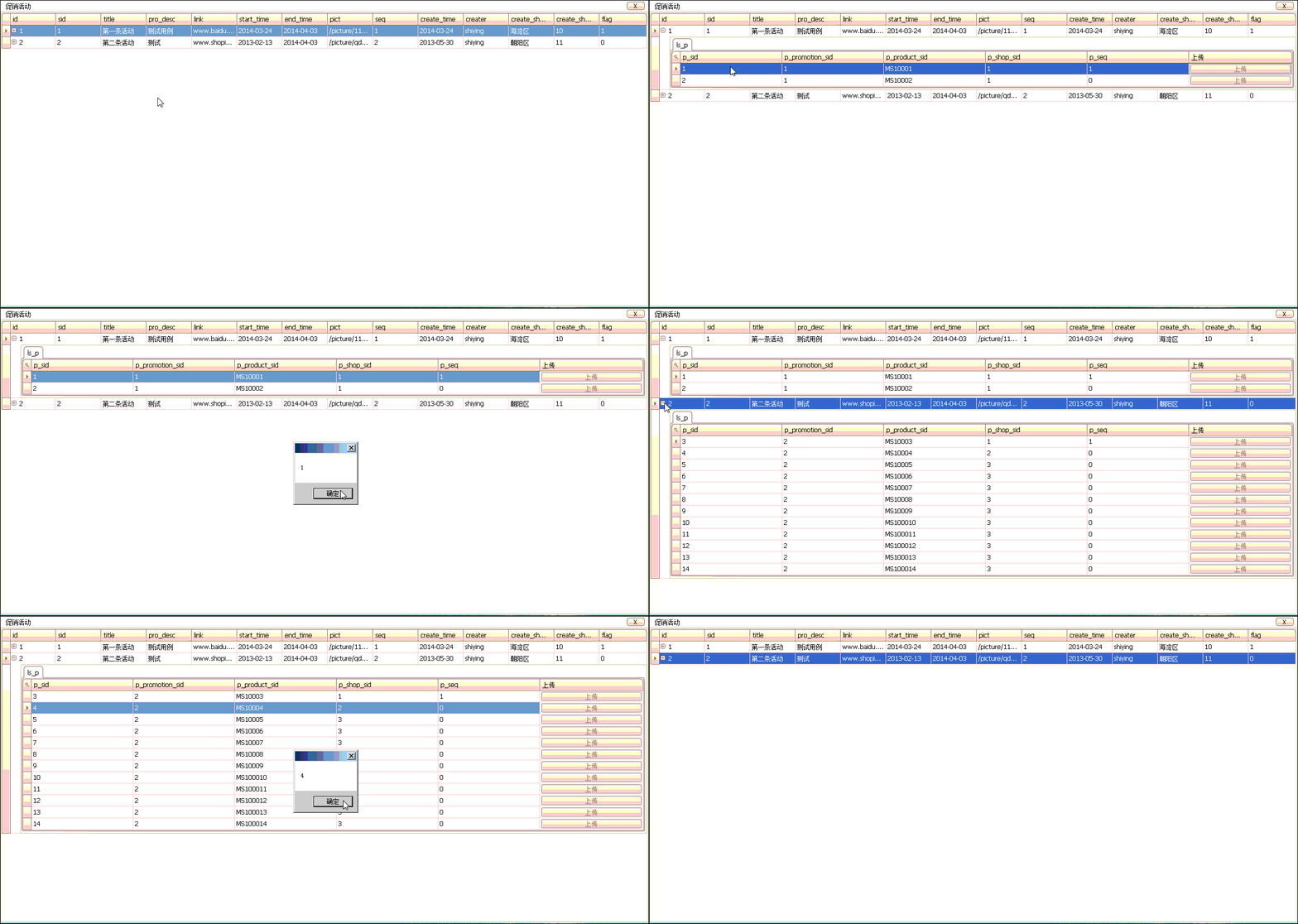
DEV—GridControl制作主从表:
(注:此例没有用到数据库,只是单纯的在内存中操作数据。)
写这一笔,是为了能更好的理解主从表,的搭建关系。
1.环境:
主表(这里用类代替):
      /// <summary>

      /// 主表

     /// </summary>

     public class mobile_flash_promotions

     {

         /// <summary>

         /// ID

         /// </summary>

         public string id { get; set; }

         public string sid { get; set; }

         /// <summary>

         /// 活动标题

         /// </summary>

         public string title { get; set; }

         public string pro_desc { get; set; }

         /// <summary>

         /// 活动链接

         /// </summary>

         public string link { get; set; }

         /// <summary>

         /// 活动开始时间

         /// </summary>

         public string start_time { get; set; }

         /// <summary>

         /// 活动结束时间

         /// </summary>

         public string end_time { get; set; }

         /// <summary>

         /// 活动图片

         /// </summary>

         public string pict { get; set; }

         public string seq { get; set; }

         /// <summary>

         ///活动 创建时间

         /// </summary>

         public string create_time { get; set; }

         /// <summary>

         /// 活动创建人

         /// </summary>

         public string creater { get; set; }

         /// <summary>

         /// 活动创建分店名称

         /// </summary>

         public string create_shop_name { get; set; }

         /// <summary>

         /// 活动创建分店sid

         /// </summary>

         public string create_shop_sid { get; set; }

         /// <summary>

         /// 是否是旗舰店

         /// </summary>

         public string flag { get; set; }

         /// <summary>

         /// 活动店铺集合

         /// </summary>

         public List<mobile_promotion_product> ls_p { get; set; }

     }
主表类
从表(仍然是类):
     /// <summary>

     /// 从表

    /// </summary>

     public class mobile_promotion_product

     {

         public string sid { get; set; }

         public string promotion_sid { get; set; }

         public string product_sid { get; set; }

         public string shop_sid { get; set; }

         public string seq { get; set; }

     }
从表类
GridControl中在MainView中显示主表的GridView,随后添加一个Level在其中添加从表的GridView,如图:
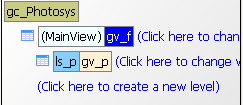
来具体说明一下,主表与从表的关系式通过主表类中的List<从表>来确立的。
如果在主从表功能实现后,从表的列名和自己写好的从表的GridView的列名不相符,那就是在GridControl中添加Level时,Level的name与主表类中代表从表集合的字段名不一样所导致的。(也就是说,如果不需要定制从表的GridView,完全可以不添加Level和从表的GridView)。
2.模拟数据库环境:
首先说要实现的效果,【点击主表Row时,刷新从表信息】
刚才提到过本例子的数据都是在内存中操作,所以首先写一个加载数据的方法:
         /// <summary>

         /// 主表数据源

       /// </summary>

         List<mobile_flash_promotions> ls_f = new List<mobile_flash_promotions>();

         /// <summary>

         /// 从表数据源

       /// </summary>

         List<mobile_promotion_product> ls_p = new List<mobile_promotion_product>();

         /// <summary>

         /// 向数据源加载数据

       /// </summary>

         public void LoadBaseData()

         {

             mobile_promotion_product mpp1 = new mobile_promotion_product() { sid = "", product_sid = "MS10001", promotion_sid = "", shop_sid = "", seq = "" };

             mobile_promotion_product mpp2 = new mobile_promotion_product() { sid = "", product_sid = "MS10002", promotion_sid = "", shop_sid = "", seq = "" };

             mobile_promotion_product mpp3 = new mobile_promotion_product() { sid = "", product_sid = "MS10003", promotion_sid = "", shop_sid = "", seq = "" };

             mobile_promotion_product mpp4 = new mobile_promotion_product() { sid = "", product_sid = "MS10004", promotion_sid = "", shop_sid = "", seq = "" };

             ls_p.Add(mpp1);

             ls_p.Add(mpp2);

             ls_p.Add(mpp3);

             ls_p.Add(mpp4);

             mobile_flash_promotions mfp1 = new mobile_flash_promotions() { id = "", sid = "", title = "第一条活动", pro_desc = "测试用例", link = "www.baidu.com", start_time = "2014-03-24", end_time = "2014-04-03", pict = "/picture/111000.jpg", seq = "", create_time = "2014-03-24", creater = "shiying", create_shop_name = "海淀区", create_shop_sid = "", flag = "" };

             mobile_flash_promotions mfp2 = new mobile_flash_promotions() { id = "", sid = "", title = "第二条活动", pro_desc = "测试", link = "www.shopin.net", start_time = "2013-02-13", end_time = "2014-04-03", pict = "/picture/qdq.jpg", seq = "", create_time = "2013-05-30", creater = "shiying", create_shop_name = "朝阳区", create_shop_sid = "", flag = "" };

             ls_f.Add(mfp1);

             ls_f.Add(mfp2);

         }
向主从表添加基本数据
然后我们添加一个Timer进来,设置每5秒添加一条数据,Enable=True。
         /// <summary>

         /// 标记从ID=5开始添加

       /// </summary>

         int i = ;

         /// <summary>

         /// 每5秒添加一次数据

       /// </summary>

         /// <param name="sender"></param>

         /// <param name="e"></param>

         private void timer1_Tick(object sender, EventArgs e)

         {

             i = i + ;

             mobile_promotion_product mpp5 = new mobile_promotion_product() { sid = (i).ToString(), product_sid = "MS1000" + (i).ToString(), promotion_sid = "", shop_sid = "", seq = "" };

             ls_p.Add(mpp5);

         }
Timer
数据添加完了,下一步是查询:
         /// <summary>

         /// 查询

       /// </summary>

         public void Query()

         {

             List<mobile_promotion_product> ls_p_f1 = ls_p.Where(p => p.promotion_sid == ls_f[].sid).ToList();

             List<mobile_promotion_product> ls_p_f2 = ls_p.Where(p => p.promotion_sid == ls_f[].sid).ToList();

             ls_f[].ls_p = ls_p_f1;

             ls_f[].ls_p = ls_p_f2;

             gc_Photosys.DataSource = ls_f;

         }
查询
基本代码都oK了,剩下的是何时调用查询,本例的查询时发生在点击主表的Row的第一个Cell时发生,即向主表的GridView添加RowCellClick事件:
         /// <summary>

         /// 主表选中行发生改变时折叠上一个展开的从表+点击主表Row查询从表

       /// </summary>

         /// <param name="sender"></param>

         /// <param name="e"></param>

         private void gv_f_RowCellClick(object sender, DevExpress.XtraGrid.Views.Grid.RowCellClickEventArgs e)

         {

             if (gv_f_rowhandle != e.RowHandle)

             {

                 //折叠从表

                 gv_f.SetMasterRowExpanded(gv_f_rowhandle, false);

                 gv_f_rowhandle = e.RowHandle;

             }

             if (e.Column.ColumnHandle == )

             {

                 Query();

             }

         }
主表RowCellClick事件
将主表类的集合绑定到主表的GridView中(MainView的GridView) 后,主从表就实现了!
总结:主从表的实现相对于DEV来说很简单,只需要在主表的每个对象中添加一个从表对象的集合即可。
DEV—【GridControl主从表】的更多相关文章
- Dev gridControl 添加表标题
1.OptionsView ->ShowViewCaption = True 2.ViewCaption = "标题"
- Dev gridControl z
Dev gridControl 添加表标题 1.OptionsView ->ShowViewCaption = True 2.ViewCaption = "标题" Dev g ...
- 在GridControl表格控件中实现多层级主从表数据的展示
在一些应用场景中,我们需要实现多层级的数据表格显示,如常规的二级主从表数据展示,甚至也有多个层级展示的需求,那么我们如何通过DevExpress的GridControl控表格件实现这种业务需求呢?本篇 ...
- DEV主从表
1.主从表隐藏表格展开按钮. 当主表内容不包含子表时候隐藏,主从表加号图标.效果如下图. 实现代码 private void gvMain_CustomDrawCell(object sender, ...
- DevExpress gridcontrol gridView主从表折叠/展开显示
在使用报表的时候,有很多需要主从表一起显示,从表不需要另外弹窗显示明细,反而直接显示在主表下方.如图所示: 第一次做这个功能,主从表显示,从表列隐藏,从表单元格点击事件这三个功能点花费了很多时间,在网 ...
- Winform开发框架之单据窗体生成(主从表,流水单号)
源码地址:https://github.com/GarsonZhang/GZFramework.ShareDemo 前言 1.在开始本节前请先重置代码为 chapter-03-start 懒人地址:h ...
- DevExpress主从表 按组分页一组不足一页为一页--以此记录
本文的主要是说明Dev的报表的主从表,主从表的每一组显示在一页,当一组超出一页,第二页只显示第一组的. 一.每上报表设置图 简单设计图如上 二.后台代码 报表页代码 public partial cl ...
- Winform界面中主从表编辑界面的快速处理
在Winform开发中,我们往往除了常规的单表信息录入外,有时候设计到多个主从表的数据显示.编辑等界面,单表的信息一般就是控件和对象实体一一对应,然后调用API保存即可,主从表就需要另外特殊处理,本随 ...
- dev Gridcontrol控件属性部分
XtraGrid的关键类就是:GridControl和GridView.GridControl本身不显示数据,数据都是显示在GridView/CardView/XXXXView中.GridContro ...
随机推荐
- python 多线程中同步的小样例
#!/usr/bin/python # -*- coding: UTF-8 -*- # 在一个资源池中.获取资源 # Author: zhang # Date: 2015-7-27 import ti ...
- C#&.NET高级面试题
转自http://chaoyouzhuo.blog.163.com/blog/static/1263760012011109114131316/ 1. DateTime.Parse(myString) ...
- Orange's_1_win7下搭建环境
工欲善其事,必先利其器. 由于公司电脑工作环境是win7,为了学习于渊的Orange,所以就在windows下配置环境: 1.nasm: nasm汇编 http://www.nasm.us/ ...
- 【小技能】如何检索苹果APP
有时候要临时在PC上查询一下苹果APP的信息,但是又没有安装itunes软件,那么你可以在必应里面使用类似如下的语句,例如来搜索“aboboo site:itunes.apple.com”,就可以搜索 ...
- 2016/3/1 淘宝 腾讯 网易 css初始化代码 以及最基础的初始化
淘宝官网(http://www.taobao.com/)样式初始化 body, h1, h2, h3, h4, h5, h6, hr, p, blockquote, dl, dt, dd, ul, o ...
- mysql工作原理(网络搜索整理的)
原文网址:Mysql 工作原理 原文网址:MySQL运行原理与基础架构 mysql基本用法原文网址:MySQL(一):基本原理 SQL 语句执行过程 数据库通常不会被直接使用,而是由其他编程语言通过S ...
- C语言进入界面编程准备篇
Win视窗编程和DOS下编程不同,但是类似.Windows应用程序也有它的入口函数,DOS程序中的入口函数是main函数,Windows程序的入口函数是WinMain函数.新建Win32 Applic ...
- make eval builtin function
1 eval的返回值是空字符串,因此它可以用于Makefile的任何位置而不引起错误 2 eval函数的作用效果 生成Makefile的动态部分,即eval用于增加Makefile的构成部分. 也就是 ...
- Lightoj 1166 - Old Sorting
Given an array containing a permutation of 1 to n, you have to find the minimum number of swaps to s ...
- Lightoj 1029 - Civil and Evil Engineer
1029 - Civil and Evil Engineer PDF (English) Statistics Forum Time Limit: 2 second(s) Memory Limi ...