
asp.net MVC中实现调取web api
  public ActionResult Index(string city)

         {

             if (string.IsNullOrEmpty(city))

             {

                 city = "上海";

             }

 //ak需要自己到百度地图官网申请

 Uri weatherInfo = new Uri("http://api.map.baidu.com/telematics/v3/weather?location=" + city + "&output=json&ak=UKMGHnstHCOFzYBe2h70gi5fLsc0C0dG");

    HttpWebRequest request = WebRequest.Create(weatherInfo) as HttpWebRequest;

             List<WeatherData> weatherDataList = new List<WeatherData>();

             using (HttpWebResponse response = request.GetResponse() as HttpWebResponse)

             {

                 // Get the response stream

                 StreamReader reader = new StreamReader(response.GetResponseStream());

                 string json = reader.ReadToEnd();

                 Weather model = JsonHelper.JsonToEntity<Weather>(json);

                 List<WeatherDto> weatherDtoList = new List<WeatherDto>();

                 List<Index> indexList = new List<Index>();

                 foreach (WeatherResult result in model.Results)

                 {

                     indexList = result.Index;

                     weatherDataList = result.Weather_Data;

                 }

                 for (int i = ; i < indexList.Count; i++)

                 {

                     WeatherDto weatherDto = new WeatherDto();

                     weatherDto.Des = indexList[i].Des;

                     weatherDto.Tipt = indexList[i].Tipt;

                     weatherDto.Title = indexList[i].Title;

                     weatherDto.Zs = indexList[i].Zs;

                     if (i < weatherDataList.Count)

                     {

                         weatherDto.Date = weatherDataList[i].Date;

                         weatherDto.DayPictureUrl = weatherDataList[i].DayPictureUrl;

                         weatherDto.NightPictureUrl = weatherDataList[i].NightPictureUrl;

                         weatherDto.Temperature = weatherDataList[i].Temperature;

                         weatherDto.Weather = weatherDataList[i].Weather;

                         weatherDto.Wind = weatherDataList[i].Wind;

                     }

                     weatherDtoList.Add(weatherDto);

                 }

             }

             return View("NewView",weatherDataList);

         }

     }

  public class WeatherDto

     {

         public string Title { get; set; }

         public string Zs { get; set; }

         public string Tipt { get; set; }

         public string Des { get; set; }

         public string Date { get; set; }

         public string DayPictureUrl { get; set; }

         public string NightPictureUrl { get; set; }

         public string Weather { get; set; }

         public string Wind { get; set; }

         public string Temperature { get; set; }

     }

  public class Weather

     {

         public string Error { get; set; }

         public string Status { get; set; }

         public string Date { get; set; }

         public List<WeatherResult> Results { get; set; }

     }

  public class WeatherResult

     {

         public string CurrentCity { get; set; }

         public string Pm25 { get; set; }

         public List<Index> Index { get; set; }

         public List<WeatherData> Weather_Data { get; set; }

     }
 @model IEnumerable<MvcAjaxTest.Models.WeatherData>

 @{

     Layout = null;

 }

 <html>

 <head>

     <title>weather</title>

     <link rel="shortcut icon" href="http://p8.qhimg.com/t0158c24c5ddb3a6745.png" type="image/x-icon">

     <link rel="stylesheet" href="~/Content/css/Weather.css" />

     <style type="text/css">

         #weathertype {

             font-size: 28px;

             padding-left: 20px;

         }

         #copyright {

             padding: 40px ;

             text-align: center;

             line-height: ;

             color: #;

         }

         .btn-app {

             background: url(http://p8.qhimg.com/t017399c8595fd6cc76.png) no-repeat 0 0;

         }

         .skinmore, .skinmore2 {

             z-index: -;

         }

         .skin2 .skinmore2 {

             background: url(http://p4.qhimg.com/t0191e46e3e10bc96e3.png) repeat center 0;

             height: %;

             left: ;

             position: absolute;

             top: ;

             width: %;

         }

         .qrcodes img {

             margin-top: 40px;

         }

         .qrcodes {

             position: absolute;

             top: 150px;

             width: 200px;

             right: %;

         }

         .header {

             height: 110px;

         }

         .logo {

             background: url(http://p9.qhimg.com/t01c2da4dacc6c6dee8.png) no-repeat;

             background-image: -webkit-image-set(url(http://p9.qhimg.com/t01c2da4dacc6c6dee8.png) 1x,url(http://p0.qhimg.com/t01ea0b4aedd360d174.png) 2x);

             float: left;

             height: 65px;

             margin-top: 35px;

             width: 183px;

         }

         .search {

             margin-top: 20px;

         }

     </style>

     <script type="text/javascript" src="~/Scripts/jquery-1.8.2.js"></script>

     <script type="text/javascript">

         function Change() {

             var citySelected = $("#GetCity option:selected").text();

             $.ajax({

                 type: "Post",

                 url: "Weather/Index",

                 data: { City: citySelected },

                 success: function (data) {

                     $("#partRefresh").html(data);

                 },

                 error: function () {

                     alert("请求失败,请稍候再试...");

                 }

             });

         }

     </script>

 </head>

 <body class="skin6" style="display: block;">

     <div>

         <select id="GetCity" onchange="Change()">

             <option value="" selected="selected">上海市</option>

             <option value="">合肥市</option>

             <option value="">牡丹江市</option>

             <option>湖州市</option>

             <option>海口市</option>

         </select>

     </div>

     <div class="morewether" id="partRefresh">

         <!-- 各天气对应中文拼音 如icon-yewanqing对应“夜晚晴“ -->

         <ul id="foreast">

             <li>

                 <p class="colora">@Model.ToList()[].Date</p>

                 <p class="icon-tu"><i class="icon-qing"></i><br>@Model.ToList()[].Weather</p>

                 <p class="otherinfo"><span>@Model.ToList()[].Temperature</span>@Model.ToList()[].Wind</p>

             </li>

             <li>

                 <p class="colora">@Model.ToList()[].Date</p>

                 <p class="icon-tu"><i class="icon-shachen"></i><br>@Model.ToList()[].Weather</p>

                 <p class="otherinfo"><span>@Model.ToList()[].Temperature</span>@Model.ToList()[].Wind</p>

             </li>

             <li>

                 <p class="colora">@Model.ToList()[].Date</p>

                 <p class="icon-tu"><i class="icon-shachen"></i><br>@Model.ToList()[].Weather</p>

                 <p class="otherinfo"><span>@Model.ToList()[].Temperature</span>@Model.ToList()[].Wind</p>

             </li>

             <li>

                 <p class="colora">@Model.ToList()[].Date</p>

                 <p class="icon-tu"><i class="icon-shachen"></i><br>@Model.ToList()[].Weather</p>

                 <p class="otherinfo"><span>@Model.ToList()[].Temperature</span>@Model.ToList()[].Wind</p>

             </li>

         </ul>

     </div>

 </body>

 </html>
效果图: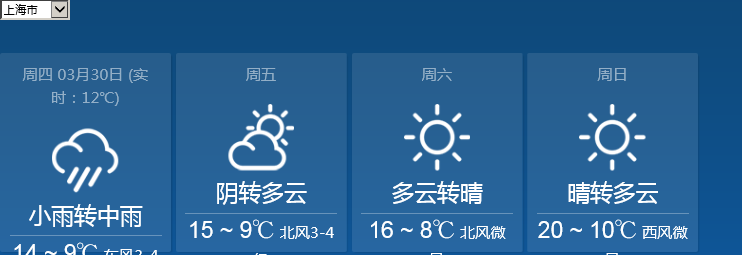
asp.net MVC中实现调取web api的更多相关文章
- ASP.NET MVC 提供与访问 Web Api
ASP.NET MVC 提供与访问 Web Api 一.提供一个 Web Api 新建一个项目,类型就选 "Web Api".我用的是MVC5,结果生成的项目一大堆东西,还编译不过 ...
- 在ASP.NET Core MVC中构建简单 Web Api
Getting Started 在 ASP.NET Core MVC 框架中,ASP.NET 团队为我们提供了一整套的用于构建一个 Web 中的各种部分所需的套件,那么有些时候我们只需要做一个简单的 ...
- ASP.NET MVC 4 (十二) Web API
Web API属于ASP.NET核心平台的一部分,它利用MVC框架的底层功能方便我们快速的开发部署WEB服务.我们可以在常规MVC应用通过添加API控制器来创建web api服务,普通MVC应用程序控 ...
- ASP.NET Core 中文文档 第二章 指南(2)用 Visual Studio 和 ASP.NET Core MVC 创建首个 Web API
原文:Building Your First Web API with ASP.NET Core MVC and Visual Studio 作者:Mike Wasson 和 Rick Anderso ...
- 如何在 ASP.NET MVC 中集成 AngularJS(3)
今天来为大家介绍如何在 ASP.NET MVC 中集成 AngularJS 的最后一部分内容. 调试路由表 - HTML 缓存清除 就在我以为示例应用程序完成之后,我意识到,我必须提供两个版本的路由表 ...
- 如何在 ASP.NET MVC 中集成 AngularJS(2)
在如何在 ASP.NET MVC 中集成 AngularJS(1)中,我们介绍了 ASP.NET MVC 捆绑和压缩.应用程序版本自动刷新和工程构建等内容. 下面介绍如何在 ASP.NET MVC 中 ...
- 在 ASP.NET MVC 中充分利用 WebGrid (microsoft 官方示例)
在 ASP.NET MVC 中充分利用 WebGrid https://msdn.microsoft.com/zh-cn/magazine/hh288075.aspx Stuart Leeks 下载代 ...
- 如何在 ASP.NET MVC 中集成 AngularJS(1)
介绍 当涉及到计算机软件的开发时,我想运用所有的最新技术.例如,前端使用最新的 JavaScript 技术,服务器端使用最新的基于 REST 的 Web API 服务.另外,还有最新的数据库技术.最新 ...
- ASP.NET MVC 中应用Windows服务以及Webservice服务开发分布式定时器
ASP.NET MVC 中应用Windows服务以及Webservice服务开发分布式定时器一:闲谈一下:1.现在任务跟踪管理系统已经开发快要结束了,抽一点时间来写一下,想一想自己就有成就感啊!! ...
随机推荐
- VS1053 datasheet 解读笔记
pdf 10 pdf 11 ` 左右声道 负载,注意这里的负载指LEFT 到GBUF,RIGHT到GBUF.所以后面会有说明GBUF一定不能连接到GND. pdf 14 pdf 14 从上面的引脚定 ...
- 使用C++11的thread取代QThread
因为在做的工程项目里使用了Qt,而实际上不涉及到屏幕显示,工程代码里使用了QThread,且没有使用Qt核心的信号与槽,为了以后移植准备使用更加通用的C++11 stl中的thread取代QThrea ...
- Getting Started with xUnit.net (desktop)
https://xunit.github.io/docs/getting-started-desktop.html In this article, we will demonstrate getti ...
- 设置sublime text2/3中预览浏览器快捷键的方法
我们为什么要设置默认的预览浏览器呢?因为搞前端的都知道,你在预览的时候不可能只预览一个浏览器,可能需要多个,当然今天我们举例中会说道谷歌浏览器Chrome,IE浏览器Internet Explorer ...
- Fabric原理剖析
Fabric架构 image.png Fabric网络 image.png Fabric模块 image.png Fabric交易流 根据Hyperledger Fabric 1.0架构, ...
- JRE System Library 与Java EE Libraries的区别
JRE System Library是只要做java开发都需要的完整的.标准的库. Java EE5 Libraries只是java三个方向中做java EE所需要的库.如果做Web方面的开发的话就 ...
- Meta标签中的format-detection属性及含义(转)
一.Meta标签中的format-detection属性及含义 意为:格式检测 或许你会有这样的经历:当你在制作手机端的页面中,点击了没有加任何链接的格式的数字时,这时手机会进行自动拔号提示操作! 禁 ...
- centos7命令行模式安装&&配置_br0+kvm+虚拟机+添加硬盘+快照及恢复
KVM创建虚拟机步骤 Submitted by zhaoley on October 18, 2016 - 10:43am 测试环境: 1: 43.243.130.89, CentOS Linux r ...
- CodeForces 718C && HDU 3572 && Constellation
Point 1. 区间乘以一个数/矩阵的幂时,不要用指数相加的方法. 而要用直接维护mulv[x]表示区间要乘多少. 不然的话,空加一个logn 2. 要点在于,冲突的点连边,形成二分图,对于在同一个 ...
- Eclipse安装配置Maven
Eclipse安装配置Maven 1 安装配置Maven 1.1 下载Maven 从Apache网站 http://maven.apache.org/ 下载并且解压缩安装Apache Maven. ...