
微服务实战系列(一)-注册中心Springcloud Eureka服务端-copy
1. 场景描述
springcloud提供了一整套可行的构建分布式系统的方案,使的企业/开发人员能够快速沟通分布式系统,今天快速构建下springcloud的注册中心Eureka。
2. 解决方案
2.1 springcloud介绍
COORDINATE ANYTHING: DISTRIBUTED SYSTEMS SIMPLIFIED
Building distributed systems doesn't need to be complex and error-prone. Spring Cloud offers a simple and accessible programming model to the most common distributed system patterns, helping developers build resilient, reliable, and coordinated applications. Spring Cloud is built on top of Spring Boot, making it easy for developers to get started and become productive quickly.

2.2 项目构建
使用的idea终极版,springcloud项目本身就是springboot项目(springboot与springcloud的关系)。
首先在idea中创建项目:file-->new-->project
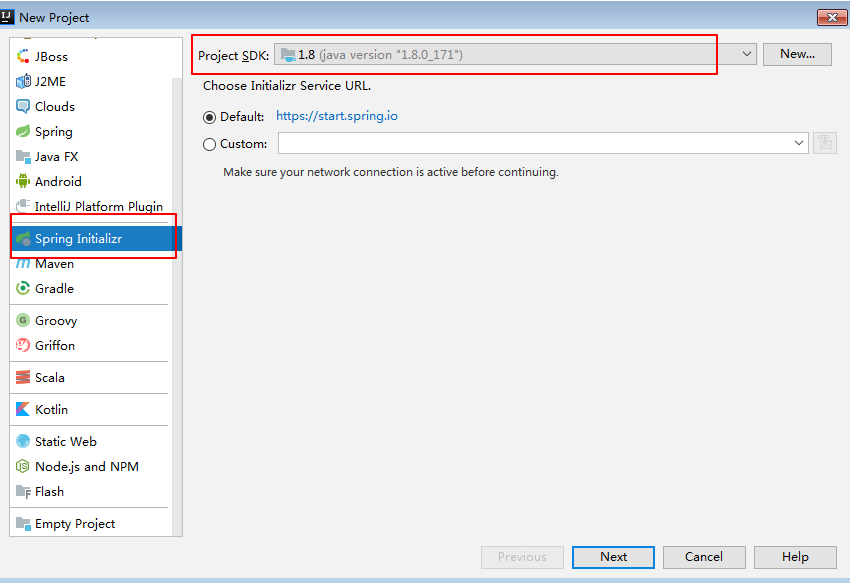
两个默认next后选择组件
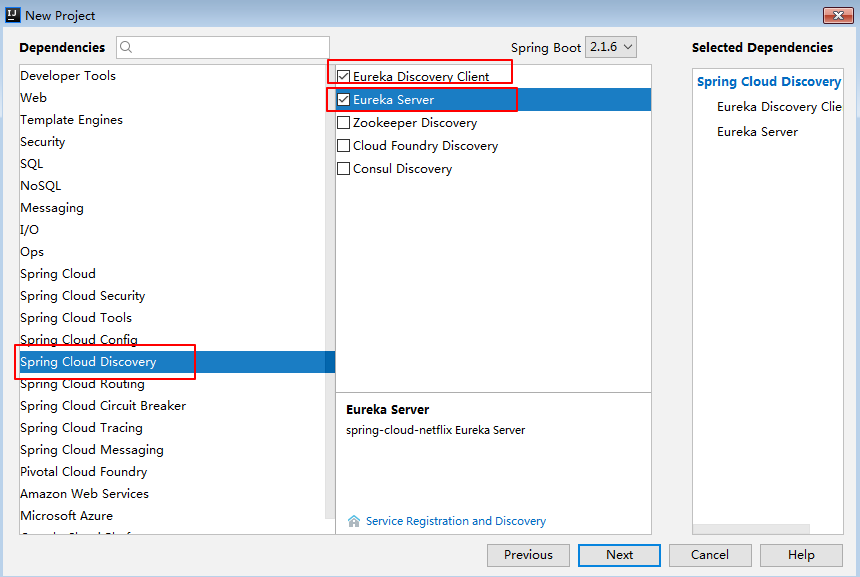
默认next->finish
2.3 配置文件pom.xml
<?xml version="1.0" encoding="UTF-8"?>

<project xmlns="http://maven.apache.org/POM/4.0.0" xmlns:xsi="http://www.w3.org/2001/XMLSchema-instance"

         xsi:schemaLocation="http://maven.apache.org/POM/4.0.0 http://maven.apache.org/xsd/maven-4.0.0.xsd">

    <modelVersion>4.0.0</modelVersion>

    <parent>

        <groupId>org.springframework.boot</groupId>

        <artifactId>spring-boot-starter-parent</artifactId>

        <version>2.1.4.RELEASE</version>

        <relativePath/> <!-- lookup parent from repository -->

    </parent>

    <groupId>com.spc</groupId>

    <artifactId>eurekaserver</artifactId>

    <version>0.0.1-SNAPSHOT</version>

    <name>eurekaserver</name>

    <description>Demo project for Spring Boot</description>

    <properties>

        <java.version>1.8</java.version>

        <spring-cloud.version>Greenwich.SR1</spring-cloud.version>

    </properties>

    <dependencies>

        <dependency>

            <groupId>org.springframework.cloud</groupId>

            <artifactId>spring-cloud-starter-netflix-eureka-client</artifactId>

        </dependency>

        <dependency>

            <groupId>org.springframework.cloud</groupId>

            <artifactId>spring-cloud-starter-netflix-eureka-server</artifactId>

        </dependency>

        <dependency>

            <groupId>org.springframework.boot</groupId>

            <artifactId>spring-boot-starter-test</artifactId>

            <scope>test</scope>

        </dependency>

    </dependencies>

    <dependencyManagement>

        <dependencies>

            <dependency>

                <groupId>org.springframework.cloud</groupId>

                <artifactId>spring-cloud-dependencies</artifactId>

                <version>${spring-cloud.version}</version>

                <type>pom</type>

                <scope>import</scope>

            </dependency>

        </dependencies>

    </dependencyManagement>

    <build>

        <plugins>

            <plugin>

                <groupId>org.springframework.boot</groupId>

                <artifactId>spring-boot-maven-plugin</artifactId>

            </plugin>

        </plugins>

    </build>

</project>
说明:
(1)springcloud本身是springboot项目,新建springboot项目。
(2)需要两个starter,eureka-server和eureka-client
如果你觉得文章对你有些帮助,欢迎微信搜索「软件老王」第一时间阅读或交流!
2.4 application启动类
package com.spc.eurekaserver;

import org.springframework.boot.SpringApplication;

import org.springframework.boot.autoconfigure.SpringBootApplication;

import org.springframework.cloud.netflix.eureka.server.EnableEurekaServer;

@SpringBootApplication

@EnableEurekaServer

public class EurekaserverApplication {

    public static void main(String[] args) {

        SpringApplication.run(EurekaserverApplication.class, args);

    }

}
说明:
比springboot项目多了一个标签:@EnableEurekaServer,该标签用于标注是注册中心。
2.5 application.yml文件
spring:

  application:

    name: registry

server:

  port: 8761

eureka:

  client:

    register-with-eureka: false

    service-url:

      defaultZone: http://localhost:8761/eureka/
说明:
(1)name为项目名称;
(2)port: 8761为启动端口。
(3)eureka下面的配置暂时不用,后续用于在高可用配置的时候,作为客户端注册到另一台注册中心,实现高可用。
2.6 启动应用

更多知识请关注公众号:「软件老王」,IT技术与相关干货分享,回复关键字获取对应干货,java,送必看的10本“武功秘籍”;图片,送100多万张可商用高清图片;面试,送刚毕业就能月薪“20k”的java面试题,软考,送官方pdf书籍与通关论文,后续会不断更新,比如“工具”,“视频”等,已经在整理中。
微服务实战系列(一)-注册中心Springcloud Eureka服务端-copy的更多相关文章
- 微服务实战系列--Nginx官网发布(转)
这是Nginx官网写的一个系列,共七篇文章,如下 Introduction to Microservices (this article) Building Microservices: Using ...
- go-zero微服务实战系列(三、API定义和表结构设计)
前两篇文章分别介绍了本系列文章的背景以及根据业务职能对商城系统做了服务的拆分,其中每个服务又可分为如下三类: api服务 - BFF层,对外提供HTTP接口 rpc服务 - 内部依赖的微服务,实现单一 ...
- go-zero微服务实战系列(十一、大结局)
本篇是整个系列的最后一篇了,本来打算在系列的最后一两篇写一下关于k8s部署相关的内容,在构思的过程中觉得自己对k8s知识的掌握还很不足,在自己没有理解掌握的前提下我觉得也很难写出自己满意的文章,大家看 ...
- Chris Richardson微服务实战系列
微服务实战(一):微服务架构的优势与不足 微服务实战(二):使用API Gateway 微服务实战(三):深入微服务架构的进程间通信 微服务实战(四):服务发现的可行方案以及实践案例 微服务实践(五) ...
- 微服务实战(六):选择微服务部署策略 - DockOne.io
原文:微服务实战(六):选择微服务部署策略 - DockOne.io [编者的话]这篇博客是用微服务建应用的第六篇,第一篇介绍了微服务架构模板,并且讨论了使用微服务的优缺点.随后的文章讨论了微服务不同 ...
- 微服务实战(三):深入微服务架构的进程间通信 - DockOne.io
原文:微服务实战(三):深入微服务架构的进程间通信 - DockOne.io [编者的话]这是采用微服务架构创建自己应用系列第三篇文章.第一篇介绍了微服务架构模式,和单体式模式进行了比较,并且讨论了使 ...
- ASP.NET Core微服务实战系列
希望给你3-5分钟的碎片化学习,可能是坐地铁.等公交,积少成多,水滴石穿,码字辛苦,如果你吃了蛋觉得味道不错,希望点个赞,谢谢关注. 前言 这里记录的是个人奋斗和成长的地方,该篇只是一个系列目录和构想 ...
- 微服务实战系列(二)-注册中心Springcloud Eureka客户端
1. 场景描述 前几天介绍了下springcloud的Eureka注册中心(springcloud-注册中心快速构建),今天结合springboot-web介绍下eureka客户端服务注册. 2. 解 ...
- 微服务实战系列(四)-注册中心springcloud alibaba nacos
1.场景描述 因要用到微服务,关于注册中心这块,与同事在技术原型上做了讨论,初步定的方案是使用:阿里巴巴的nacos+springcloud gateway,下面表格是同事整理的注册中心对比,以前用的 ...
- 微服务实战系列(五)-注册中心Eureka与nacos区别
1. 场景描述 nacos最近用的比较多,介绍下nacos及部署吧,刚看了下以前写过类似的,不过没写如何部署及与eureka区别,只展示了效果,补补吧. 2.解决方案 2.1 nacos与eureka ...
随机推荐
- 3.9 Linux查看目录中的文件(ls命令)
通过学习cd 和 pwd 命令,相信读者已经能够在庞大的 Linux 文件系统中,随心所欲地游荡并确定自己所在的位置了.本节继续来学习,如何知道某目录中存放了哪些文件或子目录. ls 命令,list ...
- MNN框架在Win10上的部署,支持OpenGL和Vulkan
上篇记录了之前在win10上部署的流程,不过在camke的时候没有选择支持OpenGL和Vulkan.这里重新按照官方的语雀文档重新进行支持OpenGL和Vulkan的编译,简单做个记录.如果有其他的 ...
- 强行修改 User-Agent, 访问对应的端
location /{ proxy_pass http://localhost:18080; proxy_set_header User-Agent "Mozilla/5.0 (Window ...
- 2024ICPC 武汉邀请赛题解 更新至 8 题
目录 Preface Problem I. 循环苹果串 Problem K. 派对游戏 Problem B. 无数的我 Problem F. 订制服装 Problem E. 回旋镖 Problem D ...
- JESD79-5C_v1.30-2024 JEDEC DDR5 SOLID STATE TECHNOLOGY ASSOCIATION 最新内存技术规范
JESD79-5C_v1.30-2024 JEDEC DDR5 SOLID STATE TECHNOLOGY ASSOCIATION 最新DDR5内存技术规范 JEDEC 技术协会公布新 DDR5 ...
- java——棋牌类游戏五子棋(webwzq1.0)之三(Msg)
package msg; import java.io.ObjectInputStream; import java.net.DatagramSocket; /******************** ...
- Eclipse JDT--AST入门
最近做program analysis,需要解析Java的源代码,于是就去看了看Abstract Syntax Tree(AST,中文为抽象语法树).有点无奈的是,网上关于这方面的资料比我想象中的少, ...
- Python:pygame游戏编程之旅四(游戏界面文字处理)
本节讲解游戏界面中字体的处理,以在界面中实时显示当前时间.小球位置为例进行实验,具体见代码. 一.代码 # -*- coding:utf-8 -*- import os import sys impo ...
- 结合uWSGI和Nginx部署flask项目
在开发环境,我们一般使用python起一个web服务即可访问,但是对于生产环境来说,我们一般使用nginx+uWSGI的方式进行部署. 使用Nginx优点: 安全:不管什么请求都要经过代理服务器,这样 ...
- Oracle.DataAccess.Client.OracleException: 提供程序与此版本的 Oracle 客户机不兼容
背景:进行程序部署,客户机上原有oracle客户端的版本为2.113.1.0(以下简称113),而数据库.开发机和其他客户机上均采用的2.112.1.0(以下简称112)客户端,所以进行了替换. 卸载 ...