
winform计算器
引言
本次项目目的主要为了熟悉winform控件使用,以及学习Microsoft.CSharp的使用。
技术栈
C# winform
实现效果
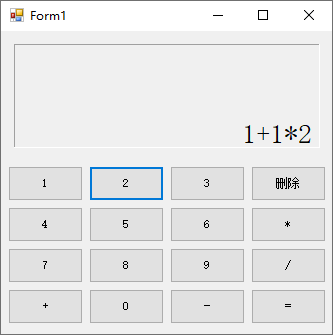
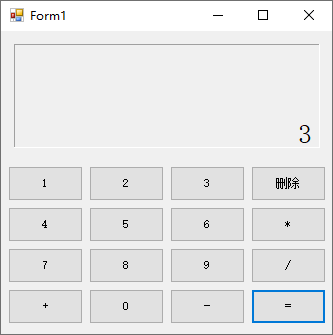
设计与实现
按键使用button空间,计算算式以及计算结果使用label控件。运算核心使用Microsoft.CSharp,利用C#动态编译特性,将算式转换成源码,交给编译器计算。
               //算式运算代码

        public static double EvaluateExpression(string expression)

        {

            CSharpCodeProvider provider = new CSharpCodeProvider();//提供编译源码的方法

            CompilerParameters parameters = new CompilerParameters();//提供编译过程中的各种参数

            parameters.GenerateInMemory = true;//不生成物理文件,使用内存

            //动态编译时需要指向它所需要的库

            parameters.ReferencedAssemblies.Add("mscorlib.dll");

            parameters.ReferencedAssemblies.Add("System.Core.dll");

            //CompilerResults存储编译后的结果

            //@后定义的是c#源码

            //编译器会将源码执行,自动进行算术运算,返回expression的结果

            CompilerResults results = provider.CompileAssemblyFromSource(parameters, @"

            using System;

            public class ExpressionEvaluator

            {

                public static double Evaluate()

                {

                    return " + expression + @";

                }

            }");

            //编译出错返回

            if (results.Errors.HasErrors)

            {

                throw new ArgumentException("Error compiling expression.", nameof(expression));

            }

            //通过反射获取程序集中的ExpressionEvaluator

            Type evaluatorType = results.CompiledAssembly.GetType("ExpressionEvaluator");

            //获取"Evaluate"方法

            MethodInfo methodInfo = evaluatorType.GetMethod("Evaluate");

            //返回结果(第一个null表示:调用静态方法,第二个null表示:方法没有参数)

            return (double)methodInfo.Invoke(null, null);

        }
挑战与解决方案
原本想要直接将算式String分解,一步一步运算,但是太麻烦,所以采用Microsoft.CSharp
winform计算器的更多相关文章
- winform 计算器
using System; using System.Collections.Generic; using System.ComponentModel; using System.Data; usin ...
- Winform——计算器
namespace 计算器2._0 { public partial class Form1 : Form { public Form1() { InitializeComponent(); } pr ...
- Winform——计算器进制转换
namespace 进制转换2._0 { public partial class Form1 : Form { public Form1() { InitializeComponent(); } p ...
- [原][C#][winForm]分级基金折溢价WinForm网络计算器
分级基金折溢价WinForm网络计算器 通过子/母基金代码,从 [ 东方财富网,天天基金网,新浪 ] 抓取分级基金的子母基金数据(代码,名称,净值,价格), 并计算出子基金(A基金,B基金)以及母基金 ...
- winform操作windows系统计算器
winform对系统计算器的调用,启动,最大化最小化显示,在mainwindow设置topmost=true时,正常显示计算器并置顶. /// <summary> /// 获取窗体的句柄函 ...
- 1.C#WinForm基础制作简单计算器
利用c#语言编写简单计算器: 核心知识点: MessageBox.Show(Convert.ToString(comboBox1.SelectedIndex));//下拉序号 MessageBox.S ...
- winform(四)——简单计算器制作
效果图: 代码区: using System; using System.Collections.Generic; using System.ComponentModel; using System. ...
- winform制作简单计算器
public Form1() { InitializeComponent(); textBox2.Text = ";//主显示屏 textBox1.Text = "";/ ...
- WinForm 制作一个简单的计算器
namespace WindowsFormsApplication6 { public partial class Form1 : Form { //存储上次点击了什么按钮,0代表什么都没有点击,1代 ...
- C# winform(计算器)
随机推荐
- [天线原理及设计>基本原理] 2. 细线天线上的电流分配
2. 细线天线上的电流分配 为了说明线性偶极子上电流分布的产生及其随后的辐射,让我们首先从无损双线传输线的几何形状开始,如图1.15(a)所示. 电荷的运动沿每条导线产生幅度为I0/2的行波电流.当电 ...
- 华为交换机S5700-52C-EI开启telnet服务
华为S5700交换机初始化和配置TELNET远程登录方法: 1,交换机开启Telnet服务 <Quidway>system-view #进入系统视图 [Quidway]telnet ser ...
- SQLserver 数据库自定义函数
起源 最近项目开发上使用的SQLserver数据库是2008版本,由于08版本的数据是没有字符串合并(STRING_AGG)这个函数(2017版本及以上支持)的,只有用stuff +for xml p ...
- Docker 构建多平台镜像
构建多平台镜像的方法分为两种:一种是在不同平台的机器上分别构建并推送对应平台的镜像,然后通过 Docker Manifest 将两个镜像标签合并为一个.另一种是通过 Docker buildx 在一台 ...
- JavaScript – Symbol
前言 Symbol 是 es6 的特性. 如果只是写业务逻辑代码, 其实是不太会用到的. 如果是做架构, 封装, UI 组件才有需要. 但学它的概念是好的. es6 有需要内置的 Symbol 链接者 ...
- CSS – Variables
参考: Youtube – CSS Variables - CSS vs Sass - variables inside media queries Why we prefer CSS Custom ...
- OData – 权限管理
前言 OData 其实没有权限的机制, Client 可以任意的 $select, $expand. 即便它可以做简单防御设置, 但是离平常的业务需求还是很远. 一般上 query entity 常见 ...
- OPENLDAP部署完整版(Linux)附一键式脚本
(一)环境信息1,系统环境2,域信息(本章节使用)(二)应用部署1,ladp部署1. yum方式安装OpenLDAP服务2.拷贝数据库配置配置文件,并启动服务3.slappasswd生成OpenLDA ...
- 离线安装MySQL
离线安装mysql [下载地址](MySQL :: Download MySQL Community Server) 解压后依次执行如下命令 rpm -ivh mysql-community-comm ...
- ServiceMesh 2:控制面和数据面的职责(图文总结)
★ ServiceMesh系列 1 Service Mesh介绍 之前的章节我们详细介绍了ServiceMesh的基础知识. ServiceMesh 是最新一代的微服务架构,作为一个基础设施层,能够与 ...