
VScode 1.13 gocode提示dial tcp 216.239.37.1:443: connectex: A connection attempt failed because the connected..
在将VScode升级至 1.13后让升级gocode,在升级时报出如下错误
D:\go_work\src>go get -u -v github.com/mdempsky/gocode

github.com/mdempsky/gocode (download)

Fetching https://golang.org/x/tools/go/gcexportdata?go-get=1

https fetch failed: Get https://golang.org/x/tools/go/gcexportdata?go-get=1: dial tcp 216.239.37.1:443: connectex: A connection attempt failed because the connected party did not properly respond after a period of time, or established connection failed because connected host has failed to respond.

package golang.org/x/tools/go/gcexportdata: unrecognized import path "golang.org/x/tools/go/gcexportdata" (https fetch: Get https://golang.org/x/tools/go/gcexportdata?go-get=1: dial tcp 216.239.37.1:443: connectex: A connection attempt failed because the connected party did not properly respond after a period of time, or established connection failed because connected host has failed to respond.)
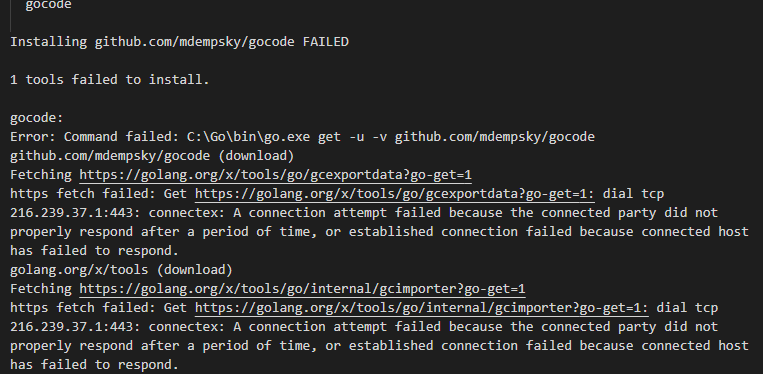
失败原因,发现是从github/golang中下载的tools不包含gocode
解决方法:
根据提示图片信息进行查找,(github/golang下载详见:http://lc161616.cnblogs.com/p/10132518.html)。提示图片如下:

根据vscode提示去github.com/mdempsky/gocode clone下来代码。然后放置到提示图片的路径下:为了保险我又放置在%GOPATH%\src\golang.org\x\tools下一份。
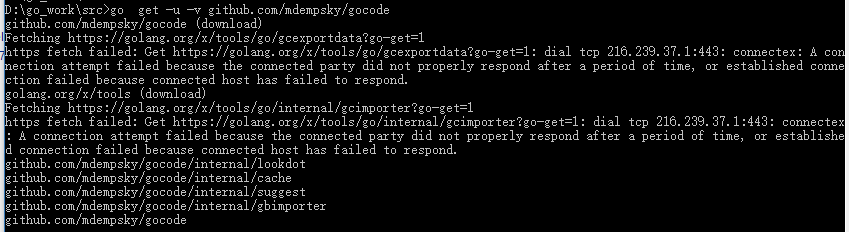
最后手动执行go get,安装成功
D:\go_work\src>go  get -u -v github.com/mdempsky/gocode

github.com/mdempsky/gocode (download)

Fetching https://golang.org/x/tools/go/gcexportdata?go-get=1

https fetch failed: Get https://golang.org/x/tools/go/gcexportdata?go-get=1: dial tcp 216.239.37.1:443: connectex: A connection attempt failed because the connected party did not properly respond after a period of time, or established connection failed because connected host has failed to respond.

golang.org/x/tools (download)

Fetching https://golang.org/x/tools/go/internal/gcimporter?go-get=1

https fetch failed: Get https://golang.org/x/tools/go/internal/gcimporter?go-get=1: dial tcp 216.239.37.1:443: connectex: A connection attempt failed because the connected party did not properly respond after a period of time, or established connection failed because connected host has failed to respond.

github.com/mdempsky/gocode/internal/lookdot

github.com/mdempsky/gocode/internal/cache

github.com/mdempsky/gocode/internal/suggest

github.com/mdempsky/gocode/internal/gbimporter

github.com/mdempsky/gocode
VScode 1.13 gocode提示dial tcp 216.239.37.1:443: connectex: A connection attempt failed because the connected..的更多相关文章
- vs code解决golang开发环境问题 dial tcp 216.239.37.1:443: connectex: A connection attempt failed
安装插件是出现 如下错误提示, https fetch failed: Get https://golang.org/x/tools/cmd/gorename?go-get=1: dial tcp 2 ...
- Go丨语言对数据库操作报错 panic: dial tcp 127.0.0.1:3306: connectex: No connection could be made because the target machine actively refused it.
panic: dial tcp 127.0.0.1:3306: connectex: No connection could be made because the target machine ac ...
- Get https://192.168.2.119/v2/: dial tcp 192.168.2.119:443: getsockopt: connection refused
Get https://192.168.2.119/v2/: dial tcp 192.168.2.119:443: getsockopt: connection refused
- http: server gave HTTP response to HTTPS client & Get https://192.168.2.119/v2/: dial tcp 192.168.2.119:443: getsockopt: connection refused
http: server gave HTTP response to HTTPS client 出现这问题的原因是:Docker自从1.3.X之后docker registry交互默认使用的是HTTP ...
- 私有Docker仓库login Error response from daemon: Get https://x.x.x.x/v2/: dial tcp x.x.x.x:443: connect: connection refused
一.登陆私有仓库错误: docker login --username=evan 192.168.0.203 Error response from daemon: Get https://192.1 ...
- docker login harbor出现的报错Error response from daemon: Get https://172.16.1.99/v1/users/: dial tcp 172.16.1.99:443: getsockopt: connection refused解决方法
出现的问题 [root@master01 ~]# docker login 172.16.1.99 Username: admin Password: Error response from daem ...
- dial tcp 10.96.0.1:443: getsockopt: no route to host --- kubernetes(k8s)DNS 服务反复重启
kubernetes(k8s)DNS 服务反复重启解决: k8s.io/dns/pkg/dns/dns.go:150: Failed to list *v1.Service: Get https:// ...
- docker登录报错Error response from daemon: Get https://192.168.30.10/v1/users/: dial tcp 192.168.30.10:443: connect: connection refused
背景描述: 登录docker报错: [root@localhost sysconfig]# docker login 192.168.30.10 Username (newcs06): newcs06 ...
- (转)dial tcp 10.96.0.1:443: getsockopt: no route to host --- kubernetes(k8s)DNS 服务反复重启
转:https://blog.csdn.net/shida_csdn/article/details/80028905 kubernetes(k8s)DNS 服务反复重启解决: k8s.io/dns/ ...
随机推荐
- Codeforces379 F. New Year Tree
Codeforces题号:#379F 出处: Codeforces 主要算法:LCA+树的直径 难度:4.4 思路分析: 给出q个操作,每次在一个节点上接上两个叶子.每一次询问树的直径. 暴力做法:每 ...
- WINDOWS 包管理器 Chocolatey
https://chocolatey.org/ - 官网 安装: @"%SystemRoot%\System32\WindowsPowerShell\v1.0\powershell.exe& ...
- BM算法
BM算法 用来求解一个数列的递推式. 即给定\(\{x_i\}\)求解一个\(\{a_i\}\),满足\(|a|=m,x_n=\sum_{i=1}^ma_i*x_{n-i}\). 考虑增量法构造. 假 ...
- 做事从来不坚持的我又开始学习PyQt了。。。。。。
链接附上,不再更新:PyQt5图形界面编程 第一部分 第一个程序 # -*- coding: utf-8 -*- import sys from PyQt5.QtWidgets import QApp ...
- ACM-ICPC 2018 南京赛区网络预赛 L题(分层最短路)
题目链接:https://nanti.jisuanke.com/t/31001 题目大意:给出一个含有n个点m条边的带权有向图,求1号顶点到n号顶点的最短路,可以使<=k条任意边的权值变为0. ...
- JAVA多线程之当一个线程在执行死循环时会影响另外一个线程吗?
一,问题描述 假设有两个线程在并发运行,一个线程执行的代码中含有一个死循环如:while(true)....当该线程在执行while(true)中代码时,另一个线程会有机会执行吗? 二,示例代码(代码 ...
- goroutine与调度器
29 November 2013 by skoo 我们都知道Go语言是原生支持语言级并发的,这个并发的最小逻辑单元就是goroutine.goroutine就是Go语言提供的一种用户态线程,当然这种用 ...
- script id
Script中的id还是有用的,比如如果页面需要加载的JS文件过多,那样最好是写一个JS文件用来加载这些JS文件 require: function(libraryName){ document.wr ...
- 使用python制作验证码
方法一 简单型:使用random模块制作一个随机字母与数字的验证码 import random def make_code(n): res='' for i in range(n): num=str( ...
- ES6学习:Map结构的目的和基本用法
Map结构的目的和基本用法 JavaScript的对象(Object)本质上是键值对的集合(Hash结构),但是只能用字符串作为键.这给它的使用带来了很大的限制. 1 2 3 4 5 6 7 8 ...