
vs code解决golang开发环境问题 dial tcp 216.239.37.1:443: connectex: A connection attempt failed
安装插件是出现 如下错误提示,
https fetch failed: Get https://golang.org/x/tools/cmd/gorename?go-get=1: dial tcp 216.239.37.1:443: connectex: A connection attempt failed because the connected party did not properly respond after a period of time, or established connection failed because connected host has failed to respond.
连接216.239.37.1超时,原本以为是因为墙内原因,翻墙后去telnet 216.239.37.1 443 发现也是不通的。
google上搜索一下,找到如下解决方法:
从golang的github上clone如下项目
git clone https://github.com/golang/tools.git tools
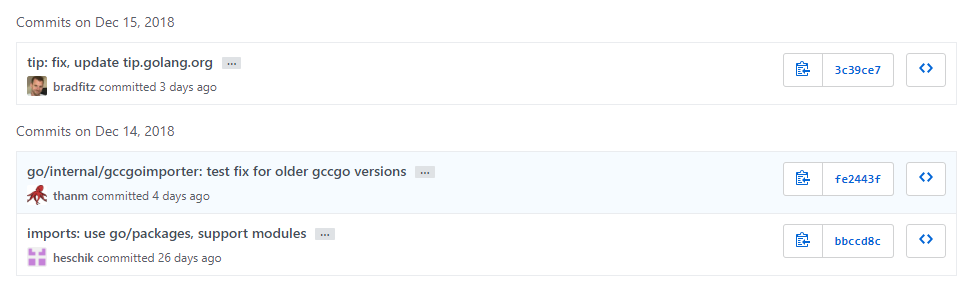
查看一下提交记录,发现近期还在更新。
将clone下来的项目防止如下目录,没有自行创建
%GOPATH%\src\golang.org\x\tools
完成后再vscode中再次点击 install all,在墙内网络环境下,除linter外全部都可以成功安装
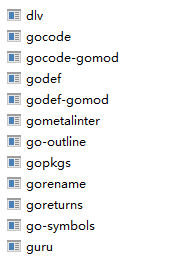
最后一个再手工执行命令会自动安装成功的,
go get -u -v github.com/alecthomas/gometalinter
参考资料:http://www.cnblogs.com/OctoptusLian/p/9325934.html
vs code解决golang开发环境问题 dial tcp 216.239.37.1:443: connectex: A connection attempt failed的更多相关文章
- VScode 1.13 gocode提示dial tcp 216.239.37.1:443: connectex: A connection attempt failed because the connected..
在将VScode升级至 1.13后让升级gocode,在升级时报出如下错误 D:\go_work\src>go get -u -v github.com/mdempsky/gocode gith ...
- Go丨语言对数据库操作报错 panic: dial tcp 127.0.0.1:3306: connectex: No connection could be made because the target machine actively refused it.
panic: dial tcp 127.0.0.1:3306: connectex: No connection could be made because the target machine ac ...
- Windows下visual studio code搭建golang开发环境
Windows下visual studio code搭建golang开发环境 序幕 其实环境搭建没什么难的,但是遇到一些问题,主要是有些网站资源访问不了(如:golang.org),导致一些包无法安装 ...
- Visual Studio Code配置GoLang开发环境
Visual Studio Code配置GoLang开发环境 在Visual Studio Code配置GoLang开发环境 作者:chszs,未经博主允许不得转载.经许可的转载需注明作者和博客主页: ...
- docker login harbor出现的报错Error response from daemon: Get https://172.16.1.99/v1/users/: dial tcp 172.16.1.99:443: getsockopt: connection refused解决方法
出现的问题 [root@master01 ~]# docker login 172.16.1.99 Username: admin Password: Error response from daem ...
- http: server gave HTTP response to HTTPS client & Get https://192.168.2.119/v2/: dial tcp 192.168.2.119:443: getsockopt: connection refused
http: server gave HTTP response to HTTPS client 出现这问题的原因是:Docker自从1.3.X之后docker registry交互默认使用的是HTTP ...
- 私有Docker仓库login Error response from daemon: Get https://x.x.x.x/v2/: dial tcp x.x.x.x:443: connect: connection refused
一.登陆私有仓库错误: docker login --username=evan 192.168.0.203 Error response from daemon: Get https://192.1 ...
- dial tcp 10.96.0.1:443: getsockopt: no route to host --- kubernetes(k8s)DNS 服务反复重启
kubernetes(k8s)DNS 服务反复重启解决: k8s.io/dns/pkg/dns/dns.go:150: Failed to list *v1.Service: Get https:// ...
- docker登录报错Error response from daemon: Get https://192.168.30.10/v1/users/: dial tcp 192.168.30.10:443: connect: connection refused
背景描述: 登录docker报错: [root@localhost sysconfig]# docker login 192.168.30.10 Username (newcs06): newcs06 ...
随机推荐
- selenium+python启动Firefox浏览器失败问题和点击登陆按钮无效问题
问题1:使用python+selenium编写脚本调用Firefox时报错:
- 【XSY1591】卡片游戏 DP
题目描述 有标有数字为\(1\)~\(9\)的卡片各\(a_1,a_2\cdots a_9\)张,还有标有乘号的卡片\(m\)张.从中取出\(n\)张按任意顺序排列,取出两个乘号相邻和乘法在边界上的非 ...
- C# 成员默认访问权限(public、private、protected、internal)
C# 成员默认访问权限(public.private.protected.internal) 来源 https://www.cnblogs.com/yezongjie/p/20181121Access ...
- 【Gym - 100796C 】Minimax Tree
BUPT2017 wintertraining(15) #7FMinimax Tree 题意 给你一棵多叉树,非叶子节点中分配k个为子节点的min函数,剩下的是max函数. 现在求根节点(1)的最大值 ...
- 【Loj117】有源汇上下界最小流(网络流)
[Loj117]有源汇上下界最小流(网络流) 题面 Loj 题解 还是模板题. #include<iostream> #include<cstdio> #include< ...
- ubuntu “无法获得锁 /var/lib/dpkg/lock -open”
在ubuntu系统终端下,用apt-get install 安装软件的时候,如果在未完成下载的情况下将终端中断,此时 apt-get进程可能没有结束.结果,如果再次运行apt-get install ...
- HDU6321 Dynamic Graph Matching (杭电多校3C)
给出一些点集,然后对于每一次要求给出的这些点集里的1,2,3,4,5,6....n/2的匹配数, dp[i][j] 表示到第i次操作里点集为j的匹配数,然后我每次加入一条边u-v,我的状态就是 dp[ ...
- Python学习day2 while循环&格式化输出&运算符
day2 运算符-while循环 1.while循环 while循环基本结构; while 条件: 结果 # 如果条件为真,那么循环则执行 # 如果条件为假,那么循环不执行 de ...
- C# Winform窗体基础属性
窗口样式: Inco:改图标样式: MaxmizeBox:true:显示右上角最大化按钮: MinmizeBox:true:显示右上角最小化按钮: ShowInco:true:显示左上角小图标: Sh ...
- 关于Java中扫描仪next()与nextLine()的区别
首先,next()一定要读取到有效字符后才可以结束输入,对输入有效字符之前遇到的空格键.Tab键或Enter键等结束符,next()方法会自动将其去掉,只有在输入有效字符之后,next()方法才将其后 ...