
第三十一篇-TextInputLayout(增强文本输入)的使用
效果图:
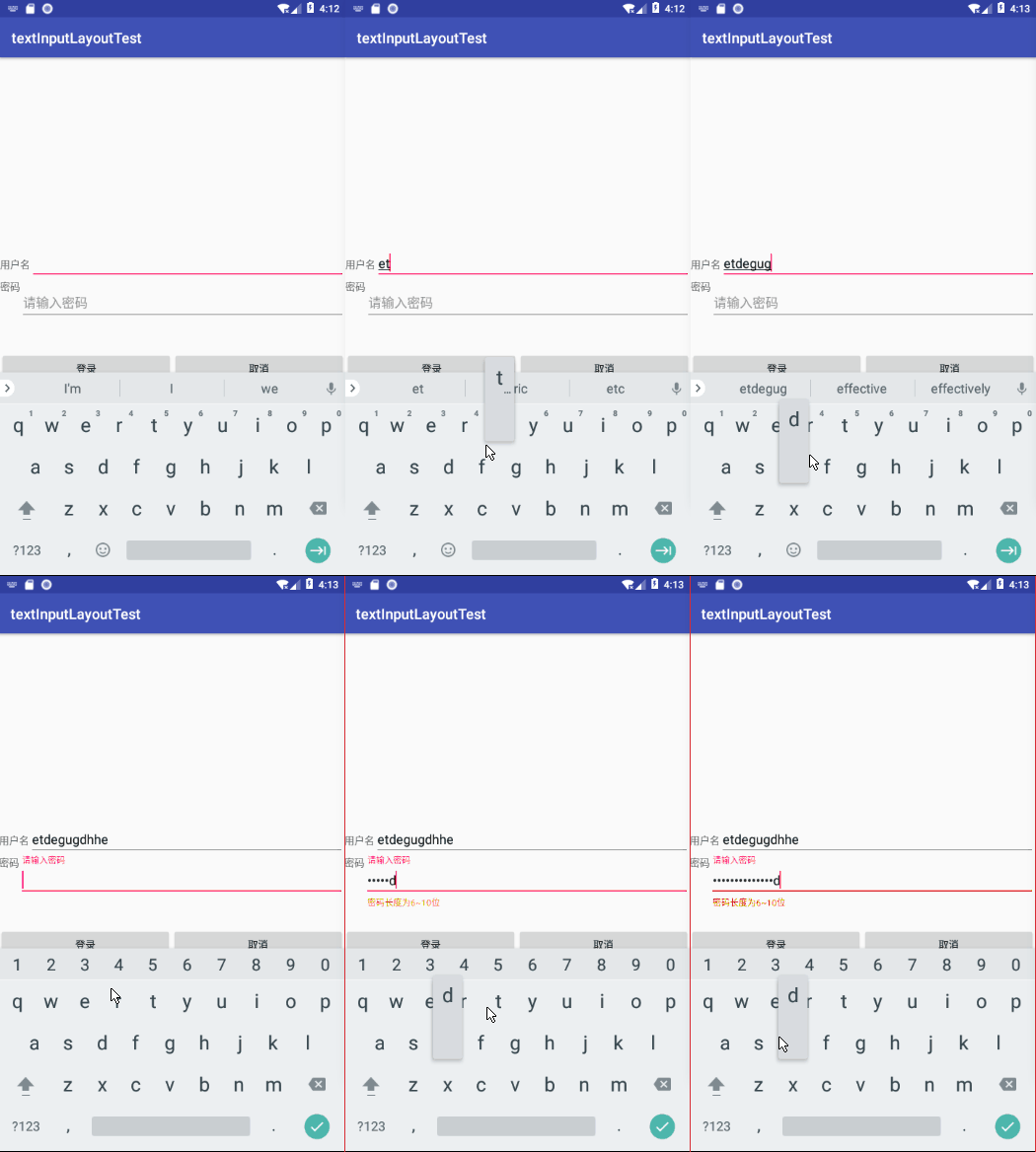
密码使用的是增强文本输入类型,当密码长度小于6或者密码长度大于10的时候就会给出提示。
main.xml
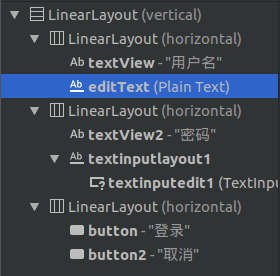
当添加TextInputLayout时,旁边会有一个下载符号,如果点不动,可以右键点击add to design,然后它会加载,加载完毕后,后面那个下载符号就消失了,可以拖动它到相应位置了。
然后可以在MainActivity.java中设置当状态改变时需要进行的操作:
textInputEditText.addTextChangedListener(new TextWatcher() {
    @Override
    public void beforeTextChanged(CharSequence s, int start, int count, int after) {

    }

    @Override
    public void onTextChanged(CharSequence s, int start, int before, int count) {

    }

    @Override
    public void afterTextChanged(Editable s) {
        if(textInputEditText.getText().toString().length()>textInputLayout.getCounterMaxLength()|
                textInputEditText.getText().toString().length()<6){
            textInputLayout.setError("密码长度为6~10位");
        }
        else{
            textInputLayout.setError("");
        }

    }
});
beforeTextChanged是状态改变前,onTextChanged是状态改变中,afterTextChanged是状态改变后,我们一般用最后一个。其中getCounterMaxLength的大小是在main.xml中设置的,我设置的是10.
MainActivity.java
package com.example.aimee.textinputlayouttest;

import android.support.design.widget.TextInputEditText;

import android.support.design.widget.TextInputLayout;

import android.support.v7.app.AppCompatActivity;

import android.os.Bundle;

import android.text.Editable;

import android.text.TextWatcher;

public class MainActivity extends AppCompatActivity {

    TextInputLayout textInputLayout;

    TextInputEditText textInputEditText;

    @Override

    protected void onCreate(Bundle savedInstanceState) {

        super.onCreate(savedInstanceState);

        setContentView(R.layout.activity_main);

        textInputLayout=findViewById(R.id.textinputlayout1);

        textInputEditText=findViewById(R.id.textinputedit1);

        check();

    }

    private void check(){

        textInputEditText.addTextChangedListener(new TextWatcher() {

            @Override

            public void beforeTextChanged(CharSequence s, int start, int count, int after) {

            }

            @Override

            public void onTextChanged(CharSequence s, int start, int before, int count) {

            }

            @Override

            public void afterTextChanged(Editable s) {

                if(textInputEditText.getText().toString().length()>textInputLayout.getCounterMaxLength()|

                        textInputEditText.getText().toString().length()<6){

                    textInputLayout.setError("密码长度为6~10位");

                }

                else{

                    textInputLayout.setError("");

                }

            }

        });

    }

}
main.xml
<?xml version="1.0" encoding="utf-8"?>

<LinearLayout xmlns:android="http://schemas.android.com/apk/res/android"

    xmlns:app="http://schemas.android.com/apk/res-auto"

    xmlns:tools="http://schemas.android.com/tools"

    android:layout_width="match_parent"

    android:orientation="vertical"

    android:gravity="center"

    android:layout_height="match_parent"

    tools:context=".MainActivity">

    <LinearLayout

        android:layout_width="match_parent"

        android:layout_height="wrap_content"

        android:orientation="horizontal">

        <TextView

            android:id="@+id/textView"

            android:layout_width="wrap_content"

            android:layout_height="wrap_content"

            android:text="用户名" />

        <EditText

            android:id="@+id/editText"

            android:layout_width="match_parent"

            android:layout_height="wrap_content"

            android:ems="10"

            android:inputType="textPersonName"

            android:text="" />

    </LinearLayout>

    <LinearLayout

        android:layout_width="match_parent"

        android:layout_height="100dp"

        android:orientation="horizontal">

        <TextView

            android:id="@+id/textView2"

            android:layout_width="wrap_content"

            android:layout_height="wrap_content"

            android:text="密码" />

        <android.support.design.widget.TextInputLayout

            android:id="@+id/textinputlayout1"

            android:layout_width="match_parent"

            android:layout_height="match_parent"

            app:counterMaxLength="10">

            <android.support.design.widget.TextInputEditText

                android:id="@+id/textinputedit1"

                android:layout_width="match_parent"

                android:layout_height="wrap_content"

                android:hint="请输入密码"

                android:inputType="textPassword" />

        </android.support.design.widget.TextInputLayout>

    </LinearLayout>

    <LinearLayout

        android:layout_width="match_parent"

        android:layout_height="wrap_content"

        android:orientation="horizontal">

        <Button

            android:id="@+id/button"

            android:layout_width="wrap_content"

            android:layout_height="wrap_content"

            android:layout_weight="1"

            android:text="登录" />

        <Button

            android:id="@+id/button2"

            android:layout_width="wrap_content"

            android:layout_height="wrap_content"

            android:layout_weight="1"

            android:text="取消" />

    </LinearLayout>

</LinearLayout>
第三十一篇-TextInputLayout(增强文本输入)的使用的更多相关文章
- Android UI开发第三十一篇——Android的Holo Theme
好长时间没写Android UI方面的文章了,今天就闲扯一下Android的Holo主题.一直做android开发的可能都知道,Android 系统的UI有过两次大的变化,一次是android 3.0 ...
- Python之路(第三十一篇) 网络编程:简单的tcp套接字通信、粘包现象
一.简单的tcp套接字通信 套接字通信的一般流程 服务端 server = socket() #创建服务器套接字 server.bind() #把地址绑定到套接字,网络地址加端口 server.lis ...
- 【转】Android UI开发第三十一篇——Android的Holo Theme
好长时间没写Android UI方面的文章了,今天就闲扯一下Android的Holo主题.一直做android开发的可能都知道,Android 系统的UI有过两次大的变化,一次是android 3.0 ...
- Python之路【第三十一篇】:django ajax
Ajax 文件夹为Ajaxdemo 向服务器发送请求的途径: 1.浏览器地址栏,默认get请求: 2.form表单: get请求 post请求 3.a标签,超链接(get请求) 4.Ajax请求 特点 ...
- 第三十一篇、iOS 9版本适配
1.网络适配(强制回退HTTP) 为了强制增强数据访问安全, iOS9 默认会把 所有的http请求 所有从NSURLConnection . CFURL . NSURLSession发出的 HTTP ...
- 第三十一篇 -- 理一下.h和.cpp的关系
今天突然想到一个问题,我们平时写代码会将代码进行分类,写到不同的cpp里,然后要用到那个类里面的函数,就直接include .h文件就好了.然后今天就在想,.h里面都是一些声明,它是怎么链接到.cpp ...
- 第三十一篇:SOUI布局之相对于特定兄弟窗口
SOUI中通过pos的标志如:[, {, }, ],这4个标志可以相对于前一个及后一个兄弟窗口,但是有时候希望相对于不是前后窗口的兄弟窗口,比如一个通过一个中心窗口同时定义它的上下左右4个窗口,这个时 ...
- 第三十三篇、富文本 NSMutableAttributedString
// 设置颜色等 NSMutableDictionary *arrDic = [NSMutableDictionary dictionary]; arrDic[NSForegroundColorAtt ...
- 第三十一篇 玩转数据结构——并查集(Union Find)
1.. 并查集的应用场景 查看"网络"中节点的连接状态,这里的网络是广义上的网络 数学中的集合类的实现 2.. 并查集所支持的操作 对于一组数据,并查集主要支持两种操作:合并两 ...
随机推荐
- 2017 Python最新面试题及答案16道题
1.Python是如何进行内存管理的? 答:从三个方面来说,一对象的引用计数机制,二垃圾回收机制,三内存池机制 一.对象的引用计数机制 Python内部使用引用计数,来保持追踪内存中的对象,所有对象都 ...
- python学习笔记(11)--文件与数据格式化
文件的概念: 文件是数据的抽象和集合,是存储在辅助存储器上的数据序列,文件是数据存储的一种形式,文件的展现形态,文本文件和二进制文件. 文本文件输出: f.txt文件保存:“我是中国人” >&g ...
- 剖析插件 DataTable 自定义列表列get请求如何书写传递的参数
重点代码Demo 已用 斜体标注 后端flask: @task_mgm.route('/taskinfo_editID=<int:num>', methods=['GET', 'POST' ...
- react 入坑笔记(四) - React 事件绑定和传参
React 事件处理 建议:在了解 js 的 this 取值后食用更佳. 一.react 与 Html 中用法的异同和注意点 html 中的绑定事件的写法: <button onclick=&q ...
- vhdl——type
TYPE 数据类型名 IS 数据类型定义 OF 基本数据类型 TYPE 数据类型名 IS 数据类型定义 常用的用户自定义的数据类型有枚举型,数组型,记录型.其中枚举型的在状态机的描述中经常使用到 ,数 ...
- Upload Files In ASP.NET Core 1.0 (Form POST And JQuery Ajax)
Uploading files is a common requirement in web applications. In ASP.NET Core 1.0 uploading files and ...
- codeforces104A
Blackjack CodeForces - 104A Tensor特别喜欢玩扑克,还总是爱发明一些关于扑克牌的游戏,有天他突然脑洞大开想到了这样的一个游戏: 现在有一副52张的扑克牌(没有大小王), ...
- CSS3选择器之属性选择器
一.属性选择器 1.E[foo^="bar"]:该属性选择器描述的是选择属性以bar开头的元素,如: //所有以名称g_开头的div的字体颜色为红色div[name^=" ...
- mybatis,mysql批量delete多个记录
1.dao 接口中 Integer delete(List<UserDeviceRela> relas); 2.xml <delete id="delete" p ...
- 静态变量setter注入
1.java中静态方法调用非静态成员变量.非静态方法 public class Circle { private double radius = 1.0; double getAre() { retu ...