
006 使用SpringMVC开发restful API四--用户信息的修复与删除,重在注解的定义
一:任务
1.任务
常用的验证注解
自定义返回消息
自定义校验注解
二:Hibernate Validator
1.常见的校验注解
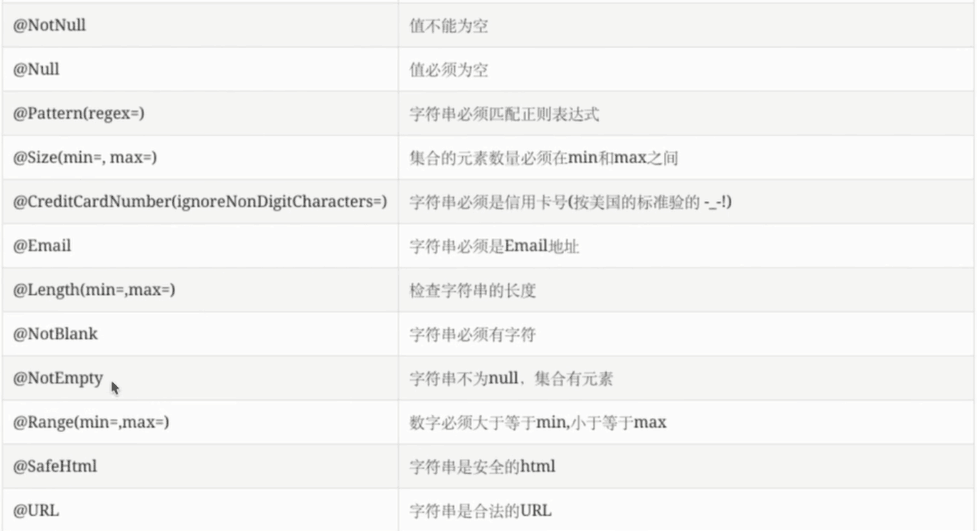
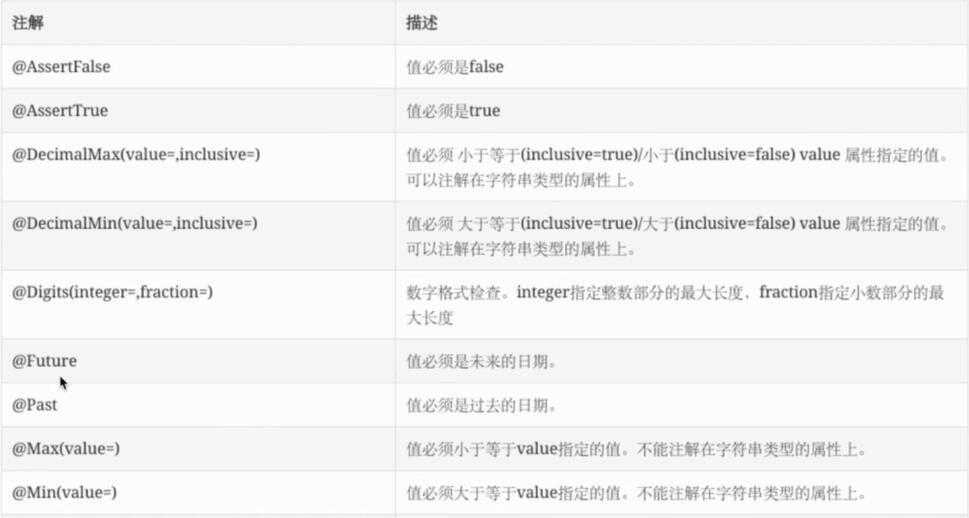
2.程序
测试类
 /**

      * @throws Exception

      *  更新程序,主要是校验程序的验证

      *

      */

     @Test

     public void whenUpdateSuccess() throws Exception {

         //JDK1.8的特性

         Date date=new Date(LocalDateTime.now().plusYears(1).

                 atZone(ZoneId.systemDefault()).toInstant().toEpochMilli());

         System.out.println(date.getTime());

         String content="{\"id\":\"1\",\"username\":\"tom\",\"password\":null,\"birthday\":"+date.getTime()+"}";

         String result=mockMvc.perform(MockMvcRequestBuilders.put("/user/1")

                 .contentType(MediaType.APPLICATION_JSON_UTF8)

                 .content(content))

             .andExpect(MockMvcResultMatchers.status().isOk())

             .andExpect(MockMvcResultMatchers.jsonPath("$.id").value("1"))

             .andReturn().getResponse().getContentAsString();

         System.out.println("result="+result);

     }
User.java
 package com.cao.dto;

 import java.util.Date;

 import javax.validation.constraints.Past;

 import org.hibernate.validator.constraints.NotBlank;

 import com.fasterxml.jackson.annotation.JsonView;

 public class User {

     //接口

     public interface UserSimpleView {};

     public interface UserDetailView extends UserSimpleView {};    //继承之后,可以展示父的所有

     private String username;

     @NotBlank

     private String password;

     private String id;

     private Date birthday;

     @JsonView(UserSimpleView.class)

     public String getUsername() {

         return username;

     }

     public void setUsername(String username) {

         this.username = username;

     }

     @JsonView(UserDetailView.class)

     public String getPassword() {

         return password;

     }

     public void setPassword(String password) {

         this.password = password;

     }

     @JsonView(UserSimpleView.class)

     public String getId() {

         return id;

     }

     public void setId(String id) {

         this.id = id;

     }

     @Past

     @JsonView(UserSimpleView.class)

     public Date getBirthday() {

         return birthday;

     }

     public void setBirthday(Date birthday) {

         this.birthday = birthday;

     }

 }
控制类
 @PutMapping("/{id:\\d+}")

     public User update(@Valid @RequestBody User user,BindingResult errors){

         if(errors.hasErrors()) {

             errors.getAllErrors().stream().forEach(error->{

                 FieldError fieldError=(FieldError)error;

                 String message=fieldError.getField()+" : "+fieldError.getDefaultMessage();

                 System.out.println(message);

             }

         );

         }

         System.out.println(user.getId());

         System.out.println(user.getUsername());

         System.out.println(user.getPassword());

         System.out.println(user.getBirthday());

         user.setId("1");

         return user;

     }
效果:
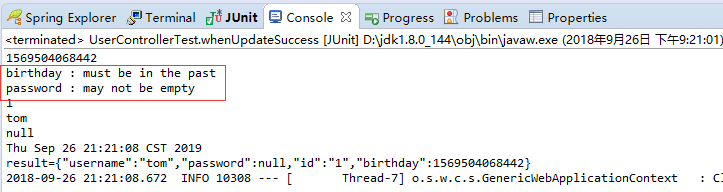
3.完善,自定义提示信息
打印的提示信息是英文的,这里提示中文的
在类上进行定义
 package com.cao.dto;

 import java.util.Date;

 import javax.validation.constraints.Past;

 import org.hibernate.validator.constraints.NotBlank;

 import com.fasterxml.jackson.annotation.JsonView;

 public class User {

     //接口

     public interface UserSimpleView {};

     public interface UserDetailView extends UserSimpleView {};    //继承之后,可以展示父的所有

     private String username;

     @NotBlank(message="密码不能为空")

     private String password;

     private String id;

     private Date birthday;

     @JsonView(UserSimpleView.class)

     public String getUsername() {

         return username;

     }

     public void setUsername(String username) {

         this.username = username;

     }

     @JsonView(UserDetailView.class)

     public String getPassword() {

         return password;

     }

     public void setPassword(String password) {

         this.password = password;

     }

     @JsonView(UserSimpleView.class)

     public String getId() {

         return id;

     }

     public void setId(String id) {

         this.id = id;

     }

     @Past(message="生日必须是过去的时间")

     @JsonView(UserSimpleView.class)

     public Date getBirthday() {

         return birthday;

     }

     public void setBirthday(Date birthday) {

         this.birthday = birthday;

     }

 }
效果

三:自定义校验注解
1.新建一个Annotation
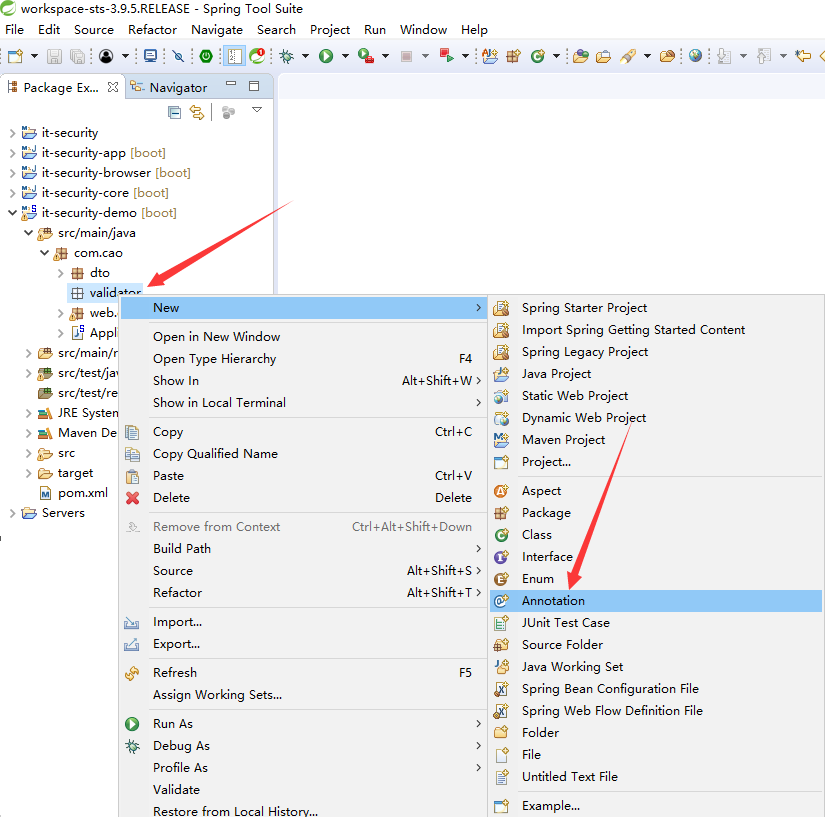
2.程序
校验类
 package com.cao.validator;

 import java.lang.annotation.ElementType;

 import java.lang.annotation.Retention;

 import java.lang.annotation.RetentionPolicy;

 import java.lang.annotation.Target;

 import javax.validation.Constraint;

 import javax.validation.Payload;

 @Target({ElementType.METHOD,ElementType.FIELD})

 @Retention(RetentionPolicy.RUNTIME)

 @Constraint(validatedBy = { MyContraintValidator.class })

 public @interface MyConstraint {

     //必写

     String message() default "{org.hibernate.validator.constraints.NotBlank.message}";

     Class<?>[] groups() default { };

     Class<? extends Payload>[] payload() default { };

     //

 }
校验处理类
 import javax.validation.ConstraintValidatorContext;

 import org.springframework.beans.factory.annotation.Autowired;

 import com.cao.service.HelloService;

 import com.cao.service.impl.HelloServiceImpl;

 public class MyContraintValidator implements ConstraintValidator<MyConstraint,Object> {

     //这个校验中可以注入spring容器中的任何东西

     @Autowired

     public HelloService hello;

     @Override

     public void initialize(MyConstraint constraintAnnotation) {

         System.out.println("my constraint init");

     }

     @Override

     public boolean isValid(Object value, ConstraintValidatorContext context) {

         hello.greeting("tomm");

         System.out.println(value);

         return false;

     }

 }
注入使用的服务
 package com.cao.service;

 public interface HelloService {

     public String greeting(String name);

 }
 package com.cao.service.impl;

 import org.springframework.stereotype.Service;

 import com.cao.service.HelloService;

 //成为Spring容器中的服务了

 @Service

 public class HelloServiceImpl implements HelloService {

     @Override

     public String greeting(String name) {

         System.out.println("greeting hello");

         return "hello "+name;

     }

 }
使用,放在User.java上
@MyConstraint(message="这是一个测试")

private String username;
测试类
     /**

      * @throws Exception

      *  更新程序,主要是校验程序的验证

      *

      */

     @Test

     public void whenUpdateSuccess() throws Exception {

         //JDK1.8的特性

         Date date=new Date(LocalDateTime.now().plusYears(1).

                 atZone(ZoneId.systemDefault()).toInstant().toEpochMilli());

         System.out.println(date.getTime());

         String content="{\"id\":\"1\",\"username\":\"Bob\",\"password\":null,\"birthday\":"+date.getTime()+"}";

         String result=mockMvc.perform(MockMvcRequestBuilders.put("/user/1")

                 .contentType(MediaType.APPLICATION_JSON_UTF8)

                 .content(content))

             .andExpect(MockMvcResultMatchers.status().isOk())

             .andExpect(MockMvcResultMatchers.jsonPath("$.id").value("1"))

             .andReturn().getResponse().getContentAsString();

         System.out.println("result="+result);

     }
效果
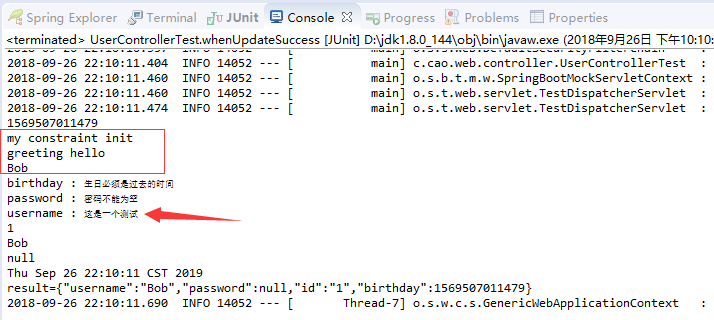
四:用户删除
1.程序
测试类
 /**

      *  删除程序,主要是校验程序的验证

      * @throws Exception

      */

     @Test

     public void whenDeleteSuccess() throws Exception {

         mockMvc.perform(MockMvcRequestBuilders.delete("/user/1")

                 .contentType(MediaType.APPLICATION_JSON_UTF8))

             .andExpect(MockMvcResultMatchers.status().isOk());

     }
控制类
 @DeleteMapping("/{id:\\d+}")

     public void delete(@PathVariable String id){

         System.out.println("id="+id);

     }
006 使用SpringMVC开发restful API四--用户信息的修复与删除,重在注解的定义的更多相关文章
- 003 使用SpringMVC开发restful API--查询用户
一:介绍说明 1.介绍 2.restful api的成熟度 二:编写Restful API的测试用例 1.引入spring的测试框架 在effective pom中查找 2.新建测试包,测试类 3.测 ...
- 004 使用SpringMVC开发restful API二--编写用户详情
一:编写用户详情服务 1.任务 @PathVariable隐射url片段到java方法的参数 在url声明中使用正则表达式 @JsonView控制json输出内容 二:@PathVariable 1. ...
- 007 使用SpringMVC开发restful API五--异常处理
一:任务 1.任务 Spring Boot中默认的错误机制处理机制 自定义异常处理 二:Spring Boot中的默认错误处理机制 1.目前 浏览器访问的时候, restful 接口主要是根据状态码进 ...
- 005 使用SpringMVC开发restful API三--处理创建请求
一:主要任务 1.说明 @RequestBody 映射请求体到java方法的参数 日期类型参数的处理 @Valid注解 BindingResult验证请求参数的合法性并处理校验结果 二:@Reques ...
- 使用Spring MVC开发RESTful API
第3章 使用Spring MVC开发RESTful API Restful简介 第一印象 左侧是传统写法,右侧是RESTful写法 用url描述资源,而不是行为 用http方法描述行为,使用http状 ...
- springmvc/springboot开发restful API
非rest的url写法: 查询 GET /user/query?name=tom 详情 GET /user/getinfo? 创建 POST /user/create?name=tom 修改 POST ...
- ASP.NET Core Web API 开发-RESTful API实现
ASP.NET Core Web API 开发-RESTful API实现 REST 介绍: 符合REST设计风格的Web API称为RESTful API. 具象状态传输(英文:Representa ...
- flask开发restful api系列(8)-再谈项目结构
上一章,我们讲到,怎么用蓝图建造一个好的项目,今天我们继续深入.上一章中,我们所有的接口都写在view.py中,如果几十个,还稍微好管理一点,假如上百个,上千个,怎么找?所有接口堆在一起就显得杂乱无章 ...
- flask开发restful api
flask开发restful api 如果有几个原因可以让你爱上flask这个极其灵活的库,我想蓝图绝对应该算上一个,部署蓝图以后,你会发现整个程序结构非常清晰,模块之间相互不影响.蓝图对restfu ...
随机推荐
- Jquyer轮播带数字和提示文字
效果图如下: 代码如下: <!DOCTYPE html PUBLIC "-//W3C//DTD XHTML 1.0 Transitional//EN" "http: ...
- 使用SimHash进行海量文本去重[转]
阅读目录 1. SimHash与传统hash函数的区别 2. SimHash算法思想 3. SimHash流程实现 4. SimHash签名距离计算 5. SimHash存储和索引 6. SimHas ...
- oracle存储大文本clob、blob
oracle存储大文本clob.blob 1 package cn.itcast.web.oracle.util; 2 3 import java.sql.Connection; 4 import j ...
- ACM-ICPC 2018 焦作赛区网络预赛 I Save the Room
Bob is a sorcerer. He lives in a cuboid room which has a length of AAA, a width of BBB and a height ...
- js调用ajax案例2,使用ok
XMLHttpRequest 是 AJAX 的基础. XMLHttpRequest 对象所有现代浏览器均支持 XMLHttpRequest 对象(IE5 和 IE6 使用 ActiveXObject) ...
- Confluence 6 手动运行和修改
手动运行一个任务 希望手动运行一个计划任务,进入计划任务的列表中,找到你希望手动运行的计划任务,在这个计划任务的边上选择 运行(Run).这个计划任务将会马上执行. 不是所有的计划任务都可以手动运行的 ...
- Confluence 6 配置数据库查询超时时间
如果数据库的查询时间太长同时你的应用程序显示没有响应,你可以配置数据库的查询超时时间.在默认情况下 Confluence 没有超时时间.希望配置数据库查询超时时间,在你的测试服务器上进行下面的操作: ...
- D3.js force力导向图用指定的字段确定link的source和target,默认是索引
json.links.forEach(function (e) { var sourceNode = json.nodes.filter(function (n) { return n.name == ...
- vue用webpack打包时引入es2015插件
1.安装依赖包 $ npm install --save-div babel-preset-es2015 ps:babel-loader.babel-core应该是默认装好的,如果没有安装,请重新安装 ...
- json如果不在pom中添加依赖会抛出500异常
所以必须添加以下依赖: <!--jackson相关依赖--><!-- https://mvnrepository.com/artifact/com.fasterxml.jackson ...