
SpringSecurity入门demo
配置依赖:
<properties>

        <spring.version>4.2.4.RELEASE</spring.version>

    </properties>

    <dependencies>

        <dependency>

            <groupId>org.springframework</groupId>

            <artifactId>spring-core</artifactId>

            <version>${spring.version}</version>

        </dependency>

        <dependency>

            <groupId>org.springframework</groupId>

            <artifactId>spring-web</artifactId>

            <version>${spring.version}</version>

        </dependency>

        <dependency>

            <groupId>org.springframework</groupId>

            <artifactId>spring-webmvc</artifactId>

            <version>${spring.version}</version>

        </dependency>

        <dependency>

            <groupId>org.springframework</groupId>

            <artifactId>spring-context-support</artifactId>

            <version>${spring.version}</version>

        </dependency>

        <dependency>

            <groupId>org.springframework</groupId>

            <artifactId>spring-test</artifactId>

            <version>${spring.version}</version>

        </dependency>

        <dependency>

            <groupId>org.springframework</groupId>

            <artifactId>spring-jdbc</artifactId>

            <version>${spring.version}</version>

        </dependency>

        <dependency>

            <groupId>org.springframework.security</groupId>

            <artifactId>spring-security-web</artifactId>

            <version>4.1.0.RELEASE</version>

        </dependency>

        <dependency>

            <groupId>org.springframework.security</groupId>

            <artifactId>spring-security-config</artifactId>

            <version>4.1.0.RELEASE</version>

        </dependency>

        <dependency>

            <groupId>javax.servlet</groupId>

            <artifactId>servlet-api</artifactId>

            <version>2.5</version>

            <scope>provided</scope>

        </dependency>

    </dependencies>

    <build>

      <plugins>

          <!-- java编译插件 -->

          <plugin>

                <groupId>org.apache.maven.plugins</groupId>

                <artifactId>maven-compiler-plugin</artifactId>

                <version>3.2</version>

                <configuration>

                    <source>1.7</source>

                    <target>1.7</target>

                    <encoding>UTF-8</encoding>

                </configuration>

          </plugin>

          <plugin>

                <groupId>org.apache.tomcat.maven</groupId>

                <artifactId>tomcat7-maven-plugin</artifactId>

                <configuration>

                    <!-- 指定端口 -->

                    <port>9090</port>

                    <!-- 请求路径 -->

                    <path>/</path>

                </configuration>

            </plugin>

       </plugins>

    </build>
配置/WEB-INF/web.xml
<?xml version="1.0" encoding="UTF-8"?>

<web-app xmlns:xsi="http://www.w3.org/2001/XMLSchema-instance"

    xmlns="http://java.sun.com/xml/ns/javaee"

    xsi:schemaLocation="http://java.sun.com/xml/ns/javaee http://java.sun.com/xml/ns/javaee/web-app_2_5.xsd"

    version="2.5">

       <context-param>

        <param-name>contextConfigLocation</param-name>

        <param-value>classpath:spring-security.xml</param-value>

     </context-param>

     <!-- 配置监听器 -->

     <listener>

        <listener-class>

            org.springframework.web.context.ContextLoaderListener

        </listener-class>

     </listener>

     <!-- 配置过滤器代理 -->

     <filter>

        <filter-name>springSecurityFilterChain</filter-name>

        <filter-class>org.springframework.web.filter.DelegatingFilterProxy</filter-class>

     </filter>

     <filter-mapping>

        <filter-name>springSecurityFilterChain</filter-name>

        <url-pattern>/*</url-pattern>

     </filter-mapping>

</web-app>
配置spring-security.xml
<?xml version="1.0" encoding="UTF-8"?>

<beans:beans xmlns="http://www.springframework.org/schema/security"

    xmlns:beans="http://www.springframework.org/schema/beans" xmlns:xsi="http://www.w3.org/2001/XMLSchema-instance"

    xsi:schemaLocation="http://www.springframework.org/schema/beans http://www.springframework.org/schema/beans/spring-beans.xsd

                        http://www.springframework.org/schema/security http://www.springframework.org/schema/security/spring-security.xsd">

    <!-- 页面拦截规则 -->

    <http use-expressions="false">

        <intercept-url pattern="/**" access="ROLE_ADMIN" />

        <!-- 开启表单登录功能 -->

        <form-login/>

    </http>

    <!-- 认证管理器 -->

    <authentication-manager>

        <authentication-provider>

            <user-service>

                <user name="admin" password="123456" authorities="ROLE_USER"/>

                <user name="ztp" password="ztp" authorities="ROLE_ADMIN"/>

            </user-service>

        </authentication-provider>

    </authentication-manager>

</beans:beans>
任意index.html文件:略
启动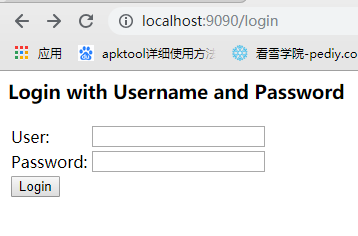
此处的登录时springSecurity内置。
自定义登录页面:
编写login.html
<form action="/login" method="post">

    <table>

        <tr>

            <td>用户名:</td>

            <td><input type="text" id="username" name="username">

        </tr>

        <tr>

            <td>密码:</td>

            <td><input type="password" id="password" name="password">

        </tr>

        <tr>

            <td colspan="2"><input type="submit" value="登录">

        </tr>

    </table>

</form>
修改spring-security.xml文件
<!-- 新规则  设置该页面不登录也能使用-->

    <http pattern="/login.html" security="none"/>

    <http pattern="/error.html" security="none"/>

    <!-- 页面拦截规则 -->

    <http use-expressions="false">

        <intercept-url pattern="/**" access="ROLE_ADMIN" />

        <!-- 开启表单登录功能  需要排除掉 /index.html-->

        <form-login login-page="/login.html" default-target-url="/index.html" authentication-failure-url="/login_error.html"/>

    </http>

    <!-- 认证管理器 -->

    <authentication-manager>

        <authentication-provider>

            <user-service>

                <user name="admin" password="123456" authorities="ROLE_USER"/>

                <user name="ztp" password="ztp" authorities="ROLE_ADMIN"/>

            </user-service>

        </authentication-provider>

    </authentication-manager>

</beans:beans>
就能普通跳转
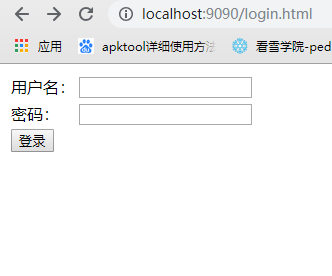
登陆后出现该页面:
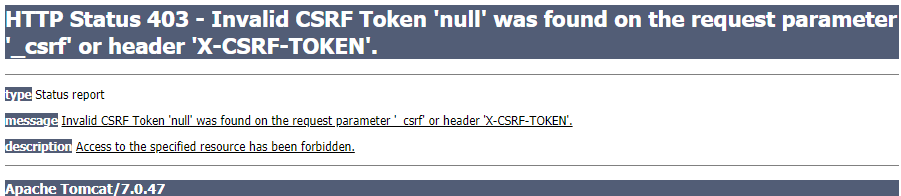
目的预防CSRF攻击
在spring-security.cml文件中选择<http>写入<csrf disabled="true"/>主动关闭csrf预防
SpringSecurity入门demo的更多相关文章
- springSecurity入门小demo--配置文件xml的方式
本例子只是一个最最最简单的入门demo,重点讲解xml的配置参数的意思和遇到的坑,主要的功能有: 自定义登录页面,错误页面 配置角色 csrf-403报错解决方法(加上一行代码配置就ok) 后台ifr ...
- Spring Security简介与入门Demo
1:Spring Security简介 Spring Security是一个能够为基于Spring的企业应用系统提供声明式的安全访问控制解决方案的安全框架.它提供了一组可以在Spring应用上下文中配 ...
- 【SSH系列】初识spring+入门demo
学习过了hibernate,也就是冬天,经过一个冬天的冬眠,当春风吹绿大地,万物复苏,我们迎来了spring,在前面的一系列博文中,小编介绍hibernate的相关知识,接下来的博文中,小编将继续介绍 ...
- 基于springboot构建dubbo的入门demo
之前记录了构建dubbo入门demo所需的环境以及基于普通maven项目构建dubbo的入门案例,今天记录在这些的基础上基于springboot来构建dubbo的入门demo:众所周知,springb ...
- apollo入门demo实战(二)
1. apollo入门demo实战(二) 1.1. 下载demo 从下列地址下载官方脚本和官方代码 https://github.com/nobodyiam/apollo-build-scripts ...
- lua入门demo(HelloWorld+redis读取)
1. lua入门demo 1.1. 入门之Hello World!! 由于我习惯用docker安装各种软件,这次的lua脚本也是运行在docker容器上 openresty是nginx+lua的各种模 ...
- netty入门demo(一)
目录 前言 正文 代码部分 服务端 客服端 测试结果一: 解决粘包,拆包的问题 总结 前言 最近做一个项目: 大概需求: 多个温度传感器不断向java服务发送温度数据,该传感器采用socket发送数据 ...
- canal入门Demo
关于canal具体的原理,以及应用场景,可以参考开发文档:https://github.com/alibaba/canal 下面给出canal的入门Demo (一)部署canal服务器 可以参考官方文 ...
- C#中缓存的使用 ajax请求基于restFul的WebApi(post、get、delete、put) 让 .NET 更方便的导入导出 Excel .net core api +swagger(一个简单的入门demo 使用codefirst+mysql) C# 位运算详解 c# 交错数组 c# 数组协变 C# 添加Excel表单控件(Form Controls) C#串口通信程序
C#中缓存的使用 缓存的概念及优缺点在这里就不多做介绍,主要介绍一下使用的方法. 1.在ASP.NET中页面缓存的使用方法简单,只需要在aspx页的顶部加上一句声明即可: <%@ Outp ...
随机推荐
- delphi:Exception EInvalidPointer in module Project1.exe
在用delphi XE5编程时遇到如下问题: Exception EInvalidPointer in module Project1.exe at 00007595. Invalid pointer ...
- 安装Python的numpy库
1. 检查是否有pip.exe, 如果没有,可以到 https://pypi.org/project/pip/#files下载 2. 安装好pip后,在安装numpy之前,查看是否安装成功,pip - ...
- MIP如何为页面加速?
MIP是近日由百度发起的开源项目,它的核心是一套应用于移动网页的开放性技术标准,通过提供MIP-HTML规范.MIP-JS运行环境以及MIP-Cache页面缓存系统,实现移动网页加速. 换言之就是,M ...
- 《DOM Scripting》学习笔记-——第九章 CSS-DOM
本章内容: 一.style属性 二.如何检索样式信息 三.如何改变样式 属性: 包含位置信息:parentNode , nextSibling , previousSibling , childNod ...
- Pecan中api-paste.ini的解析
在pecan中存在一个请求配置文件,定义服务启动程序app和过滤器filter,例如: [pipeline:main] pipeline = request_id sizelimit api-serv ...
- C#使用File.Create()创建文件后资源被占用
由于文件被占用不能读写,所以报错“另一个程序正在使用此文件进程无法访问” 解决方法是在创建文件后立即Dispose掉 File.Create(path).Dispose();
- Linux ansible 之 playbook
playbook 剧本 yaml 字典 key:value 列表 [] - 后缀名:yaml.yml playbook 命令格式 Usage: ansible-playbook [options] p ...
- Web用户登录---验证码的设计与实现
在开发中验证码是比较常用到有效防止这种问题对某一个特定注册用户用特定程序暴力破解方式进行不断的登陆尝试的方式. 验证码生成步骤:1.获得随机生成的颜色,画出随机线条生成背景底.2.String cod ...
- 如何自动生成图片用于测试 pytorch(No image? No need image)
if __name__ == '__main__': module = CAM_Module() in_data = torch.randint(0, 255, (2, 3, 7, 7), dtype ...
- Android 获取版本号名称工具类
package com.example.grenaderose.redthunder.utils; import android.content.Context; import android.con ...