
Harbor私有仓库中如何彻底删除镜像释放存储空间?
简介:
Harbor私有仓库运行一段时间后,仓库中存有大量镜像,会占用太多的存储空间。直接通过Harbor界面删除相关镜像,并不会自动删除存储中的文件和镜像。需要停止Harbor服务,执行垃圾回收命令,进行存储空间清理和回收。
相关资料:
1、Harbor用户手册中的相关说明:
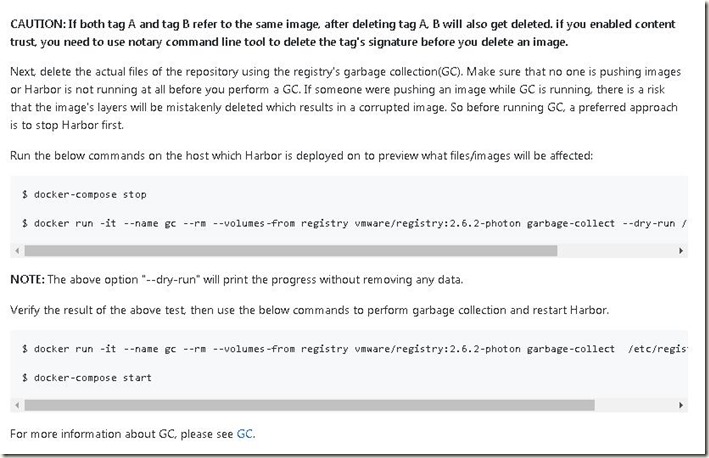
Next, delete the actual files of the repository using the registry's garbage collection(GC). Make sure that no one is pushing images or Harbor is not running at all before you perform a GC. If someone were pushing an image while GC is running, there is a risk that the image's layers will be mistakenly deleted which results in a corrupted image. So before running GC, a preferred approach is to stop Harbor first.
Run the below commands on the host which Harbor is deployed on to preview what files/images will be affected:
#要启用垃圾回收(GC),首先要关闭Harbor服务,然后再执行清理命令
#停止Harbor相关服务
$ docker-compose stop
#使用--dry-run参数运行容器,预览运行效果,但不删除任何数据
$ docker run -it --name gc --rm --volumes-from registry vmware/registry:2.6.2-photon garbage-collect --dry-run /etc/registry/config.yml
#NOTE: The above option "--dry-run" will print the progress without removing any data.
Verify the result of the above test, then use the below commands to perform garbage collection and restart Harbor.
#不使用--dry-run参数,将删除相关的文件和镜像,
$ docker run -it --name gc --rm --volumes-from registry vmware/registry:2.6.2-photon garbage-collect /etc/registry/config.yml
#重新启动Harbor相关服务
$ docker-compose start
图1:01-先在Harbor UI图形界面中删除不需要的镜像
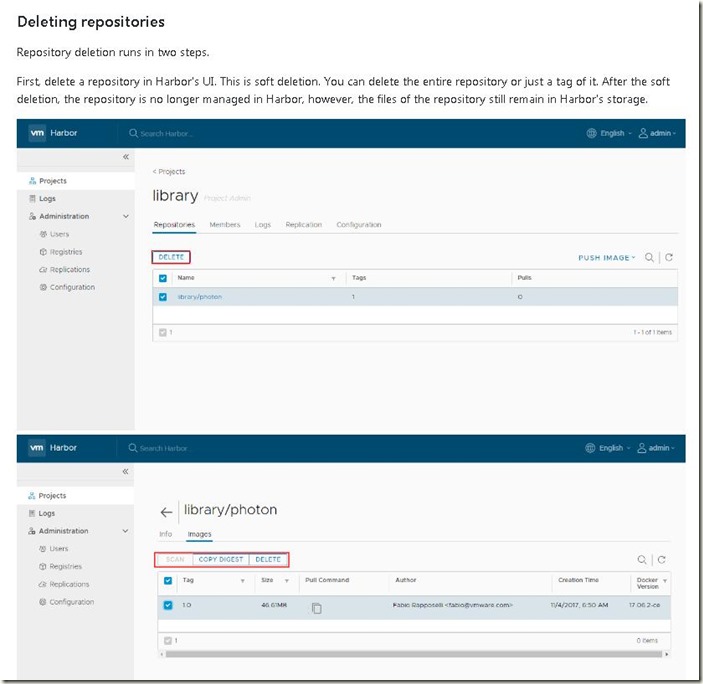
图2:02-停止Harbor服务,执行垃圾回收命令
2、数人云CTO肖总微信公号的文章:
图3:老肖说两句截图
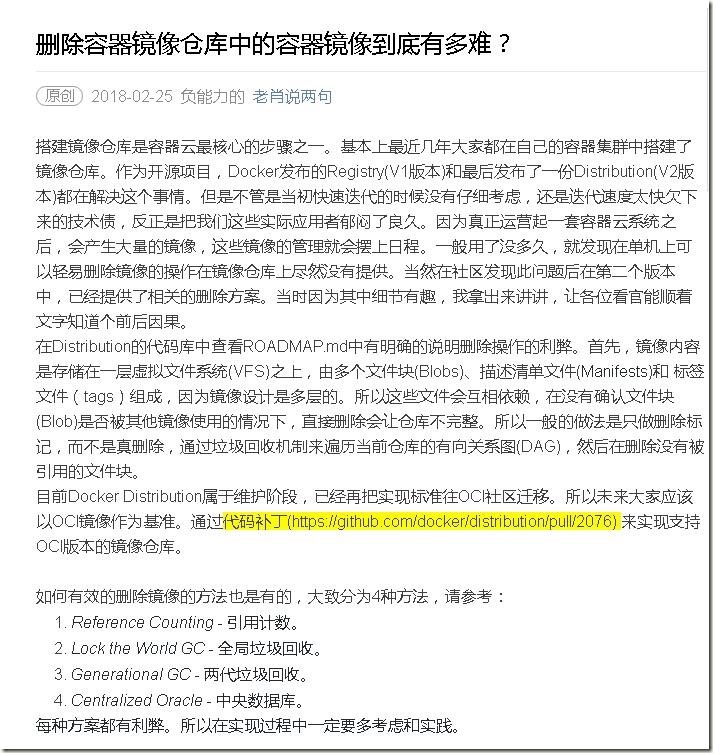
图4:数人云CTO肖总-微信公众号-老肖说两句
参考链接:
Harbor用户指南
https://github.com/vmware/harbor/blob/master/docs/user_guide.md
删除容器镜像仓库中的容器镜像到底有多难?
Garbage collection
https://github.com/docker/docker.github.io/blob/master/registry/garbage-collection.md
Harbor私有仓库中如何彻底删除镜像释放存储空间?的更多相关文章
- 删除docker私有仓库中的镜像
1.搭建私有仓库 (1)拉取私有仓库镜像 docker pull registry(2)启动私有仓库容器 docker run ‐di ‐‐name=registry ‐p 5000:5000 reg ...
- 在jenkins中使用shell命令推送当前主机上的docker镜像到远程的Harbor私有仓库
1.jenkins主机上的docker配置 先在Jenkins主机的docke上配置上Harbor私有仓库地址 cat /etc/docker/daemon.json { "insecure ...
- 配置 Containerd 在 harbor 私有仓库拉取镜像
官方文档地址:https://github.com/containerd/cri/blob/master/docs/registry.md 严格来说,这个具体可分为两部分 1.在k8s中使用Conta ...
- 一步步搭建docker私有仓库并从私有仓库中下载镜像
一步步搭建docker私有仓库 #下载镜像 docker pull registry#查看镜像 docker images #运行私有仓库,指定端口和数据卷 docker run -d -p : -v ...
- 部署 harbor 私有仓库
安装下载依赖包 安装docker-compose 从 docker compose 发布页面下载最新的 docker-compose 二进制文件,本文以1.25.4为例 cd /opt/k8s/wor ...
- Docker Harbor私有仓库部署与管理 (超详细配图)
Docker Harbor私有仓库部署与管理 1.Harbor 介绍 2.Harbor部署 3.Harbor管理 1.Harbor 介绍: 什么是 Harbor ? Harbor 是 VMware 公 ...
- Centos7搭建Harbor私有仓库(二)
1 说明 前文Centos7搭建Harbor私有仓库(一)中成功搭建了Harbor,但,是以http方式搭建的,这里我们修改为https方式 以下基于镜像CentOS-7-x86_64-Minimal ...
- 创建Harbor私有仓库
前提 1.安装docker服务 参考:https://blog.csdn.net/weixin_36522099/article/details/108861134 老名字:docker.docker ...
- 搭建harbor私有仓库
2-1.项目说明 Harbor是一个用于存储和分发Docker镜像的企业级Registry服务器,由VMware开源,其通过添加一些企业必需的功能特性,例如安全.标识和管理等,扩展了开源 Docke ...
随机推荐
- jar命令打jar包
jar -cvfM0 cloudwarehouse-enter.jar ./BOOT-INF ./META-INF ./org jar -cvfM0 xxl-job-admin.war ./BOOT- ...
- 已知长度为n的线性表采用顺序结构,写一算法删除该线性表中所有值为item的元素
/** * @author:(LiberHome) * @date:Created in 2019/2/27 23:34 * @description: * @version:$ */ /*已知长度为 ...
- EasyUI combogrid/combobox过滤时限制只能选择现有项
在使用EasyUI的combogrid时可以通过输入进行过滤,达到快速选择的目的,但是手工输入不存在的项也不会出错,结果提交到数据库后就会产生错误. 比如idField是int型的,输入的数据通过是检 ...
- db2look 工具
db2look -d sample -m > db2look_stat.out
- 关闭shift中英文切换 英文代码/中文注释随意切换着写。
x 背景 写代码的时候总是意外的就切成中文了,特别是代码中大小写切换的这种情况... 例如:"public static TimeZone CurrentTime..."publi ...
- .NET Core 2.1 源码学习:看 SocketsHttpHandler 如何在异步方法中连接 Socket
在 .NET Core 2.1 中,System.Net.Sockets 的性能有了很大的提升,最好的证明是 Kestrel 与 HttpClient 都改为使用 System.Net.Sockets ...
- One Technical Problem: Can one process load two different c libraries simutaneously, such as uclibc and glibc?
For some special reasons, there is a possible case which need to load uclibc and glibc in one proces ...
- 深度学习基础(一)LeNet_Gradient-Based Learning Applied to Document Recognition
作者:Yann LeCun,Leon Botton, Yoshua Bengio,and Patrick Haffner 这篇论文内容较多,这里只对部分内容进行记录: 以下是对论文原文的翻译: 在传统 ...
- Vuex入门(5)—— 为什么要用Action管理异步操作
Action 类似于 mutation,不同在于: 1.Action 提交的是 mutation,而不是直接变更状态. 2.Action 可以包含任意异步操作. 官方给的定义我没什么意见,事实上我通过 ...
- 一个少女心满满的例子带你入门canvas
https://blog.csdn.net/sunshine940326/article/details/76572850 本文首发于我的个人博客:http://cherryblog.site/ gi ...