
创建Harbor私有仓库
前提
1.安装docker服务
参考:https://blog.csdn.net/weixin_36522099/article/details/108861134
老名字:docker、docker-engine【yum install docker】【yum install docker-engine】
新名字:docker-ce(开源)、docker-ee(闭源)
# 安装docker环境依赖

[root@server ~]# yum install -y yum-utils device-mapper-persistent-data lvm2

# 配置国内docker的yum源,这里使用aliyun的

官方源:https://download.docker.com/linux/centos/docker-ce.repo

阿里源:http://mirrors.aliyun.com/docker-ce/linux/centos/docker-ce.repo

清华源:https://mirrors.tuna.tsinghua.edu.cn/docker-ce/linux/centos/docker-ce.repo

# 安装docker

[root@server ~]# yum install docker-ce docker-ce-cli containerd.io -y

# 启动并开机自启

[root@server ~]# systemctl start docker && systemctl enable docker

[root@vm10-20-9-57 Python-3.9.1]# docker version

Client: Docker Engine - Community

 Version:           20.10.2

 API version:       1.41

 Go version:        go1.13.15

 Git commit:        2291f61

 Built:             Mon Dec 28 16:17:48 2020

 OS/Arch:           linux/amd64

 Context:           default

 Experimental:      true

Server: Docker Engine - Community

 Engine:

  Version:          20.10.2

  API version:      1.41 (minimum version 1.12)

  Go version:       go1.13.15

  Git commit:       8891c58

  Built:            Mon Dec 28 16:16:13 2020

  OS/Arch:          linux/amd64

  Experimental:     false

 containerd:

  Version:          1.4.3

  GitCommit:        269548fa27e0089a8b8278fc4fc781d7f65a939b

 runc:

  Version:          1.0.0-rc92

  GitCommit:        ff819c7e9184c13b7c2607fe6c30ae19403a7aff

 docker-init:

  Version:          0.19.0

  GitCommit:        de40ad0
2.安装python3
https://www.cnblogs.com/zhangmingda/p/11561779.html
创建Harbor私有仓库
Harbor项目是由VMWare公司开源的企业级的Docker Registry管理项目,它包括权限管理、LDAP、日志审核、管理界面、自我注册、镜像复制、支持中文等功能。
docker-compose项目是Docker官方的开源项目,负责实现对Docker容器集群的快速编排。配置文件为docker-compose.yml,docker-compose运行目录下必须要有一个配置文件。可以管理多个docker容器实例。
官网地址:https://github.com/goharbor/harbor
1. 下载安装包
# 1. 安装docker服务【前提中所述】

[root@vm10-20-9-57 Python-3.9.1]# python -V

Python 3.9.1

[root@vm10-20-9-57 Python-3.9.1]# docker --version

Docker version 20.10.2, build 2291f61

# 2. 安装docker-compose

yum install epel-release -y

yum install python-pip -y

pip install --upgrade pip

[root@vm10-20-9-57 Python-3.9.1]# pip --version

pip 20.3.3 from /usr/local/python3/lib/python3.9/site-packages/pip (python 3.9)

[root@vm10-20-9-57 Python-3.9.1]# pip install -U -i https://pypi.tuna.tsinghua.edu.cn/simple docker-compose

[root@vm10-20-9-57 Python-3.9.1]# docker-compose -version

/usr/lib/python2.7/site-packages/paramiko/transport.py:33: CryptographyDeprecationWarning: Python 2 is no longer supported by the Python core team. Support for it is now deprecated in cryptography, and will be removed in the next release.

  from cryptography.hazmat.backends import default_backend

docker-compose version 1.26.2, build unknown

# 3. 下载harbor私有仓库

wget 'https://hub.fastgit.org/goharbor/harbor/releases/download/v2.1.0/harbor-offline-installer-v2.1.0.tgz' -O harbor-offline-installer-v2.1.0.tgz
附:github加速地址
参考:https://blog.csdn.net/hajungong007/article/details/109790370
克隆加速

#原地址

git clone https://github.com/kubernetes/kubernetes.git

#改为

git clone https://github.com.cnpmjs.org/kubernetes/kubernetes.git

#或者

git clone https://hub.fastgit.org/kubernetes/kubernetes.git

#或者

git clone https://gitclone.com/github.com/kubernetes/kubernetes.git

release下载加速

#原地址

wget https://github.com/goharbor/harbor/releases/download/v2.0.2/harbor-offline-installer-v2.0.2.tgz

#改为

wget https://hub.fastgit.org/goharbor/harbor/releases/download/v2.0.2/harbor-offline-installer-v2.0.2.tgz

免替换方法

git config --global url."https://hub.fastgit.org".insteadOf https://github.com

#测试

git clone https://github.com/kubernetes/kubernetes.git
2. 配置安装harbor私有仓库
2.1 解压包 配置yml文件
[root@vm10-20-9-57 ~]# ls

harbor-offline-installer-v2.1.0.tgz  Python-3.9.1  Python-3.9.1.tgz

[root@vm10-20-9-57 ~]# tar xzf harbor-offline-installer-v2.1.0.tgz -C /opt
[root@vm10-20-9-57 harbor]# cd /opt/harbor/

[root@vm10-20-9-57 harbor]# ll

total 545268

-rw-r--r-- 1 root root      3361 Sep 16 10:48 common.sh

-rw-r--r-- 1 root root 558317240 Sep 16 10:49 harbor.v2.1.0.tar.gz

-rw-r--r-- 1 root root      8136 Sep 16 10:48 harbor.yml.tmpl

-rwxr-xr-x 1 root root      2523 Sep 16 10:48 install.sh

-rw-r--r-- 1 root root     11347 Sep 16 10:48 LICENSE

-rwxr-xr-x 1 root root      1881 Sep 16 10:48 prepare

# 复制一份harbor.yml文件,并进行配置

[root@vm10-20-9-57 harbor]# cp harbor.yml.tmpl harbor.yml

[root@vm10-20-9-57 harbor]# vim harbor.yml

  5 hostname: 10.20.9.57         # 访问地址

  8 http:

  9   # port for http, default is 80. If https enabled, this port will redirect to     https port

 10  port: 80

 11

 12 # https related config

 13 # https:       # 这里由于没有给nginx配置https协议安全传输,故直接使用http,要把https的相关信息注释掉

 14   # https port for harbor, default is 443

 15   # port: 443

 16   # The path of cert and key files for nginx

 17   # certificate: /your/certificate/path

 18   # private_key: /your/private/key/path

 34 harbor_admin_password: 123456      # harbor管理员登录UI界面的密码,这里修改为123456

 39   password: root123
# harbor准备

[root@vm10-20-9-57 harbor]# ./prepare
2.2 解析yml配置文件
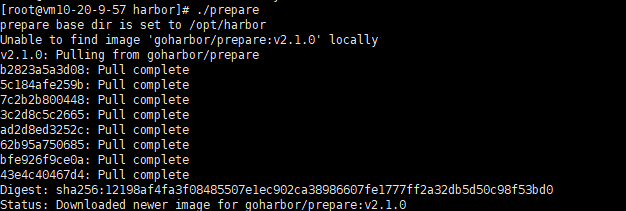
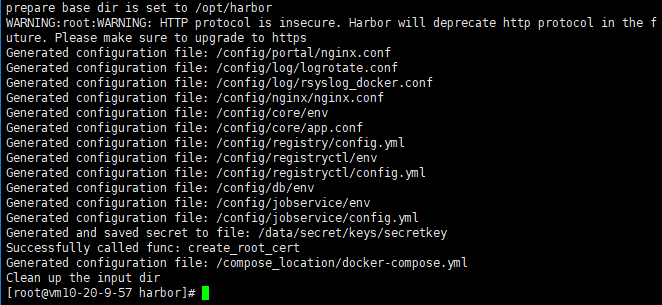
2.3 ./install.sh安装
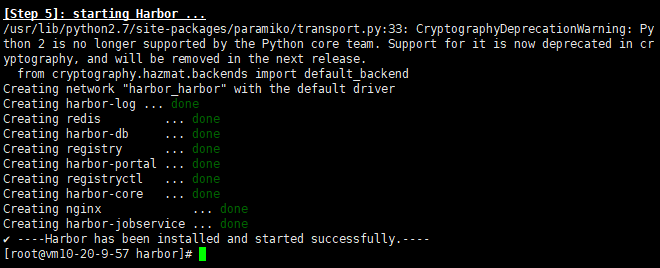
至此,harbor私有仓库就算安装成功了。
可以看到harbor依赖的镜像和运行的容器如下:

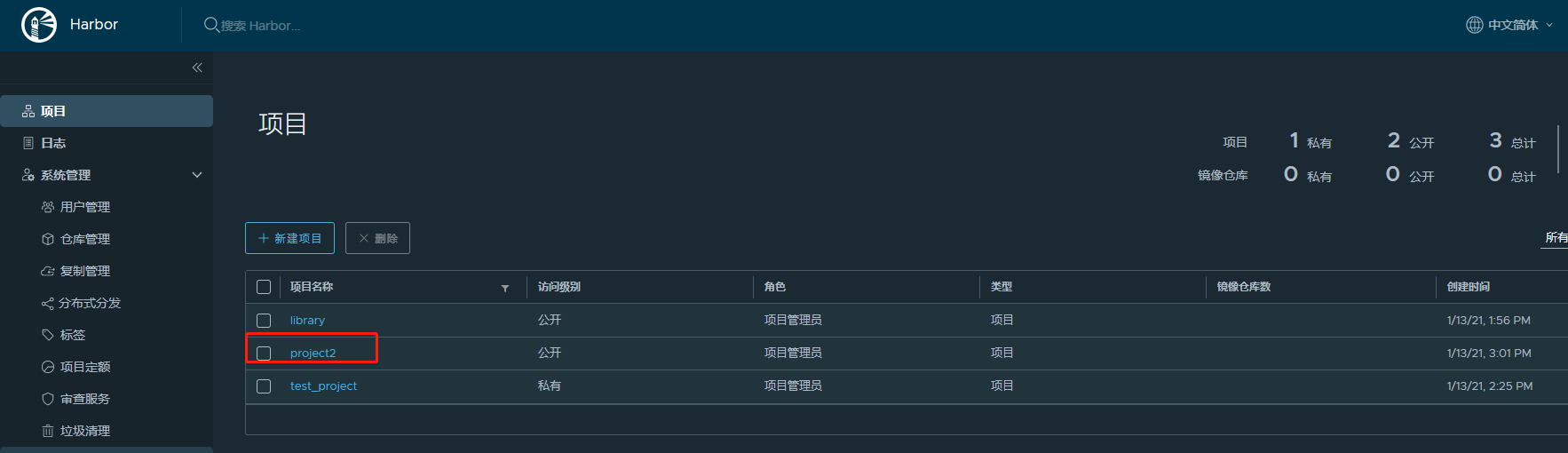
3. harbor后台管理登录
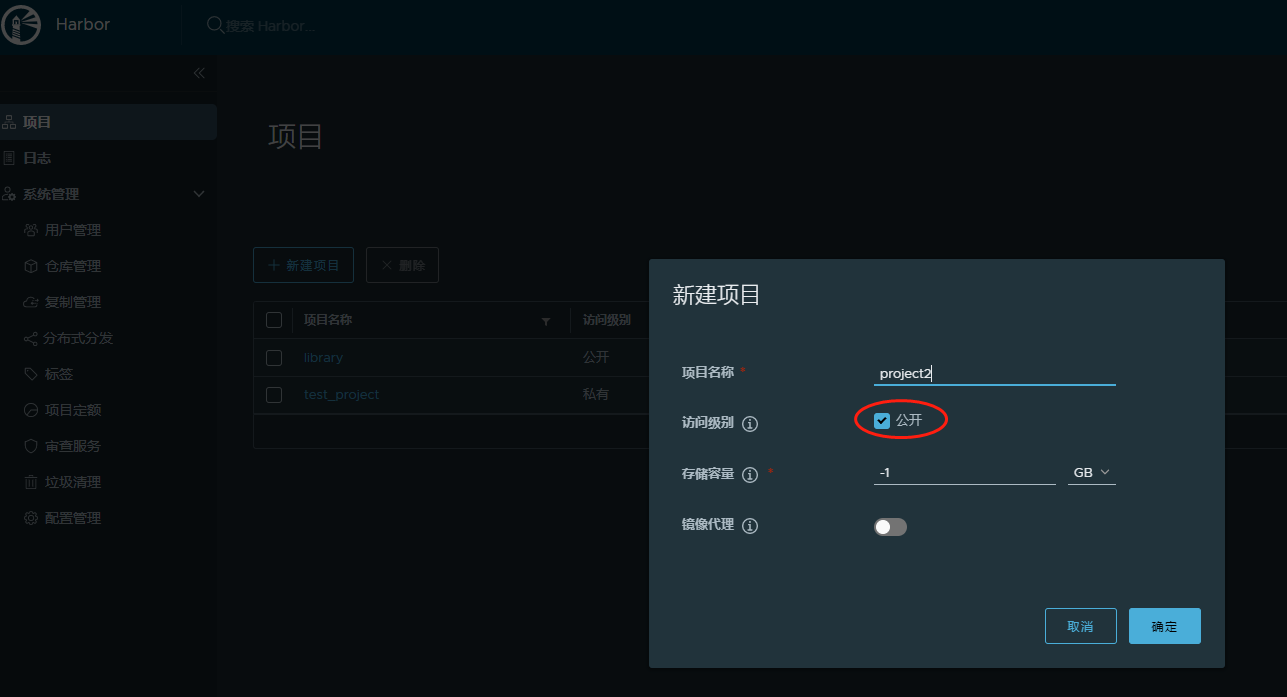
1.打开网址:http://IP地址/harbor/projects

2.创建项目:
3. docker 客户端配置使用仓库
1. 配置允许用http方式登录
192.168.43.76 为实际搭建harbor的服务器IP或者前端LB地址
#vim /etc/docker/daemon.json

{ "insecure-registries":["192.168.43.76"] }

# systemctl daemon-reload && systemctl restart docker

2. login 登录仓库
root@vm10-20-9-246:~# docker login 120.92.13.183

Authenticating with existing credentials...

WARNING! Your password will be stored unencrypted in /root/.docker/config.json.

Configure a credential helper to remove this warning. See

https://docs.docker.com/engine/reference/commandline/login/#credentials-store

Login Succeeded

root@vm10-20-9-246:~#
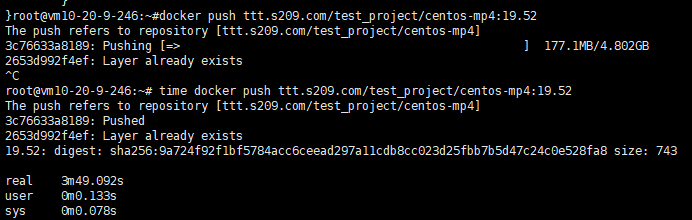
3. 构建镜像上传
root@vm10-20-9-246:~# docker ps

66fa11dac2fc        centos                                      "/bin/bash"              6 hours ago         Up 2 hours                              test-centos

root@vm10-20-9-246:~# docker commit test-centos 120.92.13.183/test_project/centos-mp4:14.47

sha256:de58721093e99876c8c96d3f4c84c1792c3f8dd52ce9b0216be15c3321709fcb

root@vm10-20-9-246:~#docker images

REPOSITORY                                  TAG                 IMAGE ID            CREATED             SIZE

120.92.13.183/test_project/centos-mp4       14.47               de58721093e9        2 hours ago         4.82GB

3. 使用对象存储作为存储
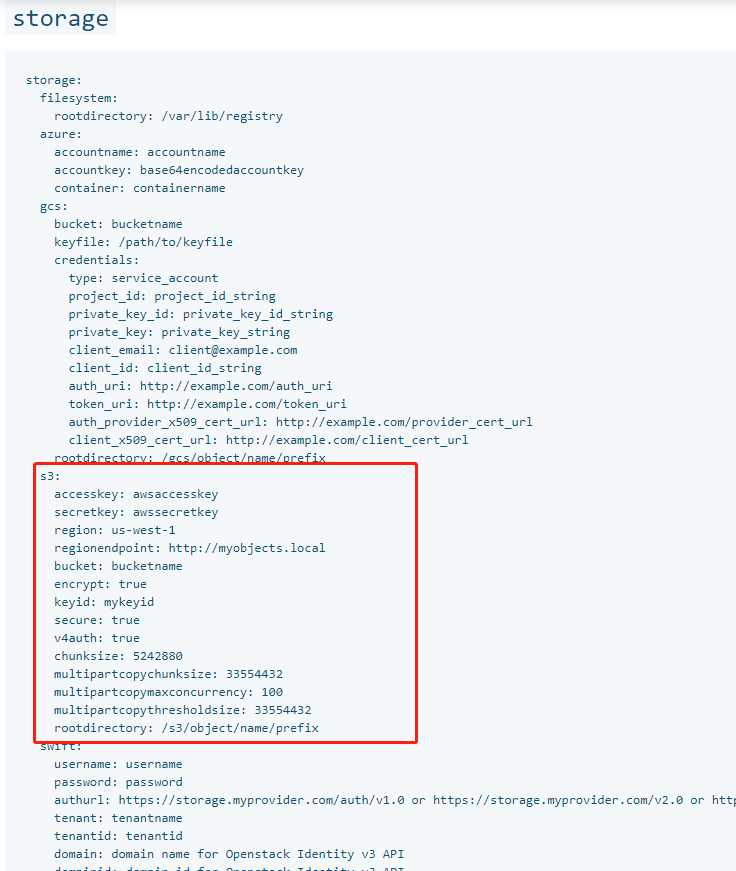
修改harbor.yml,注释data_volume: /data
参考:https://docs.docker.com/registry/configuration/
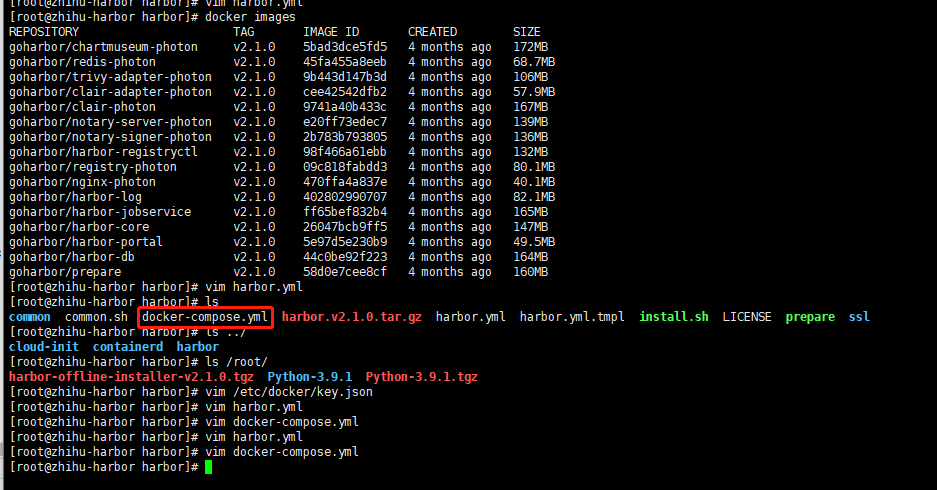
4. 使用自定义存储
修改 docker-compose.yml 里面的registry:
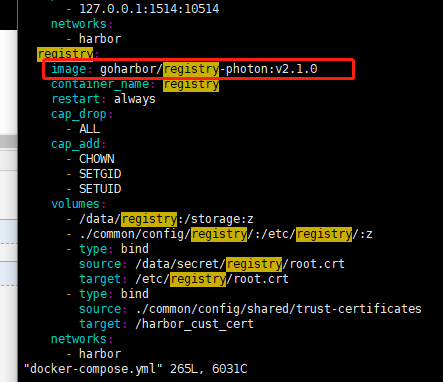 用自己封装的镜像
创建Harbor私有仓库的更多相关文章
- Centos7搭建Harbor私有仓库(二)
1 说明 前文Centos7搭建Harbor私有仓库(一)中成功搭建了Harbor,但,是以http方式搭建的,这里我们修改为https方式 以下基于镜像CentOS-7-x86_64-Minimal ...
- Docker Harbor私有仓库部署与管理 (超详细配图)
Docker Harbor私有仓库部署与管理 1.Harbor 介绍 2.Harbor部署 3.Harbor管理 1.Harbor 介绍: 什么是 Harbor ? Harbor 是 VMware 公 ...
- 配置 Containerd 在 harbor 私有仓库拉取镜像
官方文档地址:https://github.com/containerd/cri/blob/master/docs/registry.md 严格来说,这个具体可分为两部分 1.在k8s中使用Conta ...
- 搭建harbor私有仓库
2-1.项目说明 Harbor是一个用于存储和分发Docker镜像的企业级Registry服务器,由VMware开源,其通过添加一些企业必需的功能特性,例如安全.标识和管理等,扩展了开源 Docke ...
- 如何在云服务器创建maven私有仓库
参考链接:https://blog.csdn.net/silence_jjj/article/details/77531916 nexus3创建maven私有仓库(windows) 1.官网:http ...
- Harbor私有仓库中如何彻底删除镜像释放存储空间?
简介: Harbor私有仓库运行一段时间后,仓库中存有大量镜像,会占用太多的存储空间.直接通过Harbor界面删除相关镜像,并不会自动删除存储中的文件和镜像.需要停止Harbor服务,执行垃圾回收命令 ...
- Docker以http访问Harbor私有仓库(一)
1 说明 前文Centos7搭建Harbor私有仓库(一)我们成功搭建Harbor,本篇我们主要配置Docker以http方式访问私有仓库 2 Docker配置 2.1 Mac系统 2.1.1 配置D ...
- Docker以https访问Harbor私有仓库(二)
1 说明 前文Centos7搭建Harbor私有仓库(二)中,我们以https方式搭建了Harbor,本篇我们主要配置Docker以https方式访问Harbor私有仓库 2 Docker配置 2.1 ...
- 在jenkins中使用shell命令推送当前主机上的docker镜像到远程的Harbor私有仓库
1.jenkins主机上的docker配置 先在Jenkins主机的docke上配置上Harbor私有仓库地址 cat /etc/docker/daemon.json { "insecure ...
随机推荐
- git新手配置(windows环境)
windows环境,初步了解git是个什么东西,使用过svn相关软件最佳,否则可以先补一下git的相关概念和用处,相关教程:https://www.liaoxuefeng.com/wiki/89604 ...
- 详解在Linux中安装配置MySQL
最近在整理自己私人服务器上的各种阿猫阿狗,正好就顺手详细记录一下清理之后重装的步骤,今天先写点数据库的内容,关于在Linux中安装配置MySQL 安装环境 CentOS7 + MySQL5.7 下载安 ...
- 【2020五校联考NOIP #3】序列
题面传送门 原题题号:Codeforces Gym 101821B 题意: 给出一个排列 \(p\),要你找出一个最长上升子序列(LIS)和一个最长下降子序列(LDS),满足它们没有公共元素.或告知无 ...
- 解决Package is not available (for R version XXX)?
目录 1. 更新R(不推荐) 2. 更改或指定镜像源 3.源码安装 安装R包时这个错误是经常见到的.我认为有几个方法可解决,记录之. 1. 更新R(不推荐) 简单粗暴的方法就是更新R,但这波及的范围太 ...
- expr计算字符串长度
命令:expr length "quanzhiqinag" #!/bin/bash for N in quan zhi qiang do if [ `expr length $N ...
- mysql—将字符型数字转成数值型数字
今天写sql语句时,相对字符串类型的数字进行排序,怎么做呢? 需要先转换成数字再进行排序 1.直接用加法 字符串+0 eg: select * from orders order by (mark+0 ...
- 学习java的第二十三天
一.今日收获 1.java完全学习手册第三章算法的3.2排序,比较了跟c语言排序上的不同 2.观看哔哩哔哩上的教学视频 二.今日问题 1.快速排序法的运行调试多次 2.哔哩哔哩教学视频的一些术语不太理 ...
- abuse
abuse 近/反义词: ill-treat, maltreat, mistreat, misuse, prostitute, spoil; defame, disparage, malign, re ...
- flink---实时项目--day01--1. openrestry的安装 2. 使用nginx+lua将日志数据写入指定文件中 3. 使用flume将本地磁盘中的日志数据采集到的kafka中去
1. openrestry的安装 OpenResty = Nginx + Lua,是⼀一个增强的Nginx,可以编写lua脚本实现⾮非常灵活的逻辑 (1)安装开发库依赖 yum install -y ...
- 容器之分类与各种测试(四)——unordered-multiset
unordered-multiset是不定序关联式容器,其底部是通过哈希表实现功能. (ps:黑色框就是bucket,白色框即为bucket上挂载的元素) 为了提高查找效率,bucket(篮子)的数量 ...