
Python导出MySQL数据库中表的建表语句到文件
为了做数据对象的版本控制,需要将MySQL数据库中的表结构导出成文件进行版本化管理,试写了一下,可以完整导出数据库中的表结构信息
# -*- coding: utf-8 -*-

import os

import pymysql

class DBTool:

    conn = None

    cursor = None

    def __init__(self,conn_dict):

        self.conn = pymysql.connect(host=conn_dict['host'],

                                    port=conn_dict['port'],

                                    user=conn_dict['user'],

                                    passwd=conn_dict['password'],

                                    db=conn_dict['db'],

                                    charset=conn_dict['charset'])

        self.cursor = self.conn.cursor()

    def execute_query(self, sql_string):

        try:

            cursor=self.cursor

            cursor.execute(sql_string)

            list = cursor.fetchall()

            cursor.close()

            self.conn.close()

            return list

        except pymysql.Error as e:

            print("mysql execute error:", e)

            raise

    def execute_noquery(self, sql_string):

        try:

            cursor = self.cursor

            cursor.execute(sql_string)

            self.conn.commit()

            self.cursor.close()

            self.conn.close()

        except pymysql.Error as e:

            print("mysql execute error:", e)

            raise

def main():

    conn_dict = {'host': '127.0.0.1', 'port': 3306, 'user': '******', 'password': '******', 'db': 'test', 'charset': 'utf8'}

    conn = DBTool(conn_dict)

    sql_gettables = "select table_name from information_schema.`TABLES` WHERE TABLE_SCHEMA = 'databas_name';"

    list = conn.execute_query(sql_gettables)

    # 文件目标路径,如果不存在,新建一个

    mysql_file_path = 'D:\mysqlscript'

    if not os.path.exists(mysql_file_path):

        os.mkdir(mysql_file_path)

    mysqldump_commad_dict = {'dumpcommad': 'mysqldump --no-data ', 'server': '127.0.0.1', 'user': '******',

                            'password': '******', 'port': 3306, 'db': 'databse_name'}

    if list:

        for row in list:

            print(row[0])

            # 切换到新建的文件夹中

            os.chdir(mysql_file_path)

            #表名

            dbtable = row[0]

            #文件名

            exportfile =  row[0] + '.sql'

            # mysqldump 命令

            sqlfromat = "%s -h%s -u%s -p%s -P%s %s %s >%s"

            # 生成相应的sql语句

            sql = (sqlfromat % (mysqldump_commad_dict['dumpcommad'],

                                mysqldump_commad_dict['server'],

                                mysqldump_commad_dict['user'],

                                mysqldump_commad_dict['password'],

                                mysqldump_commad_dict['port'],

                                mysqldump_commad_dict['db'],

                                dbtable,

                                exportfile))

            print(sql)

            result = os.system(sql)

            if result:

                print('export ok')

            else:

                print('export fail')

if __name__ == '__main__':

    main()
建库测试
create database test_database

charset utf8mb4 collate utf8mb4_bin;

use test_database;

create table table_a

(

    id int auto_increment not null,

    name varchar(100) unique,

    create_date datetime,

    primary key pk_id(id),

    index idx_create_date(create_date)

);

insert into table_a(name,create_date) values ('aaaaaa',now());

insert into table_a(name,create_date) values ('bbbbbb',now());

create table table_b

(

    id int auto_increment not null,

    name varchar(100) unique,

    create_date datetime,

    primary key pk_id(id),

    index idx_create_date(create_date)

);

insert into table_b(name,create_date) values ('aaaaaa',now());

insert into table_b(name,create_date) values ('bbbbbb',now());
执行的时候会提示一个警告,但是不影响最终的结果
mysqldump: [Warning] Using a password on the command line interface can be insecure.
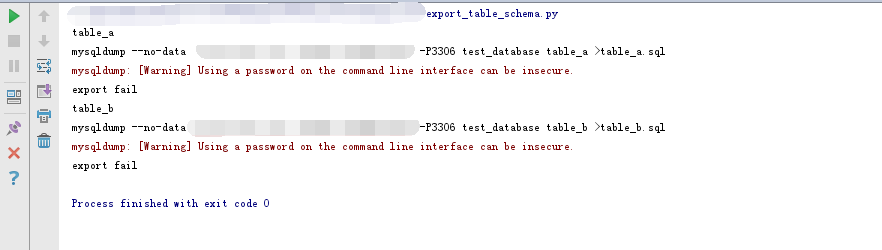
导出建表语句会根据表的数据情况编号自增列,这是mysqldump的问题而不是导出的问题,如果有必要可以需求做相应的修改

去掉mysqldump导出表结构中备注信息
import os

filepath = "D:\\mysqlscript"

# 切换到新建的文件夹中

os.chdir(filepath)

pathDir = os.listdir(filepath)

for file in pathDir:

    lines = open(file, "r")

    content = "use ***;"

    content = content + "\n"

    for line in lines:

        print(line)

        if not (str(line).startswith("--") or str(line).startswith("/*") ):

            if(line!="\n" and str(line).startswith(") ENGINE")):

                content = content +"\n"+ ")"

            else:

                content = content + line

    #将提炼后的内容重新写入文件

    print(content)

    fp = open(file, 'w')

    fp.write(content)

    fp.close()
Python导出MySQL数据库中表的建表语句到文件的更多相关文章
- Mysql元数据生成Hive建表语句注释脚本
在将数据从Mysql 等其他关系型数据库 抽取到Hive 表中时,需要同步mysql表中的注释,以下脚本可以生成hive表字段注释修改语句. 注:其他关系型数据库如:oracle 可以通过相同的思路, ...
- MySQL 查询 存储过程 视图 触发器 函数 索引 建表语句 数据库版本 当前登录用户 当前数据库名称
MySQL 查询 存储过程 视图 触发器 函数 索引 建表语句 数据库版本 当前登录用户 当前数据库名称 INFORMATION_SCHEMA.TABLES INFORMATION_SCHEMA. ...
- 使用python操作mysql数据库
这是我之前使用mysql时用到的一些库及开发的工具,这里记录下,也方便我查阅. python版本: 2.7.13 mysql版本: 5.5.36 几个python库 1.mysql-connector ...
- 【Python】使用python操作mysql数据库
这是我之前使用mysql时用到的一些库及开发的工具,这里记录下,也方便我查阅. python版本: 2.7.13 mysql版本: 5.5.36 几个python库 1.mysql-connector ...
- Python操作Mysql数据库——多表组合查询
前面我们介绍了单张表的查询,包括模糊查询.分组.排序.各种筛选条件等等操作,在实际应用中,查询的数据往往不止局限在一张表里,通常需要多张表在一起进行组合查询,今天我们将会对Mysql当中的多张有关联的 ...
- python操作mysql数据库的相关操作实例
python操作mysql数据库的相关操作实例 # -*- coding: utf-8 -*- #python operate mysql database import MySQLdb #数据库名称 ...
- mysqldump导入导出mysql数据库
body{ font-family: "Microsoft YaHei UI","Microsoft YaHei",SimSun,"Segoe UI& ...
- Python连接MySQL数据库的多种方式
上篇文章分享了windows下载mysql5.7压缩包配置安装mysql 后续可以选择 ①在本地创建一个数据库,使用navicat工具导出远程测试服务器的数据库至本地,用于学习操作,且不影响测试服务器 ...
- Python操作Mysql数据库进阶篇——查询操作详解(一)
前面我们已经介绍了在Python3.x中如何连接一个Mysql数据库,以及怎么样对这个数据库创建一个表,增删改查表里的数据.想必大家对Mysql数据库和简单的sql语句有了一定的了解,其实sql语句博 ...
随机推荐
- Windows10 VS2017 C++信号处理
#include "pch.h" #include <iostream> #include <csignal> #include <windows.h ...
- L2-014. 列车调度(set)*
L2-014. 列车调度 参考博客 #include <iostream> #include <cstdio> #include <set> #include &l ...
- Linux 挂载windows目录
1.默认情况下,Linux服务器会装有samba-client,但是没有装samba-server.但是访问Windows系统共享,安装有samba-client就可以了. [root@test ~] ...
- Linux搭建bugfree
1.xampp安装包地址: 链接:https://pan.baidu.com/s/1Th2QvF77jvIGzMROoF2rbg 密码:yoar 2.因为我用的是xshell5连接Linux服务器,直 ...
- JUnit4测试报错:class not found XXX
初学java框架,最近用eclipse跟着视频坐淘淘商城这个项目,其中使用了JUnit4做单元测试.当运行测试代码时,项目报错:class not found xxx. 借助了其他大神的博客,论坛等 ...
- 基于VM上的Ubuntu16.04如何和window界面进行复制,粘贴工作
1.卸载VMware tools: sudo apt-get autoremove open-vm-tools 2.安装界面版VMware tools. sudo apt-get install op ...
- vs2017 打开cs文件提示无法识别的GUID格式
总结一句话 no zuo no die. 是我自己在注册表中给vs增加了自动以管理员身份运行,把值给错了,弄成了 ~ RUNASADMIN WIN7RTM, 改成 ~ RUNASADMIN 后OK.还 ...
- Qt5 中文乱码问题
在做gui界面时,使用QTdesigner设计时,控件的名称等输入中文没有问题.为了更加灵活点,直接使用代码进行布局就很有必要了.这样就会出现中文的乱码.为了解决乱码,查看资料说时修改文件保存的编码, ...
- ehcache讲解及实例
ehcache讲解及实例https://www.cnblogs.com/coprince/p/5984816.html 有些情形下注解式缓存是不起作用的:同一个bean内部方法调用,子类调用父类中有缓 ...
- Java种的String
String中的常用方法 subString()的使用,charAt的使用方法: indexof等的用法 String和byte的转换,对于程序过程的传输很重要, ==和equals的比较 1equa ...