
React中使用styled-components的基础使用
今天准备来给大家分享分享React中styled-components的基础使用,仅仅是我个人的一些理解,不一定全对,有错误还请大佬们指出,496838236这是我qq,有想指点我的大佬随时加我qq好吧,要是想约我一起做保健,那我只能随叫随到了
好了,废话不多说,开工
今天我们不对react的环境进行搭建,我直接用脚手架搭一个最简单的环境来用,进入主题
1.使用styled-components
首先我们要安装styled-components
yarn add styled-components || npm install --save styled-components
2.最基础的使用,(为了方便阅读,以下所有的代码我将在一个文件中演示)
import React, { Component,Fragment} from 'react';

//引入styled-components

import styled from 'styled-components'

//修改了div的样式

const Title = styled.div`

  font-size:1.5rem;

  color:red

`

// 修改了button的样式

const Button = styled.button`

    border:none;

    background-color:blue

`

class App extends Component {

  render() {

    return (

    <Fragment>

    {

    // 开始的内容

    /* <div>大红牛</div>

    <button>枸杞11</button> */}

    <Title>大红牛</Title>

    <Button>枸杞</Button>

    </Fragment>

    )

  }

}

export default App;
运行结果: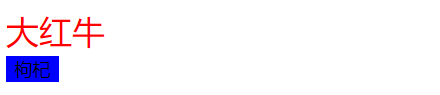
是不是很爽,其实到这里完全就可以用styled-components来写类似于CSS的代码了,但是这肯定不够啊,所以我们继续往下看
2.塑造组件
为什么要有塑造塑件呢,因为肯定会有一个场景,我们要对已经定义好的组件进行二次样式的修改,那这个时候我们就需要用塑造组件了
import React, { Component,Fragment} from 'react';

//引入styled-components

import styled from 'styled-components'

//初始组件

const Button = styled.button`

color: palevioletred;

font-size: 1em;

margin: 1em;

padding: 0.25em 1em;

border: 2px solid palevioletred;

border-radius: 3px;

`

//对组件进行二次样式修饰

const YellowButton = styled(Button)`

  background-color:yellow

`

class App extends Component {

  render() {

    return (

    <Fragment>

      <Button>红牛</Button>

      <YellowButton>枸杞</YellowButton>

    </Fragment>

    )

  }

}

export default App;
运行结果: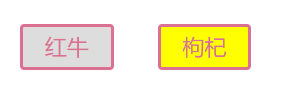
3.props传递参数 styled-components可以用props接受参数,从而根据传递的参数确定样式,是不是很强大
import React, { Component,Fragment} from 'react';

//引入styled-components

import styled from 'styled-components'

//props传递参数(根据参数的值设置样式)

// 有传递值字体会变为红色

// 无传递值会默认取蓝色

const Button = styled.button`

  padding: 0.5em;

  margin: 0.5em;

  color: ${ props => props.inputColor || "blue" };

  background: papayawhip;

  border: none;

  border-radius: 3px;

`

class App extends Component {

  render() {

    return (

    <Fragment>

        <Button inputColor="red">红牛啊</Button>

    </Fragment>

    )

  }

}

export default App;
运行结果:
除了可以根据参数的值进行样式的设置之外,我们还可以通过参数的有无来设置样式:
import React, { Component,Fragment} from 'react';

//引入styled-components

import styled from 'styled-components'

//props传递参数(根据参数的有无设置样式)

// 有参数背景会变为蓝色

// 无传递值背景会默认取黄色

const Button = styled.button`

  padding: 0.5em;

  margin: 0.5em;

  background: ${props=>props.blue?"blue":"yellow"};

  border: none;

  border-radius: 3px;

`

class App extends Component {

  render() {

    return (

    <Fragment>

        <Button blue>红牛啊</Button>

    </Fragment>

    )

  }

}

export default App;
运行结果:
.修改样式的同时添加属性,同时也可以通过这种方法引入第三方的样式,只需要设置className属性即可
import React, { Component,Fragment} from 'react';

//引入styled-components

import styled from 'styled-components'

//props传递参数(根据参数的有无设置样式)

// 有参数背景会变为蓝色

// 无传递值背景会默认取黄色

const Button = styled.button.attrs({

  title:"aaa",

  id:'bbb',

  'data-role':(props)=>props.hello

})`

  padding: 0.5em;

  margin: 0.5em;

  border: none;

  border-radius: 3px;

`

class App extends Component {

  render() {

    return (

    <Fragment>

        <Button hello="hi">红牛啊</Button>

    </Fragment>

    )

  }

}

export default App;
运行结果:
通过控制台我们可以看到,属性已经全部被加上去了
5.继承
import React, { Component,Fragment} from 'react';

//引入styled-components

import styled from 'styled-components'

//继承  根据实验 如果我没出错 最新的版本应该是不支持extend了

const Button = styled.button`

      color: palevioletred;

      font-size: 1em;

      margin: 1em;

      padding: 0.25em 1em;

      border-radius: 3px; `

const YellowButton = Button.extend`

      color: yellow;

      border-color: yellow; `;

class App extends Component {

  render() {

    return (

    <Fragment>

        <Button>红牛啊</Button>

        <YellowButton>枸杞啊</YellowButton>

    </Fragment>

    )

  }

}

export default App;
6.偷懒的写法,当标签很多时,要是我们虽每个标签都要进行修饰,那岂不是要写好多的组件,但是在有些情况下我们没必要分这木多组件,那我们不妨可以试试以下的写法
import React, { Component,Fragment} from 'react';

//引入styled-components

import styled from 'styled-components'

//另一种语法

const StyledDiv = styled.div`

  font-size: 100px;

  > span {

    font-size: 50px;

  }

  & > p {

    font-size: 25px;

  }

`

class App extends Component {

  render() {

    return (

    <Fragment>

        <StyledDiv>

            <span>红牛</span>

            <p>枸杞</p>

        </StyledDiv>

    </Fragment>

    )

  }

}

export default App;
运行结果: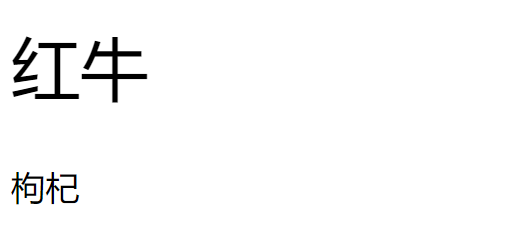
好啦,好啦今天就先到这里吧,希望各位大佬能指教指教我,实在不想指教一起约个正规保健也是可以的好吧
React中使用styled-components的基础使用的更多相关文章
- React中最基础的jsx语法
import React, { Component } from 'react'; class App extends Component { render() { return ( <div ...
- styled components草根中文版文档
1.styled components官网网址 https://www.styled-components.com/docs 以组件的形式来写样式. 1.1安装 yarn add styled-c ...
- 【Web技术】401- 在 React 中使用 Shadow DOM
本文作者:houfeng 1. Shadow DOM 是什么 Shadow DOM 是什么?我们先来打开 Chrome 的 DevTool,并在 'Settings -> Preferences ...
- 聊一聊 React 中的 CSS 样式方案
和 Angular,Vue 不同,React 并没有如何在 React 中书写样式的官方方案,依靠的是社区众多的方案.社区中提供的方案有很多,例如 CSS Modules,styled-compone ...
- React中的合成事件
React中的合成事件 React自己实现了一套高效的事件注册.存储.分发和重用逻辑,在DOM事件体系基础上做了很大改进,减少了内存消耗,简化了事件逻辑,并最大程度地解决了IE等浏览器的不兼容问题. ...
- React中使用CSSTransitionGroup插件实现轮播图
动画效果,是一个页面上必不可少的功能,学习一个新的东西,当然就要学习,如何用新的东西,用它的方法去实现以前的东西啦.今天呢,我就在这里介绍一个试用react-addons-css-transition ...
- React 深入系列1:React 中的元素、组件、实例和节点
文:徐超,<React进阶之路>作者 授权发布,转载请注明作者及出处 React 深入系列,深入讲解了React中的重点概念.特性和模式等,旨在帮助大家加深对React的理解,以及在项目中 ...
- React 中阻止事件冒泡的问题
在正式开始前,先来看看 JS 中事件的触发与事件处理器的执行. JS 中事件的监听与处理 事件捕获与冒泡 DOM 事件会先后经历 捕获 与 冒泡 两个阶段.捕获即事件沿着 DOM 树由上往下传递,到达 ...
- [Web 前端] mobx教程(三)-在React中使用Mobx
copy from : https://blog.csdn.net/smk108/article/details/85053903 Mobx提供了一个mobx-react包帮助开发者方便地在React ...
随机推荐
- 第二十七节:Java基础面向对象-静态,单例模式,继承详情知识点
前言 Java基础面向对象-静态,单例模式,继承详情知识点.静态-static关键字,static变量,静态代码块,代码块(不加静态),对象创建过程,单例模式,继承. 静态-static关键字 // ...
- 第十八节:详解Java抽象类和接口的区别
前言 对于面向对象编程来说,抽象是它的特征之一. 在Java中,实现抽象的机制分两种,一为抽象类,二为接口. 抽象类为abstract class,接口为Interface. 今天来学习一下Java中 ...
- JavaScript 函数式编程读书笔记2
概述 这是我读<javascript函数式编程>的读书笔记,供以后开发时参考,相信对其他人也有用. 说明:虽然本书是基于underscore.js库写的,但是其中的理念和思考方式都讲的很好 ...
- Swift5 语言指南(八) 函数
函数是执行特定任务的自包含代码块.您为函数指定了一个标识其功能的名称,此名称用于“调用”函数以在需要时执行其任务. Swift的统一函数语法足够灵活,可以表达从没有参数名称的简单C风格函数到具有每个参 ...
- moment.js 学习笔记
一.安装 / 使用 npm install moment 注:使用版本为 2.22.2 var moment = require('moment'); moment().format(); // 20 ...
- Java排序方法sort的使用详解(转)
一.对数组的排序: //对数组排序 public void arraySort(){ int[] arr = {1,4,6,333,8,2}; Arrays.sort(arr);//使用java.ut ...
- Java中IO流中的装饰设计模式(BufferReader的原理)
本文粗略的介绍下JavaIO的整体框架,重在解释BufferReader/BufferWriter的演变过程和原理(对应的设计模式) 一.JavaIO的简介 流按操作数据分为两种:字节流与字符流. 流 ...
- ES6中的proxy
1 概述 Proxy 可以理解成,在目标对象之前架设一层“拦截”,外界对该对象的访问,都必须先通过这层拦截,因此提供了一种机制,可以对外界的访问进行过滤和改写. Proxy 这个词的原意是代理,用在这 ...
- 关于git的常用命令
1.git add <name> 将工作区的内容添加到暂存区 2.git commit -m <备注> 将内容提交到暂存区 3.git status 查看状态 4. git ...
- Cookie的存储、获取、删除操作
var Cookie={ set: function (name, value, days) { var d = new Date; d.setTime(d.getTime() + 24*60*60* ...