
mybatis-高级结果映射之一对一
mybatis的高级结果映射可以很轻松的帮助我们处理一对一, 一对多的数据关系。
1 数据准备
1.1 数据库
创建以下的名为 mybatis 的数据库, 并在其下创建4个表。
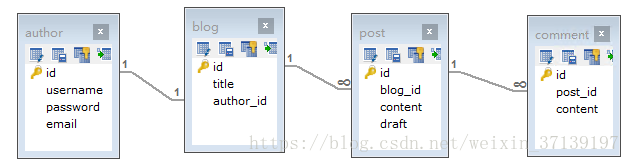
在此就不贴出来建表的 SQL 语句了 , 感兴趣的可以去我的 Github:mybatis-mapping 中获取。
1.2 实体类, 接口和XML
使用 mybatis-代码生成器 生成相应的实体类, 接口和XML。
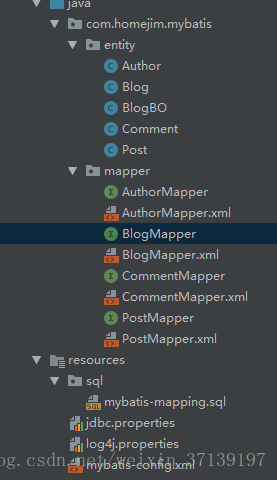
以上为生成的项目结构。
2 一对一映射
创建的表中, author 和 blog 就是一对一的关系。
我们希望找到一个blog, 然后就会把它的作者信息也关联出来。
2.1 resultType 方式一
注意:resultType方式要求获取到的列和成员变量名一致。
2.1.1 创建对象
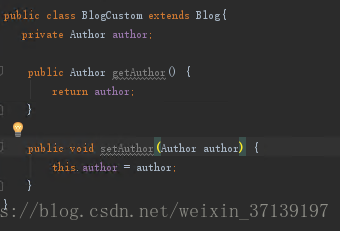
创建一个类BlogCustom, 该类继承于 Blog 类, 在该类上添加 Author 对象作为成员变量
2.1.2 创建接口方法和XML 语句
    BlogBO selectBoById(int id);

    /**

     * 根据博客的 id 获取博客及作者的信息

     * @param id

     * @return

     */

    BlogCustom selectCutomById(int id);
对应的 XML 语句:
  <select id="selectCutomById" parameterType="java.lang.Integer" resultType="com.homejim.mybatis.entity.BlogCustom">

   SELECT

    b.id,

    b.title,

    b.author_id AS authorId,

    a.id AS "author.id",

    a.username AS "author.username",

    a.password AS "author.password" ,

    a.email AS "author.email"

  FROM blog b LEFT JOIN author a ON b.author_id=a.id

 where b.id = #{id,jdbcType=INTEGER}

  </select>
通过 author.username 这种方式可以设定 author 对象中的 username 属性。
2.1.3 测试
    @Test

    public void testSelectCustomById() {

        SqlSession sqlSession = sqlSessionFactory.openSession();

        BlogMapper blogMapper = sqlSession.getMapper(BlogMapper.class);

        BlogCustom blogCustom = blogMapper.selectCutomById(1);

        System.out.println(ToStringBuilder.reflectionToString(blogCustom, ToStringStyle.MULTI_LINE_STYLE));

    }
运行后的结果
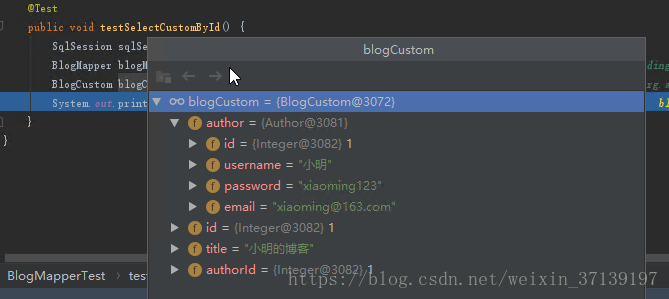
有时候, 我们获取的另外的属性不多, 则我们也可以选择下面的方式二。
2.2 resultType 方式二
2.2.1 创建对象
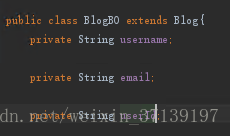
创建一个类BlogBO, 该类继承于 Blog 类, 在该类上添加 Author 中的成员变量作为该类自己的成员变量。
2.2.2 创建接口方法和XML 语句
接口方法
    /**

     * 根据博客的 id 获取博客及作者的信息

     * @param id

     * @return

     */

    BlogBO selectBoById(int id);
XML 对应的 SQL , 其中 resultType 是上面定义的实体对象。
  <select id="selectBoById" parameterType="java.lang.Integer" resultType="com.homejim.mybatis.entity.BlogBO">

    select

     b.id, b.title, b.author_id as authorId, a.id as userId, a.username, a.email

    from blog b left join author a on b.author_id=a.id

    where b.id = #{id,jdbcType=INTEGER}

  </select>
2.2.3 测试
创建一个测试例子。
    @Test

    public void testSelectBoById() {

        SqlSession sqlSession = sqlSessionFactory.openSession();

        BlogMapper blogMapper = sqlSession.getMapper(BlogMapper.class);

        BlogBO blogBO = blogMapper.selectBoById(1);

        System.out.println(ToStringBuilder.reflectionToString(blogBO, ToStringStyle.MULTI_LINE_STYLE));

    }
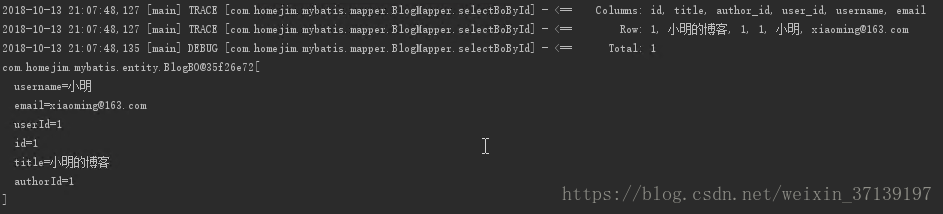
测试结果
2.3 resultMap 方式
2.3.1 创建对象
创建一个类BlogCustom, 该类继承于 Blog 类, 在该类上添加 Author 对象作为成员变量

2.3.2 创建对应 resultMap
对应创建一个 resultMap
  <resultMap id="BOResultMap" type="com.homejim.mybatis.entity.BlogCustom" extends="BaseResultMap">

    <result column="username" jdbcType="VARCHAR" property="author.username" />

    <result column="user_id" jdbcType="VARCHAR" property="author.id" />

    <result column="email" jdbcType="VARCHAR" property="author.email" />

  </resultMap>
2.3.3 创建接口方法和XML 语句
    /**

     * 根据博客的 id 获取博客及作者的信息, resultMap 方式

     * @param id

     * @return

     */

    BlogCustom selectCutomByIdMap(int id);
SQL 语句得出的列名与 BOResultMap 一致。
  <select id="selectCutomByIdMap" parameterType="java.lang.Integer" resultMap="BOResultMap">

   SELECT

    b.id,

    b.title,

    b.author_id AS authorId,

    a.id AS "user_id",

    a.username,

    a.email

  FROM blog b LEFT JOIN author a ON b.author_id=a.id

 where b.id = #{id,jdbcType=INTEGER}

  </select>
2.3.4 测试
    /**

     *  resultMap 方式一测试

     */

    @Test

    public void testSelectCustomByIdMap() {

        SqlSession sqlSession = sqlSessionFactory.openSession();

        BlogMapper blogMapper = sqlSession.getMapper(BlogMapper.class);

        BlogCustom blogCustom = blogMapper.selectCutomByIdMap(1);

        System.out.println(ToStringBuilder.reflectionToString(blogCustom, ToStringStyle.MULTI_LINE_STYLE));

    }
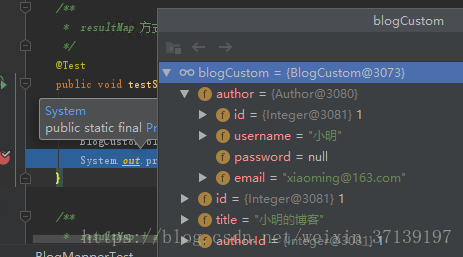
得出的结果
其实该类型也可以配置对应 BlogBO 类对应的方式, 在此不做过多的讲解。
2.4 resultMap + association 方式
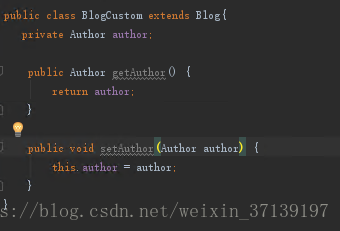
2.4.1 创建对象
创建一个类BlogCustom, 该类继承于 Blog 类, 在该类上添加 Author 对象作为成员变量
2.4.2 创建 resultMap
  <resultMap id="CustomResultMap" type="com.homejim.mybatis.entity.BlogCustom" extends="BaseResultMap">

     <association property="author" javaType="com.homejim.mybatis.entity.Author">

       <id column="user_id" jdbcType="INTEGER" property="id" />

       <result column="username" jdbcType="VARCHAR" property="username" />

       <result column="email" jdbcType="VARCHAR" property="email" />

     </association>

  </resultMap>
或者, 可以引用别的 Mapper 中的结果集。
  <resultMap id="CustomResultMap" type="com.homejim.mybatis.entity.BlogCustom" extends="BaseResultMap">

     <association property="author" javaType="com.homejim.mybatis.entity.Author" resultMap="com.homejim.mybatis.mapper.AuthorMapper.BaseResultMap">

     </association>

  </resultMap>
2.4.3 创建接口方法和XML 语句
    /**

     * 根据博客的 id 获取博客及作者的信息, resultMap + association方式

     * @param id

     * @return

     */

    BlogCustom selectCutomByIdAMap(int id);
SQL 语句
<select id="selectCutomByIdAMap" parameterType="java.lang.Integer" resultMap="CustomResultMap">

   SELECT

    b.id,

    b.title,

    b.author_id AS authorId,

    a.id AS "user_id",

    a.username,

    a.email

  FROM blog b LEFT JOIN author a ON b.author_id=a.id

 where b.id = #{id,jdbcType=INTEGER}

  </select>
2.4.4 测试
    /**

     *  resultMap + association 方式测试

     */

    @Test

    public void testSelectCustomByIdAMap() {

        SqlSession sqlSession = sqlSessionFactory.openSession();

        BlogMapper blogMapper = sqlSession.getMapper(BlogMapper.class);

        BlogCustom blogCustom = blogMapper.selectCutomByIdAMap(1);

        System.out.println(ToStringBuilder.reflectionToString(blogCustom, ToStringStyle.MULTI_LINE_STYLE));

    }
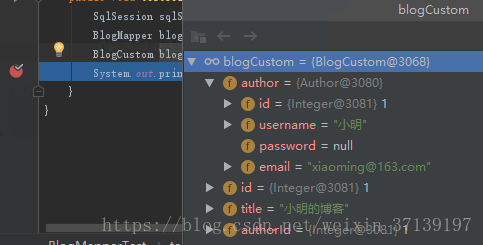
结果
2.5 resultMap + association 嵌套查询
以上几种方法都是通过 left join 的 SQL 语句获取多个对象的结果。 还可以经过简单的 SQL 语句, 多次查询而转化为我们需要的结果。
2.5.1
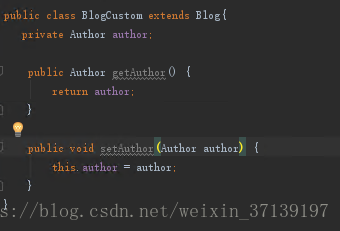
2.5.1 创建对象
创建一个类BlogCustom, 该类继承于 Blog 类, 在该类上添加 Author 对象作为成员变量
2.5.2 创建 resultMap
  <resultMap id="blogAuthorMap" type="com.homejim.mybatis.entity.BlogCustom" extends="BaseResultMap">

    <association property="author" column="author_id" select="com.homejim.mybatis.mapper.AuthorMapper.selectById" fetchType="eager" />

  </resultMap>
该结果集与之前的不同了, association 标签中使用了 select 属性。
select: 另一个查询的 id, mybatis 会额外执行这个查询来获取嵌套的结果
column: 列名(别名), 将主查询中的列作为嵌套查询的参数, 多个参数使用逗号(英文)分隔开。
fetchType: 数据加载的方式, 可选择为 lazy(延迟加载) 或者 eager(积极加载), 该配置会覆盖全局的 lazyLoadingEnabled 配置。
2.5.3 创建接口方法和XML 语句
    /**

     * 根据博客的 id 获取博客及作者的信息, resultMap + association嵌套方式

     * @param id

     * @return

     */

    BlogCustom selectBlogAndAuthorByIdSelect(int id);
获取的数据是博客和用户的信息, 以下的 SQL 只是获取博客信息, 用户信息通过 com.homejim.mybatis.mapper.AuthorMapper.selectById 获取。
  <select id="selectBlogAndAuthorByIdSelect" parameterType="java.lang.Integer" resultMap="blogAuthorMap">

   SELECT

    b.id,

    b.title,

    b.author_id

  FROM blog b

 where b.id = #{id,jdbcType=INTEGER}

  </select>
com.homejim.mybatis.mapper.AuthorMapper.selectById 是一个全限定名, 即 AuthorMapper 下的 selectById 方法
    /**

     * 嵌套查询使用的方法

     * @param id

     * @return

     */

    Author selectById(Integer id);
对应的 SQL
  <select id="selectById" parameterType="java.lang.Integer" resultMap="BaseResultMap">

    select

    <include refid="Base_Column_List" />

    from author

    where id = #{id}

  </select>
2.5.4 测试
使用时, 调用 selectBlogAndAuthorByIdSelect 方法即可。
    /**

     *  resultMap + association 嵌套查询方式测试

     */

    @Test

    public void testSelectBlogAndAuthorByIdSelect() {

        SqlSession sqlSession = sqlSessionFactory.openSession();

        BlogMapper blogMapper = sqlSession.getMapper(BlogMapper.class);

        BlogCustom blogCustom = blogMapper.selectBlogAndAuthorByIdSelect(1);

        System.out.println(ToStringBuilder.reflectionToString(blogCustom, ToStringStyle.MULTI_LINE_STYLE));

        Assert.assertNotNull(blogCustom);

        Assert.assertNotNull(blogCustom.getAuthor());

    }
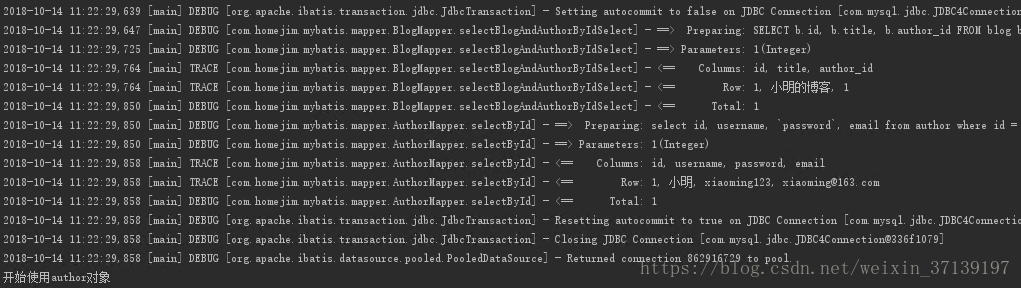
输出, 会发送两次 SQL 语句。
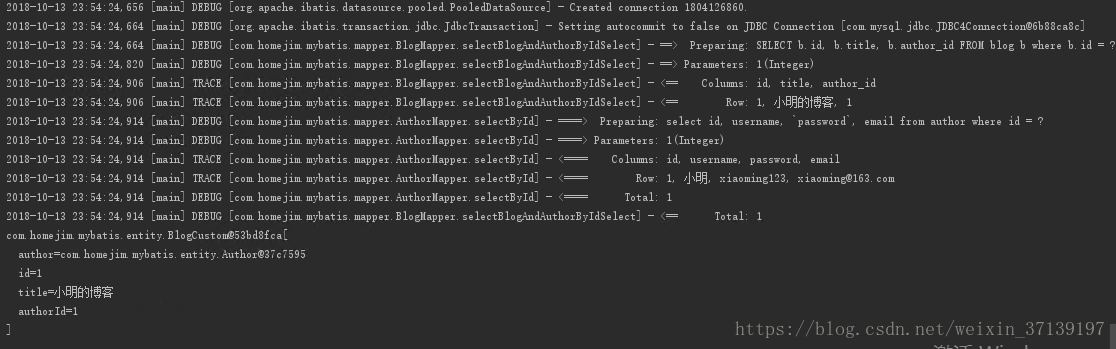
可以看到, 上面的结果示意图中, 发送了两次 SQL 。
2.5.5 延迟加载
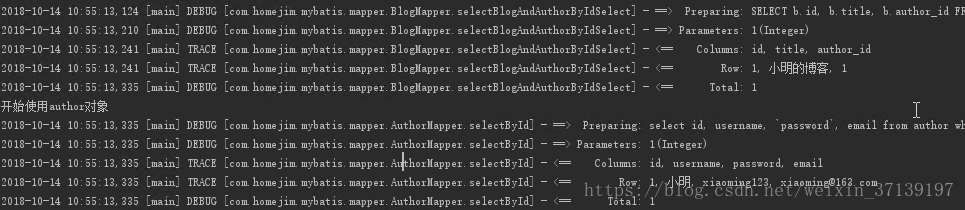
如果是一个对象中只是包含一两个对象, 使用上面的方式还好。 但是如果包含有很多, 那要一次性发送很多次 SQL, 性能上就会很有影响。延迟加载可以解决此类的问题。
延迟加载就是说,只有在调用内部的对象时, 才会把获取该对象的 SQL 发送出去。
更改结果集
  <resultMap id="blogAuthorMapLazy" type="com.homejim.mybatis.entity.BlogCustom" extends="BaseResultMap">

    <association fetchType="lazy" property="author" column="author_id" select="com.homejim.mybatis.mapper.AuthorMapper.selectById" />

  </resultMap>
将上面的查询中的结果集更改 resultMap="blogAuthorMapLazy"
  <select id="selectBlogAndAuthorByIdSelect" parameterType="java.lang.Integer" resultMap="blogAuthorMapLazy"> <!--resultMap="blogAuthorMap"-->

    SELECT

    b.id,

    b.title,

    b.author_id

  FROM blog b

 where b.id = #{id,jdbcType=INTEGER}

  </select>
更改延迟加载总开关
 <setting name="lazyLoadingEnabled" value="true"/>

<setting name="aggressiveLazyLoading" value="false"/>
测试
注意: 延迟加载是在
SqlSession的声明周期内的, 如果超出该声明周期, 如 spring 中, 只能在 Service 层使用延迟加载的对象, 如果返回Controller层在获取延迟加载属性, 则会抛出异常。
有时候, 我们配置了延迟加载, 但是却想要一次性加载, 怎么办?
有一个配置属性可以帮我们解决 lazyLoadTriggerMethods, 它的默认配置如下:
<setting name="lazyLoadTriggerMethods" value="equals,clone,hashCode,toString"/>
就是说我们使用上面配置中的任何一个方法(上面的是默认的, 我们可以不配置), 就可以加载属性啦。
测试
    /**

     *  resultMap + association 嵌套查询方式测试(延迟加载不延迟lazyLoadTriggerMethods)

     */

    @Test

    public void testSelectBlogAndAuthorByIdSelectTrigger() {

        SqlSession sqlSession = sqlSessionFactory.openSession();

        BlogMapper blogMapper = sqlSession.getMapper(BlogMapper.class);

        BlogCustom blogCustom = blogMapper.selectBlogAndAuthorByIdSelect(1);

        blogCustom.equals(null);

        Assert.assertNotNull(blogCustom);

        sqlSession.close();

        System.out.println("开始使用author对象");

        Assert.assertNotNull(blogCustom.getAuthor());

    }
结果
3. 代码
本来还要写的一对多, 鉴别器的, 但由于篇幅的原因, 后续继续吧。
一起学 mybatis
你想不想来学习 mybatis? 学习其使用和源码呢?那么, 在博客园关注我吧!!
我自己打算把这个源码系列更新完毕, 同时会更新相应的注释。快去 star 吧!!
mybatis-高级结果映射之一对一的更多相关文章
- MyBatis从入门到精通(九):MyBatis高级结果映射之一对一映射
最近在读刘增辉老师所著的<MyBatis从入门到精通>一书,很有收获,于是将自己学习的过程以博客形式输出,如有错误,欢迎指正,如帮助到你,不胜荣幸! 本篇博客主要讲解MyBatis中实现查 ...
- Mybatis高级结果映射
有时侯,我们用SQL取得的结果需要映射到类似Map<key, Bean>这样的数据结构中或是映射到多个实体类中时,我们就需要使用到resultMap.下面用3个例子说明Mybatis高级结 ...
- MyBatis从入门到精通(第6章):MyBatis 高级查询->6.1.1高级结果映射之一对一映射
jdk1.8.MyBatis3.4.6.MySQL数据库5.6.45.IntelliJ IDEA 2019.2.4 本章主要包含的内容为 MyBatis 的高级结果映射,主要处理数据库一对一.一对多的 ...
- Mybatis 高级结果映射 ResultMap Association Collection
在阅读本文章时,先说几个mybatis中容易混淆的地方: 1. mybatis中的列不是数据库里的列而是查询里的列,可以是别名(如 select user_name as userName,这时col ...
- 转:mybatis 高级结果映射(http://blog.csdn.net/ilovejava_2010/article/details/8180521)
高级结果映射 MyBatis的创建基于这样一个思想:数据库并不是您想怎样就怎样的.虽然我们希望所有的数据库遵守第三范式或BCNF(修正的第三范式),但它们不是.如果有一个数据库能够完美映射到所有应用程 ...
- MyBatis从入门到精通(十一):MyBatis高级结果映射之一对多映射
最近在读刘增辉老师所著的<MyBatis从入门到精通>一书,很有收获,于是将自己学习的过程以博客形式输出,如有错误,欢迎指正,如帮助到你,不胜荣幸! 本篇博客主要讲解MyBatis中如何使 ...
- MyBatis高级查询
-------------------------siwuxie095 MyBatis 高级查询 1.MyBatis 作为一个 ORM 框架,也对 SQL 的高级查询做了支持, MyBatis 高级查 ...
- 【Mybatis高级映射】一对一映射、一对多映射、多对多映射
前言 当我们学习heribnate的时候,也就是SSH框架的网上商城的时候,我们就学习过它对应的高级映射,一对一映射,一对多映射,多对多映射.对于SSM的Mybatis来说,肯定也是差不多的.既然开了 ...
- 六 mybatis高级映射(一对一,一对多,多对多)
1 订单商品数据模型 以订单商品数据为模型,来对mybaits高级关系映射进行学习.
- Mybatis(四) 高级映射,一对一,一对多,多对多映射
天气甚好,怎能不学习? 一.单向和双向 包括一对一,一对多,多对多这三种情况,但是每一种又分为单向和双向,在hibernate中我们就详细解析过这单向和双向是啥意思,在这里,在重复一遍,就拿一对多这种 ...
随机推荐
- 如何打jar包
一.制作只含有字节码文件的jar包1.最简单的jar包——直接输出hello2.含有两个类的jar包——通过调用输出hello3.有目录结构的jar包——通过引包并调用输出hello 二.制作含有ja ...
- BigDecimal遇到的问题,大伙也说说
一:相除精度丢失的问题 BigDecimal的api除法相对加减乘要实现的复杂多了,只介绍常用的我遇到的问题: 问题:两数相除,如果9/3=3整除没问题,但是10/3=0.33333333...... ...
- matplotlib多plot可视化
代码: # -*- coding: utf-8 -*- """ Created on Thu Jul 12 16:37:47 2018 @author: zhen &qu ...
- [20171211]ora-16014 11g.txt
[20171211]ora-16014 11g.txt --//上午测试了10g下备库log_archive_dest_1参数配置VALID_FOR=(ONLINE_LOGFILES,ALL_ROLE ...
- .net core xss攻击防御
XSS攻击全称跨站脚本攻击,是为不和层叠样式表(Cascading Style Sheets, CSS)的缩写混淆,故将跨站脚本攻击缩写为XSS,XSS是一种在web应用中的计算机安全漏洞,它允许恶意 ...
- tkinter学习系列之(八) Canvas控件
目录 目录 前言 (一)carves创建方法 (二)carves的画图方法 目录 前言 由于最近想在tkinter里内嵌matplotlib,由于用到tkinter里的carves控件,先学习一下. ...
- C# X509Certificate类 调用证书
一.命名空间 using System.Security.Cryptography.X509Certificates; 二.调用代码 string certPath = Server.MapPath( ...
- 统计单词数 OpenJ_Bailian - 4030(字符串处理)
一般的文本编辑器都有查找单词的功能,该功能可以快速定位特定单词在文章中的位置,有的还能统计出特定单词在文章中出现的次数. 现在,请你编程实现这一功能,具体要求是:给定一个单词,请你输出它在给定的文章中 ...
- Vxlan学习笔记——原理(转)
文章转自http://www.cnblogs.com/hbgzy/p/5279269.html 1. 为什么需要Vxlan 普通的VLAN数量只有4096个,无法满足大规模云计算IDC的需求,而IDC ...
- P1044-栈-洛谷luogu
题目背景 栈是计算机中经典的数据结构,简单的说,栈就是限制在一端进行插入删除操作的线性表. 栈有两种最重要的操作,即poppop(从栈顶弹出一个元素)和pushpush(将一个元素进栈). 栈的重要性 ...