
C# WinForm Webbrowser 强制所有网页链接在同一页面打开或者在TabControl中弹出新窗口(续)
上面那个文写的如同粑粑一样
效果图
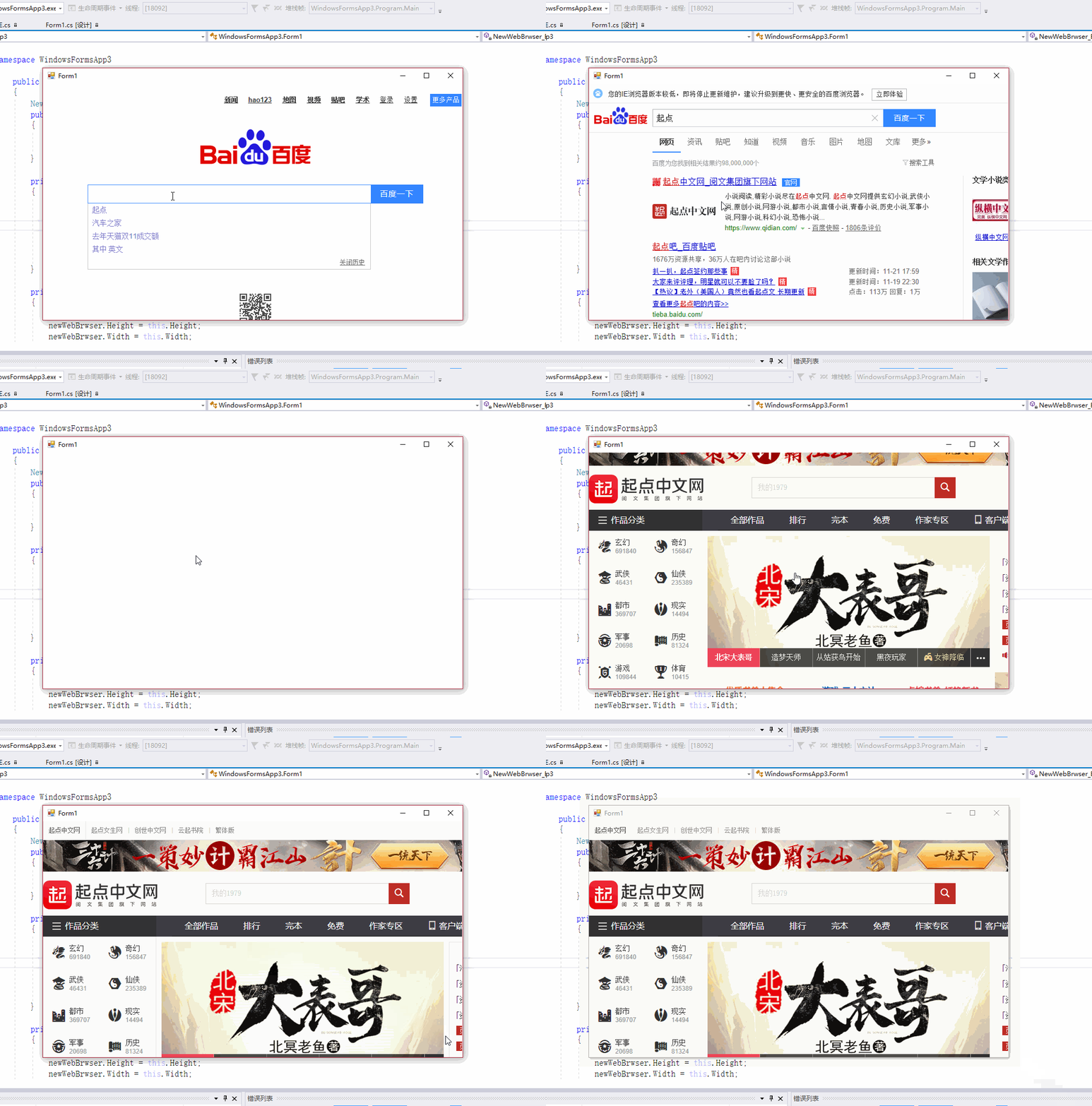
Winfrom 中添加这个类就好了
using System;

using System.Collections.Generic;

using System.ComponentModel;

using System.Linq;

using System.Text;

using System.Threading.Tasks;

using System.Windows.Forms;

namespace IE

{

    public class WebBrowserUrl : CancelEventArgs

    {

        public String Url { get; }

        public String Frame { get; }

        public WebBrowserUrl(String url, String frame) : base()

        {

            this.Url = url;

            this.Frame = frame;

        }

    }

    public class WebBrowserUrl2

    {

        public String Url { get; }

        public String Frame { get; }

        public WebBrowserUrl2(String url, String frame)

        {

            this.Url = url;

            this.Frame = frame;

        }

    }

    public class WebBrowserEvent

    {

        public bool cancel;

    }

    public class NewWebBrwser : WebBrowser

    {

        System.Windows.Forms.AxHost.ConnectionPointCookie cookie;

        NewWebBrowserEvent events;

        public event EventHandler BeforeNavigate;

     //   public event EventHandler BeforeNewWindow;

        public delegate void OnNewWindow2(WebBrowserUrl2 webPra, WebBrowserEvent cancel);

        public event  OnNewWindow2 BeforeNewWindow2;

        protected override void CreateSink()

        {

            base.CreateSink();//还是需要源

            events = new NewWebBrowserEvent(this);

            cookie = new System.Windows.Forms.AxHost.ConnectionPointCookie(this.ActiveXInstance, events, typeof(INewDWWebBrowserEvent));

        }

        protected override void DetachSink()

        {

            if (null != cookie)

            {

                cookie.Disconnect();

                cookie = null;

            }

            base.DetachSink();

        }

        public void OnBeforeNavigate(string url, string frame, out bool cancel)

        {

            var Arg = BeforeNavigate;

            WebBrowserUrl webBrowserUrl = new WebBrowserUrl(url, frame);

            Arg?.Invoke(this, webBrowserUrl);

            cancel = webBrowserUrl.Cancel;

        }

        public void OnBeforeNewWindow(string url, out bool cancel)

        {

            //var Arg = BeforeNewWindow;

            //WebBrowserUrl webBrowserUrl = new WebBrowserUrl(url, null);

            //Arg?.Invoke(this, webBrowserUrl);

            //cancel = webBrowserUrl.Cancel;

            var Arg = BeforeNewWindow2;

            WebBrowserUrl2 webBrowserUrl = new WebBrowserUrl2(url, null);

            WebBrowserEvent webBrowserEvent = new WebBrowserEvent();

            Arg?.Invoke(webBrowserUrl,webBrowserEvent);

            cancel = webBrowserEvent.cancel;

        }

    }

    public class NewWebBrowserEvent : System.Runtime.InteropServices.StandardOleMarshalObject, INewDWWebBrowserEvent

    {

        private NewWebBrwser webBrowser;

        public NewWebBrowserEvent(NewWebBrwser newWebBrowser) => webBrowser = newWebBrowser;

        public void BeforeNavigate2(object pDisp, ref object urlObject, ref object flags, ref object targetFrameName, ref object postData, ref object headers, ref bool cancel)

        {

            webBrowser.OnBeforeNavigate((string)urlObject, (string)targetFrameName, out cancel);

        }

        //官方说明此 事件是低于IE6时会引发

        public void NewWindow2(ref object ppDisp, ref bool cancel)

        {

            webBrowser.OnBeforeNewWindow(((WebBrowser)ppDisp).Url.ToString(), out cancel);

        }

        //当高于IE6时使用

        public void NewWindow3(object pDisp, ref bool cancel, ref object flags, ref object URLContext, ref object URL)

        {

            webBrowser.OnBeforeNewWindow((string)URL, out cancel);

        }

    }

     [System.Runtime.InteropServices.ComImport(), System.Runtime.InteropServices.Guid("34A715A0-6587-11D0-924A-0020AFC7AC4D"),

      System.Runtime.InteropServices.InterfaceTypeAttribute(System.Runtime.InteropServices.ComInterfaceType.InterfaceIsIDispatch),

      System.Runtime.InteropServices.TypeLibType(System.Runtime.InteropServices.TypeLibTypeFlags.FHidden)]

    public interface INewDWWebBrowserEvent

    {

        [System.Runtime.InteropServices.DispId()]

        void BeforeNavigate2(object pDisp, ref object urlObject, ref object flags, ref object targetFrameName, ref object postData, ref object headers, ref bool cancel);

        //官方说明此 事件是低于IE6时会引发

        [System.Runtime.InteropServices.DispId()]

        void NewWindow2(ref object ppDisp, ref bool cancel);

        //当高于IE6时使用

        [System.Runtime.InteropServices.DispId()]

        void NewWindow3(object pDisp, ref bool cancel, ref object flags, ref object URLContext, ref object URL);

    }

}
使用方式

C# WinForm Webbrowser 强制所有网页链接在同一页面打开或者在TabControl中弹出新窗口(续)的更多相关文章
- 强制所有网页链接在同一页面打开或者在TabControl中弹出新窗口
IEwebbrowser中老生常谈的话题. 一般的解决都是通过 // webBrowser.Navigating += WebBrowser_Navigating; 注册转跳前事件 private v ...
- C# WPF Webbrowser 强制所有网页链接在同一页面打开
只要搞懂Winform的 WPF稍微改一改就可以了 主类:负责跳转的 using System; using System.Collections.Generic; using System.Com ...
- C# Winform WebBrowser控件
C# WinForm WebBrowser 1.主要用途:使用户可以在窗体中导航网页. 2.注意:WebBrowser 控件会占用大量资源.使用完该控件后一定要调用 Dispose 方法,以便确保及时 ...
- .NET4.5 WFP中用WebBrowser获取/操作网页html代码
引言 想给自己之前写的网页小说爬虫程序更新换代,之前一直是用winform的形式写的程序,因此这一次更新打算把UI换成WPF(因为听说WPF很漂亮),顺便也以此引入WPF的学习. 那么作为网页爬虫程序 ...
- c# webbrowser 随机点击链接
HtmlElementCollection hec = webBrowser1.Document.All; ; i < hec.Count; i++) { if (hec[i].GetAttri ...
- paip.点击每个网页链接都提示下载的解决。
paip.点击每个网页链接都提示下载的解决. 作者Attilax 艾龙, EMAIL:1466519819@qq.com 来源:attilax的专栏 地址:http://blog.csdn. ...
- JavaScript 网页链接调用Android程序
如何让网页链接实现启动Android的应用,网上有说重写WebView相关的shouldOverrideUrlLoading方法,但是这种理论上能实现,因为你的网页不是仅仅被你自己的webview来浏 ...
- webBrowser中操作网页元素全攻略
原文 webBrowser中操作网页元素全攻略 1.获取非input控件的值: webBrowser1.Document.All["控件ID"].InnerText; 或webBr ...
- Winform WebBrowser引用IE版本问题
做了一个Winform的项目.项目里使用了WebBrowser控件.以前一直都以为WebBrowser是直接调用的系统自带的IE,IE是呈现出什么样的页面WebBrowser就呈现出什么样的页面.其实 ...
随机推荐
- ORACLE和MYSQL函数
函数 编号 类别 ORACLE MYSQL 注释 1 数字函数 round(1.23456,4) round(1.23456,4) 一样: ORACLE:select round(1.23456,4) ...
- InputStreamReader和BufferedReader的区别
.InputStream.OutputStream 处理字节流的抽象类 InputStream 是字节输入流的所有类的超类,一般我们使用它的子类,如FileInputStream等. OutputSt ...
- for in 循环的输出顺序问题
var data = { '4': 'first', '3': 'second', '2': 'third', '1': 'fourth' }; for (var i in data) { conso ...
- 如何在Linux中添加新的系统调用
系统调用是应用程序和操作系统内核之间的功能接口.其主要目的是使得用户 可以使用操作系统提供的有关设备管理.输入/输入系统.文件系统和进程控制. 通信以及存储管理等方面的功能,而不必了解系统程序的内部结 ...
- 关于windows的jdk
扯淡工作从web开发转向build automation,不知不觉已经一个半月了,各种学习熟悉build相关的流程和知识,比如ant, maven, jenkins 等CI技能.因为这一个半月学的东西 ...
- 【HDU4960】Another OCD Patient
题意 给出一个长度为n的整数序列.可以将一段连续的序列进行合并.合并的长度不同代价不同.问付出最少多少代价可以将这个序列变成一个对称的序列.n<=5000 分析 一看题感觉是个dp很好写啊.f[ ...
- laravel中的模型关联之(一对一)
一对一 一对一的关联关系就相当于,赞和文章之间的关系,一个用户只能赞一次一个文章,只能和文章发生一次关系, 用户和赞的文章是唯一的一份,这里举得是判断用户是否赞过某个文章 一个参数都是你要获取的模型, ...
- Springboot21 整合redis、利用redis实现消息队列
1 前提准备 1.1 创建一个springboot项目 技巧01:本博文基于springboot2.0创建 1.2 安装redis 1.2.1 linux版本 参考博文 1.2.2 windows版本 ...
- module 'keras.engine.topology' has no attribute 'load_weights_from_hdf5_group_by_name'
参考: https://blog.csdn.net/heiheiya/article/details/81111932 https://blog.csdn.net/c20081052/article/ ...
- php_imagick超强的PHP图片处理扩展
php_imagick是一个可以供PHP调用ImageMagick功能的PHP扩展,使用这个扩展可以使PHP具备和ImageMagick相同的功能. ImageMagick是一套功能强大.稳定而且 ...