
C# WPF Webbrowser 强制所有网页链接在同一页面打开
只要搞懂Winform的 WPF稍微改一改就可以了
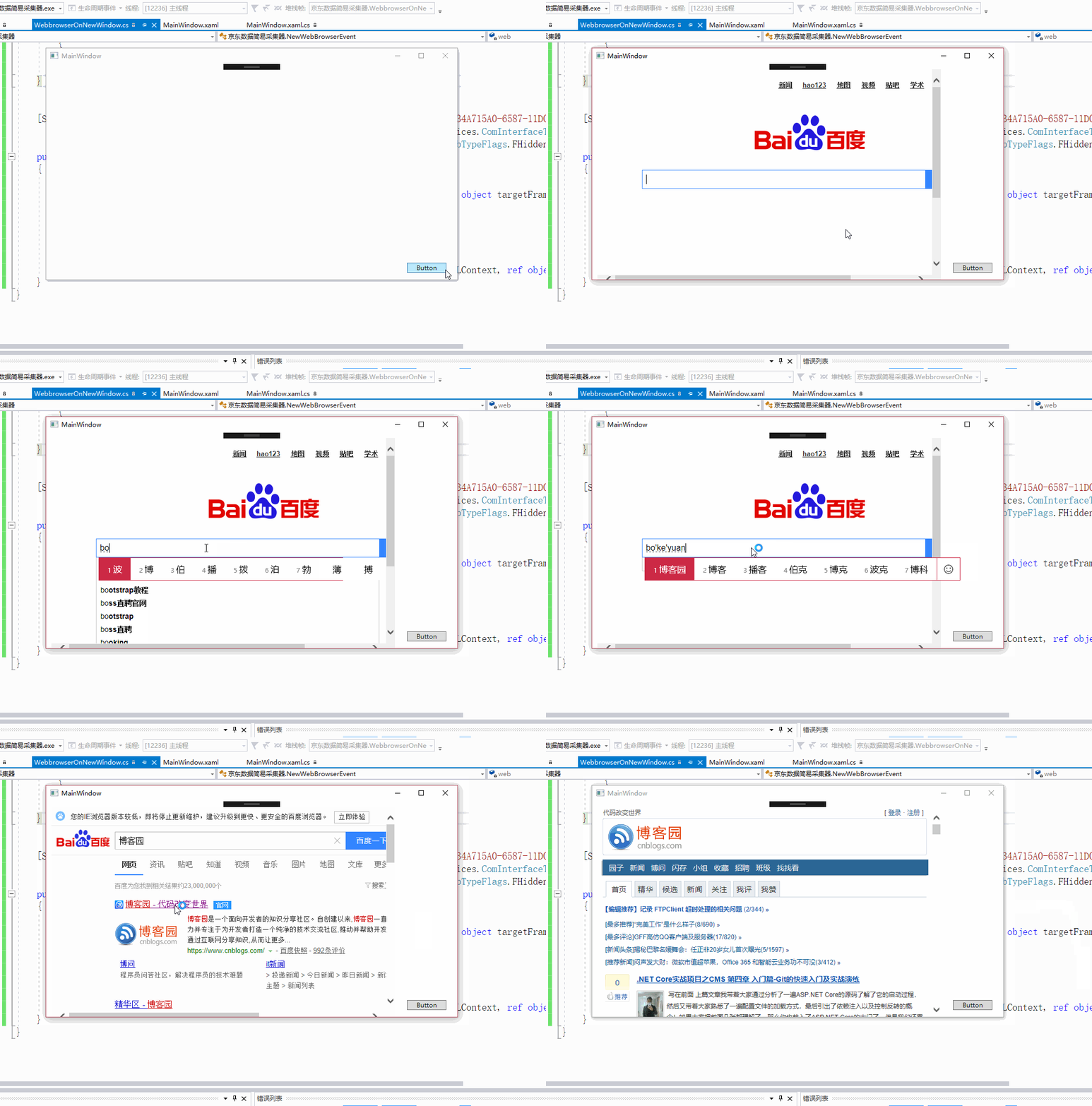
主类:负责跳转的
using System;

using System.Collections.Generic;

using System.ComponentModel;

using System.Linq;

using System.Reflection;

using System.Text;

using System.Threading.Tasks;

using System.Windows.Controls;

using static System.Windows.Forms.AxHost;

namespace Test

{

    public class WebBrowserUrl2

    {

        public String Url { get; }

        public String Frame { get; }

        public WebBrowserUrl2(String url, String frame)

        {

            this.Url = url;

            this.Frame = frame;

        }

    }

    public class WebBrowserEvent

    {

        public bool cancel;

    }

    public class WebbrowserOnNewWindow

    {

        static readonly BindingFlags info =

            BindingFlags.Instance |

            BindingFlags.Public |

            BindingFlags.NonPublic |

            BindingFlags.FlattenHierarchy |

            BindingFlags.CreateInstance;

        private WebBrowser web;

        public WebbrowserOnNewWindow(WebBrowser webBrowser)

        {

            web = webBrowser ?? throw new Exception();

            Excetue();

        }

        //跳转参考这个

        public delegate void OnNewWindow(WebBrowserUrl2 webBrowserUrl, WebBrowserEvent webBrowserEvent);

        public event OnNewWindow BeforeNewWidnow;

        private void Excetue()

        {

            var propertyAxiWebbrowser = web.GetType().GetProperty("AxIWebBrowser2", info);

            var axIWebBrowser2 = propertyAxiWebbrowser.GetValue(web, null);

            var webBrowserEvent = new NewWebBrowserEvent(this);

            var cookie = new ConnectionPointCookie(axIWebBrowser2, webBrowserEvent, typeof(INewDWWebBrowserEvent));

        }

        public void OnBeforeNewWindow(string url, out bool cancel)

        {

            var Arg = BeforeNewWidnow;

            WebBrowserUrl2 webBrowserUrl = new WebBrowserUrl2(url, null);

            WebBrowserEvent webBrowserEvent = new WebBrowserEvent();

            Arg?.Invoke(webBrowserUrl, webBrowserEvent);

            cancel = webBrowserEvent.cancel;

        }

    }

    public class NewWebBrowserEvent : System.Runtime.InteropServices.StandardOleMarshalObject, INewDWWebBrowserEvent

    {

        private WebbrowserOnNewWindow web;

        public NewWebBrowserEvent(WebbrowserOnNewWindow webbrowserOnNewWindow) => web = webbrowserOnNewWindow;

        public void BeforeNavigate2(object pDisp, ref object urlObject, ref object flags, ref object targetFrameName, ref object postData, ref object headers, ref bool cancel)

        {

            //WPF这个和Winform差不多 没写

            //webBrowser.OnBeforeNavigate((string)urlObject, (string)targetFrameName, out cancel);

        }

        //官方说明此 事件是低于IE6时会引发

        public void NewWindow2(ref object ppDisp, ref bool cancel)

        {

            //WPF这个和Winform差不多 没写

            //  webBrowser.OnBeforeNewWindow(((WebBrowser)ppDisp).Url.ToString(), out cancel);

        }

        //当高于IE6时使用

        public void NewWindow3(object pDisp, ref bool cancel, ref object flags, ref object URLContext, ref object URL)

        {

            web.OnBeforeNewWindow((string)URL, out cancel);

        }

    }

    [System.Runtime.InteropServices.ComImport(), System.Runtime.InteropServices.Guid("34A715A0-6587-11D0-924A-0020AFC7AC4D"),

      System.Runtime.InteropServices.InterfaceTypeAttribute(System.Runtime.InteropServices.ComInterfaceType.InterfaceIsIDispatch),

      System.Runtime.InteropServices.TypeLibType(System.Runtime.InteropServices.TypeLibTypeFlags.FHidden)]

    public interface INewDWWebBrowserEvent

    {

        [System.Runtime.InteropServices.DispId()]

        void BeforeNavigate2(object pDisp, ref object urlObject, ref object flags, ref object targetFrameName, ref object postData, ref object headers, ref bool cancel);

        //官方说明此 事件是低于IE6时会引发

        [System.Runtime.InteropServices.DispId()]

        void NewWindow2(ref object ppDisp, ref bool cancel);

        //当高于IE6时使用

        [System.Runtime.InteropServices.DispId()]

        void NewWindow3(object pDisp, ref bool cancel, ref object flags, ref object URLContext, ref object URL);

    }

}
XAML 界面
//省略其他

<Grid>

        <WebBrowser  x:Name="WB"  HorizontalAlignment="Left" Height="" Margin="10,10,0,0" VerticalAlignment="Top" Width="" Source="http://www.baidu.com" LoadCompleted="WB_LoadCompleted" />

    </Grid>
XAML.CS
  public partial class MainWindow : Window

    {

        private bool Start;

        public MainWindow()

        {

            InitializeComponent();

        }

        private void WB_LoadCompleted(object sender, NavigationEventArgs e)

        {

            if (!Start)

            { //这一步是没法省了

              //webbrowser在WPF中时密封类型

                WebbrowserOnNewWindow onNewWindow = new WebbrowserOnNewWindow(WB);

                onNewWindow.BeforeNewWidnow += OnNewWindow_BeforeNewWidnow;

                Start = true;

            }

        }

        private void OnNewWindow_BeforeNewWidnow(WebBrowserUrl2 webBrowserUrl, WebBrowserEvent webBrowserEvent)

        {

            WB.Navigate(new Uri(webBrowserUrl.Url));

            webBrowserEvent.cancel = true;

        }

    }
C# WPF Webbrowser 强制所有网页链接在同一页面打开的更多相关文章
- C# WinForm Webbrowser 强制所有网页链接在同一页面打开或者在TabControl中弹出新窗口(续)
上面那个文写的如同粑粑一样 效果图 Winfrom 中添加这个类就好了 using System; using System.Collections.Generic; using System.Com ...
- 强制所有网页链接在同一页面打开或者在TabControl中弹出新窗口
IEwebbrowser中老生常谈的话题. 一般的解决都是通过 // webBrowser.Navigating += WebBrowser_Navigating; 注册转跳前事件 private v ...
- WPF WebBrowser Memory Leak 问题及临时解决方法
首先介绍一下内存泄漏(Memory Leak)的概念,内存泄露是指程序中已动态分配的堆内存由于某种原因未释放或者无法释放,造成系统内存的浪费,导致程序运行速度减慢甚至系统崩溃等严重后果. 最近在使用W ...
- .NET4.5 WFP中用WebBrowser获取/操作网页html代码
引言 想给自己之前写的网页小说爬虫程序更新换代,之前一直是用winform的形式写的程序,因此这一次更新打算把UI换成WPF(因为听说WPF很漂亮),顺便也以此引入WPF的学习. 那么作为网页爬虫程序 ...
- c# webbrowser 随机点击链接
HtmlElementCollection hec = webBrowser1.Document.All; ; i < hec.Count; i++) { if (hec[i].GetAttri ...
- WPF WebBrowser+TabControl MVVM模式 简单应用 提供源码下载
源代码下载 这个程序是TabControl和Webbrowser的练手小程序 可达到练手目的有: MVVM设计模式的基本使用 Binding(包括相对源[RelativeSource]绑定)的基本使用 ...
- paip.点击每个网页链接都提示下载的解决。
paip.点击每个网页链接都提示下载的解决. 作者Attilax 艾龙, EMAIL:1466519819@qq.com 来源:attilax的专栏 地址:http://blog.csdn. ...
- WPF WebBrowser屏蔽弹出alert ,confirm ,prompt ,showModalDialog() ,window.open()
WPF WebBrowser屏蔽弹出alert ,confirm ,prompt ,showModalDialog() ,window.open()添加Microsoft.mshtml.dll,然后写 ...
- JavaScript 网页链接调用Android程序
如何让网页链接实现启动Android的应用,网上有说重写WebView相关的shouldOverrideUrlLoading方法,但是这种理论上能实现,因为你的网页不是仅仅被你自己的webview来浏 ...
随机推荐
- VS2017自定义代码片段, 实现快捷输入
点击VS2017的工具→代码片段管理器, 下图: 语言选择C#, 路径定位到 Visual C#, 然后复制这个路径在电脑中打开 这里以增加 crk 快捷方式输出 Console.ReadKey()来 ...
- 一个电脑同时运行 64bit 和 32bit 的eclipse 如何匹配 jdk环境
一个电脑同时运行 64bit 和 32bit 的 eclipse 如何匹配 jdk环境 1 eclipse 分 64bit 和 32bit 两种. 64bit的eclipse 只能搭配 64b ...
- 详解调试Apache的mod_rewrite模块
大家都知道Apache里面的Rewrite规则是一件很蛋疼的事情,有时候只是想做一个伪静态而已,不想去研究那些复杂的规则,可官方给的规则又常常出错,出了问题我们就要调试一下,看看提交的参数被映射到了哪 ...
- Super Jumping! Jumping! Jumping(最大递增子序列的和)
Nowadays, a kind of chess game called “Super Jumping! Jumping! Jumping!” is very popular in HDU. May ...
- JVM中的JIT
JVM中的JIT 介绍Java虚拟机的文章或者书籍总会提到Java虚拟机中的JIT编译器,可是JIT编译器到底是什么?为什么需要JIT编译呢? JIT编译器,是Just In Time编译的意思,又称 ...
- C# XML 操作
1 xml文件格式 <?xml version="1.0" encoding="utf-8"?> <userInfo> <user ...
- id 和 instancetype 方法的区别
首先明确 id 和 instancetype 都是万能指针,都能指向一个对象:(instancetype == id == 万能指针 == 指向一个对象) 主要区别亮点: 1. id 在编译时候不能判 ...
- SqlServer—大话函数依赖与范式
说明:数据库中的某些概念真的很让人头疼,概念的东西本来就是很枯燥的,再加上枯燥的学习,那就更加枯燥了.概念这东西,你不理解也能生产东西,经验多了就行,但是为了更深入的学习,你还必须理解.这里,我抛开书 ...
- Linux nethack
一.简介 游戏目标:在地下城的最底层取得炎多的护符项链(Amulet of Yendor),并返回最上层,在圣祭坛上供奉给神灵.完成整个游戏的奖赏是,玩家会成为不朽的半神. 二.安装 1)下载源码 ...
- ls -al
ls -al:显示当前文件下所有的文件