
ArcEngine设置有牵引线的标注
来自:https://blog.csdn.net/u011609113/article/details/51372827/
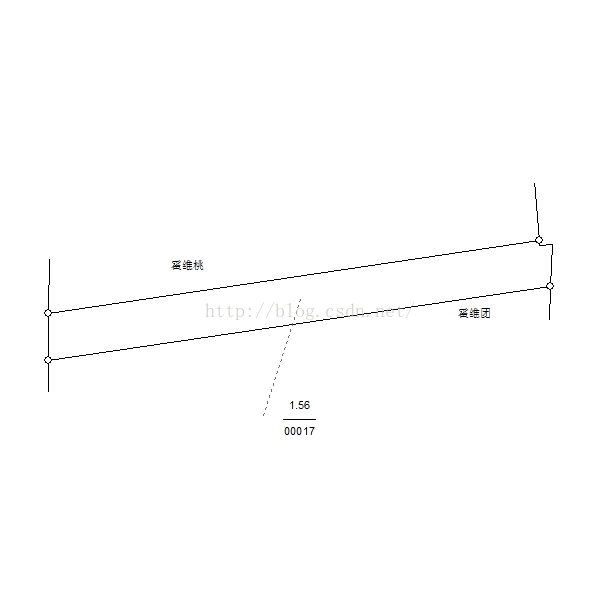
在ArcGIs中很容易就能设置带有牵引线的标注。
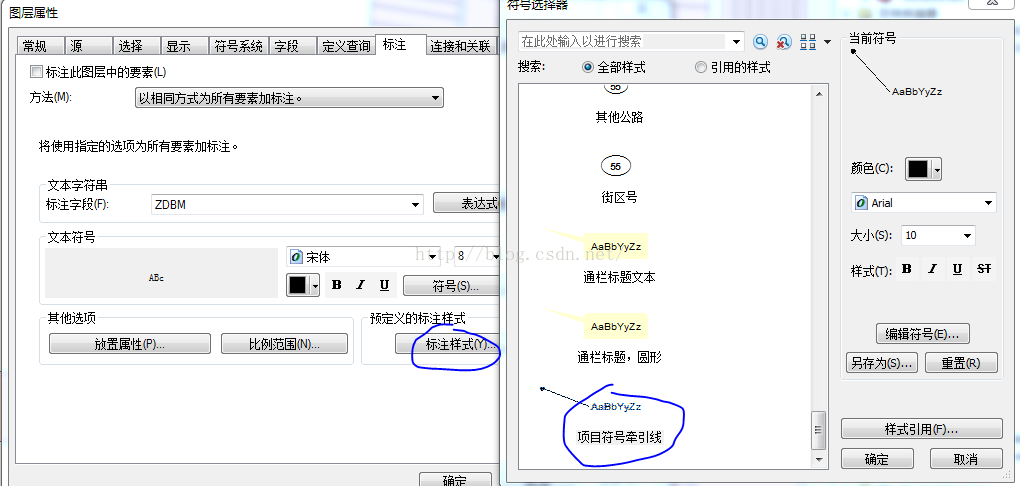
        /// <summary>

        /// 设置有引线的标注

        /// </summary>

        /// <param name="IN_FeatureLayer">要标注的图层</param>

        /// <param name="IN_Axmapcontrol">显示控件</param>

        private void PRV_SetLabelWithCallout(IFeatureLayer IN_FeatureLayer,AxMapControl IN_Axmapcontrol)

        {

            //设定地图标注引擎

            IAnnotateMap Temp_AnnotateMap = new AnnotateMapClass();

            IN_Axmapcontrol.Map.AnnotationEngine = Temp_AnnotateMap;

            //标注集合

            IGeoFeatureLayer Temp_AnnotationLayer = IN_FeatureLayer as IGeoFeatureLayer;

            IAnnotateLayerPropertiesCollection Temp_AllAnnoProps;

            Temp_AllAnnoProps = Temp_AnnotationLayer.AnnotationProperties;

            Temp_AllAnnoProps.Clear();//清理已有标注属性

            IAnnotateLayerProperties Temp_Anno = PRV_SetPropertiesWithCallout(IN_FeatureLayer, "[OBJECTID]", IN_Axmapcontrol);

            Temp_AllAnnoProps.Add(Temp_Anno);

            IN_Axmapcontrol.AddLayer(IN_FeatureLayer as ILayer);

        }
        /// <summary>

        /// 设有引线的标注参数

        /// </summary>

        /// <param name="IN_FeatureLayer">要标注的图层</param>

        /// <param name="IN_ClassExpression">标注表达式</param>

        /// <param name="IN_Axmapcontrol">显示控件</param>

        /// <returns>标注参数</returns>

        private IAnnotateLayerProperties PRV_SetPropertiesWithCallout(IFeatureLayer IN_FeatureLayer, string IN_ClassExpression,AxMapControl IN_Axmapcontrol)

        {

            //标注引擎

            ILabelEngineLayerProperties2 Temp_LabelEngine2 = new LabelEngineLayerPropertiesClass();

            IBasicOverposterLayerProperties4 Temp_BasicOverPoster = new BasicOverposterLayerPropertiesClass();

            //表达式

            Temp_LabelEngine2.Expression = IN_ClassExpression;

            //引线

            ILineCallout Temp_Callout = new LineCalloutClass();

            //引线样式

            Temp_Callout.Style = esriLineCalloutStyle.esriLCSMidpoint;

            Temp_Callout.LeaderTolerance = 1;

            //将外框都设为null,这样就只有引线了

            Temp_Callout.Border = null;

            Temp_Callout.AccentBar = null;

            Temp_Callout.Gap = 10;

            //引线类型,这里为点状线

            ISimpleLineSymbol Temp_LineSymbol = new SimpleLineSymbolClass();

            Temp_LineSymbol.Style = esriSimpleLineStyle.esriSLSDot;

            Temp_Callout.LeaderLine = Temp_LineSymbol;

            //文字符号设定

            IFormattedTextSymbol Temp_TextSymbol = new TextSymbolClass();

            //文字颜色

            IRgbColor Temp_RGB = new RgbColorClass();

            Temp_RGB.Red = 0;

            Temp_RGB.Green = 0;

            Temp_RGB.Blue = 0;

            //文字字体与字号

            Temp_TextSymbol = new TextSymbolClass();

            Temp_TextSymbol.Color = (IColor)Temp_RGB;

            Temp_TextSymbol.Size = 18;

            //需要引用stdole.dll

            stdole.IFontDisp Temp_Font = new stdole.StdFontClass() as stdole.IFontDisp;

            Temp_Font.Name = "Arial";

            Temp_TextSymbol.Background = Temp_Callout as ITextBackground;

            Temp_TextSymbol.Font = Temp_Font;

            Temp_LabelEngine2.Symbol = Temp_TextSymbol as ITextSymbol;

            //标注放置方式

            switch (IN_FeatureLayer.FeatureClass.ShapeType)//判断图层类型

            {

                case ESRI.ArcGIS.Geometry.esriGeometryType.esriGeometryPolygon:

                    Temp_BasicOverPoster.FeatureType = esriBasicOverposterFeatureType.esriOverposterPolygon;

                    Temp_BasicOverPoster.PolygonPlacementMethod = esriOverposterPolygonPlacementMethod.esriAlwaysHorizontal;

                    break;

                case ESRI.ArcGIS.Geometry.esriGeometryType.esriGeometryPoint:

                    Temp_BasicOverPoster.FeatureType = esriBasicOverposterFeatureType.esriOverposterPoint;

                    Temp_BasicOverPoster.PointPlacementMethod = esriOverposterPointPlacementMethod.esriAroundPoint;

                    break;

                case ESRI.ArcGIS.Geometry.esriGeometryType.esriGeometryPolyline:

                    Temp_BasicOverPoster.FeatureType = esriBasicOverposterFeatureType.esriOverposterPolyline;

                    break;

            }

            Temp_LabelEngine2.BasicOverposterLayerProperties = Temp_BasicOverPoster as IBasicOverposterLayerProperties;

            //设定标注

            IMapOverposter Temp_MapPos = IN_Axmapcontrol.Map as IMapOverposter;

            IOverposterProperties Temp_OverPoster = Temp_MapPos.OverposterProperties;

            IAnnotateLayerProperties Temp_AnnoPClass = Temp_LabelEngine2 as IAnnotateLayerProperties;

            (IN_FeatureLayer as IGeoFeatureLayer).DisplayAnnotation = true;

            return Temp_AnnoPClass;

        }
ArcEngine设置有牵引线的标注的更多相关文章
- Arcengine设置坐标系
转自原文 Arcengine设置坐标系 ArcGIS Engine提供了一系列对象供开发者管理GIS系统的坐标系统. 对大部分开发者而言了解ProjectedCoordinateSystem, Geo ...
- GoogleMap的鼠标点击标注、搜索和设置城市的简单应用
资源 Google Map API包含了大量的文档.示例和各种资料.在使用前需要申请自己的密钥 墙内要用:http://maps.google.cn/maps/api/js? 墙外可用:https:/ ...
- IntelliJ IDEA 教程设置讲解
IntelliJ IDEA 常用设置讲解 说明 IntelliJ在业界被公认为最好的java开发工具之一,尤其在智能代码助手.代码自动提示.重构.J2EE支持.Ant.JUnit.CVS整合.代码审查 ...
- IntelliJ IDEA 常用设置讲解
说明 IntelliJ IDEA 有很多人性化的设置我们必须单独拿出来讲解,也因为这些人性化的设置让我们这些 IntelliJ IDEA 死忠粉更加死心塌地使用它和分享它. 常用设置 IntelliJ ...
- 【Matplotlib】绘图常见设置说明
说明:此贴会不定期进行更新! 设置1:图像的大小设置. 如果已经存在figure对象,可以通过以下代码设置尺寸大小: f.set_figheight(15) f.set_figwidth(15) 若果 ...
- 【Matplotlib】 刻度设置(2)
Tick locating and formatting 该模块包括许多类以支持完整的刻度位置和格式的配置.尽管 locators 与主刻度或小刻度没有关系,他们经由 Axis 类使用来支持主刻度和小 ...
- IntelliJ IDEA 常用设置讲解1
IntelliJ IDEA 有很多人性化的设置我们必须单独拿出来讲解,也因为这些人性化的设置让我们这些 IntelliJ IDEA 死忠粉更加死心塌地使用它和分享它. 常用设置 IntelliJ ID ...
- openlayer3之高级标注实现
首先看实现效果: 实现要点: 1)树形标注实现 2)复杂标注样式定义 3)效率优化 1.树形标注实现 树形标注采用字体符号来实现,包括以下几个步骤 1)载入字体 2)设置标注值与字体对照关系 3)设置 ...
- arcengine新建要素类
ArcGIS里面新建数据集,看起来简单,平时都是默认创建,实际上好多细节问题我们都没注意到 一.在数据集上新建要素类: How to create a feature class within a f ...
随机推荐
- 远程不能访问CentOS的tomcat 8080端口
一般认为是CentOS的iptabls防火墙的问题,方法如下: ps -ef | grep tomcat ker 4399 1 6 21:46 pts/1 00:00:01 /usr/java/jdk ...
- Python_oldboy_自动化运维之路_面向对象2(十)
本节内容: 面向对象程序设计的由来 什么是面向对象的程序设计及为什么要有它 类和对象 继承与派生 多的态与多态性 封装 静态方法和类方法 面向对象的软件开发 反射 类的特殊成员方法 异常处理 1.面向 ...
- dubbo启动报错failed to bind nettyserver on
dubbo报错 今天启动项目的时候,关掉了custom服务, <dubbo:consumer check="false"/> 并且关掉了spring的elastic-j ...
- 嵌入式telnet的安装
一 在已经安装telnet上,执行查询命令将查到的命令拷贝的未安装telnet的134上. [NTP-Fedora20 system]#whereis xinetd xinetd: /usr/sbin ...
- WebStrom配置node.js
Webstrom的注册码: WebStorm 7.0.1注册码 user name:newasp 注册码: ===== LICENSE BEGIN ===== 16417-12042010 00001 ...
- WebApi帮助类
public class HttpClientBase { /// <summary> /// HttpClient实现Post请求 /// </summary> protec ...
- 【笔试题】在 Java 中,如何跳出当前的多重嵌套循环?
笔试题 在 Java 中,如何跳出当前的多重嵌套循环? public class Demo { public static void main(String[] args) { System.out. ...
- Wireshark网络分析就这么简单
tcpdump抓包命令: root#tcpdump -I eth0 -s 80 -w /tmp/tcpdump.cap 注:其中80表示,只抓每个包的前80个字节. 抓包时就筛选自己需要的包: Wir ...
- thinkphp中order方法
order方法属于模型的连贯操作方法之一,用于对操作的结果排序. 用法 $Model->where('status=1')->order('id desc')->limit(5)-& ...
- java中static,final,private方法的继承多态问题
父类中的final private方法不能被继承,父类中的static方法可以被继承,但是不能重写,这三者都属于前期绑定,java中除了这三种以及构造方法之外剩下的都是后期绑定(运行是绑定). 当父 ...