
ESXi主机性能问题
服务器遇到一个问题
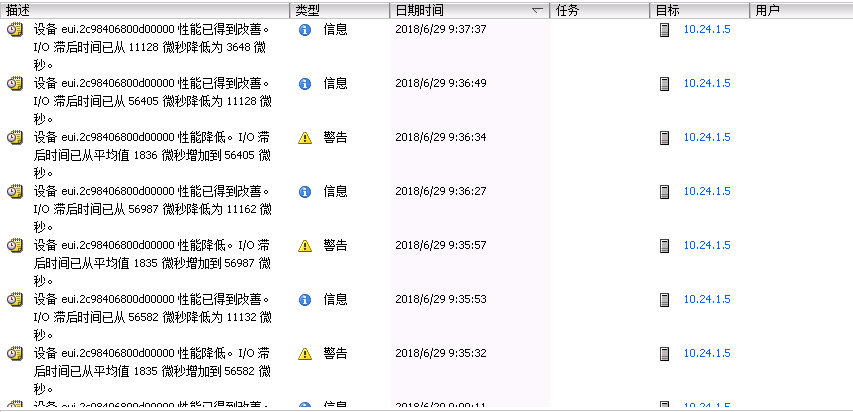
百度了下 基本发现是 四路的 windows 服务器的问题. 造成一些 性能降低. 然后查看了下几个虚拟机
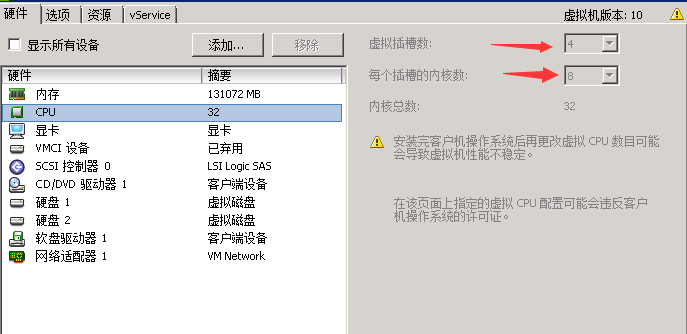
的确是设置的4个虚拟插槽
根据百度的结果 要么改配置文件 要么改 这个四路 感觉讲四路降低成2路最简单了
建议进行处理
或许是整个事情的文档记录
然后解决办法为:
先mark 一下 再慢慢看解决方案 组要是还没看懂。
http://blog.sina.com.cn/s/blog_004175870101mzfl.html
VM的网站
https://kb.vmware.com/s/article/2231
设备 naa.6006016004102900751132ac8de3e211 性能降低。I/O 滞后时间
已从平均值 516 微秒增加到 10332 微秒。
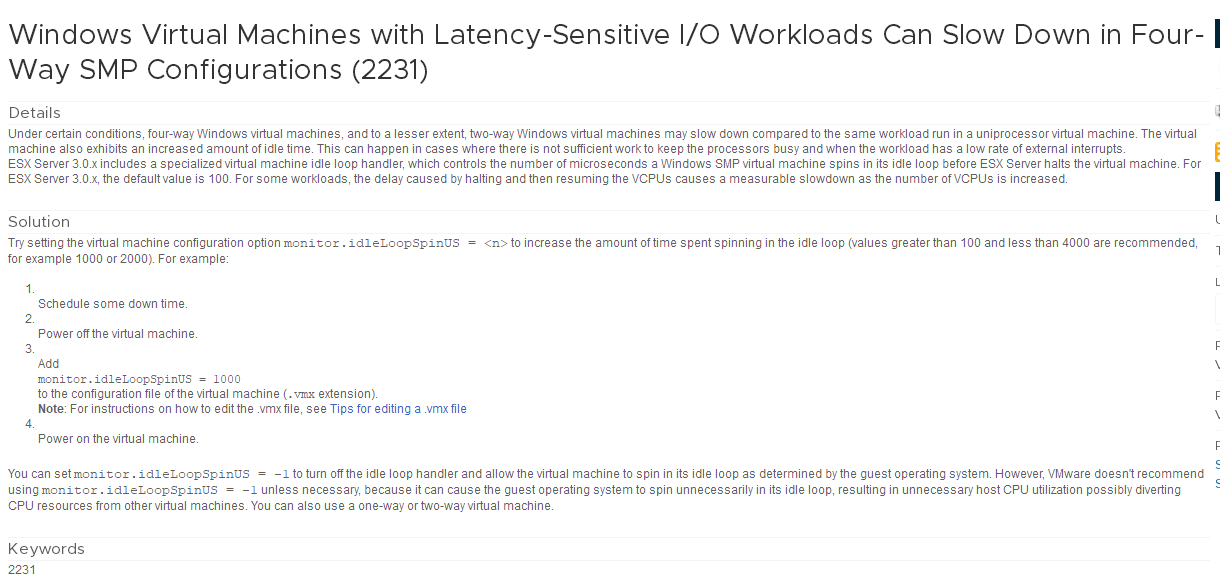
导致这个原因和解决办法了:这原因是主要是有VM性能监控导致的,具体原因VMware工程师也说不清楚,解决办法是更改VM属性参数。如下截图:
Windows Virtual Machines with Latency-Sensitive I/O Workloads Can Slow Down in Four-Way SMP Configurations (2231)
Details
Solution
- Schedule some down time.
- Power off the virtual machine.
- Add
monitor.idleLoopSpinUS = 1000
to the configuration file of the virtual machine (.vmx extension).
Note: For instructions on how to edit the .vmx file, see Tips for editing a .vmx file - Power on the virtual machine.
Keywords
Request a Product Feature
查看原文:http://www.kuizi.com/archives/2143
ESXi主机性能问题的更多相关文章
- ESX/ESXi 主机的某些存储阵列可能存在读取或写入性能问题 (1002598)
Last Updated: 12/14/2018Categories: Troubleshooting Details 免责声明:本文为 ESX/ESXi hosts might experienc ...
- vSphere ESXi主机配置iSCSI存储
vSphere ESXi主机配置iSCSI存储 vSphere ESXi主机一般连接的存储类型有光纤存储.iSCSI存储两类.本次案例为iSCSI存储连接ESXi主机的配置. 案例环境:ESXi主机通 ...
- [转帖]VMWare官网:无法关闭 ESXi 主机上的虚拟机 (1014165)
无法关闭 ESXi 主机上的虚拟机 (1014165) https://kb.vmware.com/s/article/1014165?lang=zh_CN Last Updated: 4/17/20 ...
- BizTalk开发系列(三十二)浅谈BizTalk主机性能优化
很多BizTalk的项目都要考虑到性能优化的问题,虽然BizTalk采用多线程处理消息的,大大提高了程序效率.但默认情况下 BizTalk的主机有很多阻止参数会控制BizTalk对服务器的资源使用率, ...
- Esxi主机虚拟机迁移注意事项
1. Esxi主机上的虚拟机迁移只能是低----->高,或版本一样的才能进行迁移 [如Esxi5.1---->Esxi5.5]ok, 而Esxi5.5----->Esxi5.1 no ...
- 怎样使用Secure CRT查看vcenter和esxi主机的日志文件(转)
对ESXI主机的日志管理对于故障诊断和合规性至关重要.Esxi主机的日志通过syslog工具进行管理的,在默认的情况下,日志文件存储在主机的scratch分区中(/scratch/log/).scra ...
- 性能测试 基于Python结合InfluxDB及Grafana图表实时采集Linux多主机性能数据
基于Python结合InfluxDB及Grafana图表实时采集Linux多主机性能数据 by:授客 QQ:1033553122 实现功能 测试环境 环境搭建 使用前提 使用方法 运行程序 效果展 ...
- 主机性能监控之wmi 获取磁盘信息
标 题: 主机性能监控之wmi 获取磁盘信息作 者: itdef链 接: http://www.cnblogs.com/itdef/p/3990541.html 欢迎转帖 请保持文本完整并注明出处 仅 ...
- 主机性能监控之wmi 获取进程信息
标 题: 主机性能监控之wmi 获取进程信息作 者: itdef链 接: http://www.cnblogs.com/itdef/p/3990499.html 欢迎转帖 请保持文本完整并注明出处 仅 ...
随机推荐
- python-celery定时提交任务
pip install celery 使用消息中间件:RabbitMQ/Redis app=Celery('任务名',backend='xxx',broker='xxx') 基本使用 import c ...
- AOP实现拦截对象以及获取切入目标方法和注解
AOP实现拦截对象以及获取切入目标方法和注解 一.JoinPoint是什么? AspectJ使用org.aspectj.lang.JoinPoint接口表示目标类连接点对象,如果是环绕增强时,使用 o ...
- 数据同步canal服务端HA配置
canal服务端HA模式,本人并未使用过,为保证文章的完整性,从以下地址摘抄该部分内容,待以后验证及使用 https://github.com/alibaba/canal/wiki/AdminGuid ...
- CSS2.0实现面包屑
CSS2.0实现面包屑 面包屑这样的 我们以前都是用背景图片做这块工作,但是直到大概2个星期之前在新浪微博上看到用css3.0实现这样的面包屑 但是目前情况下IE6-8并不支持css3.0 只有标准游 ...
- HDU 2059 龟兔赛跑(超级经典的线性DP,找合适的j,使得每个i的状态都是最好的)
龟兔赛跑 Time Limit:1000MS Memory Limit:32768KB 64bit IO Format:%I64d & %I64u Submit Status ...
- [c.c.a.m.AgentManagerImpl] (AgentConnectTaskPool-39:ctx-c37090c5) Failed to handle host connection: java.lang.IllegalArgumentException: Can't add host: with h
如果无法添加成功,/etc/redhat-release文件覆盖过去 cat /etc/redhat-release CentOS Linux release 7.1.1503 (Core)Red H ...
- C++箴言:理解typename的两个含义 nested dependent name(嵌套依赖名字)
template<class T> class Widget; // uses "class"template<typename T> class Widg ...
- c++ 模板参数做容器参数迭代器报错 vector<T>::const_iterator,typename const报错
错误1: template<class T>void temp(std::vector<T>& container){ std::vector<T& ...
- 20155220 Exp5 MSF基础应用
Exp5 MSF基础应用 一个主动攻击实践,MS08-067 首先利用msfconsole启用msf终端 然后利用search MS08-067搜索漏洞,会显示相应漏洞模块 根据上图,我们输入use ...
- CS50.4
1, PDF,portable document format 便携式文档格式 2, 关于文本编辑器(文字编辑器)和文档编辑器(文字处理器),前者可用来写程序的源代码?名字挺难分辨的. *3, “-o ...