
CentOS 7.0安装配置LAMP服务器(Apache+PHP+MariaDB)
CentOS 7.0默认使用的是firewall作为防火墙,这里改为iptables防火墙。
1、关闭firewall:
systemctl stop firewalld.service #停止firewall
systemctl disable firewalld.service #禁止firewall开机启动
2、安装iptables防火墙
yum install iptables-services #安装
vi /etc/sysconfig/iptables #编辑防火墙配置文件
# Firewall configuration written by system-config-firewall
# Manual customization of this file is not recommended.
*filter
:INPUT ACCEPT [0:0]
:FORWARD ACCEPT [0:0]
:OUTPUT ACCEPT [0:0]
-A INPUT -m state --state ESTABLISHED,RELATED -j ACCEPT
-A INPUT -p icmp -j ACCEPT
-A INPUT -i lo -j ACCEPT
-A INPUT -m state --state NEW -m tcp -p tcp --dport 22 -j ACCEPT
-A INPUT -m state --state NEW -m tcp -p tcp --dport 80 -j ACCEPT
-A INPUT -m state --state NEW -m tcp -p tcp --dport 3306 -j ACCEPT
-A INPUT -j REJECT --reject-with icmp-host-prohibited
-A FORWARD -j REJECT --reject-with icmp-host-prohibited
COMMIT
:wq! #保存退出
systemctl restart iptables.service #最后重启防火墙使配置生效
systemctl enable iptables.service #设置防火墙开机启动
二、关闭SELINUX
vi /etc/selinux/config
#SELINUX=enforcing #注释掉
#SELINUXTYPE=targeted #注释掉
SELINUX=disabled #增加
:wq! #保存退出
setenforce 0 #使配置立即生效
安装篇:
一、安装Apache
系统运维 www.osyunwei.com 温馨提醒:qihang01原创内容©版权所有,转载请注明出处及原文链
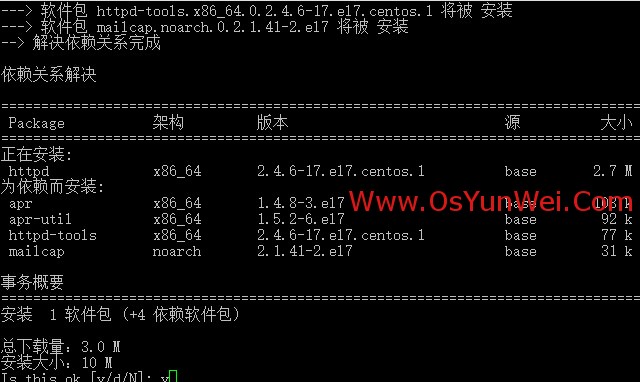
yum install httpd #根据提示,输入Y安装即可成功安装
systemctl start httpd.service #启动apache
systemctl stop httpd.service #停止apache
systemctl restart httpd.service #重启apache
systemctl enable httpd.service #设置apache开机启动
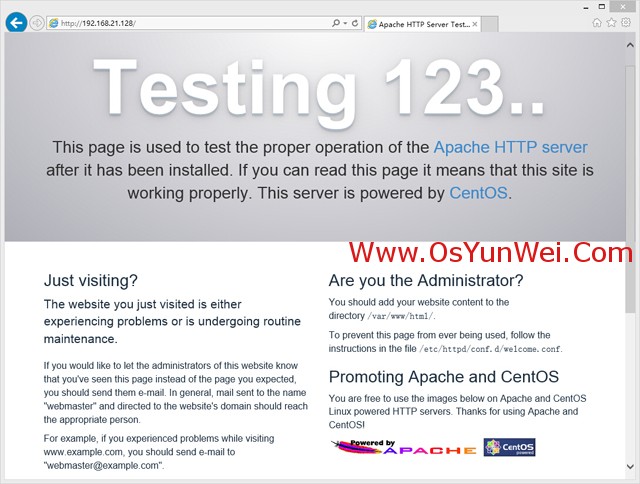
在客户端浏览器中打开服务器IP地址,会出现下面的界面,说明apache安装成功
系统运维 www.osyunwei.com 温馨提醒:qihang01原创内容©版权所有,转载请注明出处及原文链
二、安装MariaDB
CentOS 7.0中,已经使用MariaDB替代了MySQL数据库
1、安装MariaDB
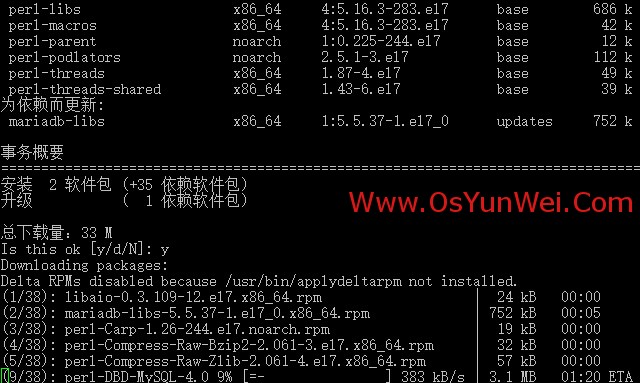
yum install mariadb mariadb-server #询问是否要安装,输入Y即可自动安装,直到安装完成
systemctl start mariadb.service #启动MariaDB
systemctl stop mariadb.service #停止MariaDB
systemctl restart mariadb.service #重启MariaDB
systemctl enable mariadb.service #设置开机启动
cp /usr/share/mysql/my-huge.cnf /etc/my.cnf #拷贝配置文件(注意:如果/etc目录下面默认有一个my.cnf,直接覆盖即可)
2、为root账户设置密码
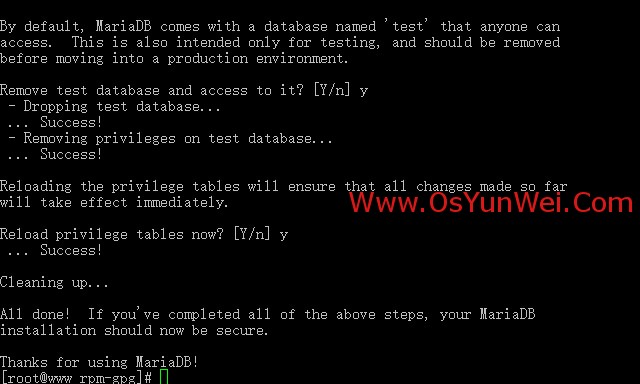
mysql_secure_installation
回车,根据提示输入Y
输入2次密码,回车
根据提示一路输入Y
最后出现:Thanks for using MySQL!
MariaDB密码设置完成,重新启动 MariaDB:
systemctl restart mariadb.service #重启MariaDB
三、安装PHP
1、安装PHP
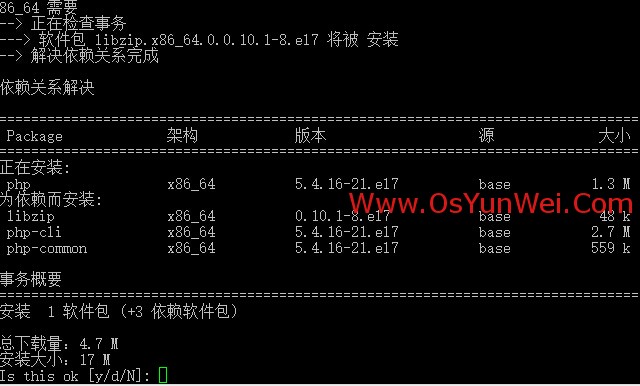
yum install php #根据提示输入Y直到安装完成
2、安装PHP组件,使PHP支持 MariaDB
yum install php-mysql php-gd libjpeg* php-ldap php-odbc php-pear php-xml php-xmlrpc php-mbstring php-bcmath php-mhash
#这里选择以上安装包进行安装,根据提示输入Y回车
systemctl restart mariadb.service #重启MariaDB
systemctl restart httpd.service #重启apache
配置篇
一、Apache配置
vi /etc/httpd/conf/httpd.conf #编辑文件
ServerSignature On #添加,在错误页中显示Apache的版本,Off为不显示
Options Indexes FollowSymLinks #修改为:Options Includes ExecCGI FollowSymLinks(允许服务器执行CGI及SSI,禁止列出目录)
#AddHandler cgi-script .cgi #修改为:AddHandler cgi-script .cgi .pl (允许扩展名为.pl的CGI脚本运行)
AllowOverride None #修改为:AllowOverride All (允许.htaccess)
AddDefaultCharset UTF-8 #修改为:AddDefaultCharset GB2312 (添加GB2312为默认编码)
#Options Indexes FollowSymLinks #修改为 Options FollowSymLinks(不在浏览器上显示树状目录结构)
DirectoryIndex index.html #修改为:DirectoryIndex index.html index.htm Default.html Default.htm index.php(设置默认首页文件,增加index.php)
MaxKeepAliveRequests 500 #添加MaxKeepAliveRequests 500 (增加同时连接数)
:wq! #保存退出
systemctl restart httpd.service #重启apache
rm -f /etc/httpd/conf.d/welcome.conf /var/www/error/noindex.html #删除默认测试页
二、php配置
vi /etc/php.ini #编辑
date.timezone = PRC #把前面的分号去掉,改为date.timezone = PRC
disable_functions = passthru,exec,system,chroot,scandir,chgrp,chown,shell_exec,proc_open,proc_get_status,ini_alter,ini_alter,ini_restore,dl,openlog,syslog,readlink,symlink,popepassthru,stream_socket_server,escapeshellcmd,dll,popen,disk_free_space,checkdnsrr,checkdnsrr,getservbyname,getservbyport,disk_total_space,posix_ctermid,posix_get_last_error,posix_getcwd, posix_getegid,posix_geteuid,posix_getgid, posix_getgrgid,posix_getgrnam,posix_getgroups,posix_getlogin,posix_getpgid,posix_getpgrp,posix_getpid, posix_getppid,posix_getpwnam,posix_getpwuid, posix_getrlimit, posix_getsid,posix_getuid,posix_isatty, posix_kill,posix_mkfifo,posix_setegid,posix_seteuid,posix_setgid, posix_setpgid,posix_setsid,posix_setuid,posix_strerror,posix_times,posix_ttyname,posix_uname
#列出PHP可以禁用的函数,如果某些程序需要用到这个函数,可以删除,取消禁用。
expose_php = Off #禁止显示php版本的信息
short_open_tag = ON #支持php短标签
open_basedir = .:/tmp/ #设置表示允许访问当前目录(即PHP脚本文件所在之目录)和/tmp/目录,可以防止php木马跨站,如果改了之后安装程序有问题(例如:织梦内容管理系统),可以注销此行,或者直接写上程序的目录/data/www.osyunwei.com/:/tmp/
:wq! #保存退出
systemctl restart mariadb.service #重启MariaDB
systemctl restart httpd.service #重启apache
测试篇
cd /var/www/html
vi index.php #输入下面内容
<?php
phpinfo();
?>
:wq! #保存退出
在客户端浏览器输入服务器IP地址,可以看到如下图所示相关的配置信息!
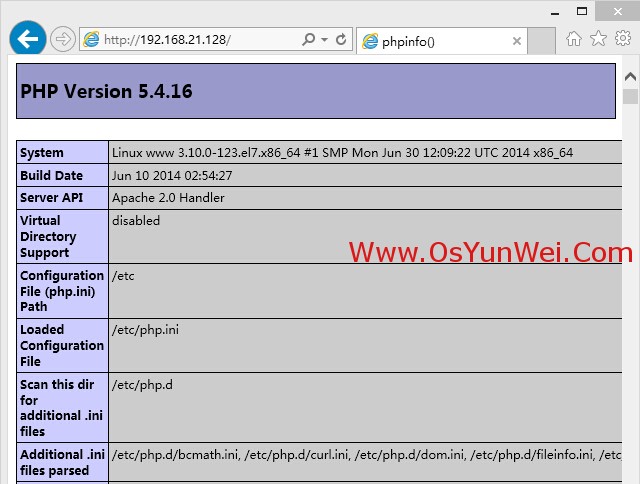
注意:apache默认的程序目录是/var/www/html
权限设置:chown apache.apache -R /var/www/html
至此,CentOS 7.0安装配置LAMP服务器(Apache+PHP+MariaDB)教程完成!
CentOS 7.0安装配置LAMP服务器(Apache+PHP+MariaDB)的更多相关文章
- CentOS 7.0系统安装配置LAMP服务器(Apache+PHP+MariaDB)
CentOS 7.0接触到的用户是比较少的,今天看了站长写了一篇关于centos7中安装配置LAMP服务器的教程,下面我把文章稍加整理一下转给大家学习交流,希望例子能给各位带来帮助哦. cento ...
- CentOS 7.0 安装配置LAMP服务器方法(Apache+PHP+MariaDB)(转)
转自:http://www.jb51.net/os/188488.html 作者:佚名 字体:[增加 减小] 来源:osyunwei 准备篇: CentOS 7.0系统安装配置图解教程 http:/ ...
- CentOS 6.4安装配置LAMP服务器(Apache+PHP5+MySQL)
这篇文章主要介绍了CentOS 6.4安装配置LAMP服务器(Apache+PHP5+MySQL)的方法,需要的朋友可以参考下 文章写的不错,很详细:IDO转载自网络: 准备篇: 1.配置防火墙,开启 ...
- CentOS 6.3安装配置LAMP服务器(Apache+PHP5+MySQL)
准备篇: 1.配置防火墙,开启80端口.3306端口 vi /etc/sysconfig/iptables -A INPUT -m state --state NEW -m tcp -p tcp -- ...
- CentOS 6.5安装配置LAMP服务器(Apache+PHP5+MySQL)的方法
CentOS 6.5安装配置LAMP服务器(Apache+PHP5+MySQL)的方法 准备篇: 1.配置防火墙,开启80端口.3306端口vi /etc/sysconfig/iptables-A I ...
- CentOS 5.11安装配置LAMP服务器(Apache+PHP5+MySQL)
http://www.osyunwei.com/archives/8880.html 准备篇: CentOS 5.x系统安装配置图解教程 http://www.osyunwei.com/archive ...
- CentOS 6.6安装配置LAMP服务器(Apache+PHP5+MySQL)
准备篇: CentOS 6.6系统安装配置图解教程 http://www.osyunwei.com/archives/8398.html 1.配置防火墙,开启80端口.3306端口 vi /etc/s ...
- CentOS 7.0 安装配置LAMP服务器方法(Apache+PHP+MariaDB)
一.配置防火墙,开启80端口.3306端口 CentOS 7.0默认使用的是firewall作为防火墙,这里改为iptables防火墙. 1.关闭firewall: #停止firewall服务 sys ...
- CentOS 6.5安装配置LAMP服务器(Apache+PHP5+MySQL)
1.配置防火墙,开启80端口.3306端口vi /etc/sysconfig/iptables-A INPUT -m state --state NEW -m tcp -p tcp --dport 8 ...
随机推荐
- js break continue
for 循环从 1 到 10 迭代变量 i.在循环主体中,if 语句将(使用取模运算符)检查 i 的值是否能被 5 整除.如果能被 5 整除,将执行 break 语句.alert 显示 "4 ...
- Mysql触发器总结
触发器(trigger):监视某种情况,并触发某种操作. 触发器创建语法四要素:1.监视地点(table) 2.监视事件(insert/update/delete) 3.触发时间(after/befo ...
- zw版【转发·台湾nvp系列Delphi例程】HALCON HImage与Bitmap格式转换
zw版[转发·台湾nvp系列Delphi例程]HALCON HImage与Bitmap格式转换 (Delphi Prism)namespace HImage_Bitmap_Prism;interfac ...
- yii2中textarea中的默认值设置
1. view中显示文本域的位置 <?= $form->field($goods_model, 'goods_introduce')->textArea(['class'=>' ...
- cvLoadImage函数解析 cvLoadImageM()函数
1.函数原型:IplImage* cvLoadImage( const char* filename, int flags=CV_LOAD_IMAGE_COLOR ); filename :要被读入的 ...
- Revit 二次开发 (二) 倾斜的板
在Revit二次开发过程中,建立一个倾斜的板是可以通过如下方法进行的: // // 摘要: // Creates a slab within the project with the given ho ...
- 集成Spring事物管理
什么是事物 事物是访问数据库的一个操作序列,数据库应用系统通过事物集来完成对数据库的存取.事物的正确执行使得数据库从一种状态转换为另一种状态. 事物必须服从ISO/IEC所制定的ACID原则.ACID ...
- ImagXpress中如何修改Alpha通道方法汇总
ImagXpress支持处理Alpha通道信息来管理图像的透明度,Alpha通道支持PNG ,TARGA和TIFF文件,同时还支持BMP和ICO文件.如果说保存的图像样式不支持Alpha通道,就将会丢 ...
- hobby
如果把战争的原则凝缩为一个词,那就是集中. 人生有三把钥匙, 接受. 改变. 离开.不能接受,那就改变,不能改变,那就离开. 少问别人为什么,多问自己凭什么. 太平自古将军定,不许将军见太平
- 【PHP设计模式 01_DuoTai.php】多态的说明
<?php /** * [多态] * 定义一个抽象类:Tiger,有两个子类:XTiger 和 MTiger */ header("Content-type: text/html; c ...