
css简单学习属性3---css属性选择器
1:通配符
<!DOCTYPE html>

<html lang="en">

<head>

    <meta charset="UTF-8">

    <title>Title</title>

    <style>

        [id*=div] {

            color: lime;

        }

        /*^首字符*/

        [id^=div] {

            color: darkblue;

        }

        /*$结束字符*/

        [id$=ym] {

            color: crimson;

        }

    </style>

</head>

<body>

<div id="mydiv1">示例文本1</div>

<div id="div2">示例文本2</div>

<div id="div3">示例文本3</div>

<div id="div4">示例文本4</div>

<div id="my">示例文本5</div>

</body>

</html>
2:UI伪类选择器
<!DOCTYPE html>

<html lang="en">

<head>

    <meta charset="UTF-8">

    <title>Title</title>

    <style>

        /* 鼠标经过有效 */

     input[type="text"]:hover{

         background-color: darkviolet;

     /* 鼠标焦点有效 */

            input[type="text"]:focus{

                background-color: darkviolet;

     }

    </style>

</head>

<body>

<input type="text" name="name">

<input type="text" name="name">

</body>

</html>
3:结合元素选择器:
例如: a.class{}
<!DOCTYPE html>

<html lang="en">

<head>

    <meta charset="UTF-8">

    <title>Title</title>

<style>

    a.div{

        color: red;

    }

</style>

</head>

<body>

<div class="div">

    wowowotest

</div>

/* 只对下面有效 */

<a class="div"> wowowotest</a>

</body>

</html>
4:多类选择器
例如: .class.class{}
<!DOCTYPE html>

<html lang="en">

<head>

    <meta charset="UTF-8">

    <title>Title</title>

<style>

    .div1{

        color: blue;

    }

    .div2{

        font-size: 30px;

    }

    .div1.div2{

    font-style: italic;

    }

</style>

</head>

<body>

<div class="div1">wowowo test</div>

<div class="div2">wowowo test</div>

/* 拥有上面所有属性 */

<div class="div1 div2">wowowo test</div>

</body>

</html>
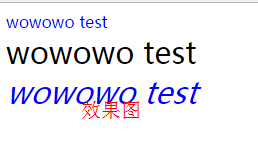
5:属性选择器
例如: [title]{}
<!DOCTYPE html>

<html lang="en">

<head>

    <meta charset="UTF-8">

    <title>Title</title>

<style>

[title]{

    color: aqua;

}

    [href]{

        font-size: 30px;

    }

[title="p2"]{
color:red;
}

</style>

</head>

<body>

<p title="">hello</p>
<p title="p2">hello2</p>

/* <href=""未带参数,如果带参数。<style>必须一致>*/

<a href="">wowowo</a>

</body>

</html>
A:在css中定义图片相对路径
#primary-nav {

//相对路径

background: url(../images/alert-overlay.png) repeat-x;

height: 35px;

font-size: 10px;

color: #fff;

line-height: 34px;

background-color: #;

margin:  auto;

max-width: 1128px;

font-weight: bold;

font-family: Verdana,Arial,Helvetica,sans-serif;

box-shadow: 1px 2px 5px 1px #;

}
B.对应文件结构


C:下面display为什么要加important
.main-navigation a {

color: #5e5e5e;

//为什么要加!important

padding:  15px!important;

}
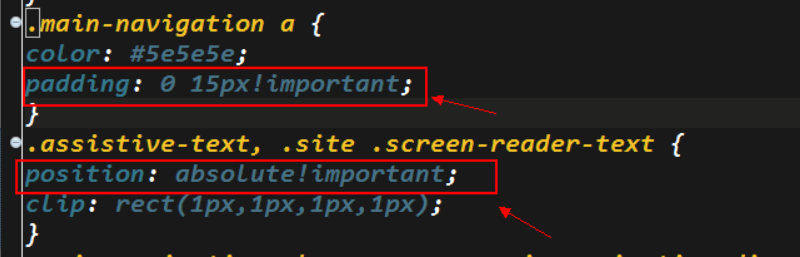
加!important就表示提升这个属性的优先级 比如说你如果在其它地方又写了一个display:inline之类的 还会按照你这里的block进行解释
另外IE6是不认!important的 可以利用这个特性来给不同的浏览器做不同的css设置
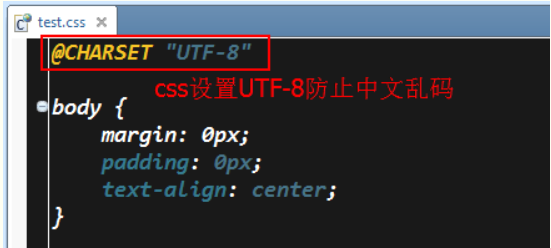
D.css防止中文乱码
E.<div style="clear:both;"></div>
<div style="clear:both"></div>
clear:both该属性的值指出了不允许有浮动对象的边。
通俗的讲:这段代码的做用是:清除同行元素,不允许其它元素与之在一行内。
css简单学习属性3---css属性选择器的更多相关文章
- css布局学习笔记之position属性
position属性用于定位元素,它的几个值分别如下: 1,static static 是默认值.任意 position: static; 的元素不会被特殊的定位.一个 static 元素表示它不会被 ...
- css简单学习属性
1:内联元素和块级元素 1).块级元素,默认是:内联元素可以变成块级元素,块级元素可以变成内联元素. <!DOCTYPE html> <html lang="en&qu ...
- css简单学习属性2---背景图片
<!DOCTYPE html> <html lang="en"> <head> <meta charset="UTF-8&quo ...
- Css的学习之旅-css的选择器(2)
1.最常用的是派生选择器:eg:ul li{ color:red} 2.id选择器:eg:#id{color:red} 3.类选择器:设置标签的class = "",类似id.用点 ...
- HTML&CSS基础学习笔记1.33-元素选择器
元素选择器 最常见的 CSS 选择器是元素选择器.换句话说,文档的元素就是最基本的选择器: p { text-indent:10px; color:blue; } 什么情况下使用元素选择器,一般我们这 ...
- CSS入门级学习
css入门学习1:认识CSS 1.1:css简介,css全称是层叠样式表,Cascading style sheets 1.2:css的作用,主要是用于定义html内容在浏览器内的显示样式,如文字大小 ...
- HTML和css简单日常总结
今天主要学习了两个部分:第一部分html:在w3school学习了一些标签的使用和一些属性和方法,例如一些标签<a>,<h1><h6><from>< ...
- [Codecademy] HTML&CSS 第七课:CSS: An Overview
本文出自 http://blog.csdn.net/shuangde800 [Codecademy] HTML && CSS课程学习目录 --------------------- ...
- 学习css常用基本层级伪类属性选择器
常见的css选择器包含:常用选择器.基本选择器.层级选择器.伪类选择器.属性选择器,其中常用选择器分为:1.html选择符*{}//给页面上所有的标签设置模式:2.类选择符.hcls{}//给clas ...
随机推荐
- Stock Exchange (最大上升子子串)
/* 题意: 给定L个整数A1,A2,...,An,按照从左到右的顺序选出尽量多的整数, 组成一个上升序列(子序列可以理解为:删除0个或者多个数,其他的数的吮吸不变). 例如,1,6,2,3,7,5, ...
- Django之路——2 Django的安装
Django的安装分为两种方式,一种是命令行安装,另外一种是pycharm安装.在这里只说一种在命令行里面安装的 1.命令行安装 这个自不必多说,直接上干货,如果遇到pip版本过低,安装失败的,请自自 ...
- 解决在macOS下安装了python却没有pip命令的问题【经验总结】
可以使用brew直接安装python,但是安装完成了之后没有pip命令. pip是常用的python包管理工具,类似于java的maven.第一反应brew install pip,却提示没这货. 可 ...
- JS正则表达式完整教程
JS正则表达式完整教程(略长) 引言 亲爱的读者朋友,如果你点开了这篇文章,说明你对正则很感兴趣. 想必你也了解正则的重要性,在我看来正则表达式是衡量程序员水平的一个侧面标准. 关于正则表达式的教程, ...
- BZOJ 2699: 更新 (DP)
题目 对于一个数列A[1-N],一种寻找最大值的方法是:依次枚举A[2]到A[N],如果A[i]比当前的A[1]值要大,那么就令A[1]=A[i],最后A[1]为所求最大值.假设所有数都在范围[1, ...
- SIGAI机器学习第四集 基本概念
大纲: 算法分类有监督学习与无监督学习分类问题与回归问题生成模型与判别模型强化学习评价指标准确率与回归误差ROC曲线交叉验证模型选择过拟合与欠拟合偏差与方差正则化 半监督学习归类到有监督学习中去. 有 ...
- postgresql slow sql report 慢查询报告
其实也不完全算PostgreSQL的技巧,应该算是SHELL技巧. 首先要配置好postgresql.conf,让PG记录下慢查询,并且日志固定格式,如下: log_destination = 'cs ...
- linux系列(二十):find命令
1.命令格式 find pathname -options [-print -exec -ok ...] 2.命令功能 用于在文件树种查找文件,并作出相应的处理 3.命令参数 pathname: fi ...
- 解决vue多个路由共用一个页面的问题
在日常的vue开发中我们可能会遇见多个路由需要共用一个页面的需求,特别是当路由是通过动态添加的,不同的路由展示的东西只是数据不同其他没有变化.例如: ? 1 2 3 4 5 6 7 8 9 10 11 ...
- 一个简单的python实现百度登录操作
conftest作为全局调用,用于登录之后的其他元素使用,且保持登录状态的操作 在开始前需要搭建好测试环境,环境包含python+webdriver+浏览器驱动(此处为firefox) 1.conft ...