
Link monitoring
参考:https://www.ibm.com/support/knowledgecenter/en/linuxonibm/com.ibm.linux.z.l0wlcb00/l0wlcb00_miimonitor.html
https://www.ibm.com/support/knowledgecenter/linuxonibm/com.ibm.linux.z.l0wlcb00/l0wlcb00_miimonitor.html
https://www.ibm.com/support/knowledgecenter/en/linuxonibm/com.ibm.linux.z.l0wlcb00/l0wlcb00_miimonitorvsarpmonitor.html
Linux bonding驱动支持两种 link monitor:MII (Media Independent Interface) monitor and the ARP (Address Resolution Protocol) monitor。
这两中link monitor不能同时存在,你一次只能选择选择一种。而且也不是所有的bonding modes支持这两种link monitor,支持MII的占大多数。
MII monitor vs. ARP monitor
The MII monitor is driver-dependent. It monitors the links from the device to the nearest connected switch. If the failure occurs beyond the nearest connected switch, it cannot be detected by MII monitor. However, the ARP monitor is based on the communication to the target hosts designated by their IP addresses. Even if the link is beyond the nearest connected switch, the APR monitor can detect it.
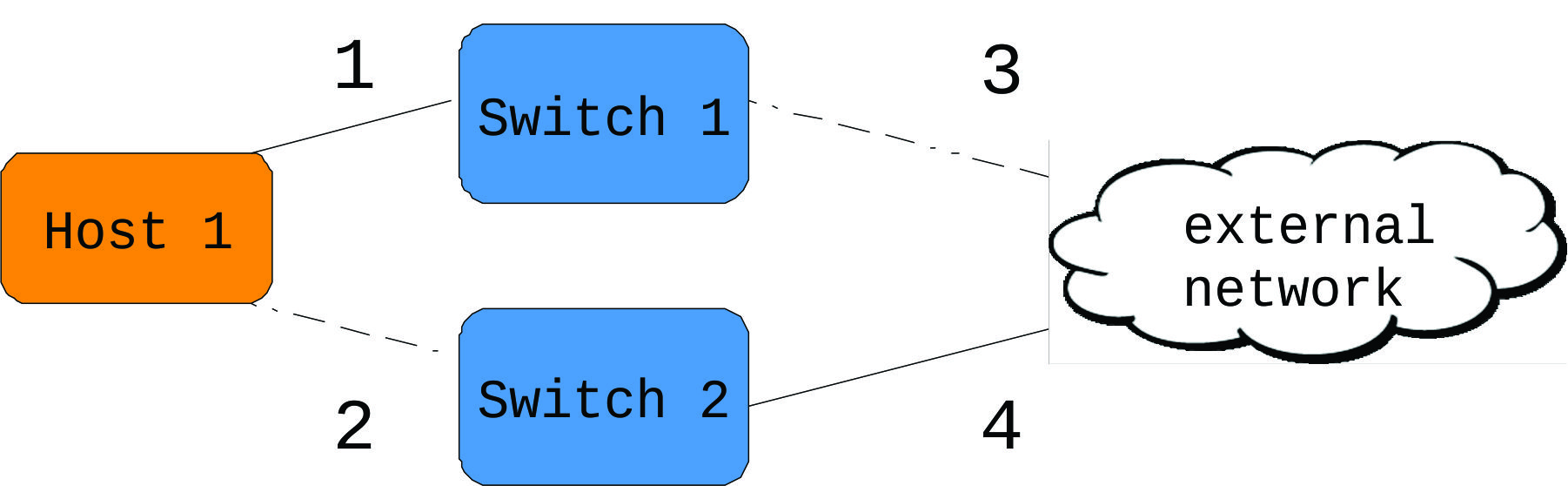
Figure 1 shows a network typology in which Host 1 is connected to two independent switches. Both of the switches are connected to an external network. If link 2 is broken, both MII and ARP monitors will be able to detect it, since the link is within the nearest connected switch. If link 3 is broken, only ARP monitor can detect it.
The MII monitor is appropriate for bonding when the network communication is within a LAN. The ARP IP target-based monitor is suitable for bonding that is expected to communicate to an outside network.
MII monitor
MII monitor周期检查MII (Media Independent Interface)提供的信息。如果MII反映了某个网络设备故障,那么bonding driver会把这个故障设备标记为关闭。与MII monitor有关的选项:
miimon
指定MII monitor多久检查一次MII (Media Independent Interface)提供的信息。默认值是0,也就是禁用MII monitor的检查功能。对于Linux on Z,这个值通常为1000
Linux on IBM Z (or Linux on z for short, and previously Linux on z Systems) is the collective term for the Linux operating system compiled to run on IBM mainframes, especially IBM Z and IBM LinuxONE servers. Similar terms which imply the same meaning are Linux on zEnterprise, Linux on zSeries, Linux/390, Linux/390x, etc. The terms zLinux or z/Linux are also sometimes used, but these terms are discouraged by IBM as they create the implication of an IBM-offered or IBM-distributed version of Linux, which is incorrect.

A pair of IBM mainframes. On the left is the IBM Z z13. On the right is the IBM LinuxONE Rockhopper.
use_carrier
指定miimon是否应使用MII或ETHTOOL ioctls与netif_carrier_ok()来确定链接状态。 默认值是1,这使得可以使用netif_carrier_ok()。 这由Linux on Z上的qeth设备驱动程序支持。
updelay
指定在检测到链路恢复后启用从设备之前要等待的时间(以毫秒为单位)。 updelay的数值应该是miimon数值的倍数。
downdelay
指定检测到链路故障后禁用从设备的时间(以毫秒为单位)。 downdelay的数值应该是miimon数值的倍数。
Figure . Example: Using the MII monitor

miimon=

use_carrier=

updelay=

downdelay=
ARP monitor
The ARP monitor checks the links by periodically sending ARP packets to the designated targets. If there is no reply from a certain device, it considers the device to be down. The ARP monitor generates regular traffic by issuing ARP probes. The ARP monitor is not supported by all of the bonding modes. Requested options are:
- arp_interval
- Specifies the ARP link monitoring frequency in milliseconds. The default value is 0, which disables the ARP monitor. A reasonable value could be 1000.
- arp_ip_target
- These are the IP addresses of targets of the ARP request sent to determine the health of the link to the targets. Multiple IP addresses must be separated by a comma. At least one IP address must be given for ARP monitoring to function. The maximum number of targets that can be specified is 16.
-
Figure . Example: Using the ARP monitor

arp_interval=

arp_ip_target=192.0.2.29,192.0.2.30
Link monitoring的更多相关文章
- Configure a VLAN on top of a team with NetworkManager (nmcli) in RHEL7
SOLUTION VERIFIED September 13 2016 KB1248793 Environment Red Hat Enterprise Linux 7 NetworkManager ...
- Create a Team in RHEL7
SOLUTION VERIFIED September 13 2016 KB2620131 Environment Red Hat Enterprise Linux 7 NetworkManager ...
- 专题:Channel Bonding/bonding
EtherChannel最初是由cisco提出,通过聚合多条物理链路为单条逻辑链路,从而实现高可用及提高吞吐量等目的.AgP(Port Aggregation Protocol,Cisco专有协议). ...
- Android WiFi 日志记录(四次握手)
记录一下四次握手的log. PMK: PMK(Pairwise Master Key,成对主密钥 STA和AP得到PMK后,将进行密匙派生以得到PTK.最后,PTK被设置到硬件中, 用于数据的加解密. ...
- RHEL6.x查看网卡槽位对应设备文件及路径
先查看网卡mac地址,由于我的服务器做了mac地址绑定,所以会有相同的hwaddr地址,请忽略. [root@node-0a0a05d3- net]# ifconfig eth0 | grep HWa ...
- Linux查看硬件信息命令
一.查看服务器硬件信息 (1)查看服务器型号.序列号 [root@Master ~]# dmidecode|grep "System Information" -A9|egrep ...
- Linux高级网络设置——将多个网卡设置成一个网卡
Linux下可以设置网卡模式 模式0:负载均衡 模式1:主备模式,不提高网络带宽 模式3:多网卡同时发送相同的数据 准备实验环境: Redhat 6.4 企业版64位,最小化安装. 给虚拟机添加网卡 ...
- RHEL7中网卡绑定team和bond的区别
red hat 官方给出的team和bond特性对比 A Comparison of Features in Bonding and Team Feature Bonding Team broadca ...
- Sensitive directory/file Integrity Monitoring and Checking
catalogue . OSSEC . HashSentry: Host-Based IDS in Python . Afick . 检测流程 1. OSSEC OSSEC is an Open So ...
随机推荐
- NET-使用Js调用WebService
注:JsWebServiceObject 此类是我做测试示例时为了测试js是否能调用webService中的复合类型而单独新建的一个类 此类中只有名字与年龄的属性. 最近身边的一个朋友做项目,其中有一 ...
- 【opencv】split
opencv-split Divides a multi-channel array into several single-channel arrays. code ,,,,,,,,,,,}; Ma ...
- Pyhthon3之使用__slots__
正常情况下,我们定义了一个class,创建了一个class实例后,我们可以给该实例绑定任何属性和方法,这就是动态语言的灵活性.先定义class: >>> class Student( ...
- 【数据库开发】windows环境下通过c++使用redis
1.Windows下Redis的安装使用 Redis是一个key-value存储系统.Redis的出现,很大程度补偿了memcached这类key/value存储的不足,在部 分场合可以对关系数据库起 ...
- CMake生成VS2010工程相对路径和绝对路径问题说明
CMake生成VS2010工程相对路径和绝对路径问题说明 声明:引用请注明出处http://blog.csdn.net/lg1259156776/ 主要是使用CMake生成的VS2010的工程,最好不 ...
- 排序算法的实现之Javascript(常用)
排序算法的实现之Javascript 话不多说,直接代码. 1.冒泡排序 1.依次比较相邻的两个数,如果前一个比后一个大,则交换两者的位置,否则位置不变 2.按照第一步的方法重复操作前length-1 ...
- python安装第三方的包
转载自:http://blog.csdn.net/xyqzki/article/details/38414433 第一种基本安装方法 1 下载第三方包,解压 2 在命令提示符里输入cmd,然后用cd进 ...
- jqGrid取消所有选中
// 获取所有选中行id var jqGridRowid=$("#jqGrid").jqGrid("getGridParam","selarrrow& ...
- [学习笔记] Blender layout 视图切换
layout 数字键5 --- 正交视图/透视图 切换 数字键0 -- 摄像机视图 数字键7 -- 顶视图 数字键1 --- 前视图 数字键3 --- 右视图 ctrl +数字键3 --- 左视图 ...
- 【牛客网】Longest Common Subsequence
[牛客网]Longest Common Subsequence 发现只有d数组最格路 于是我们把前三个数组中相同的数记成一个三维坐标,同一个数坐标不会超过8个 从前往后枚举d,每次最多只会更新不超过8 ...