
包+time+datetime+random+hashlibhmac+typing+requests+re模块(day17整理)
目录
昨日内容
os模块
与操作用系统交互
sys模块
与python解释器交互
json模块
跨平台数据交互,json串
pickle模块
存储python所有类型的数据,为了python文件和python文件的交互
logging模块
日志记录
今日内容
包
- 包就是模块,拿来导入用的
- 包是含有__init__的文件夹,导包就是导入__init__
- 包一定被当作模块文件导入,模块文件的搜索路径以执行文件路径为准
相对导入
.代表当前被导入文件所在的文件夹
..代表当前被导入文件所在的文件夹的上一级
...代表当前被导入文件所在的文件夹的上一级的上一级
# aaa/.py

from .m1 import func1
from .m2 import func2
绝对导入
# aaa/.py

from aaa.m1 import func1
from aaa.m2 import func2
time模块
提供三种不同类型的时间,且可以互相转换
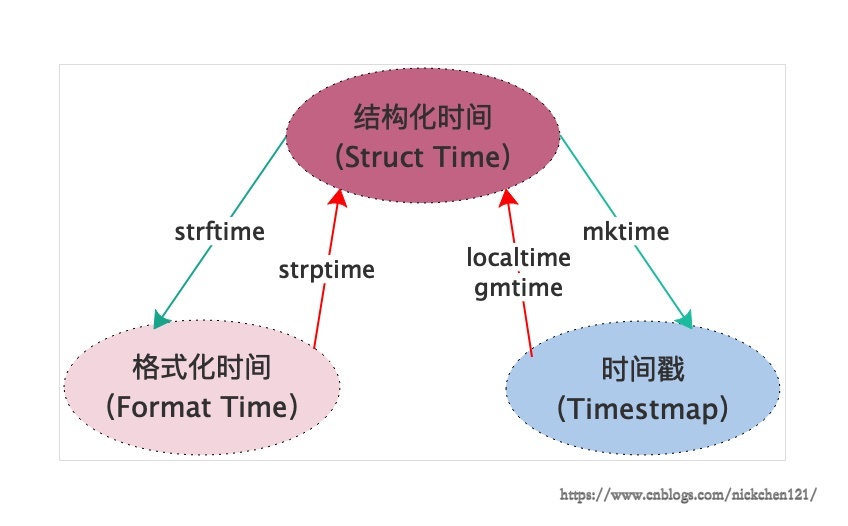
sleep
time.sleep(3) # 暂停3s时间戳 time
从1970年1月1日00时开始
import time
print(time.time())  #
格式化时间 strtime
print(time.strtime('%Y-%m-%d %H:%M:%S'))
print(time.strtime('%Y-%m-%d %X'))
结构化时间 localtime
print(time.localtime()) 结构化时间-->格式化时间
struct_time = time.localtime(3600*24*365)
print(time.strtime('%Y-%m-%d %H:%M:%S',struct_time))
格式化时间-->结构化时间
format_time = time.strtime('%Y-%m-%d %H:%M:%S')
print(time.strptime(format_time,'%Y-%m-%d %H:%M:%S'))
结构化时间-->时间戳
struct_time = time.localtime(3600*24*365)
print(time.mktime(struct_time))
时间戳-->结构化时间
time_stamp = time.time()
print(time.localtime(time_stamp))
datetime模块
时间的加减
- datetime.now() 当前时间
- timedelta(整形)
import datetime

now = datetime.datetime.now()
prtin(now)  # 2019-09-28 18:40:11.829581当前时间

# 默认加/减天数
print(now + datetime.timedelta(3))  # 2019-10-01 18:40:11.829581

# 加3周
print(now + datetime.timedelta(week = 3))

# 加减3小时
print(now + datetime.timedelta(hours = 3))

# 替换时间
print(now.replace(year=1949, month=10, day=1, hour=10, minute=1, second=0, microsecond=0))
random模块
随机数
- random 随机数(<1)
- randint 指定范围随机数
- shuffle 打乱顺序
- choice 随机选择
- seed 只随机一次
- sample 指定随机抽取多少个
import random

# 0-1的随机数
print(random.random())

# [1,3]的随机数
print(random.randit(1,3))

# 打乱顺序
lt = [1,2,3]
random.shuffle(lt)
print(lt)

# 随机选择一个
print(random.chioce(lt))

# 只随机一次
random.seed(1) # 根据传入的数字进行类似梅森旋转算法得出随机数

import time
random.seed(time.time())  # 根据时间得出随机数,每一次都会一样

# 了解
print(random.sample([1,2,3,'a'],2)) # 在列表中随机抽取2个数
hashlib模块和hmac模块
hashlib模块
对字符加密,并且加上密钥
import hashlib

m = hashlib.md5()
m.update(b'hello')
print(m.hexdigest())  # 根据hello生成的密钥
固定的字符串生成的密钥相同
hmac模块
密钥(加密钥)
import hmac

m = hmac.new(b'wick')  # 加的密钥

m.update(b'hash123456')  # 本身密码生成的密钥

# 最终存储的密钥是用户输入的密码生成的密钥加上内置密钥,更加难以破解
typing模块
与函数联用,控制函数参数的数据类型,提供了基础数据之外的数据类型
#导入可迭代对象,迭代器对象,生成器三种数据类型
from typing import Iterable,Iterator,Generator

def func(x:int, y: Iterable)->list:
    return[1,2,3,4]

func(10,'qwer')
requests模块
模拟浏览器对url发送请求, 拿到数据
import requests

response = requests.get('http://www.baidu.com')  # 向百度网站发送请求,得到一个响应

data = response.text  # 将响应读取成文本

res = re.findall('正则匹配',data,re.S)  # 利用正则re筛选出想要的数据
re模块
在字符串中筛选出符合某种特点的字符串
元字符
^ 以...开头
import re
s = 'abc红花dabc'

res = re.findall('^ab',s)
print(res)  # ['ab'] 按照\n分隔找元素
$ 以...结尾
res = re.findall('bc$',s)
print(res)  # ['bc'] 根据\n判断结尾
. 代表任意字符(不匹配换行符)
res = re.findall('abc.',s)
print(res)  #['abc红']
\d 数字
s = 'asd313ew'
res = re.findall('\d',s)
print(res)  # ['3','1','3']
\w 数字/字母/下划线
s = 'af 1*-@ f_'
res = re.findall('\w',s)
print(res)  # ['a','f','1','f','_']
\s 空格,\t,\n
s = 'sdfa 324_sa#$@'
res =re.findall('\s',s)
print(res)  # [' ']
\D 非数字
s = 'a32s 3f '
res =re.findall('\D',s)
print(res)  # ['a','s',' ,'f',' ']
\W 除了字母/数字/下划线
s = 'sk-#l@d_23 42ljk'
res = re.findall('\W', s)
print(res)  # ['-','#','@',' ']
\S 非空
s = 'skld_23 42ljk'
res = re.findall('\S', s)
print(res)  # ['s', 'k', 'l', 'd', '_', '2', '3', '4', '2', 'l', 'j', 'k']
+ 前面一个字符至少有一个
s = 'abcddddd abcd abc'
print(re.findall('abcd+', s))  # ['abcddddd', 'abcd']
? 前面的一个字符0或者1个
s = 'abcddddd abcd abc'
print(re.findall('abcd?', s))  # ['abcd','abcd','abc']
* 前面的一个字符至少0个
s = 'abcdddddddddddddddddd abcd abc'
print(re.findall('abcd*', s))  # ['abcdddddddddddddddddd', 'abcd', 'abc']
[] 中括号内随便取一个都可以
s = 'abc bbc cbc dbc'
print(re.findall('[abc]bc', s))  # ['abc', 'bbc', 'cbc']
[^]: 中括号的都不可以
s = 'abc bbc cbc dbc'
print(re.findall('[^abc]bc', s))  # ['dbc']
|:或
s = 'abc bbc dbc'
print(re.findall('abc|bbc', s))  # ['abc','bbc']
{2} 前面的字符2个
s = 'abccabc abccc'
print(re.findall('abc{2}', s))  # ['abcc', 'abcc']
{1,2} 前面的字符1-2个
s = 'abccabc abccc'
print(re.findall('abc{1,2}', s))  # ['abcc', 'abc', 'abcc']
贪婪模式
.* 任意字符 + 至少0个
s = 'abcdefgbbbbbbbbbbbbbbbbbbbbbbbbbbbbbbbbbbbbbg'
print(re.findall('a.*g', s))  # 包括'a'和最后一个'g'之间的所有字符,['abcdefgbbbbbbbbbbbbbbbbbbbbbbbbbbbbbbbbbbbbbg']
非贪婪模式
.*? 任意字符 + 至少0个 + 前一字符0或1个(控制进入非贪婪)
s = 'abcdefgbbbbbbbbbbbbbbbbbbbbbbbbbbbbbbbbbbbbbg'
print(re.findall('a.*?g', s))  # 包括'a'和第一个'g'之间的所有字符['abcdefg']
bug
s = 'abcdefg'
print(re.findall('.*?', s))  # ['', 'a', '', 'b', '', 'c', '', 'd', '', 'e', '', 'f', '', 'g', '']
特殊构造 (了解)
a(?=\d) a后面是数字,但是不要数字,且不消耗字符串内容
s = 'a123 aaaa a234 abc'
#    a1    aa
#           aa
#            aa a2    ab
print(re.findall('a(?=\d)', s))  # ['a', 'a']
print(re.findall('a(?=\w)', s))  # ['a', 'a', 'a', 'a', 'a', 'a']
print(re.findall('a\w', s))  # ['a1', 'aa', 'aa', 'a2', 'ab']
匹配邮箱
s = '#@#@#@nickchen121@163.com$$$$////nick@qq.com$$#$#$[]]2287273393@162.com@$2423423lksdlfj#'
# \w(字母/数字/下划线)+(0-无穷个)@ \w(字母/数字/下划线)+(0-无穷个).com
print(re.findall('\w+@\w+.com', s))
函数
compile 编译
把正则匹配编译成一个变量
s = 'abcd abcddd abc'

# 邮箱匹配规则
email_pattern = re.compile('\w+@\w+.com')

# 手机号码匹配规则
phone_patter = re.compile('\d{13}')
print(re.findall(email_pattern, s))

print(re.findall('abcd*', s))  # res = re.compile('abcd*')
match 匹配
只在字符串开头查找,找不到就报错
s = 'ab abcddd abc'
res = re.match('abc*', s)  # 对象
print(res.group())  # ab

res = re.match('abcd*', s)
print(res.group())  # 报错
search 查找
从字符串中查找,找到就不找了
s = 'ab abcddd abc'
res = re.search('abcd*', s)
print(res.group())  # abcddd
split 切割
s = 'ab23423abcddd234234abcasdfjl'
print(re.split('\d+', s))  # ['ab', 'abcddd', 'abcasdfjl']
sub 替换
s = 'ab23423abcddd234234abcasdfjlasjdk234l23lk4j2kl34kl25k3j2kl3j5lkj'
print(re.sub('\d+', ' ', s))  # ab abcddd abcasdfjlasjdk l lk j kl kl k j kl j lkj
subn 替换,替换次数
s = 'ab23423abcddd234234abcasdfjlasjdk234l23lk4j2kl34kl25k3j2kl3j5lkj'
print(re.subn('\d+', ' ', s))  # ('ab abcddd abcasdfjlasjdk l lk j kl kl k j kl j lkj', 12)
修饰符
re.S 全局搜索(匹配换行符)
s = '''abc
abcabc*abc
'''

# .不匹配换行
print(re.findall('abc.abc', s))  # ['abc*abc']
print(re.findall('abc.abc', s, re.S))  # ['abc\nabc', 'abc*abc']
分组
只要括号里面的内容
s = 'abc abcd abcdd'
print(re.findall('a(.)c(d)', s))  # [('b', 'd'), ('b', 'd')]
有名分组 (了解)
a(?Pd)
s = 'abc abcd abcdd'
print(re.search('a(?P<name>.)c(?P<name2>d)', s).groupdict())  # {'name': 'b', 'name2': 'd'}
超高级用法
'c(?P\d+)a', '\g'
s = 'abc123abc123'  # c123a
print(re.sub('c(\d+)a', ' ', s))  # ab bc123
print(re.sub('c(?P<name1>\d+)a', '\g<name1>', s))  # \g<name1>这个东西不能替换掉  ab123bc123
# 以下必须得记住
# .*?
# 贪婪和非贪婪
# findall
# re.S
# match和sarch的区别
# 分组
# 有名分组:给分组加名字
# 哪些做了解
# 杂七杂八的元字符
# 特殊构造元字符
# 特殊修饰符包+time+datetime+random+hashlibhmac+typing+requests+re模块(day17整理)的更多相关文章
- (常用)time,datetime,random,shutil(zipfile,tarfile),sys模块
a.time模块import time 时间分为三种形式1.时间戳 (时间秒数的表达形式, 从1970年开始)print(time.time())start_time=time.time()time. ...
- python time、datetime、random、os、sys模块
一.模块1.定义模块:用来从逻辑上组织Python代码(变量,函数,类,逻辑:实现一个功能),本质就是.py结尾的python文件(文件名:test.py,对应的模块名:test)包:用来从逻辑上组织 ...
- python基础-7模块,第三方模块安装方法,使用方法。sys.path os sys time datetime hashlib pickle json requests xml
模块,用一砣代码实现了某个功能的代码集合. 类似于函数式编程和面向过程编程,函数式编程则完成一个功能,其他代码用来调用即可,提供了代码的重用性和代码间的耦合.而对于一个复杂的功能来,可能需要多个函数才 ...
- Day13 Python基础之time/datetime/random模块一(十一)
time模块 import time print(help(time)) time.time() #return current time in seconds since the Epoch as ...
- python笔记-1(import导入、time/datetime/random/os/sys模块)
python笔记-6(import导入.time/datetime/random/os/sys模块) 一.了解模块导入的基本知识 此部分此处不展开细说import导入,仅写几个点目前的认知即可.其 ...
- Python-Windows下安装BeautifulSoup和requests第三方模块
http://blog.csdn.net/yannanxiu/article/details/50432498 首先给出官网地址: 1.Request官网 2.BeautifulSoup官网 我下载的 ...
- [py]requests+json模块处理api数据,flask前台展示
需要处理接口json数据,过滤字段,处理字段等. 一大波json数据来了 参考: https://stedolan.github.io/jq/tutorial/ https://api.github. ...
- python接口测试中安装whl格式的requests第三方模块
下载 安装 requests第三方模块 下载:http://docs.python-requests.org/en/latest/user/install/#install 我下载是 https:// ...
- Python-hashlib、OS、Random、sys、zipfile模块
# print(sys.version) #python 版本 # print(sys.path) # print(sys.platform) #当前什么系统 # print(sys.argv) #当 ...
随机推荐
- 使用flask-mail扩展发送邮件
使用flask-mail扩展发送电子邮件 在我们开发完web系统后,一些特定的事件发生时,系统要自动发送相关邮件至管理员,运维人员和其他相关人员.python标准库中的smtplib包也可以用在Fla ...
- Cocos Creator实现左右跳游戏
1. 玩法说明 游戏开始后,点击屏幕左右两侧,机器人朝左上方或右上方跳一步,如果下一步有石块,成功得1分,否则游戏结束. 2. 模块介绍 游戏场景分为2个:主页场景(home).游戏场景(game) ...
- 构建之法——homework1:问题思考
1.我看了第一章概论,1.2.4 软件工程的目标——创造“足够好”的软件,其中提到了什么是好的软件? 软件工程的一个要素就是把软件的Bug都消灭掉的过程. 提问:我们知道Bug是不可能完全消灭掉的, ...
- JS/Jquery 表单方式提交总结
1. submit提交 (1). submit 按钮式提交 缺点:在提交前不可修改提交的form表单数据 // 1. html <form method="post" act ...
- VR中的“寻路(wayfinding)”
虚拟现实(VR)中很重要的一个问题就是Locomotion(用户在VR中的移动).这个Locomotion分为两种,一种是点对点的,如传送门的方式,一种是包含了可以操控的中间过程的,这种被称为“导航( ...
- 记录一次redis cpu异常升高的排插思路
好久没有写博客 现在重新捡起来 记录工作中遇到的问题 方便以后在遇到类似的问题也有一个参考. 背景:有一天生产服务器redis cpu 频繁报警 单核cpu 所以在想是不是业务量上来了. ...
- Spring5源码解析3-refresh方法初探
接上回分析完register(annotatedClasses);后,现在来看一下refresh();方法. // new AnnotationConfigApplicationContext(App ...
- 【SQL】 收入支出求盈亏
求项目ID为1000的盈亏 表名为:T 字段:ID P_ID AMOUNT TYPE(1:收入 2:支出) '
- 记录一次jvm内存泄露的问题
前些天,运维告诉我刚上线的java服务占用CPU过高. 以下是发现解决问题的具体流程. 1:通过#top命令查看,我的java服务确实把CPU几乎占满了,如图 可看到18400这个进程CPU占用达到了 ...
- 基于mosquitto的MQTT客户端实现C语言
在对MQTT的学习过程中 一下的内容对我提供了帮助 https://www.runoob.com/w3cnote/mqtt-intro.html 对MQTT的入门级介绍 很基础讲解了什么是MQTT h ...