
activiti5初识
因工作需要,接手新的项目,其中用到了activiti实现的工作流,特意去大致学习下,特此记录下。
1.acticiti5框架说明及表结构介绍
Activiti5工作流引擎框架: 它实际上是一个javaEE的半成品项目(企业一般用它来做二次开发).
-- dao层.
-- service层.
-- 它有数据库表(24表). Activiti5.18,所有表都是以act开头
-- Activiti5底层用得持久层框架是MyBatis3,
它有自己的数据库表,提供了七个核心业务服务类.
ACT_RE_* :'RE' 表示 repository(存储库)。资源库流程规则表。这个前缀的表包含了流程定义和流程静态资源(图片、规则 等)
| act_re_deployment | 部署信息表 |
| act_re_model | 流程设计模型部署表 |
| act_re_prodef |
流程定义数据表 |
ACT_RU_* :'RU’ 表示 runtime(运行时)。运行时数据库表。这些运行时的表,
包含流程实例、任务、变量、异步任务 等运行中的数据。
这样运行时表可以一直很小数据很快。
| act_ru_execution | 运行时流程执行实例表 |
| act_ru_identitylink | 运行时流程人员表,主要存储任务节点与参与者的相关信息 |
| act_ru_lask | 运行时任务节点表 |
| act_ru_variable | 运行时流程变量数据表 |
ACT_ID_* :'ID' 表示 identity(身份)。组织机构表。
这些表包含了身份信息,比如用户、组 等。
| act_id_group | 用户组信息表 |
| act_id_info | 用户扩展信息表 |
| act_id_membership | 用户与用户组对应信息表 |
| act_id_user | 用户信息表 |
ACT_HI_* :'HI' 表示 history(历史)。历史数据库表。这些表包含历史数据,
比如历史流程实例,变量、任务 等。
| act_hi_actinst | 历史节点表 |
| act_hi_attachment | 历史附件表 |
| act_hi_comment | 历史意见表 |
| act_hi_identitylink | 历史流程人员表 |
| act_hi_detail | 历史详情表,提供历史变量查询 |
| act_hi_procinst | 历史流程实例表 |
| act_hi_tasking | 历史任务实例表 |
| act_hi_varinst | 历史变量表 |
ACT_GE_* :'GE' 表示 general(普遍的)。通用数据表。
用于不同场景下,如存放资源文件。
| act_ge_bytearry | 二进制数据表 |
| act_ge_property |
属性数据表, |
还有一个log表act_evt_log
2.下载及安装使用
官网地址:http://www.activiti.org
下载 activiti-5.18.0.zip
解压后:
database : (数据库相关)存放了Activiti框架的sql语句.
docs: api文档、用户指南、xsd
libs: 存放了自己所有的jar.
wars: web应用.
1)安装数据库,生成表
执行以下脚本
-- activiti.mysql55.create.engine.sql
-- activiti.mysql55.create.history.sql
-- activiti.mysql.create.identity.sql
2)集成spring
引用maven
<dependency>
    <groupId>org.activiti</groupId>
    <artifactId>activiti-engine</artifactId>
    <version>5.18.0</version>
</dependency>
<dependency>
    <groupId>org.activiti</groupId>
    <artifactId>activiti-spring</artifactId>
    <version>5.18.0</version>
</dependency>
3)配置activiti.xml配置,配置jdbc,及上一步生成的库的链接路径,注入activiti服务接口
<?xml version="1.0" encoding="UTF-8"?>
<beans xmlns="http://www.springframework.org/schema/beans" xmlns:xsi="http://www.w3.org/2001/XMLSchema-instance" xmlns:tx="http://www.springframework.org/schema/tx" xmlns:context="http://www.springframework.org/schema/context"
   xmlns:aop="http://www.springframework.org/schema/aop" xmlns:mvc="http://www.springframework.org/schema/mvc" xmlns:task="http://www.springframework.org/schema/task"
   xsi:schemaLocation="http://www.springframework.org/schema/mvc http://www.springframework.org/schema/mvc/spring-mvc-4.0.xsd
         http://www.springframework.org/schema/aop http://www.springframework.org/schema/aop/spring-aop-4.0.xsd
       http://www.springframework.org/schema/tx http://www.springframework.org/schema/tx/spring-tx-4.0.xsd
      http://www.springframework.org/schema/beans http://www.springframework.org/schema/beans/spring-beans-4.0.xsd
      http://www.springframework.org/schema/context http://www.springframework.org/schema/context/spring-context-4.0.xsd
      http://www.springframework.org/schema/task http://www.springframework.org/schema/task/spring-task-4.0.xsd">

   <!-- 加载activiti引擎 -->

   <bean id="processEngineConfiguration" class="org.activiti.engine.impl.cfg.StandaloneProcessEngineConfiguration">
      <!-- 连接数据的配置 -->
      <property name="jdbcDriver" value="${jdbc.driverClassName}"></property>
      <property name="jdbcUrl" value="${jdbc.url}"></property>
      <property name="jdbcUsername" value="${jdbc.username}"></property>
      <property name="jdbcPassword" value="${jdbc.password}"></property>
      <property name="activityFontName" value="宋体"/>
      <property name="labelFontName" value="宋体"/>
      <property name="jdbcPingEnabled" value="true"></property>
      <property name="jdbcMaxActiveConnections" value="1000"></property>
      <property name="jdbcMaxIdleConnections" value="200"></property>
      <property name="jdbcMaxCheckoutTime" value="20000"></property>
      <property name="jdbcPingConnectionNotUsedFor" value="3600000"></property>
   </bean>
    <bean id="processEngine" class="org.activiti.spring.ProcessEngineFactoryBean">
        <property name="processEngineConfiguration" ref="processEngineConfiguration" />
    </bean>
    <!-- activiti的各种服务接口 -->
    <bean id="repositoryService" factory-bean="processEngine"
        factory-method="getRepositoryService" />
    <bean id="runtimeService" factory-bean="processEngine"
        factory-method="getRuntimeService" />
    <bean id="taskService" factory-bean="processEngine"
        factory-method="getTaskService" />
    <bean id="historyService" factory-bean="processEngine"
        factory-method="getHistoryService" />
    <bean id="managementService" factory-bean="processEngine"
        factory-method="getManagementService" />
    <bean id="IdentityService" factory-bean="processEngine"
        factory-method="getIdentityService" />
    <bean id="formService" factory-bean="processEngine"
        factory-method="getFormService" />

</beans>
其中核心api说明如下:
ProcessEngineConfiguration.流程引擎配置信息类.
属性的设置、构建流程引擎.
ProcessEngine: 流程引擎.
获取七个业务处理类.
RepositoryService仓储服务:
act_re_*、act_ge_*
RuntimeService运行时服务
act_ru_*
TaskService任务服务
act_ru_*
FormService表单服务
IdentityService身份服务
act_id_*
HistoryService历史服务
act_hi_*
ManagementService管理服务.
act_id_*、act_evt_log
3.插件安装
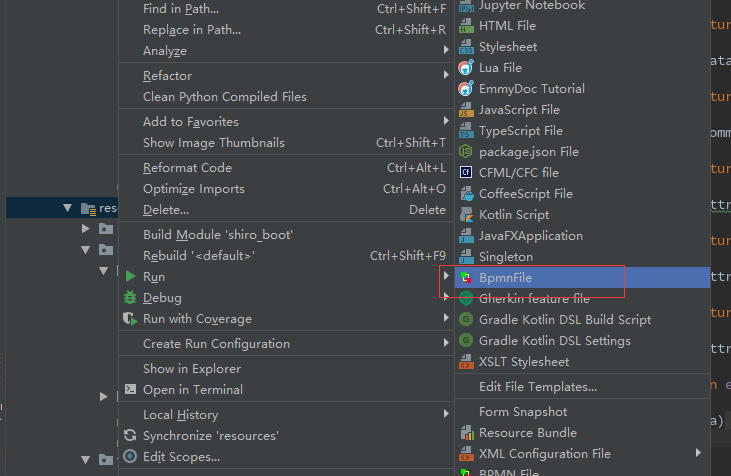
idea可以安装actiBPM

然后可以创建bpm流程文件

4.activiti的代码实现
1)部署bmp流程,使得其流程保存到数据库字段中
RepositoryService repositoryService = processEngine.getRepositoryService(); Deployment deployment = repositoryService.createDeployment() .addClasspathResource("onboarding.bpmn20.xml").deploy();
2)开始流程,结束流程,查询历史流程,查询流程节点状态等都是调用核心api即可,具体可以参考activiti中接口方法,参照使用。
类似如下:
/**查询历史任务*/
List<HistoricTaskInstance> list = historyService.createHistoricTaskInstanceQuery()
        .taskAssignee(request.getData().getAssignee())
        .finished().processFinished()
        .processDefinitionNameLike(processDefinitionName)
        .orderByHistoricTaskInstanceEndTime()
        .desc()
        .listPage(request.getData().getFirstResult(), request.getData().getMaxResults())

总而言之,activiti就是为我们封装了一套流程流转的逻辑,包括里面实现的逻辑和节点数据的保存,然后封装了sql的语法上封装了自己的语言来查询和添加数据,开始和结束流程也只是对数据的新增和修改,
至于查看流程流转流程则只是对一系列数据的查询,大体如此了,想明白这些,也就不是什么神秘难懂的东西了。
activiti5初识的更多相关文章
- activiti5.13工作流系列(一)-初识
1.什么是工作流? 工作流就是让多个参与者之间按照某种预定义的规则传递文档.信息或任务的过程,工作流由实体(Entity).参与者(Participant).流程定义(Flow Definition) ...
- Java_Activiti5_菜鸟也来学Activiti5工作流_之初识BPMN2.0的简单结构(五)
<?xml version="1.0" encoding="UTF-8"?> <definitions xmlns="http:// ...
- Java_Activiti5_菜鸟也来学Activiti5工作流_之初识常用服务类和数据表(二)
/** * 代码清单中使用 ProcessEngines类加载默认的流程配置文件(activiti.cfg.xml),再获取各个服务组件的实例. * RepositoryService主要用于管理流程 ...
- Android动画效果之初识Property Animation(属性动画)
前言: 前面两篇介绍了Android的Tween Animation(补间动画) Android动画效果之Tween Animation(补间动画).Frame Animation(逐帧动画)Andr ...
- 初识Hadoop
第一部分: 初识Hadoop 一. 谁说大象不能跳舞 业务数据越来越多,用关系型数据库来存储和处理数据越来越感觉吃力,一个查询或者一个导出,要执行很长 ...
- python学习笔记(基础四:模块初识、pyc和PyCodeObject是什么)
一.模块初识(一) 模块,也叫库.库有标准库第三方库. 注意事项:文件名不能和导入的模块名相同 1. sys模块 import sys print(sys.path) #打印环境变量 print(sy ...
- 初识IOS,Label控件的应用。
初识IOS,Label控件的应用. // // ViewController.m // Gua.test // // Created by 郭美男 on 16/5/31. // Copyright © ...
- UI篇(初识君面)
我们的APP要想吸引用户,就要把UI(脸蛋)搞漂亮一点.毕竟好的外貌是增进人际关系的第一步,我们程序员看到一个APP时,第一眼就是看这个软件的功能,不去关心界面是否漂亮,看到好的程序会说"我 ...
- Python导出Excel为Lua/Json/Xml实例教程(一):初识Python
Python导出Excel为Lua/Json/Xml实例教程(一):初识Python 相关链接: Python导出Excel为Lua/Json/Xml实例教程(一):初识Python Python导出 ...
随机推荐
- 阿里云ECS服务器部署HADOOP集群(五):Pig 安装
本篇将在阿里云ECS服务器部署HADOOP集群(一):Hadoop完全分布式集群环境搭建的基础上搭建. 1 环境介绍 一台阿里云ECS服务器:master 操作系统:CentOS 7.3 Hadoop ...
- 记录python上传文件的坑(2)
描述: 1.之前在写项目mock代码时,碰到一个上传文件的接口,但项目接口本身有token保护机制,碰到token失效时,需要重新获取一次token后,再次对上传文件发起请求,在实际调用中发现,第一次 ...
- 这可能是最漂亮的Spring事务管理详解
事务概念回顾 什么是事务? 事务是逻辑上的一组操作,要么都执行,要么都不执行. 事物的特性(ACID): 原子性: 事务是最小的执行单位,不允许分割.事务的原子性确保动作要么全部完成,要么完全不起作用 ...
- Java中的String为什么要设计成不可变的?
一.不可变类和不可变对象 Normally,you create an object and allow its contents to be changed later.However ,occas ...
- Java入门系列之包装类(四)
前言 上一节我们讲解了StringBuilder VS StringBuffer以及二者区别,本节我们来讲解包装类. 包装类 我们知道在Java中有8中基本数据类型,分为数值类型:byte.short ...
- Java面试,如何在短时间内做突击
面试前很有必要针对性的多刷题,大部分童鞋实战能力强,理论不行,面试前不做准备很吃亏.这里整理了很多常考面试题,希望对你有帮助. 面试技术文 Java岗 面试考点精讲(基础篇01期) Java岗 面 ...
- easyui-datagrid 使用笔记
1.清空所有行和所有列 $('#dgJGQuery').datagrid({ columns: [], url: '', data: [] }); 2.采用 datagrid-groupview 分组 ...
- 个人项目开源之c++基于epoll实现高并发游戏盒子(服务端+客户端)源代码
正在陆续开源自己的一些项目 此为c++实现高并发的游戏盒子,平台问题需要迁移重构,所以有一些遗留问题,客户端异常断开没有处理,会导致服务器崩溃,还有基于快写代码编程平台实现的小程序切换,线程读写缓存没 ...
- 团队项目之团队展示&选题
团队博文:https://www.cnblogs.com/blackpanda/p/11734448.html 一. 团队展示 1. 队名: Black Panda 2. 队员: 郑伟金 3117 ...
- WPF--事件列表
事件 描述 Annotation.AnchorChanged 新增.移除或修改 Anchor 元素时发生. Annotation.AuthorChanged 新增.移除或修改 Author 元素时发生 ...