
优化 Ubuntu
优化Ubuntu
1. 更换 apt 源
echo 'deb http://mirrors.aliyun.com/ubuntu/ bionic main restricted universe multiverse

deb-src http://mirrors.aliyun.com/ubuntu/ bionic main restricted universe multiverse

deb http://mirrors.aliyun.com/ubuntu/ bionic-security main restricted universe multiverse

deb-src http://mirrors.aliyun.com/ubuntu/ bionic-security main restricted universe multiverse

deb http://mirrors.aliyun.com/ubuntu/ bionic-updates main restricted universe multiverse

deb-src http://mirrors.aliyun.com/ubuntu/ bionic-updates main restricted universe multiverse

deb http://mirrors.aliyun.com/ubuntu/ bionic-backports main restricted universe multiverse

deb-src http://mirrors.aliyun.com/ubuntu/ bionic-backports main restricted universe multiverse

deb http://mirrors.aliyun.com/ubuntu/ bionic-proposed main restricted universe multiverse

deb-src http://mirrors.aliyun.com/ubuntu/ bionic-proposed main restricted universe multiverse' >/etc/apt/sources.list
2. 系统更新
sudo apt update

sudo apt upgrade
3. 安装搜狗输入法
3.1 安装 fcitx 输入框架
sudo apt install fcitx
3.2 下载 linux 版本搜狗输入法
wget http://cdn2.ime.sogou.com/dl/index/1524572264/sogoupinyin_2.2.0.0108_amd64.deb
3.3 安装
sudo dpkg -i sogoupinyin_2.2.0.0108_amd64.deb
如果出现依赖包的问题执行
sudo apt --fix-broken install
3.4 进入设置
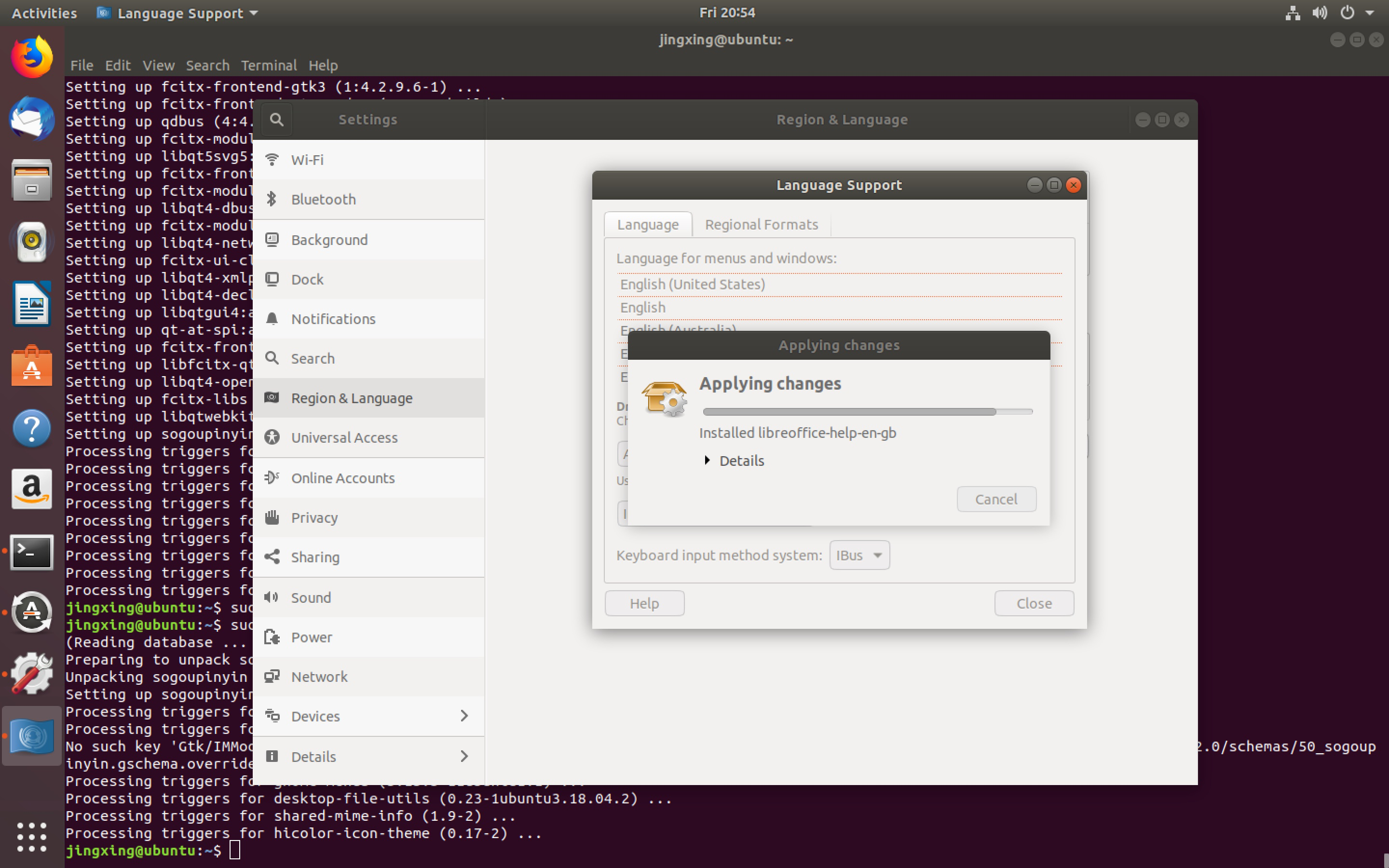
- 根据提示安装输入法
- 将输入框架改为 fcitx
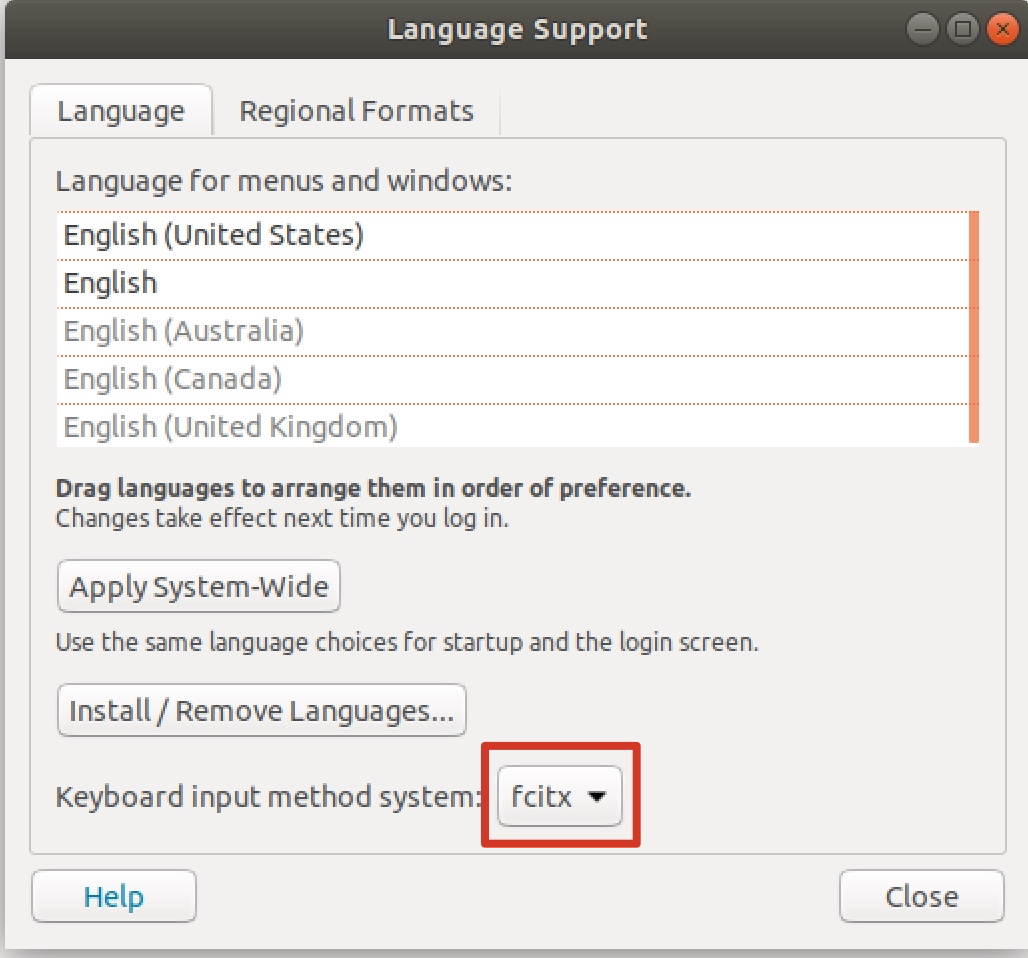
点击Apply System-Wide后将用户注销,如果注销没有效果那么就重启吧。
- 登陆后右上角出现小键盘
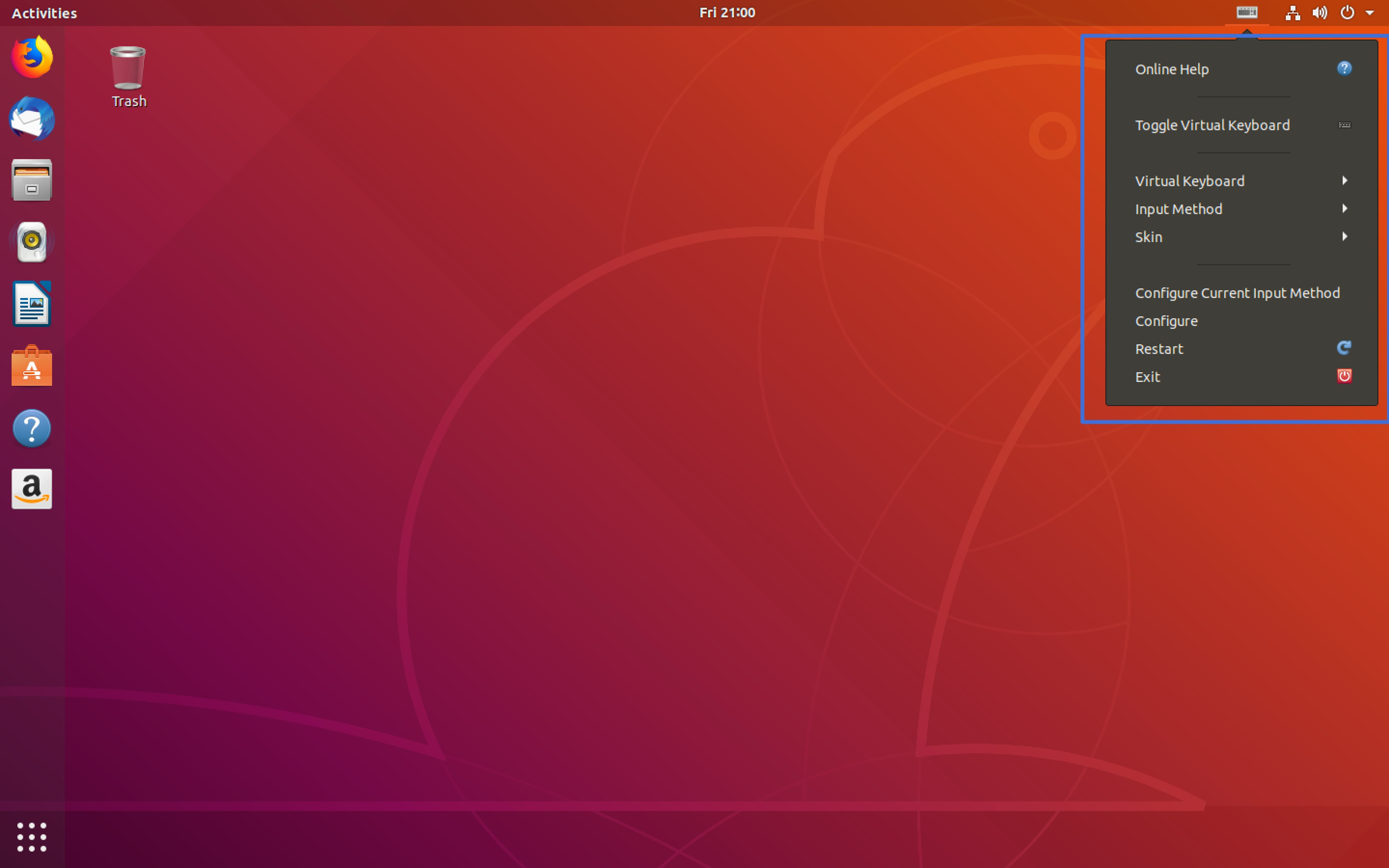
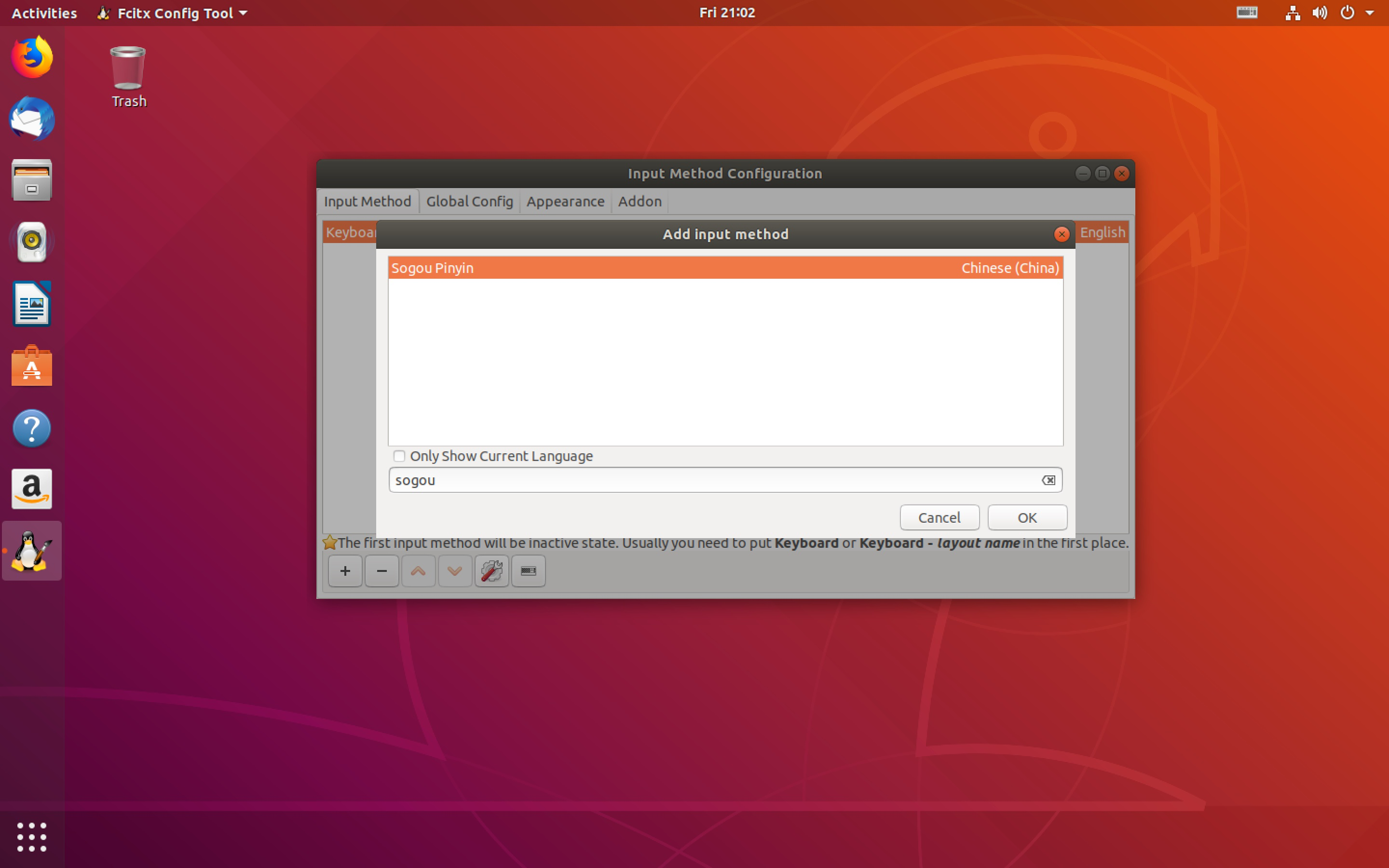
点击Configure Current Input Method,进入Input Method界面,选择加号添加搜狗输入法。
4. 软件卸载、安装
4.1 卸载 libreOffice 安装 wps
sudo apt remove libreoffice-common
4.2 安装 wps
wget https://wdl1.cache.wps.cn/wps/download/ep/Linux2019/8722/wps-office_11.1.0.8722_amd64.deb

sudo dpkg -i wps-office_11.1.0.8722_amd64.deb
4.3 卸载 firefox 安装 chrome
sudp apt remove firefox

wget https://dl.google.com/linux/direct/google-chrome-stable_current_amd64.deb

sudo dpkg -i google-chrome-stable_current_amd64.deb
5. vim 配置
5.1 下载 vim
sudo apt install vim
5.2 编辑 vim 配置文件
sudo vim /etc/vim/vimrc
添加如下代码:
配置还在更新
6. 美化 ubuntu
6.1 安装 unity-tweak-tool
sudo apt intall unity-tweak-tool
6.2 下载 flatabulous 主题
# 按照官方教程使用 add-apt-repository 方法定位不到 flatabulous 包,改用手动安装

sudo add-apt-repository ppa://noobslab/themes

sudo apt update

sudo apt install flatabulous-theme
wget https://github.com/anmoljagetia/Flatabulous/archive/master.zip

mkdir .theme

mv ./master.zip ~/.theme

unzip master.zip
6.3 下载 flat icons
sudo add-apt-repository ppa://noobslab/icons

sudo apt update

sudo apt install ultra-flat-icons
6.4 打开 unity-tweak-tool
再打开 unity-tweak-tool 时出现:
 Gtk was imported without specifying a version first. Use gi.require_version('Gtk', '3.0') before import to ensure that the right version gets loaded.

  from gi.repository import Gtk

Error: schema com.canonical.notify-osd not installed
解决办法如下:
sudo apt install notify-osd

sudo apt install overlay-scrollbar
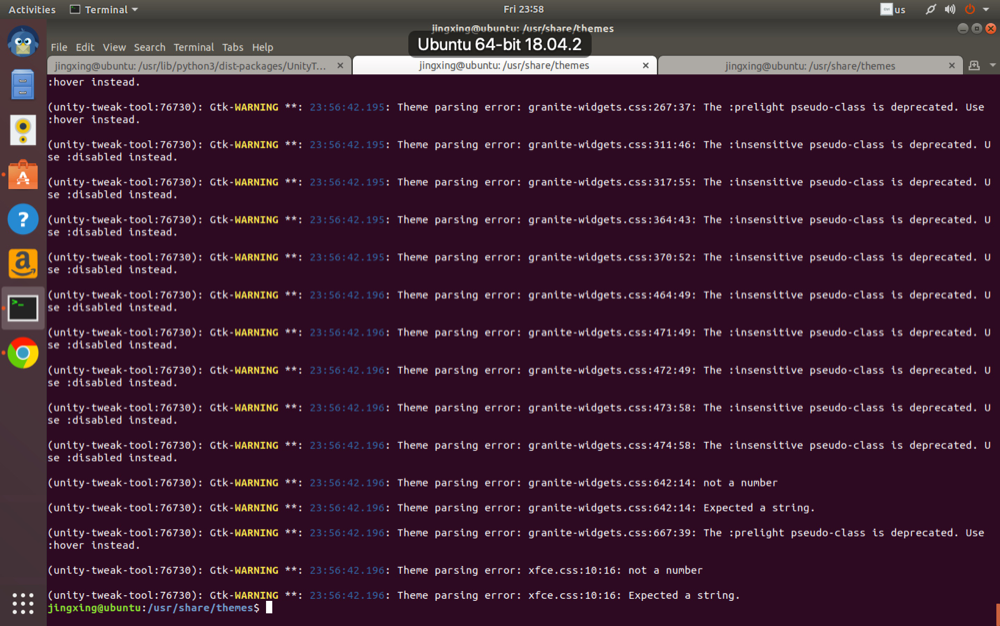
图标配置好了,但是主题因为 GTK 的原因没有成功,记录如下:
6.5 下载字体
在 monaco-font 库中下载 zip 包
unzip monaco-font-master.zip

sudo ./install-font-ubuntu.sh https://github.com/todylu/monaco.ttf/blob/master/monaco.ttf?raw=true
下载完成后使用unity-tweak-tool设置字体。
7. 终端
这个才是重头戏。
因为很多 linux 默认的终端 shell 都是 bash,但是不太好用,所以改为 zsh。
7.1 下载 zsh
sudo apt install zsh
7.2 下载 oh-my-zsh
sh -c "$(wget -O- https://raw.githubusercontent.com/robbyrussell/oh-my-zsh/master/tools/install.sh)"
7.3 修改默认 shell
sudo usermod --shell /bin/zsh $USERNAME
修改后记得 log_out 重新登录用户。
7.4 修改皮肤
vim ~/.zshrc

# 修改皮肤

ZSH_THEME="robbyrussell"
8. 插件安装
8.1 autojump
- 下载
sudo apt install aotujump
- 配置 autojump
vim /usr/share/doc/autojump/README.Debian

echo '. /usr/share/autojump/autojump.sh' >> ~/.zshrc

source ~/.zshrc
8.2 zsh-syntax-highlighting
- 安装
git clone https://github.com/zsh-users/zsh-syntax-highlighting.git ${ZSH_CUSTOM:-~/.oh-my-zsh/custom}/plugins/zsh-syntax-highlighting
- 配置
plugins=(zsh-syntax-highlighting)

source ~/.zshrc
8.3 zsh-autosuggestions
- 安装
git clone git://github.com/zsh-users/zsh-autosuggestions $ZSH_CUSTOM/plugins/zsh-autosuggestions
- 配置
plugins=(zsh-autosuggestions)

source ~/.zshrc
8.4 git-open
- 下载
git clone https://github.com/paulirish/git-open.git $ZSH_CUSTOM/plugins/git-open
- 配置
plugins=(git-open)

source ~/.zshrc
8.5 修改查看 history 格式
HIST_STAMPS="yyyy-mm-dd"
优化 Ubuntu的更多相关文章
- 优化Ubuntu 16.04系统的几件事
安装完Ubuntu 16.04后,要更换为国内的软件源: sudo gedit /etc/apt/sources.list #用文本编辑器打开源列表 在文件开头添加下面的阿里云的软件源: deb ht ...
- 优化ubuntu桌面
---恢复内容开始--- 此博主写的很全 http://blog.csdn.net/terence1212/article/details/52270210 使用安装Unity Tweak Tool ...
- 对Ubuntu操作系统进行彻底优化
在安装Linux系统之初,就应该考虑怎样使Linux系统得到最好的性能.Linux本身也设计成可以良好扩展的形态,比如在Linux系统中,我们可以随心所欲地组织磁盘分区,有些朋友喜欢一个/,一个swa ...
- 更换ubuntu apt-get 源
为了优化ubuntu软件安装/更新速度,我测试了国内几家apt源的速度,发现北京交大的apt源速度相对最快,然后可以通过以下步骤更新ubuntu源 1) 备份默认的apt源 $ cd /etc/apt ...
- SQL Server on Ubuntu——Ubuntu上的SQL Server(全截图)
本文从零开始一步一步介绍如何在Ubuntu上搭建SQL Server 2017,包括安装系统.安装SQL等相关步骤和方法(仅供测试学习之用,基础篇). 一. 创建Ubuntu系统(Create U ...
- Ubuntu基于zsh自定义设置shell主题
为优化Ubuntu命令行页面效果,Google一番选择github上开源项目zsh,以自定义Shell主题,注:本机系统为Ubuntu 14.04 1.安装zsh sudo apt-get insta ...
- 更换ubuntu apt-get源
原文地址:http://www.cnblogs.com/zhangpengshou/p/3591387.html 为了优化ubuntu软件安装/更新速度,我测试了国内几家apt源的速度,发现北京交大的 ...
- SQL Server on Ubuntu
本文从零开始一步一步介绍如何在Ubuntu上搭建SQL Server 2017,包括安装系统.安装SQL等相关步骤和方法(仅供测试学习之用,基础篇). 一. 创建Ubuntu系统(Create U ...
- linux安装、使用优化、常用软件
定制自己的ubuntu桌面系统 一.安装ubuntu 1.下载ubuntu镜像Iso文件 ubuntu官网下载:https://cn.ubuntu.com/download 2.u盘写入 (1)下载U ...
随机推荐
- 2019年5月23日 AY 程序员调侃语录
我是AY,杨洋,做wpf开发的,最近得了一种病,程序员患得患失综合征.同事说,我年纪在变大,技术跟不上.业余之间,我原创了写了一些语录,给大家中午休息,累疲惫的时候,开心放松下. 1.有很多公司找我谈 ...
- vue 左右滑动效果
个人实际开发中用到的效果问题总结出来便于自己以后开发查看调用,如果也适用其他人请随意拿走勿喷就行! vue.js是现在流行的js框架之一,vue 是一套用于构建用户界面的渐进式javascript框架 ...
- ElasticSearch学习(一):ElasticSearch介绍
一.ElasticSearch是什么? ElasticSearch是一款非常强大的.基于Lucene的开源搜索及分析引擎,可以帮助你从海量数据中,快速找到相关的数据信息. 比如,当你在GitHub上搜 ...
- 附008.Kubernetes TLS证书介绍及创建
一 Kubernetes证书 1.1 TLS Kubernetes系统的各个组件需要使用TLS证书对其通信加密以及授权认证,建议在部署之前先生成相关的TLS证书. 1.2 CA证书创建方式 kuber ...
- 5分钟学会Java9-Java11的七大新特性
现在Java有多元化的发展趋势,既有JS又有C++还有C#的影子,不学习那是不行滴. 来来来,花5分钟看看Java9-Java11的七大新特性,还有代码样例. Java11 发布了,然而很多公司还在用 ...
- 多线程与高并发(三)synchronized关键字
上一篇中学习了线程安全相关的知识,知道了线程安全问题主要来自JMM的设计,集中在主内存和线程的工作内存而导致的内存可见性问题,及重排序导致的问题.上一篇也提到共享数据会出现可见性和竞争现象,如果多线程 ...
- idea上MyBatis第一个例子
接着上面创建的maven项目来. 1.java目录下创建cn.happy.entity包 2.idea下创建数据库连接 配置连接参数 3.把数据库表变成实体类 导入成功,改一下包名就可以用了 4.新建 ...
- docker无法启动
docker无法启动 docker启动时报错Error starting daemon: SELinux is not supported with the overlay2 graph driver ...
- java请求转发,响应重定向的区别
请求转发:request.getRequestDispatcher().forward(); 例:request.getRequestDispatcher("/index.jsp" ...
- C++学习书籍推荐《C++程序设计原理与实践》下载
百度云及其他网盘下载地址:点我 编辑推荐 <C++程序设计原理与实践>是经典程序设计思想与C++开发实践的完美结合,是C++之父回归校园后对C++编程原理和技巧的全新阐述.书中全面地介绍了 ...