
HyperLedger Fabric 1.4 生产环境动态添加组织及节点
1.1 操作概述
在“kafka生产环境部署”和“生产环境使用ca生成msp和tls”两篇文章的搭建的环境基础上,实现组织及节点的动态添加功能。
1.2 网络拓扑
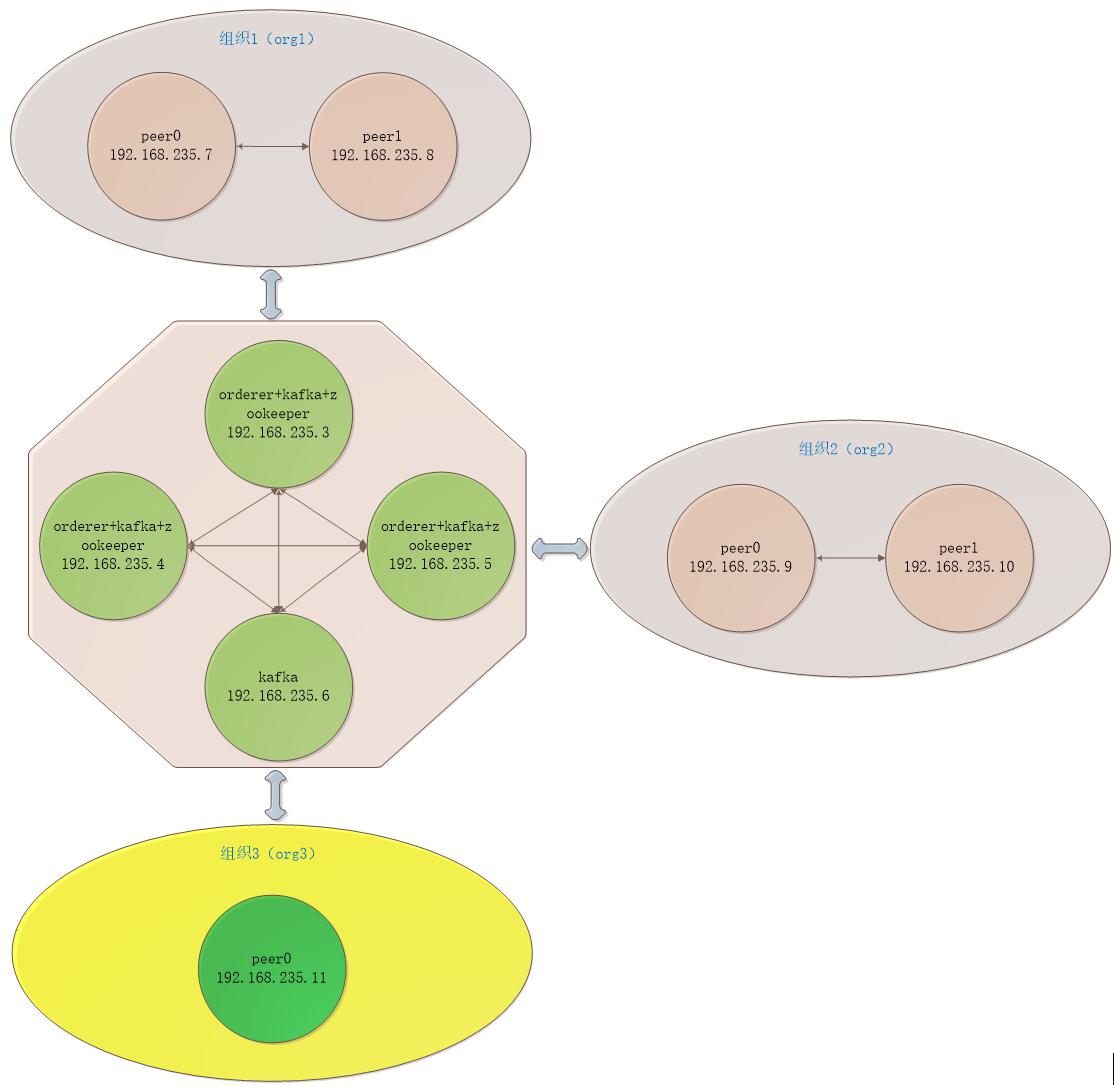
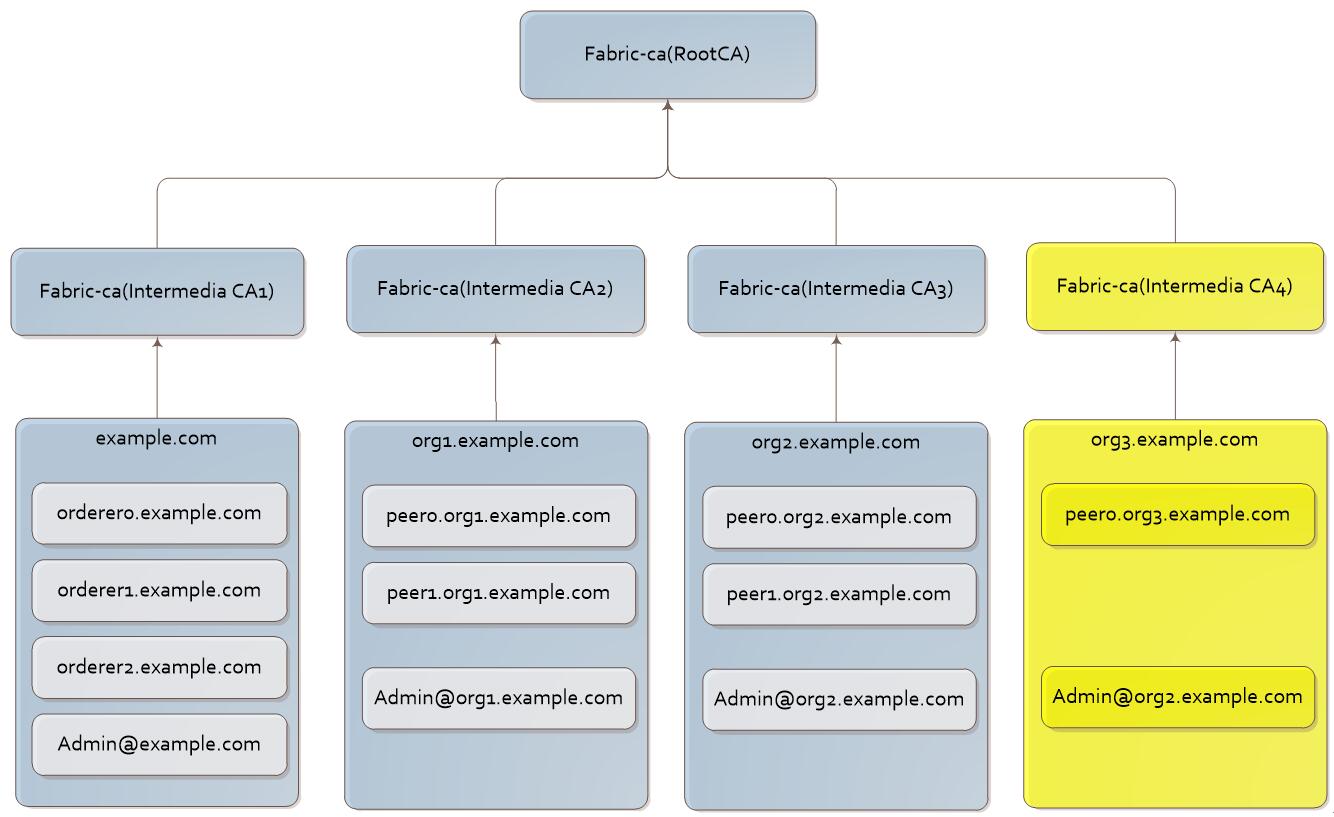
1.3 新组织配置
1.3.1 生成新组织证书
切换到192.168.235.6服务器上进行CA服务启动及生成证书操作。
1. CA服务启动
1) IntermediaCA4启动
① 初始化CA服务
# fabric-ca-server init -b admin4:adminpw4 -u http://admin:adminpw@localhost:7054 --home ./intermediaca4

# vi ./intermediaca4/fabric-ca-server-config.yaml

修改

version: 1.4.

port:
② 启动CA服务
【命令行启动】

# fabric-ca-server start -b admin4:adminpw4 -u http://admin:adminpw@localhost:7054 --home ./intermediaca4 --cfg.affiliations.allowremove --cfg.identities.allowremove

【docker启动】

拷贝文件docker-intermediaca4.yml到ca-server目录

# docker-compose -f docker-intermediaca4.yaml up -d
2) IntermediaCAtls4启动
1) 初始化CA服务
# fabric-ca-server init -b admin4:adminpw4 -u http://admin:adminpw@localhost:7054 --home ./intermediacatls4

# vi ./intermediacatls4/fabric-ca-server-config.yaml

修改

version: 1.4.

port:
2) 启动CA服务
【命令行启动】

# fabric-ca-server start -b admin4:adminpw4 -u http://admin:adminpw@localhost:7054 --home ./intermediacatls4 --cfg.affiliations.allowremove --cfg.identities.allowremove

【docker启动】

拷贝文件docker-intermediaca4.yml到ca-server目录

# docker-compose -f docker-intermediacatls4.yaml up -d
2. IntermediaCA4生成证书
1) 生成org3.example.com的msp
① 登记org3.example.com
# fabric-ca-client enroll --csr.cn=org3.example.com --csr.hosts=['org3.example.com'] -M ./crypto-config/peerOrganizations/org3.example.com/msp -u http://admin4:adminpw4@localhost:7058 --home ./fabric-ca-client

# vi ./fabric-ca-client/crypto-config/peerOrganizations/org3.example.com/msp/config.yaml

输入:

NodeOUs:

Enable: true

ClientOUIdentifier:

Certificate: intermediatecerts/localhost-.pem

OrganizationalUnitIdentifier: client

PeerOUIdentifier:

Certificate: intermediatecerts/localhost-.pem

OrganizationalUnitIdentifier: peer
② 添加联盟成员
# fabric-ca-client affiliation list -M ./crypto-config/peerOrganizations/org3.example.com/msp -u http://admin4:adminpw4@localhost:7058 --home ./fabric-ca-client

# fabric-ca-client affiliation remove --force org1 -M ./crypto-config/peerOrganizations/org3.example.com/msp -u http://admin4:adminpw4@localhost:7058 --home ./fabric-ca-client

# fabric-ca-client affiliation remove --force org3 -M ./crypto-config/peerOrganizations/org3.example.com/msp -u http://admin4:adminpw4@localhost:7058 --home ./fabric-ca-client

# fabric-ca-client affiliation add com -M ./crypto-config/peerOrganizations/org3.example.com/msp -u http://admin4:adminpw4@localhost:7058 --home ./fabric-ca-client

# fabric-ca-client affiliation add com.example -M ./crypto-config/peerOrganizations/org3.example.com/msp -u http://admin4:adminpw4@localhost:7058 --home ./fabric-ca-client

# fabric-ca-client affiliation add com.example.org3 -M ./crypto-config/peerOrganizations/org3.example.com/msp -u http://admin4:adminpw4@localhost:7058 --home ./fabric-ca-client
2) 生成Admin@example.com的msp
1) 注册Admin@example.com
# fabric-ca-client register --id.name Admin@org3.example.com --id.type client --id.affiliation "com.example.org3" --id.attrs '"hf.Registrar.Roles=client,orderer,peer,user","hf.Registrar.DelegateRoles=client,orderer,peer,user",hf.Registrar.Attributes=*,hf.GenCRL=true,hf.Revoker=true,hf.AffiliationMgr=true,hf.IntermediateCA=true,role=admin:ecert' --id.secret= --csr.cn=org3.example.com --csr.hosts=['org3.example.com'] -M ./crypto-config/peerOrganizations/org3.example.com/msp -u http://admin4:adminpw4@localhost:7058 --home ./fabric-ca-client
2) 登记Admin@example.com
# fabric-ca-client enroll -u http://Admin@org3.example.com:123456@localhost:7058 --csr.cn=org3.example.com --csr.hosts=['org3.example.com'] -M ./crypto-config/peerOrganizations/org3.example.com/users/Admin@org3.example.com/msp --home ./fabric-ca-client
3) 生成msp
# mkdir ./fabric-ca-client/crypto-config/peerOrganizations/org3.example.com/users/Admin@org3.example.com/msp/admincerts

# cp ./fabric-ca-client/crypto-config/peerOrganizations/org3.example.com/users/Admin@org3.example.com/msp/signcerts/cert.pem ./fabric-ca-client/crypto-config/peerOrganizations/org3.example.com/users/Admin@org3.example.com/msp/admincerts

# mkdir ./fabric-ca-client/crypto-config/peerOrganizations/org3.example.com/msp/admincerts

# cp ./fabric-ca-client/crypto-config/peerOrganizations/org3.example.com/users/Admin@org3.example.com/msp/signcerts/cert.pem ./fabric-ca-client/crypto-config/peerOrganizations/org3.example.com/msp/admincerts
3) 生成peer0.org3.example.com的msp
1) 注册peer0.org3.example.com
# fabric-ca-client register --id.name peer0.org3.example.com --id.type peer --id.affiliation "com.example.org3" --id.attrs '"role=peer",ecert=true' --id.secret= --csr.cn=peer0.org3.example.com --csr.hosts=['peer0.org3.example.com'] -M ./crypto-config/peerOrganizations/org3.example.com/msp -u http://admin4:adminpw4@localhost:7058 --home ./fabric-ca-client
2) 登记peer0.org3.example.com
# fabric-ca-client enroll -u http://peer0.org3.example.com:123456@localhost:7058 --csr.cn=peer0.org3.example.com --csr.hosts=['peer0.org3.example.com'] -M ./crypto-config/peerOrganizations/org3.example.com/peers/peer0.org3.example.com/msp --home ./fabric-ca-client
3) 生成msp
# mkdir ./fabric-ca-client/crypto-config/peerOrganizations/org3.example.com/peers/peer0.org3.example.com/msp/admincerts

# cp ./fabric-ca-client/crypto-config/peerOrganizations/org3.example.com/users/Admin@org3.example.com/msp/signcerts/cert.pem ./fabric-ca-client/crypto-config/peerOrganizations/org3.example.com/peers/peer0.org3.example.com/msp/admincerts
3. IntermediaCAtls4生成证书
1) 生成org3.example.com的tls
① 登记org3.example.com
# fabric-ca-client enroll --csr.cn=org3.example.com --csr.hosts=['org3.example.com'] -M ./crypto-config/peerOrganizations/org3.example.com/tlstmp -u http://admin4:adminpw4@localhost:8057 --home ./fabric-ca-client
② 添加联盟成员
# fabric-ca-client affiliation list -M ./crypto-config/peerOrganizations/org3.example.com/tlstmp -u http://admin4:adminpw4@localhost:8057 --home ./fabric-ca-client

# fabric-ca-client affiliation remove --force org1 -M ./crypto-config/peerOrganizations/org3.example.com/tlstmp -u http://admin4:adminpw4@localhost:8057 --home ./fabric-ca-client

# fabric-ca-client affiliation remove --force org3 -M ./crypto-config/peerOrganizations/org3.example.com/tlstmp -u http://admin4:adminpw4@localhost:8057 --home ./fabric-ca-client

# fabric-ca-client affiliation add com -M ./crypto-config/peerOrganizations/org3.example.com/tlstmp -u http://admin4:adminpw4@localhost:8057 --home ./fabric-ca-client

# fabric-ca-client affiliation add com.example -M ./crypto-config/peerOrganizations/org3.example.com/tlstmp -u http://admin4:adminpw4@localhost:8057 --home ./fabric-ca-client

# fabric-ca-client affiliation add com.example.org3 -M ./crypto-config/peerOrganizations/org3.example.com/tlstmp -u http://admin4:adminpw4@localhost:8057 --home ./fabric-ca-client
2) 生成Admin@example.com的tls
1) 注册Admin@example.com
# fabric-ca-client register --id.name Admin@org3.example.com --id.type client --id.affiliation "com.example.org3" --id.attrs '"hf.Registrar.Roles=client,orderer,peer,user","hf.Registrar.DelegateRoles=client,orderer,peer,user",hf.Registrar.Attributes=*,hf.GenCRL=true,hf.Revoker=true,hf.AffiliationMgr=true,hf.IntermediateCA=true,role=admin:ecert' --id.secret= --csr.cn=org3.example.com --csr.hosts=['org3.example.com'] -M ./crypto-config/peerOrganizations/org3.example.com/tlstmp -u http://admin4:adminpw4@localhost:8057 --home ./fabric-ca-client
2) 登记Admin@example.com
# fabric-ca-client enroll -d --enrollment.profile tls -u http://Admin@org3.example.com:123456@localhost:8057 --csr.cn=org3.example.com --csr.hosts=['org3.example.com'] -M ./crypto-config/peerOrganizations/org3.example.com/users/Admin@org3.example.com/tlstmp --home ./fabric-ca-client
1) 生成tls
# mkdir ./fabric-ca-client/crypto-config/peerOrganizations/org3.example.com/users/Admin@org3.example.com/tls

# cp ./intermediacatls4/ca-chain.pem ./fabric-ca-client/crypto-config/peerOrganizations/org3.example.com/users/Admin@org3.example.com/tls/ca.crt

# cp ./fabric-ca-client/crypto-config/peerOrganizations/org3.example.com/users/Admin@org3.example.com/tlstmp/signcerts/cert.pem ./fabric-ca-client/crypto-config/peerOrganizations/org3.example.com/users/Admin@org3.example.com/tls/client.crt

# cp ./fabric-ca-client/crypto-config/peerOrganizations/org3.example.com/users/Admin@org3.example.com/tlstmp/keystore/xxxxxxx_sk ./fabric-ca-client/crypto-config/peerOrganizations/org3.example.com/users/Admin@org3.example.com/tls/client.key

# rm -rf ./fabric-ca-client/crypto-config/peerOrganizations/org3.example.com/users/Admin@org3.example.com/tlstmp
3) 生成peer0.org3.example.com的tls
1) 注册peer0.org3.example.com
# fabric-ca-client register --id.name peer0.org3.example.com --id.type peer --id.affiliation "com.example.org3" --id.attrs '"role=peer",ecert=true' --id.secret= --csr.cn=peer0.org3.example.com --csr.hosts=['peer0.org3.example.com'] -M ./crypto-config/peerOrganizations/org3.example.com/tlstmp -u http://admin4:adminpw4@localhost:8057 --home ./fabric-ca-client
2) 登记peer0.org3.example.com
# fabric-ca-client enroll -d --enrollment.profile tls -u http://peer0.org3.example.com:123456@localhost:8057 --csr.cn=peer0.org3.example.com --csr.hosts=['peer0.org3.example.com'] -M ./crypto-config/peerOrganizations/org3.example.com/peers/peer0.org3.example.com/tlstmp --home ./fabric-ca-client
3) 生成tls
# mkdir ./fabric-ca-client/crypto-config/peerOrganizations/org3.example.com/peers/peer0.org3.example.com/tls

# cp ./intermediacatls4/ca-chain.pem ./fabric-ca-client/crypto-config/peerOrganizations/org3.example.com/peers/peer0.org3.example.com/tls/ca.crt

# cp ./fabric-ca-client/crypto-config/peerOrganizations/org3.example.com/peers/peer0.org3.example.com/tlstmp/signcerts/cert.pem ./fabric-ca-client/crypto-config/peerOrganizations/org3.example.com/peers/peer0.org3.example.com/tls/server.crt

# cp ./fabric-ca-client/crypto-config/peerOrganizations/org3.example.com/peers/peer0.org3.example.com/tlstmp/keystore/xxxxxxx_sk ./fabric-ca-client/crypto-config/peerOrganizations/org3.example.com/peers/peer0.org3.example.com/tls/server.key

# rm -rf ./fabric-ca-client/crypto-config/peerOrganizations/org3.example.com/peers/peer0.org3.example.com/tlstmp
1.3.2 生成新组织配置
切换到192.168.235.7服务器下进行操作。
1. 证书生成的org3.example.com目录拷贝到/crypto-config/peerOrganizations目录下。
2. 在configtx.yaml配置文件中加上org3组织信息,并拷贝到kafkapeer目录下。
3. 将org3的配置以 json 格式输出
# cd $GOPATH/src/github.com/hyperledger/fabric/kafkapeer

# docker-compose -f docker-compose-peer.yaml up -d

# ./bin/configtxgen -printOrg Org3MSP -profile ./configtx.yaml > ./channel-artifacts/org3.json
4. 安装jq工具
jq 是 Linux 下命令行处理 JSON 的工具,可以对 JSON 进行过滤、格式化、修改等等操作
# yum install epel-release

# yum install jq
5. 获取当前 channel 的配置
# docker exec -it cli bash

# ORDERER_CA=/opt/gopath/src/github.com/hyperledger/fabric/peer/crypto/ordererOrganizations/example.com/orderers/orderer0.example.com/msp/tlsintermediatecerts/tls-localhost-.pem

# peer channel fetch config config_block.pb -o orderer0.example.com: -c mychannel --tls --cafile $ORDERER_CA

# exit

# docker cp xxxxxxxx:/opt/gopath/src/github.com/hyperledger/fabric/peer/config_block.pb /opt/gopath/src/github.com/hyperledger/fabric/kafkapeer
6. 修改原配置文件,新增 org3 配置
# ./bin/configtxlator proto_decode --input config_block.pb --type common.Block | jq .data.data[].payload.data.config > config.json
7. 修改 config.json,新增 org3
# jq -s '.[0] * {"channel_group":{"groups":{"Application":{"groups": {"Org3MSP":.[1]}}}}}' config.json ./channel-artifacts/org3.json > modified_config.json
8. 将 config.json 和 modified_config.json 转为 protobuf 格式
# ./bin/configtxlator proto_encode --input config.json --type common.Config > original_config.pb

# ./bin/configtxlator proto_encode --input modified_config.json --type common.Config > modified_config.pb
9. 根据 config.pb 和 modified_config.pb 计算出 org3_update.pb
# ./bin/configtxlator compute_update --channel_id mychannel --original original_config.pb --updated modified_config.pb > config_update.pb
10. 解码 config_update.pb 为 json,然后用 jq 修改,然后在编码为 protobuf 格式,最终输出 org3_update_in_envelope.pb
# ./bin/configtxlator proto_decode --input config_update.pb --type common.ConfigUpdate > config_update.json

# echo '{"payload":{"header":{"channel_header":{"channel_id":"mychannel", "type":2}},"data":{"config_update":'$(cat config_update.json)'}}}' | jq . > config_update_in_envelope.json

# ./bin/configtxlator proto_encode --input config_update_in_envelope.json --type common.Envelope > org3_update_in_envelope.pb

# docker cp /opt/gopath/src/github.com/hyperledger/fabric/kafkapeer/org3_update_in_envelope.pb xxxxxxxx:/opt/gopath/src/github.com/hyperledger/fabric/peer/
1.3.3 提交新组织配置
1. 为 Org3 新配置签名
# docker exec -it cli bash

# CORE_PEER_LOCALMSPID="Org1MSP"

# CORE_PEER_TLS_ROOTCERT_FILE=/opt/gopath/src/github.com/hyperledger/fabric/peer/crypto/peerOrganizations/org1.example.com/peers/peer0.org1.example.com/tls/ca.crt

# CORE_PEER_MSPCONFIGPATH=/opt/gopath/src/github.com/hyperledger/fabric/peer/crypto/peerOrganizations/org1.example.com/users/Admin@org1.example.com/msp

# CORE_PEER_ADDRESS=peer0.org1.example.com:

# peer channel signconfigtx -f org3_update_in_envelope.pb

# CORE_PEER_LOCALMSPID="Org2MSP"

# CORE_PEER_TLS_ROOTCERT_FILE=/opt/gopath/src/github.com/hyperledger/fabric/peer/crypto/peerOrganizations/org2.example.com/peers/peer0.org2.example.com/tls/ca.crt

# CORE_PEER_MSPCONFIGPATH=/opt/gopath/src/github.com/hyperledger/fabric/peer/crypto/peerOrganizations/org2.example.com/users/Admin@org2.example.com/msp

# CORE_PEER_ADDRESS=peer0.org2.example.com:

# peer channel signconfigtx -f org3_update_in_envelope.pb
2. 提交签名后的配置交易至 orderer
# ORDERER_CA=/opt/gopath/src/github.com/hyperledger/fabric/peer/crypto/ordererOrganizations/example.com/orderers/orderer0.example.com/msp/tlsintermediatecerts/tls-localhost-.pem

# peer channel update -f org3_update_in_envelope.pb -c mychannel -o orderer0.example.com: --tls --cafile $ORDERER_CA
1.4 新组织启动
切换到192.168.235.11服务器上操作。
1. 配置docker-compose-peer.yaml文件,拷贝到kafkapeer目录下。
2. 服务器(192.168.235.11)启动
# cd $GOPATH/src/github.com/hyperledger/fabric/kafkapeer

# docker-compose -f docker-compose-peer.yaml up -d
3. 获取当前 channel 的配置
# docker exec -it cli bash

# ORDERER_CA=/opt/gopath/src/github.com/hyperledger/fabric/peer/crypto/ordererOrganizations/example.com/orderers/orderer0.example.com/msp/tlsintermediatecerts/tls-localhost-.pem

# peer channel fetch  mychannel.block -o orderer0.example.com: -c mychannel --tls --cafile $ORDERER_CA
4. 将 Org 所有 Peer 加入 channel
# peer channel join -b mychannel.block
5. 升级chaincode和背书策略
# peer chaincode install -n mycc -p github.com/hyperledger/fabric/kafkapeer/chaincode/go/example02/ -v 2.0
6. 为 Org1 的 peer0升级chaincode到2.0
切换到192.168.235.7服务器上
# peer chaincode install -n mycc -p github.com/hyperledger/fabric/kafkapeer/chaincode/go/example02/ -v 2.0

# ORDERER_CA=/opt/gopath/src/github.com/hyperledger/fabric/peer/crypto/ordererOrganizations/example.com/orderers/orderer0.example.com/msp/tlsintermediatecerts/tls-localhost-.pem

# peer chaincode upgrade -o orderer0.example.com: --tls --cafile $ORDERER_CA -C mychannel -n mycc -v 2.0 -c '{"Args":["init","a","200","b","400"]}' -P "OR ('Org1MSP.peer','Org2MSP.peer','Org3MSP.peer')"
7. 为 Org2 的 peer0升级chaincode到2.0
切换到192.168.235.9服务器上
# peer chaincode install -n mycc -p github.com/hyperledger/fabric/kafkapeer/chaincode/go/example02/ -v 2.0
1.5 新组织验证
切换到192.168.235.11服务上,在Peer上查询a值。
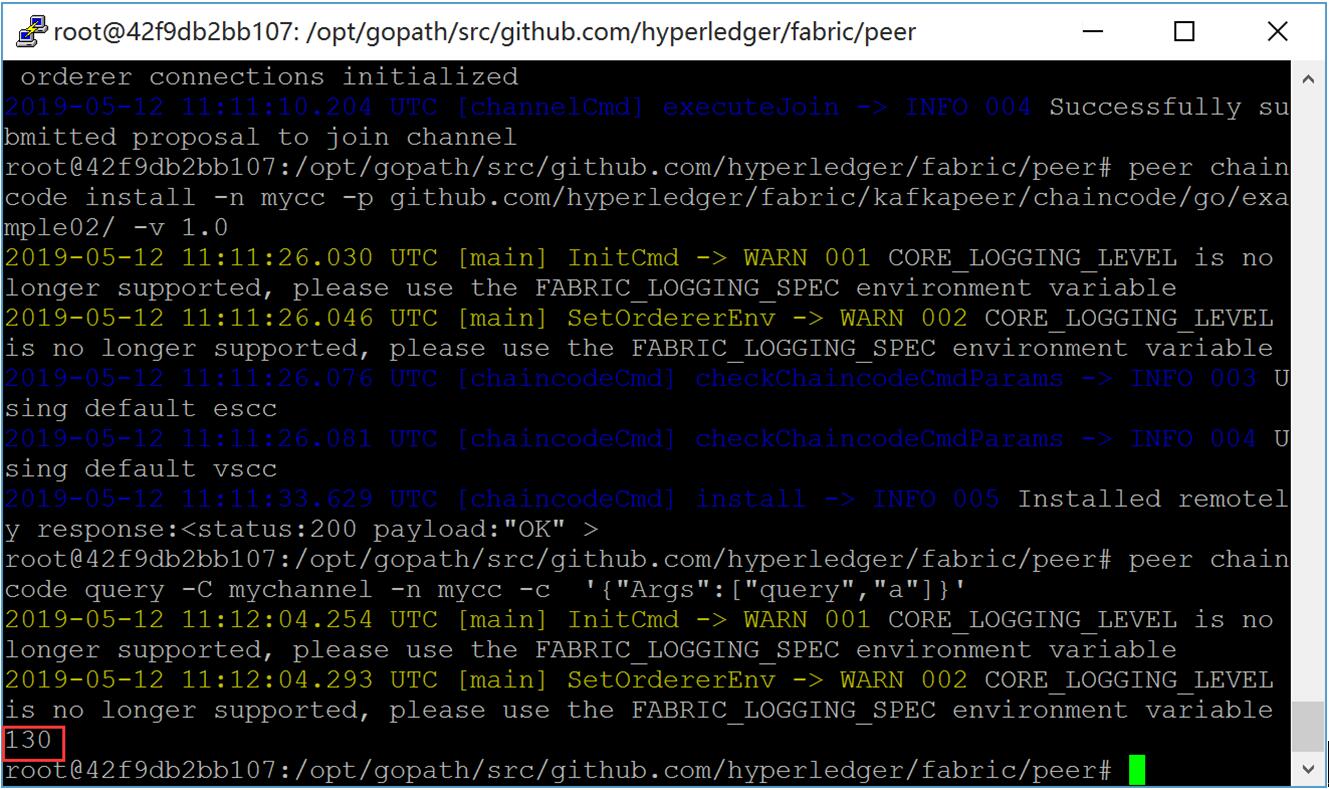
1) Peer上查询a,显示130
# peer chaincode query -C mychannel -n mycc -c '{"Args":["query","a"]}'
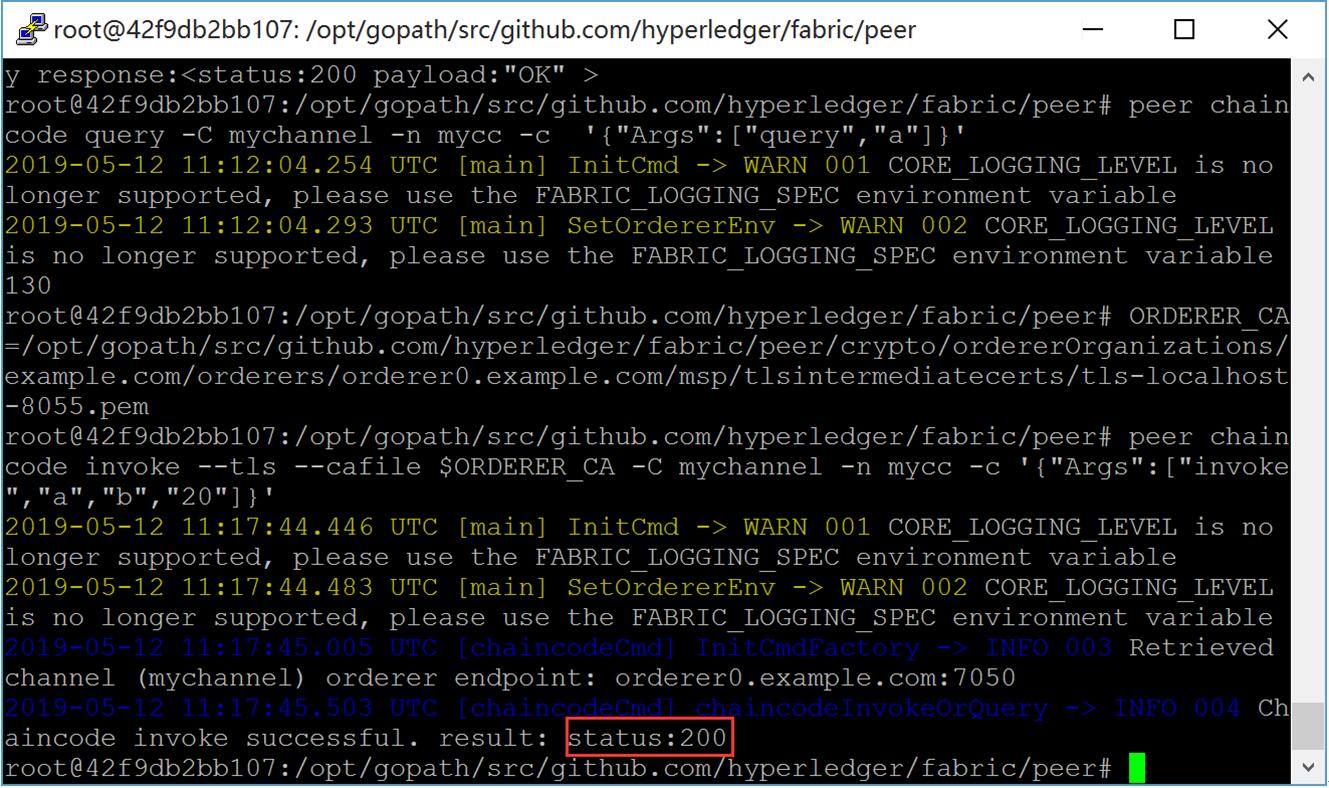
2) Peer上进行a向b转20交易
# ORDERER_CA=/opt/gopath/src/github.com/hyperledger/fabric/peer/crypto/ordererOrganizations/example.com/orderers/orderer0.example.com/msp/tlsintermediatecerts/tls-localhost-.pem

# peer chaincode invoke --tls --cafile $ORDERER_CA -C mychannel -n mycc -c '{"Args":["invoke","a","b","20"]}'
3) Peer上查询b,显示110
# peer chaincode query -C mychannel -n mycc -c '{"Args":["query","a"]}'

网易云课堂视频在线教学,地址:https://study.163.com/course/introduction/1209401942.htm
HyperLedger Fabric 1.4 生产环境动态添加组织及节点的更多相关文章
- Centos7 HyperLedger Fabric 1.4 生产环境部署
Kafka生产环境部署案例采用三个排序(orderer)服务.四个kafka.三个zookeeper和四个节点(peer)组成,共准备八台服务器,每台服务器对应的服务如下所示: kafka案例网络拓扑 ...
- HyperLedger Fabric 1.4 生产环境使用ca生成msp和tls(12)
在上一章:Fabric kafka生产环境部署的基础上部署Fabric CA,使用Fabric CA进行生成公私钥和证书等文件,全部替换cryptogen工具,包括生成TLS相关的私钥和证书等文件. ...
- 菜鸟系列Fabric——Fabric 动态添加组织(7)
Fabric 网络动态添加组织 1.环境准备 如果存在fabric网络环境可不执行,若不存在可以安装下列进行准备 下载fabric-sample,fabric https://github.com/h ...
- adoop集群动态添加和删除节点
hadoop集群动态添加和删除节点说明 上篇博客我已经安装了Hadoop集群(hadoop集群的安装步骤和配置),现在写这个博客我将在之前的基础上进行节点的添加的删除. 首先将启动四台机器(一主三从) ...
- 关于jQuery获取不到动态添加的元素节点的问题
遇到问题: 当我获取 $("#art-list")页面元素后去在后面追加标签的时候(append),在下面用 $(selector) 获取刚刚添加的标签,发现怎么都获取不到. 问题 ...
- 【干货干货】hyperledger fabric 之动态添加组织/修改配置 (Fabric-java-sdk) 下
我们接着上一节来讲: 在熟悉动态增加组织或修改配置的步骤后,我们就可以使用java的api来完成动态增加组织或修改配置了: 废话不多说,直接上干货: 1,预制条件 org3的证书以及组织3的MSP详情 ...
- HyperLedger Fabric 1.4 基础环境搭建(7)
学习了前面几章理论知识后,本章开始介绍实践操作,先介绍Fabric基础环境搭建,采用的操作系统为Centos 7 64位,依次介绍Docker安装.Docker-Compose安装.GO语言环境安装. ...
- 区块链 Hyperledger Fabric v1.0.0 环境搭建
前言:最近项目涉及到超级账本,在有些理论知识的基础上,需要整一套环境来. 这是一个特别要注意的事情,笔者之前按照网络上推荐,大部分都是推荐ubuntu系统的,于是下载Ubuntu系统(16.04.5和 ...
- 基于Debian搭建Hyperledger Fabric 2.4开发环境及运行简单案例
相关实验源码已上传:https://github.com/wefantasy/FabricLearn 前言 在基于truffle框架实现以太坊公开拍卖智能合约中我们已经实现了以太坊智能合约的编写及部署 ...
随机推荐
- python2中的SSL:CERTIFICATE_VERIFY_FAILED错误的解决办法
在使用urllib2访问一个自签名的https链接时,对于python2.6以下版本,TLS握手期间是不会检查服务器X509的证书签名是否是CA的可信任根证书.不过python2.7以后改变了这种情况 ...
- 【Stream—6】BufferedStream相关知识分享
一.简单介绍以下BufferedStream 在前几章的讲述中,我们已经能够掌握流的基本特性和特点,一般进行对流的处理时,系统肩负着IO所带来的开销,调用十分频繁,这时候就应该想个办法减少这种开销,而 ...
- OpenStack集成ceph
openstack组件集成ceph OpenStack集成ceph详细过程可以查看ceph官方文档:ceph document OpenStack Queens版本,1台控制节点controller, ...
- 内网环境搭建NTP服务器
说在前面:ntp和ntpdate区别 ①两个服务都是centos自带的(centos7中不自带ntp).ntp的安装包名是ntp:ntpdate的安装包是ntpdate.他们并非由一个安装包提供. ② ...
- 在.NET Core中使用Jwt对API进行认证
在.NET Core中想用给API进行安全认证,最简单的无非就是Jwt,悠然记得一年前写的Jwt Demo,现在拿回来改成.NET Core的,但是在编码上的改变并不大,因为Jwt已经足够强大了.在项 ...
- java 抽象类和接口整理
java中定义一些不含方法体的方法,方法体的实现交给该类的子类根据自己的具体情况去实现,这样的方法就是abstract修饰的抽象方法,包含抽象方法的类叫抽象类,用abstract修饰 抽象方法: ab ...
- 寻找键盘bug
被这句阻拦了
- php踩过的那些坑(5)浮点数计算
一.前方有坑 php在使用加减乘除等运算符计算浮点数的时候,经常会出现意想不到的结果,特别是关于财务数据方面的计算,给不少工程师惹了很多的麻烦.比如今天工作终于到的一个案例: $a = 2586; $ ...
- 第二章 Unity Shader基础
[TOC] 1. Unity Shader 的基础: ShaderLab 学习和编写着色器的过程一直是一个学习曲线很陡峭的过程,通常情况下为了自定义渲染效果往往要和很多文件和设置打交道,这些设置很容易 ...
- 二叉树的操作--C语言实现
树是一种比较复杂的数据结构,它的操作也比较多.常用的有二叉树的创建,遍历,线索化,线索化二叉树的遍历,这些操作又可以分为前序,中序和后序.其中,二叉树的操作有递归与迭代两种方式,鉴于我个人的习惯,在这 ...